
183使用 MediaPlayer Framework 框架播放视频
效果如下:
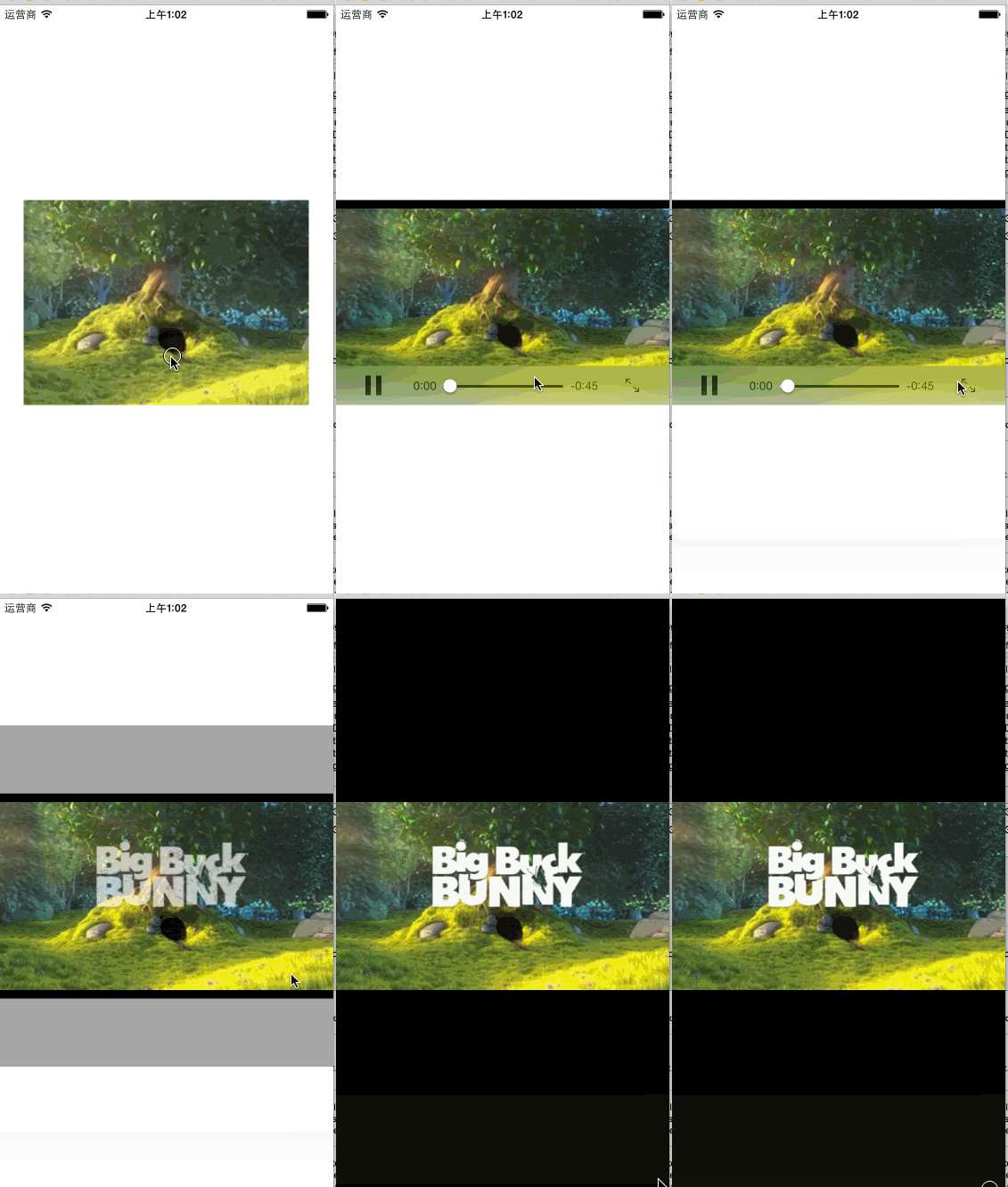
ViewController.h
 #import <UIKit/UIKit.h>

 #import <MediaPlayer/MediaPlayer.h>

 @interface ViewController : UIViewController

 @property (strong, nonatomic) IBOutlet UIButton *btnPlayMovie;

 @property (strong, nonatomic) MPMoviePlayerController *moviePlayerController;

 @end
ViewController.m
 #import "ViewController.h"

 @interface ViewController ()

 - (void)layoutUI;

 @end

 @implementation ViewController

 - (void)viewDidLoad {

     [super viewDidLoad];

     [self layoutUI];

 }

 - (void)didReceiveMemoryWarning {

     [super didReceiveMemoryWarning];

     // Dispose of any resources that can be recreated.

 }

 - (void)layoutUI {

 }

 - (IBAction)playMovie:(id)sender {

     NSString *filePath = [[NSBundle mainBundle] pathForResource:@"Big-Buck-Bunny-Clip"

                                                          ofType:@"m4v"];

     NSURL *fileURL = [NSURL fileURLWithPath:filePath];

     //导入<MediaPlayer/MediaPlayer.h>包,必须在头文件声明对应的全局引用的电影播放器控制器对象示例属性,否则会出现黑屏无法播放,因为对象被回收了

     //实现电影播放器控制器对象示例_moviePlayerController

     _moviePlayerController = [[MPMoviePlayerController alloc] initWithContentURL:fileURL];

     _moviePlayerController.view.frame = CGRectMake(,

                                                    _btnPlayMovie.frame.origin.y,

                                                    self.view.frame.size.width,

                                                    _btnPlayMovie.frame.size.height);

     //从通知中心,添加电影播放器控制器对象示例(播放完成返回状态)的观察者

     [[NSNotificationCenter defaultCenter] addObserver:self

                                              selector:@selector(playMovieComplete:)

                                                  name:MPMoviePlayerPlaybackDidFinishNotification

                                                object:_moviePlayerController];

     [self.view addSubview:_moviePlayerController.view];

     [_moviePlayerController play];

 }

 - (void)playMovieComplete:(NSNotification *)notification {

     MPMoviePlayerController *moviePlayController = [notification object];

     //从通知中心,移除电影播放器控制器对象示例(播放完成返回状态)的观察者

     [[NSNotificationCenter defaultCenter] removeObserver:self

                                                     name:MPMoviePlayerPlaybackDidFinishNotification

                                                   object:moviePlayController];

     //从它的父级视图,移除电影播放器控制器对象示例的视图

     [moviePlayController.view removeFromSuperview];

 }

 @end
Main.storyboard
 <?xml version="1.0" encoding="UTF-8" standalone="no"?>

 <document type="com.apple.InterfaceBuilder3.CocoaTouch.Storyboard.XIB" version="3.0" toolsVersion="7702" systemVersion="14D136" targetRuntime="iOS.CocoaTouch" propertyAccessControl="none" useAutolayout="YES" useTraitCollections="YES" initialViewController="vXZ-lx-hvc">

     <dependencies>

         <plugIn identifier="com.apple.InterfaceBuilder.IBCocoaTouchPlugin" version="7701"/>

     </dependencies>

     <scenes>

         <!--View Controller-->

         <scene sceneID="ufC-wZ-h7g">

             <objects>

                 <viewController id="vXZ-lx-hvc" customClass="ViewController" sceneMemberID="viewController">

                     <layoutGuides>

                         <viewControllerLayoutGuide type="top" id="jyV-Pf-zRb"/>

                         <viewControllerLayoutGuide type="bottom" id="2fi-mo-0CV"/>

                     </layoutGuides>

                     <view key="view" contentMode="scaleToFill" id="kh9-bI-dsS">

                         <rect key="frame" x="0.0" y="0.0" width="600" height="600"/>

                         <autoresizingMask key="autoresizingMask" flexibleMaxX="YES" flexibleMaxY="YES"/>

                         <subviews>

                             <button opaque="NO" contentMode="scaleToFill" contentHorizontalAlignment="center" contentVerticalAlignment="center" lineBreakMode="middleTruncation" translatesAutoresizingMaskIntoConstraints="NO" id="POH-zG-xLO">

                                 <rect key="frame" x="140" y="185" width="320" height="230"/>

                                 <state key="normal" image="Big-Buck-Bunny-Clip">

                                     <color key="titleShadowColor" white="0.5" alpha="1" colorSpace="calibratedWhite"/>

                                 </state>

                                 <connections>

                                     <action selector="playMovie:" destination="vXZ-lx-hvc" eventType="touchUpInside" id="RTL-0Q-0nR"/>

                                 </connections>

                             </button>

                         </subviews>

                         <color key="backgroundColor" white="1" alpha="1" colorSpace="custom" customColorSpace="calibratedWhite"/>

                         <constraints>

                             <constraint firstItem="POH-zG-xLO" firstAttribute="centerX" secondItem="kh9-bI-dsS" secondAttribute="centerX" id="DhU-rM-rsz"/>

                             <constraint firstAttribute="width" secondItem="POH-zG-xLO" secondAttribute="width" id="Mzy-Q3-6CL"/>

                             <constraint firstItem="POH-zG-xLO" firstAttribute="centerY" secondItem="kh9-bI-dsS" secondAttribute="centerY" id="OPN-No-jC2"/>

                         </constraints>

                         <variation key="default">

                             <mask key="constraints">

                                 <exclude reference="Mzy-Q3-6CL"/>

                             </mask>

                         </variation>

                     </view>

                     <connections>

                         <outlet property="btnPlayMovie" destination="POH-zG-xLO" id="kEF-6Y-YOE"/>

                     </connections>

                 </viewController>

                 <placeholder placeholderIdentifier="IBFirstResponder" id="x5A-6p-PRh" sceneMemberID="firstResponder"/>

             </objects>

         </scene>

     </scenes>

     <resources>

         <image name="Big-Buck-Bunny-Clip" width="320" height="230"/>

     </resources>

 </document>
183使用 MediaPlayer Framework 框架播放视频的更多相关文章
- [Xcode 实际操作]六、媒体与动画-(17)使用MediaPlayer框架播放视频
目录:[Swift]Xcode实际操作 本文将演示视频的播放功能. 在项目名称上点击鼠标右键,弹出右键菜单, 选择[Add Files to "DemoApp"],往项目中导入文件 ...
- Android MediaPlayer和SurfaceView播放视频
昨天介绍了VideoView播放视频,今天再介绍一种播放视频的方法MediaPlayer和SurfaceView,MediaPlayer播放音频,SurfaceView来显示图像,具体步骤如下: 1. ...
- 使用MediaPlayer和SurfaceView播放视频
使用VideoView播放视频简单.方便,丹有些早期的开发者更喜欢使用MediaPlayer来播放视频,但由于MediaPlayer主要用于播放音频,因此它没有提供图像输出界面,此时 需要借助于Sur ...
- android中使用MediaPlayer和SurfaceView播放视频
package com.test.video; import java.io.IOException; import android.media.AudioManager; import androi ...
- 运用surfaceView与MediaPlayer实现播放视频的功能
该程序运用了surfaceView与MediaPlayer结合,实现播放视频,surfaceView详情请见 SurfaceView的使用 使用了第三方包Volly里面的方法StringQueue下载 ...
- android中使用surfaceview+MediaPlayer播放视频
Android中播放视频主要有两种方式: 使用其自带的播放器.指定Action为ACTION_VIEW,Data为Uri,Type为其MIME类型 使用android自带的VideoView,这种方法 ...
- 使用MediaPlayer类和SurfaceView来播放视频
MediaPlayer可以播放视频,只需需要SurfaceView的配合,SurfaceView主要用于显示MediaPlayer播放的视频流媒体的画面渲染. SurfaceView是配合MediaP ...
- Android开发 MediaPlayer入门_播放本地视频
前言 MediaPlayer,可以播放视频/音频,并且它支持本地和网络文件的播放.本片博客作为入门教程,先以最通俗的方式解释播放文件本地视频.(如果你嫌MediaPlayer还是太麻烦可以试试选择Vi ...
- iOS中 MediaPlayer framework实现视频播放 韩俊强的博客
iOS开发中播放音乐可以使用MPMusicPlayerController类来实现,播放视频可以使用MPMoviePlayerController和MPMoviePlayerViewControlle ...
随机推荐
- Android 开发自己的网络收音机3——电台分类(ExpandableListView)
上一篇文章说了使用SlidingMenu开源项目实现侧滑栏,今天主要是讲解多级列表ExpandableListView的使用,以及如何使用它实现电台分类管理.ExpandableListView是An ...
- JAVA传入一个字符串,返回一个字符串中的大写字母
/** * * @param 传入一个字符串 * @return 返回一个字符串中的大写字母 */ private static String str ...
- 【Unity笔记】根骨骼动画/运动(Root Motion)
根骨骼动画:当动画中角色发生位移后,动作坐标原点跟随角色移动.例如一个向前跳跃的动画,如果在场景中重复该动画,能够看到角色一路往前跳跃,位置一直在前进.适用于有位移的放技能动作等. 非根骨骼动画:当动 ...
- Knockout开发中文API系列1
从本节开始介绍关于KnockoutJs相关的内容,本节主要介绍knockoutjs一些重要特性与优点,以及它与Jquery等框架库之间的区别. 1.Knockout.js是什么? Knockout是一 ...
- 编写.info文件
概述 drupal用.info文件来存储主题和模块的metadata. 对于模块来说,.info文件用于: 为Drupal站点管理界面解析信息: 为模块的激活和卸载提供标准和需求: 提醒drupal一 ...
- Lucene增删改查
IndexManager.java package com.witwicky.lucene; import java.io.File; import java.util.ArrayList; impo ...
- PCL点云分割(2)
关于点云的分割算是我想做的机械臂抓取中十分重要的俄一部分,所以首先学习如果使用点云库处理我用kinect获取的点云的数据,本例程也是我自己慢慢修改程序并结合官方API 的解说实现的,其中有很多细节如果 ...
- javascript弹层
<!DOCTYPE html PUBLIC "-//W3C//DTD XHTML 1.0 Transitional//EN" "http://www.w3.org/ ...
- selenium(java)处理HTML5的视频播放
大多数浏览器使用控件(如 Flash) 来播放规频,但是,不同的浏览器需要使用不同的插件.HTML5 定义了一个新的元素<video>,,指定了一个标准的方式来嵌入电影片段.IE9+.Fi ...
- Python之排序
1. 2维数组排序 (按照每行第一个数字从小到大进行排序) poses.sort(key=lambda x: x[0]) for ppp in poses: print ppp,','