
splinter
 # coding:utf-8

 import tornado.web

 import tornado.options

 import tornado.httpserver

 import tornado.ioloop

 import hashlib

 import xmltodict

 import time

 import tornado.gen

 import json

 import os

 from tornado.web import RequestHandler

 from tornado.options import options, define

 from tornado.httpclient import AsyncHTTPClient, HTTPRequest

 WECHAT_TOKEN = "itcast"

 WECHAT_APP_ID = "wx36766f74dbfeef15"

 WECHAT_APP_SECRET = "aaf6dbca95a012895eb570f0ba549ee5"

 define("port", default=8000, type=int, help="")

 class AccessToken(object):

     """access_token辅助类"""

     _access_token = None

     _create_time = 0

     _expires_in = 0

     @classmethod

     @tornado.gen.coroutine

     def update_access_token(cls):

         client = AsyncHTTPClient()

         url = "https://api.weixin.qq.com/cgi-bin/token?" \

         "grant_type=client_credential&appid=%s&secret=%s" % (WECHAT_APP_ID, WECHAT_APP_SECRET)

         resp = yield client.fetch(url)

         dict_data = json.loads(resp.body)

         if "errcode" in dict_data:

             raise Exception("wechat server error")

         else:

             cls._access_token = dict_data["access_token"]

             cls._expires_in = dict_data["expires_in"]

             cls._create_time = time.time()

     @classmethod

     @tornado.gen.coroutine

     def get_access_token(cls):

         if time.time() - cls._create_time > (cls._expires_in - 200):

             # 向微信服务器请求access_token

             yield cls.update_access_token()

             raise tornado.gen.Return(cls._access_token)

         else:

             raise tornado.gen.Return(cls._access_token)

 class WechatHandler(RequestHandler):

     """对接微信服务器"""

     def prepare(self):

         signature = self.get_argument("signature")

         timestamp = self.get_argument("timestamp")

         nonce = self.get_argument("nonce")

         tmp = [WECHAT_TOKEN, timestamp, nonce]

         tmp.sort()

         tmp = "".join(tmp)

         real_signature = hashlib.sha1(tmp).hexdigest()

         if signature != real_signature:

             self.send_error(403)

     def get(self):

         echostr = self.get_argument("echostr")

         self.write(echostr)

     def post(self):

         xml_data = self.request.body

         dict_data = xmltodict.parse(xml_data)

         msg_type = dict_data["xml"]["MsgType"]

         if msg_type == "text":

             content = dict_data["xml"]["Content"]

             """

             <xml>

 <ToUserName><![CDATA[toUser]]></ToUserName>

 <FromUserName><![CDATA[fromUser]]></FromUserName>

 <CreateTime>12345678</CreateTime>

 <MsgType><![CDATA[text]]></MsgType>

 <Content><![CDATA[你好]]></Content>

 </xml>

 """

             resp_data = {

                 "xml":{

                     "ToUserName": dict_data["xml"]["FromUserName"],

                     "FromUserName": dict_data["xml"]["ToUserName"],

                     "CreateTime": int(time.time()),

                     "MsgType": "text",

                     "Content": content,

                 }

             }

             self.write(xmltodict.unparse(resp_data))

         elif msg_type == "event":

             if dict_data["xml"]["Event"] == "subscribe":

                 """用户关注的事件"""

                 resp_data = {

                     "xml": {

                         "ToUserName": dict_data["xml"]["FromUserName"],

                         "FromUserName": dict_data["xml"]["ToUserName"],

                         "CreateTime": int(time.time()),

                         "MsgType": "text",

                         "Content": u"您来啦,笑而不语",

                     }

                 }

                 if "EventKey" in dict_data["xml"]:

                     event_key = dict_data["xml"]["EventKey"]

                     scene_id = event_key[8:]

                     resp_data["xml"]["Content"] = u"您来啦,笑而不语%s次" % scene_id

                 self.write(xmltodict.unparse(resp_data))

             elif dict_data["xml"]["Event"] == "SCAN":

                scene_id = dict_data["xml"]["EventKey"]

                resp_data = {

                    "xml": {

                        "ToUserName": dict_data["xml"]["FromUserName"],

                        "FromUserName": dict_data["xml"]["ToUserName"],

                        "CreateTime": int(time.time()),

                        "MsgType": "text",

                        "Content": u"您扫描的是%s" % scene_id,

                    }

                }

                self.write(xmltodict.unparse(resp_data))

         else:

             resp_data = {

                 "xml": {

                     "ToUserName": dict_data["xml"]["FromUserName"],

                     "FromUserName": dict_data["xml"]["ToUserName"],

                     "CreateTime": int(time.time()),

                     "MsgType": "text",

                     "Content": "I love itcast",

                 }

             }

             self.write(xmltodict.unparse(resp_data))

 class QrcodeHandler(RequestHandler):

     """请求微信服务器生成带参数二维码返回给客户"""

     @tornado.gen.coroutine

     def get(self):

         scene_id = self.get_argument("sid")

         try:

             access_token = yield AccessToken.get_access_token()

         except Exception as e:

             self.write("errmsg: %s" % e)

         else:

             client = AsyncHTTPClient()

             url = "https://api.weixin.qq.com/cgi-bin/qrcode/create?access_token=%s" % access_token

             req_data = {"action_name": "QR_LIMIT_SCENE", "action_info": {"scene": {"scene_id": scene_id}}}

             req = HTTPRequest(

                 url=url,

                 method="POST",

                 body=json.dumps(req_data)

             )

             resp = yield client.fetch(req)

             dict_data = json.loads(resp.body)

             if "errcode" in dict_data:

                 self.write("errmsg: get qrcode failed")

             else:

                 ticket = dict_data["ticket"]

                 qrcode_url = dict_data["url"]

                 self.write('<img src="https://mp.weixin.qq.com/cgi-bin/showqrcode?ticket=%s"><br/>' % ticket)

                 self.write('<p>%s</p>' % qrcode_url)

 class ProfileHandler(RequestHandler):

     @tornado.gen.coroutine

     def get(self):

         code = self.get_argument("code")

         client = AsyncHTTPClient()

         url = "https://api.weixin.qq.com/sns/oauth2/access_token?" \

                 "appid=%s&secret=%s&code=%s&grant_type=authorization_code" % (WECHAT_APP_ID, WECHAT_APP_SECRET, code)

         resp = yield client.fetch(url)

         dict_data = json.loads(resp.body)

         if "errcode" in dict_data:

             self.write("error occur")

         else:

             access_toke = dict_data["access_token"]

             open_id = dict_data["openid"]

             url = "https://api.weixin.qq.com/sns/userinfo?" \

                   "access_token=%s&openid=%s&lang=zh_CN" % (access_toke, open_id)

             resp = yield client.fetch(url)

             user_data = json.loads(resp.body)

             if "errcode" in user_data:

                 self.write("error occur again")

             else:

                 self.render("index.html", user=user_data)

 """

 用户最终访问的URL

 https://open.weixin.qq.com/connect/oauth2/authorize?

 appid=wx36766f74dbfeef15&redirect_uri=http%3A//www.idehai.com/wechat8000/profile&response_type=code&scope=snsapi_userinfo

 &state=1#wechat_redirect

 """

 class MenuHandler(RequestHandler):

     @tornado.gen.coroutine

     def get(self):

         try:

             access_token = yield AccessToken.get_access_token()

         except Exception as e:

             self.write("errmsg: %s" % e)

         else:

             client = AsyncHTTPClient()

             url = "https://api.weixin.qq.com/cgi-bin/menu/create?access_token=%s" % access_token

             menu = {

                 "button": [

                     {

                         "type": "view",

                         "name": "我的主页",

                         "url": "https://open.weixin.qq.com/connect/oauth2/authorize?appid=wx36766f74dbfeef15&redirect_uri=http%3A//www.idehai.com/wechat8000/profile&response_type=code&scope=snsapi_userinfo&state=1&connect_redirect=1#wechat_redirect"

                     }

                 ]

             }

             req = HTTPRequest(

                 url=url,

                 method="POST",

                 body=json.dumps(menu, ensure_ascii=False)

             )

             resp = yield client.fetch(req)

             dict_data = json.loads(resp.body)

             if dict_data["errcode"] == 0:

                 self.write("OK")

             else:

                 self.write("failed")

 def main():

     tornado.options.parse_command_line()

     app = tornado.web.Application(

         [

             (r"/wechat8000", WechatHandler),

             (r"/qrcode", QrcodeHandler),

             (r"/wechat8000/profile", ProfileHandler),

             (r"/menu", MenuHandler),

         ],

         template_path=os.path.join(os.path.dirname(__file__), "template")

     )

     http_server = tornado.httpserver.HTTPServer(app)

     http_server.listen(options.port)

     tornado.ioloop.IOLoop.current().start()

 if __name__ == "__main__":

     main()
 import requests

 from time import sleep

 def check():

     url = "https://kyfw.12306.cn/otn/leftTicket/queryZ?leftTicketDTO.train_date=2018-02-08&leftTicketDTO.from_station=CQW&leftTicketDTO.to_station=CSQ&purpose_codes=ADULT"

     #url = "https://kyfw.12306.cn/otn/leftTicket/queryZ?leftTicketDTO.train_date=2018-02-08&leftTicketDTO.from_station=CDW&leftTicketDTO.to_station=CSQ&purpose_codes=ADULT"

     res = requests.get(url)

     res.encoding = 'utf-8'

     dic = res.json()

     # print(len(dic['data']['result']))

     return dic['data']['result']

 # tem_list[23]软卧

 # tem_list[24]动卧

 # tem_list[25]硬卧

 # tem_list[23]软卧

 # tem_list[23]软卧

 #176 1 k578硬卧

 #171 2  k578软卧

 ord=0

 num = 1

 list2 = []

 for i in check():

     # print(type(i))

     tem_list = i.split('|')

     # print("tem_list",tem_list[23])

     # sleep(1)

     # print(type(tem_list),len(tem_list))

     # for row in range(22,25):

     #     print(ord,tem_list[1])

     # ord +=1

     # print("hhh",tem_list[23])

     for row in tem_list:

         print(tem_list[num])

         print('before%s'%ord)

         # print("23",row)

         # print('after')

         ord +=1

         sleep(1)

         # print("row",row)

         # if row:

         #     print("row",row)

         #     list2.append(row)

         # else:

         #     list2.append('null%s'%ord)

         #     ord +=1

 print("ooo",list2)

     # for n in tem_list:

         # print(num,n)

         # num += 1

         # print(tem_list[1])

     # for num in tem_list:

     #     print(tem_list[num])

 #     if tem_list[23] !='无' and tem_list[23] != '':

 #         print(tem_list[3],tem_list[23])

 #         # print('%s》》》》%s有':(%tem_list[3],%tem_list[23]))

 #     else:

 #         print(tem_list[3],tem_list[23])

 #         print('%s》》》》无'%tem_list[3])
splinter的更多相关文章
- Splinter学习——不仅仅是自动化测试哦
前两天,想抢购一个小米MIX,结果,一开始抢就没有了.于是想,作为程序猿,总得有点特殊手段吧,比如说一个小脚本.最近在学习python,百度了一下,发现了Splinter这个强大的东东!用了不到两小时 ...
- 利用web工具splinter模拟登陆做自动签到
首先,我需要的工具和组件有: Chrome浏览器 浏览器驱动ChromeDriver Python 3.5 Web应用测试工具Splinter 代码部分: from splinter import B ...
- splinter(python操作浏览器魔魁啊)
from splinter import Browser def main(): browser = Browser() browser.visit('http://google.com') brow ...
- Splinter学习--初探3,两种方式登录QQ邮箱
目前,qq邮箱的登录方式有: 1.利用账号.密码登录 2.快捷登录,前提是你本地已有qq账号登录中 和前面一样,还是先到qq邮箱登录首页,审查页面元素,找到我们进行登录操作所相关的链接.按钮或是输入框 ...
- Splinter学习--初探1,模拟百度搜索
Splinter是以Selenium, PhantomJS 和 zope.testbrowser为基础构建的web自动化测试工具,基本原理同selenium 支持的浏览器包括:Chrome, Fire ...
- python学习之——splinter使用
开始学习使用splinter工具了,目前是摸索中,先熟悉splinter工具的使用方法~~ 实现功能: 打开firefox浏览器->www.baidu.com->输入关键词 python, ...
- python学习之——splinter介绍
Splinter是什么: 是一个用 Python 编写的 Web 应用程序进行验收测试的工具. Splinter执行的时候会自动打开你指定的浏览器,访问指定的URL,然后你所开发的模拟的任何行为,都会 ...
- python splinter
from splinter.browser import Browser with Browser() as b: for url,name in web: b.visit(url) b.fill(' ...
- Python自动化测试工具Splinter简介和使用实例
Splinter 快速介绍 官方网站:http://splinter.cobrateam.info/ 官方介绍: Splinter is an open source tool for testing ...
- 搭建splinter+python环境时遇到的错误
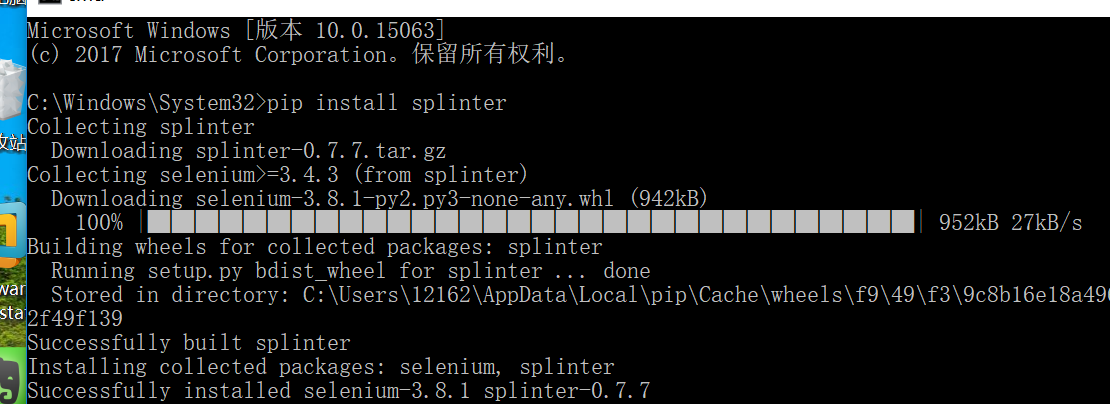
因为不想用urllib2了,没有用过splinter,今天就想试试,毕竟后者支持的功能更人性化/自动化. 1,安装splinter 安装过程很简单,安装了pip的话,执行: $ [sudo] pip ...
随机推荐
- Summary of continuous function spaces
In general differential calculus, we have learned the definitions of function continuity, such as fu ...
- Python题目练习(二)
1.如何实现对python列表去重,并保持原来顺序 li = [1,2,5,3,1,6,3,8,0,3,2,4] l = [] for i in li: if i not in l: l.append ...
- Codeforces 633F The Chocolate Spree 树形dp
The Chocolate Spree 对拍拍了半天才知道哪里写错了.. dp[ i ][ j ][ k ]表示在 i 这棵子树中有 j 条链, 是否有链延伸上来. #include<bits/ ...
- Codeforces 1012D AB-Strings 贪心
原文链接https://www.cnblogs.com/zhouzhendong/p/CF1012D.html 题目传送门 - CF1012D 题意 给定字符串 $s,t$ ,其中只包含小写字母 $a ...
- Python Enum 枚举 用法汇总
Python Enum 枚举 用法汇总 import os import sys if sys.version_info.major + sys.version_info.minor * 0.1 &l ...
- html-背景图片
<!DOCTYPE html> <html lang="en"> <head> <meta charset="UTF-8&quo ...
- 利用Python中的mock库对Python代码进行模拟测试
这篇文章主要介绍了利用Python中的mock库对Python代码进行模拟测试,mock库自从Python3.3依赖成为了Python的内置库,本文也等于介绍了该库的用法,需要的朋友可以参考下 ...
- NN:实现BP神经网络的回归拟合,基于近红外光谱的汽油辛烷值含量预测结果对比—Jason niu
load spectra_data.mat plot(NIR') title('Near infrared spectrum curve—Jason niu') temp = randperm(siz ...
- python之迭代器与生成器
python之迭代器与生成器 可迭代 假如现在有一个列表,有一个int类型的12345.我们循环输出. list=[1,2,3,4,5] for i in list: print(i) for i i ...
- 002.MongoDB社区版安装
一 前期准备 1.1 相关软件包介绍 包裹名字 描述 mongodb-org 一个将自动安装以下四个组件包的组合包. mongodb-org-server 包含mongod守护程序,关联的init脚本 ...