
【SpringBoot】搜索框架ElasticSearch介绍和整合SpringBoot
========================12章 搜索框架ElasticSearch介绍和整合SpringBoot =============================
加入小D课堂技术交流答疑群:Q群:699347262
1、搜索引擎知识和搜索框架elasticsearch基本介绍
简介:通过京东电商 介绍什么是搜索引擎,和开源搜索框架ElasticSearch6.x新特性介绍
前言:介绍ES的主要特点和使用场景,新特性讲解
mysql:like 模糊,性能问题,
solr:针对企业,Lucene
elasticsearch:针对数据量特别大,PB,TB
纯java开发,springboot使用,5.6版本
es升级4->5版本,改动大,但是5版本后,改动不大
elasticSearch主要特点
1、特点:全文检索,结构化检索,数据统计、分析,接近实时处理,分布式搜索(可部署数百台服务器),处理PB级别的数据
搜索纠错,自动完成
2、使用场景:日志搜索,数据聚合,数据监控,报表统计分析
3、国内外使用者:维基百科,Stack Overflow,GitHub
新特性讲解
1、6.2.x版本基于Lucene 7.x,更快,性能进一步提升,对应的序列化组件,升级到Jackson 2.8
mysql:database table rocord
es : index type(只能存在一个) document
2、推荐使用5.0版本推出的Java REST/HTTP客户端,依赖少,比Transport使用更方便,在基准测试中,性能并不输于Transport客户端,
在5.0到6.0版本中,每次有对应的API更新, 文档中也说明,推荐使用这种方式进行开发使用,所有可用节点间的负载均衡
在节点故障和特定响应代码的情况下进行故障转移,失败的连接处罚(失败的节点是否重试取决于失败的连续次数;失败的失败次数越多,客户端在再次尝试同一节点之前等待的时间越长)
3、(重要)不再支持一个索引库里面多个type,6.x版本已经禁止一个index里面多个type,所以一个index索引库只能存在1个type
官方文档:
1、6.0更新特性
https://www.elastic.co/guide/en/elasticsearch/reference/6.0/release-notes-6.0.0.html#breaking-java-6.0.0
2、6.1更新特性
https://www.elastic.co/guide/en/elasticsearch/reference/6.1/release-notes-6.1.0.html
2、快熟部署ElastcSearch5.6.x
简介:讲解为什么不用ES6.x版本,及本地快速安装ElasticSeach和场景问题处理
配置JDK1.8
使用wget 下载elasticsearch安装包
wget https://artifacts.elastic.co/downloads/elasticsearch/elasticsearch-5.6.8.tar.gz
解压
tar -zxvf elasticsearch-5.6.8.tar.gz
官网:https://www.elastic.co/products/elasticsearch
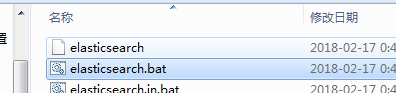
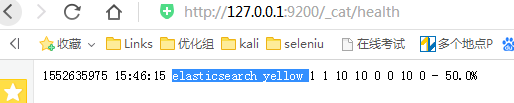
windows下开启
外网访问配置:
config目录下面elasticsearch.yml
修改为 network.host: 0.0.0.0
配置es出现相关问题处理(阿里云、腾讯云,亚马逊云安装问题集合):
1、问题一
Java HotSpot(TM) 64-Bit Server VM warning: INFO: os::commit_memory(0x00000000c5330000, 986513408, 0) failed; error='Cannot allocate memory' (errno=12)
#
# There is insufficient memory for the Java Runtime Environment to continue.
# Native memory allocation (mmap) failed to map 986513408 bytes for committing reserved memory.
# An error report file with more information is saved as:
# /usr/local/software/temp/elasticsearch-6.2.2/hs_err_pid1912.log
解决:内存不够,购买阿里云的机器可以动态增加内存
2、问题二
[root@iZwz95j86y235aroi85ht0Z bin]# ./elasticsearch
[2018-02-22T20:14:04,870][WARN ][o.e.b.ElasticsearchUncaughtExceptionHandler] [] uncaught exception in thread [main]
org.elasticsearch.bootstrap.StartupException: java.lang.RuntimeException: can not run elasticsearch as root
at org.elasticsearch.bootstrap.Elasticsearch.init(Elasticsearch.java:125) ~[elasticsearch-6.2.2.jar:6.2.2]
at org.elasticsearch.bootstrap.Elasticsearch.execute(Elasticsearch.java:112) ~[elasticsearch-6.2.2.jar:6.2.2]
at org.elasticsearch.cli.EnvironmentAwareCommand.execute(EnvironmentAwareCommand.java:86) ~[elasticsearch-6.2.2.jar:6.2.2]
at org.elasticsearch.cli.Command.mainWithoutErrorHandling(Command.java:124) ~[elasticsearch-cli-6.2.2.jar:6.2.2]
解决:用非root用户
添加用户:useradd -m 用户名 然后设置密码 passwd 用户名
3、问题三
./elasticsearch
Exception in thread "main" java.nio.file.AccessDeniedException: /usr/local/software/temp/elasticsearch-6.2.2/config/jvm.options
解决:权限不够 chmod 777 -R 当前es目录
常见配置问题资料:https://www.jianshu.com/p/c5d6ec0f35e0
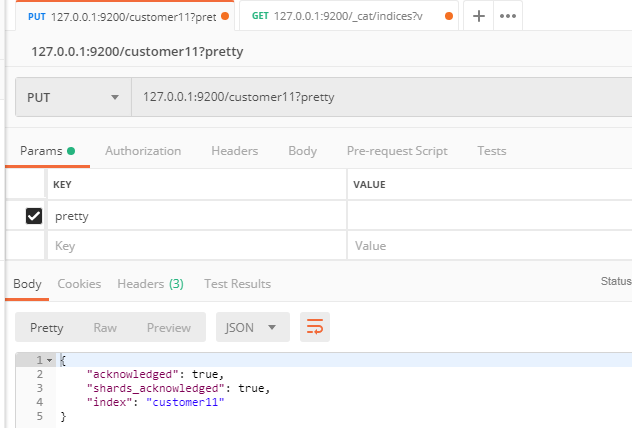
3、ElasticSearch5.6.8测试数据准备
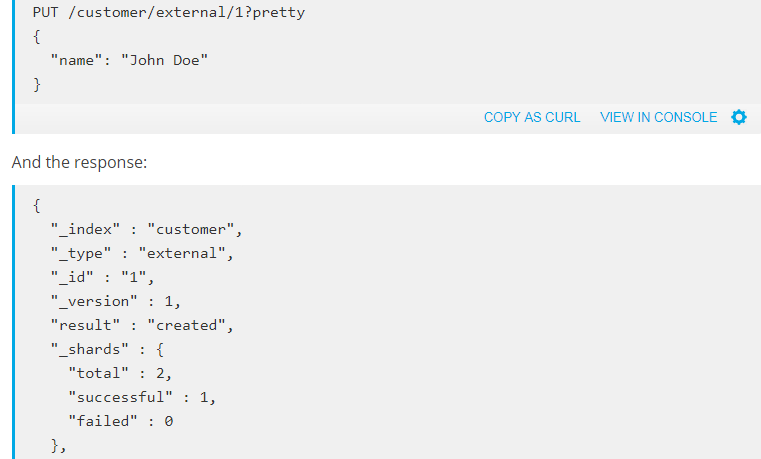
简介: ElasticSearch5.6.x简单测试
1、步骤 https://www.elastic.co/guide/en/elasticsearch/reference/5.6/index.html
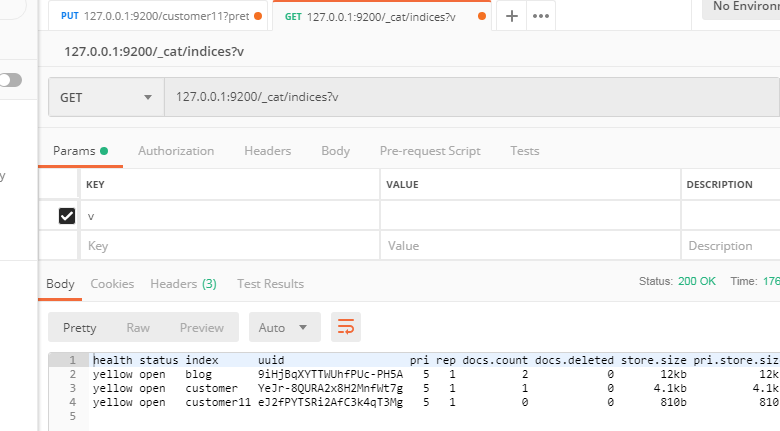
2、使用POSTMAN 工具
基础
查看集群状态:localhost:9200/_cat/health?v
查看索引列表:localhost:9200/_cat/indices?v

4、SpringBoot2.x整合elasticsearch5.6.x
简介:SpringBoot2.x整合elasticSearch5.6.8实战
Spring Data Elasticsearch文档地址
https://docs.spring.io/spring-data/elasticsearch/docs/3.0.6.RELEASE/reference/html/
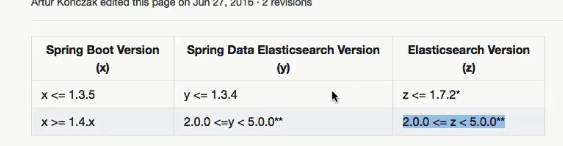
版本说明:SpringBoot整合elasticsearch
https://github.com/spring-projects/spring-data-elasticsearch/wiki/Spring-Data-Elasticsearch---Spring-Boot---version-matrix
版本差异:
1、添加maven依赖
<dependency>
<groupId>org.springframework.boot</groupId>
<artifactId>spring-boot-starter-data-elasticsearch</artifactId>
</dependency>
2、接口继承ElasticSearchRepository,里面有很多默认实现
注意点:
索引名称记得小写,类属性名称也要小写
新建实体对象article
加上类注解 @Document(indexName = "blog", type = "article")
3、配置文件:
# ELASTICSEARCH (ElasticsearchProperties)
spring.data.elasticsearch.cluster-name=elasticsearch # Elasticsearch cluster name.
spring.data.elasticsearch.cluster-nodes=localhost:9300 # Comma-separated list of cluster node addresses.
spring.data.elasticsearch.repositories.enabled=true # Whether to enable Elasticsearch repositories.
4、QueryBuilder使用
https://www.elastic.co/guide/en/elasticsearch/client/java-api/1.3/query-dsl-queries.html
//单个匹配,搜索name为jack的文档
QueryBuilder queryBuilder = QueryBuilders.matchQuery("title", "搜");
4、查看es数据
查看索引信息:http://localhost:9200/_cat/indices?v
查看某个索引库结构:http://localhost:9200/blog
查看某个对象:http://localhost:9200/blog/article/1
【SpringBoot】搜索框架ElasticSearch介绍和整合SpringBoot的更多相关文章
- 12章 搜索框架ElasticSearch介绍和整合SpringBoot 4节课
1.搜索引擎知识和搜索框架elasticsearch基本介绍 简介:通过京东电商 介绍什么是搜索引擎,和开源搜索框架ElasticSearch6.x新特性介绍 前言:介绍ES的主要特点和使用场 ...
- 【SpringBoot】常用Starter介绍和整合模板引擎Freemaker、thymeleaf
========7.SpringBoot常用Starter介绍和整合模板引擎Freemaker.thymeleaf ========================= 1.SpringBoot Sta ...
- 通用mapper版+SpringBoot+MyBatis框架+mysql数据库的整合
转:https://blog.csdn.net/qq_35153200/article/details/79538440 开发环境: 开发工具:Intellij IDEA 2017.2.3 JDK : ...
- SpringBoot其他框架-JPA-Hibernate-Swagger
SpringBoot其他框架 通过了解其他的SpringBoot框架,我们就可以在我们自己的Web服务器上实现更多更高级的功能. 邮件发送:Mail 我们在注册很多的网站时,都会遇到邮件或是手机号验证 ...
- 整合springboot(app后台框架搭建四)
springboot可以说是为了适用SOA服务出现,一方面,极大的简便了配置,加速了开发速度:第二方面,也是一个嵌入式的web服务,通过jar包运行就是一个web服务: 还有提供了很多metric,i ...
- 【SpringBoot】息队列介绍和SpringBoot2.x整合RockketMQ、ActiveMQ
========================13.消息队列介绍和SpringBoot2.x整合RockketMQ.ActiveMQ ======================= 1.JMS介绍和 ...
- SpringBoot常用Starter介绍和整合模板引擎Freemaker、thymeleaf 4节课
1.SpringBoot Starter讲解 简介:介绍什么是SpringBoot Starter和主要作用 1.官网地址:https://docs.spring.io/spring-boot/doc ...
- 小D课堂 - 零基础入门SpringBoot2.X到实战_第7节 SpringBoot常用Starter介绍和整合模板引擎Freemaker、thymeleaf_28..SpringBoot Starter讲解
笔记 1.SpringBoot Starter讲解 简介:介绍什么是SpringBoot Starter和主要作用 1.官网地址:https://docs.spring.io/spring-b ...
- Dubbo整合Springboot框架
本文使用的是alibaba的Dubbo. Dubbo整合Springboot可以分为四步: 第一步:首先需要了解Dubbo官方给的建议,至少有三个工程: 接口工程:主要存实体bean和业务接口 服务提 ...
随机推荐
- 一些有趣的 js 包
https://github.com/octalmage/robotjs Node.js桌面自动化.控制鼠标,键盘和屏幕. http://robotjs.io
- 在 mac iTerm2 中使用 cmd 终端
在 mac iTerm2 中使用 cmd 终端 主要是因为要在 window 中做一些命令行上的工作, 但又不想切换到整个 window 系统里面去. 在程序和功能中开启 telnet 在服务中启用 ...
- CSS布局学习(三) - position属性定义及解释(官网直译)
static ①元素的位置是在文档正常布局流中的位置. ②设置top right bottom left与z-index无效. ③在未指定position时,static是默认值 以下例子进行说明: ...
- SpringMVC 搭建
1. 新建一个项目 Paste_Image.png 我们用eclipse新建项目,选择Dynamic Web Project(动态的Web项目). 点击Next Paste_Image.png ...
- TypeScript作业
题目: 了解神话故事盘古开天辟地或者女娲开世造物,通过typescript程序模拟出天地的变化过程或者万物的衍生过程 参考博客园大神: https://www.cnblogs.com/tansm/p/ ...
- 【转】 pthread设置线程的调度策略和优先级
转自:https://www.cnblogs.com/tianzeng/p/9192706.html 线程的调度有三种策略:SCHED_OTHER.SCHED_RR和SCHED_FIFO.Policy ...
- linux存储管理之mount挂载
Mount 挂载详解 ====================================================================================本节内容: ...
- hihocoder #1044 : 状态压缩·一 状压DP
http://hihocoder.com/problemset/problem/1044 可以看出来每一位的选取只与前m位有关,我们把每个位置起始的前m位选取状态看出01序列,就可以作为一个数字来存储 ...
- linux是什么,有什么特点
(1)Linux是一套免费使用和自由传播的类Unix操作系统,是一个基于POSIX和UNIX的多用户.多任务.支持多线程和多CPU的操作系统.它能运行主要的UNIX工具软件.应用程序和网络协议.它支持 ...
- hdu多校第3场A.Ascending Rating
Problem A. Ascending Rating Time Limit: / MS (Java/Others) Memory Limit: / K (Java/Others) Total Sub ...