
spring cloud config配置
参考:
http://www.ityouknow.com/springcloud/2017/05/22/springcloud-config-git.html
http://www.ityouknow.com/springcloud/2017/05/25/springcloud-config-eureka.html
https://www.cnblogs.com/xiaoliu66007/p/8963934.html
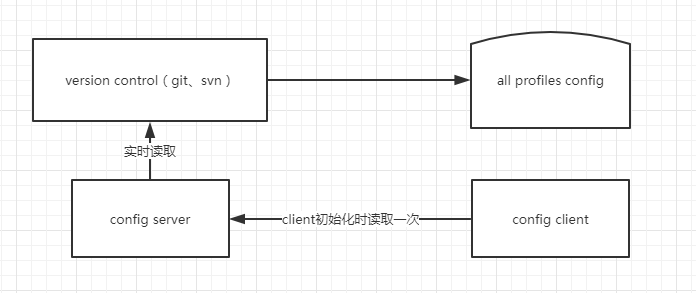
关系图
版本控制
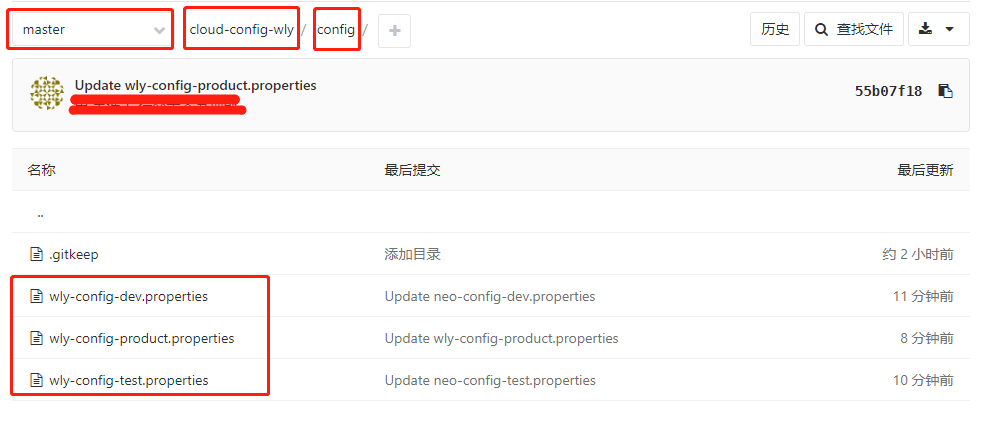
差异文件内容
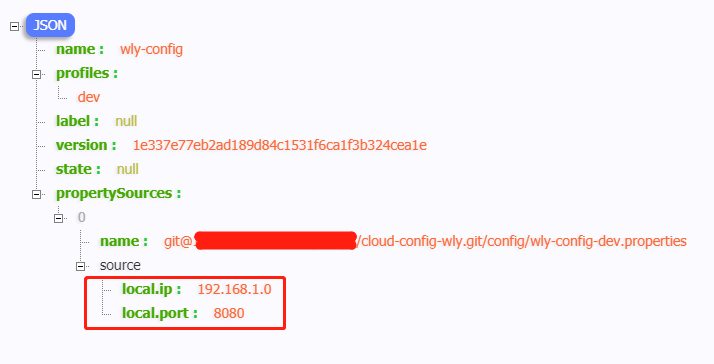
wly-config-dev.properties
local.ip=192.168.1.0

local.port=8080
wly-config-test.properties
local.ip=192.168.1.1

local.port=8081
wly-config-product.properties
local.ip=192.168.1.2

local.port=8082
spring boot版本:2.0.3.RELEASE
spring cloud config server配置
pom.xml
<dependency>

    <groupId>org.springframework.cloud</groupId>

    <artifactId>spring-cloud-config-server</artifactId>

</dependency>
application.yml
server:

  port: 8080

spring:

  application:

    name: spring-cloud-config-server-wly

  cloud:

    config:

      server:

        # git配置:项目/${search-paths}/${application}-${profile}.properties

        # cloud-config-wly/config/config/neo-config-dev.properties

        git:

          # 项目地址,换成自己的项目地址

          uri: git@xxx:xxxx/cloud-config-wly.git

          # 表示文件路径

          search-paths: config

          # 项目用户名,换成项目用户名

          username: xxx

          # 项目密码,换成项目密码

          password: xxx
启动类(新增@EnableConfigServer注解)
package com.wang.springcloudconfig;

import org.springframework.boot.SpringApplication;

import org.springframework.boot.autoconfigure.SpringBootApplication;

import org.springframework.cloud.config.server.EnableConfigServer;

@EnableConfigServer

@SpringBootApplication

public class SpringcloudconfigApplication {

    public static void main(String[] args) {

        SpringApplication.run(SpringcloudconfigApplication.class, args);

    }

}
启动服务
http://localhost:8080/wly-config/dev
spring cloud config client配置
pom.xml
<!-- 引入spring cloud config 客户端配置 -->

<dependency>

    <groupId>org.springframework.cloud</groupId>

    <artifactId>spring-cloud-starter-config</artifactId>

</dependency>

<!-- 引入web模块 -->

<dependency>

    <groupId>org.springframework.boot</groupId>

    <artifactId>spring-boot-starter-web</artifactId>

</dependency>
application.yml同级目录(src/main/resources)新增配置文件:bootstrap.properties
此文件会先于application.yml加载
# 相当于${application}

spring.cloud.config.name=wly-config

# 相当于${profile}

spring.cloud.config.profile=product

# 配置中心server服务url

spring.cloud.config.uri=http://localhost:8080/

# 相当于git分支

spring.cloud.config.label=master
application.yml
spring:

  application:

    name: spring-cloud-config-client-wly

server:

  port: 8081
controller
package com.wang.springcloudconfigclient.web;

import org.springframework.beans.factory.annotation.Autowired;

import org.springframework.core.env.Environment;

import org.springframework.web.bind.annotation.RequestMapping;

import org.springframework.web.bind.annotation.RestController;

/**

 * @Author wly

 * @Date 2018/7/2 11:35

 */

@RestController

public class HelloController {

    @Autowired

    private Environment env;

    @RequestMapping("/test")

    public String test() {

        return env.getProperty("local.ip") + "," + env.getProperty("local.port");

    }

}
访问
http://localhost:8081/test
页面输出
192.168.1.2,8082
基于注册中心版
在spring cloud config client端写死spring cloud config server的ip、port不适用于复杂多变的场景,比如集群的配置,ip变化等。所以我们可以基于注册中心配置
启动一个注册中心的服务spring-cloud-eureka,端口号8765
pom.xml
spring cloud config server、spring cloud config client均引入eureka客户端
<dependency>

    <groupId>org.springframework.cloud</groupId>

    <artifactId>spring-cloud-starter-netflix-eureka-client</artifactId>

</dependency>
启动类
spring cloud config server、spring cloud config client启动类均添加注册注解(@EnableDiscoveryClient)
package com.wang.springcloudconfig;

import org.springframework.boot.SpringApplication;

import org.springframework.boot.autoconfigure.SpringBootApplication;

import org.springframework.cloud.client.discovery.EnableDiscoveryClient;

import org.springframework.cloud.config.server.EnableConfigServer;

@EnableConfigServer

@EnableDiscoveryClient

@SpringBootApplication

public class SpringcloudconfigApplication {

    public static void main(String[] args) {

        SpringApplication.run(SpringcloudconfigApplication.class, args);

    }

}
spring cloud config server application.yml
添加注册中心配置
server:

  port: 8080

spring:

  application:

    name: spring-cloud-config-server-wly

  cloud:

    config:

      server:

        # git配置:项目/${search-paths}/${application}-${profile}.properties

        # cloud-config-wly/config/config/neo-config-dev.properties

        git:

          # 项目地址

          uri: git@xxx:xxx/cloud-config-wly.git

          # 表示文件路径

          search-paths: config

          # 项目用户名

          username: xxxx

          # 项目密码

          password: xxxx

eureka:

  client:

    serviceUrl:

      defaultZone: http://localhost:8765/eureka
spring cloud config client bootstrap.properties
# 相当于${application}

spring.cloud.config.name=wly-config

# 相当于${profile}

spring.cloud.config.profile=dev

# 配置中心server服务url,使用注册中心配置后,此句注释即可

#spring.cloud.config.uri=http://localhost:8080/

# 相当于git分支

spring.cloud.config.label=master
# 启用注册发现

spring.cloud.config.discovery.enabled=true
# 读取服务,即config server的spring.application.name

spring.cloud.config.discovery.serviceId=spring-cloud-config-server-wly

# 注册中心地址

eureka.client.serviceUrl.defaultZone=http://localhost:8765/eureka
顺序启动注册中心、spring cloud config server、spring cloud config client3个服务
注册中心

访问(效果与之前一致~)
http://localhost:8080/wly-config/dev
http://localhost:8081/test
代码
server:https://gitee.com/wlyfree/springcloudconfig
client:https://gitee.com/wlyfree/springcloudconfigclient
spring cloud config配置的更多相关文章
- spring cloud config配置记录
1. spring cloud config配置记录 1.1. pom <!-- 分布式配置中心 --> <dependency> <groupId>org.spr ...
- Spring Cloud Config 配置刷新
客户端进行刷新操作. 1.添加 actuator包,这样 /refresh url才处于可用状态. <dependency> <groupId>org.springframew ...
- 跟我学SpringCloud | 第七篇:Spring Cloud Config 配置中心高可用和refresh
SpringCloud系列教程 | 第七篇:Spring Cloud Config 配置中心高可用和refresh Springboot: 2.1.6.RELEASE SpringCloud: Gre ...
- 微服务SpringCloud之Spring Cloud Config配置中心Git
微服务以单个接口为颗粒度,一个接口可能就是一个项目,如果每个项目都包含一个配置文件,一个系统可能有几十或上百个小项目组成,那配置文件也会有好多,对后续修改维护也是比较麻烦,就和前面的服务注册一样,服务 ...
- 微服务SpringCloud之Spring Cloud Config配置中心服务化
在前面两篇Spring Cloud Config配置中心的博客中都是需要指定配置服务的地址url:spring.cloud.config.uri,客户端都是直接调用配置中心的server端来获取配置文 ...
- spring cloud --- config 配置中心 [本地、git获取配置文件]
spring boot 1.5.9.RELEASE spring cloud Dalston.SR1 1.前言 spring cloud config 配置中心是什么? 为了统一管理配 ...
- Spring Cloud Config 配置中心高可用
详细参见 <Spring Cloud 与 Docker微服务架构实战> p163-9.10 Spring Cloud Config 与 Eureka 配合使用 p163-9.12 Conf ...
- Spring Cloud Config 配置中心 自动加解密功能 jasypt方式
使用此种方式会存在一种问题:如果我配置了自动配置刷新,则刷新过后,加密过后的密文无法被解密.具体原因分析,看 SpringCloud 详解配置刷新的原理 使用 jasypt-spring-boot- ...
- Spring Cloud Config 配置中心
请将远程配置文件的格式写对: 比如使用 *.yml 或者 *.properties yml: testconfig: testvalue properties: testconfig=testvalu ...
随机推荐
- Mac下用Launchd实现使用rc.local执行开机启动命令
其实原理很简单,使用Launchd创建一个开机启动的服务,然后这个服务关联/etc/rc.local文件,那么接下来操作rc.local就和Linux下一样的了. 当然,这种思路还可以直接使用在~/. ...
- mono上部署web程序初体验
早就想体验一下mono,但一直琐事缠身.难得有时间,便在网上一通狂搜mono相关的资料. 如果想使用Apache服务器,只能使用mod_mono的方式,这里有详细的介绍.这种方式有点繁琐,需要安装一大 ...
- springboot-22-自定义starter
先说下springboot的运行原理 springboot最主要的配置 是 @SpringBootApplication 然后这里面 @EnableAutoCOnfiguration 最为重要, 继续 ...
- Innosetup中在安装界面左下角添加超链接
在程序的安装界面左下角加上超链接,如下图: 1. 新建一个标签,这里使用的控件是TNewStaticText ,完整的方法是 //该方法传入两个参数: //1. ParentForm:将这个URLLa ...
- 使用postman模拟上传文件到springMVC的坑:the request was rejected because no multipart boundary was found
参考该文解决问题:http://blog.csdn.net/sanjay_f/article/details/47407063 报错 threw exception [Request processi ...
- You have not concluded your merge. (MERGE_HEAD exists)。(转)
自己简直就是一个git小白,碰到问题,一点点的解决吧,可能不太系统,但也只能勤能补拙了 Git本地有修改如何强制更新 本地有修改和提交,如何强制用远程的库更新更新.我尝试过用git pull -f,总 ...
- Go RabbitMQ(四)消息路由
RabbitMQ_Routing 本节内容我们将对发布订阅增加一个特性:订阅子集.比如我们将一些危险的错误消息保存进硬盘中,同时在控制台仍然能够读取所有的消息 Bingings 上一节内容我们将队列跟 ...
- linux定时任务之crontab
1.使用crontab crontab -u //设定某个用户的cron服务 crontab -l //列出某个用户cron服务的详细内容 crontab -r //删除某个用户的cron服务 cro ...
- 【LeetCode题解】2_两数相加
目录 [LeetCode题解]2_两数相加 描述 方法一:小学数学 思路 Java 代码(非递归写法) Java 代码(递归写法) Python 代码(非递归写法) [LeetCode题解]2_两数相 ...
- select2和bootstrap模态框一起使用导致select2的input获取不到焦点问题
select2和bootstrap模态框一起使用导致select2的input获取不到焦点问题 解决办法: 把页面中的 tabindex="-1" 删掉, 或者值改为1 代码片 ...