
微服务SpringCloud之Spring Cloud Config配置中心服务化
在前面两篇Spring Cloud Config配置中心的博客中都是需要指定配置服务的地址url:spring.cloud.config.uri,客户端都是直接调用配置中心的server端来获取配置文件信息。如果server端要做集群,客户端只能通过原始的方式来路由,server端改变IP地址的时候,客户端也需要修改配置,不符合springcloud服务治理的理念。springcloud提供了这样的解决方案,我们只需要将server端当做一个服务注册到eureka中,client端去eureka中去获取配置中心server端的服务既可。
一、Server端改造
1.添加依赖
在SpringCloudConfigServer项目中,添加spring-cloud-starter-netflix-eureka-client引用。
<dependency>

    <groupId>org.springframework.cloud</groupId>

    <artifactId>spring-cloud-starter-netflix-eureka-client</artifactId>

</dependency>
<?xml version="1.0" encoding="UTF-8"?>

<project xmlns="http://maven.apache.org/POM/4.0.0" xmlns:xsi="http://www.w3.org/2001/XMLSchema-instance"

    xsi:schemaLocation="http://maven.apache.org/POM/4.0.0 http://maven.apache.org/xsd/maven-4.0.0.xsd">

    <modelVersion>4.0.0</modelVersion>

    <parent>

        <groupId>org.springframework.boot</groupId>

        <artifactId>spring-boot-starter-parent</artifactId>

        <version>2.1.6.RELEASE</version>

        <relativePath/> <!-- lookup parent from repository -->

    </parent>

    <groupId>com.example</groupId>

    <artifactId>SpringCloudConfigServer</artifactId>

    <version>0.0.1-SNAPSHOT</version>

    <packaging>war</packaging>

    <name>SpringCloudConfigServer</name>

    <description>Demo project for Spring Boot</description>

    <properties>

        <java.version>1.8</java.version>

        <spring-cloud.version>Greenwich.SR2</spring-cloud.version>

    </properties>

    <dependencies>

        <dependency>

            <groupId>org.springframework.boot</groupId>

            <artifactId>spring-boot-starter-web</artifactId>

        </dependency>

        <dependency>

            <groupId>org.springframework.cloud</groupId>

            <artifactId>spring-cloud-config-server</artifactId>

        </dependency>

<dependency>

    <groupId>org.springframework.cloud</groupId>

    <artifactId>spring-cloud-starter-netflix-eureka-client</artifactId>

</dependency>

        <dependency>

            <groupId>org.springframework.boot</groupId>

            <artifactId>spring-boot-starter-tomcat</artifactId>

            <scope>provided</scope>

        </dependency>

        <dependency>

            <groupId>org.springframework.boot</groupId>

            <artifactId>spring-boot-starter-test</artifactId>

            <scope>test</scope>

        </dependency>

    </dependencies>

    <dependencyManagement>

        <dependencies>

            <dependency>

                <groupId>org.springframework.cloud</groupId>

                <artifactId>spring-cloud-dependencies</artifactId>

                <version>${spring-cloud.version}</version>

                <type>pom</type>

                <scope>import</scope>

            </dependency>

        </dependencies>

    </dependencyManagement>

    <build>

        <plugins>

            <plugin>

                <groupId>org.springframework.boot</groupId>

                <artifactId>spring-boot-maven-plugin</artifactId>

            </plugin>

        </plugins>

    </build>

</project>
2.增加了eureka注册中心的配置
在application.properties中增加eureka注册中心的配置,http://localhost:8088是后面启动的eureka server的地址
eureka.client.serviceUrl.defaultZone=http://localhost:8088/eureka/
3.增加注解
在main方法中增加@EnableDiscoveryClient注解
二、客户端改造
1、添加依赖
也是引入spring-cloud-starter-netflix-eureka-client。
<dependency>

    <groupId>org.springframework.cloud</groupId>

    <artifactId>spring-cloud-starter-netflix-eureka-client</artifactId>

</dependency>
<?xml version="1.0" encoding="UTF-8"?>

<project xmlns="http://maven.apache.org/POM/4.0.0" xmlns:xsi="http://www.w3.org/2001/XMLSchema-instance"

    xsi:schemaLocation="http://maven.apache.org/POM/4.0.0 http://maven.apache.org/xsd/maven-4.0.0.xsd">

    <modelVersion>4.0.0</modelVersion>

    <parent>

        <groupId>org.springframework.boot</groupId>

        <artifactId>spring-boot-starter-parent</artifactId>

        <version>2.1.6.RELEASE</version>

        <relativePath/> <!-- lookup parent from repository -->

    </parent>

    <groupId>com.example</groupId>

    <artifactId>SpringCloudConfigClient</artifactId>

    <version>0.0.1-SNAPSHOT</version>

    <packaging>war</packaging>

    <name>SpringCloudConfigClient</name>

    <description>Demo project for Spring Boot</description>

    <properties>

        <java.version>1.8</java.version>

        <spring-cloud.version>Greenwich.SR2</spring-cloud.version>

    </properties>

    <dependencies>

        <dependency>

            <groupId>org.springframework.boot</groupId>

            <artifactId>spring-boot-starter-web</artifactId>

        </dependency>

        <dependency>

            <groupId>org.springframework.cloud</groupId>

            <artifactId>spring-cloud-starter-config</artifactId>

        </dependency>

<dependency>

  <groupId>org.springframework.boot</groupId>

  <artifactId>spring-boot-starter-actuator</artifactId>

</dependency>

<dependency>

    <groupId>org.springframework.cloud</groupId>

    <artifactId>spring-cloud-starter-netflix-eureka-client</artifactId>

</dependency>

        <dependency>

            <groupId>org.springframework.boot</groupId>

            <artifactId>spring-boot-starter-tomcat</artifactId>

            <scope>provided</scope>

        </dependency>

        <dependency>

            <groupId>org.springframework.boot</groupId>

            <artifactId>spring-boot-starter-test</artifactId>

            <scope>test</scope>

        </dependency>

    </dependencies>

    <dependencyManagement>

        <dependencies>

            <dependency>

                <groupId>org.springframework.cloud</groupId>

                <artifactId>spring-cloud-dependencies</artifactId>

                <version>${spring-cloud.version}</version>

                <type>pom</type>

                <scope>import</scope>

            </dependency>

        </dependencies>

    </dependencyManagement>

    <build>

        <plugins>

            <plugin>

                <groupId>org.springframework.boot</groupId>

                <artifactId>spring-boot-maven-plugin</artifactId>

            </plugin>

        </plugins>

    </build>

</project>
2.配置文件
在bootstrap.properties中去掉指定配置服务的地址url,增加了最后的三个配置:
spring.cloud.config.name=neo-config

spring.cloud.config.profile=dev

spring.cloud.config.label=

spring.cloud.config.discovery.enabled=true

spring.cloud.config.discovery.serviceId=spring-cloud-config-server

eureka.client.serviceUrl.defaultZone=http://localhost:8088/eureka/
spring.cloud.config.discovery.enabled :开启Config服务发现支持
spring.cloud.config.discovery.serviceId :指定server端的name,也就是server端spring.application.name的值
eureka.client.serviceUrl.defaultZone :指向注册中心的地址
3.启动类增加注解
在main方法中增加注解@EnableDiscoveryClient。
三、测试
1.分别启动eureka server、SpringCloudConfigServer、SpringCloudConfigClient。
2.浏览器输入http://localhost:8088/,可以看到注入到eureka server中的服务。
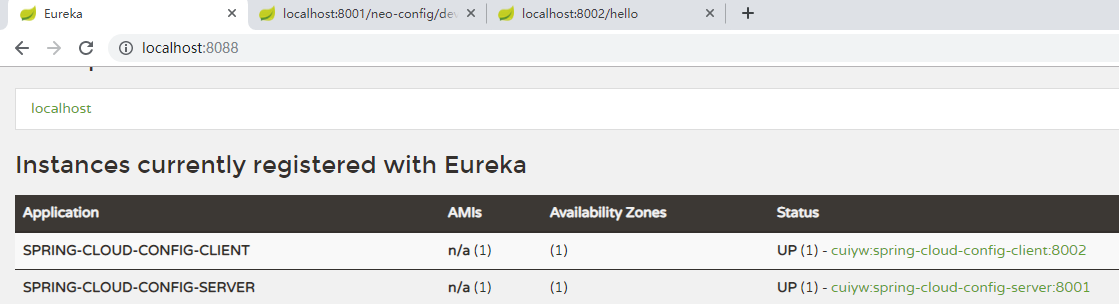
3.输入http://localhost:8001/neo-config/dev,可以看到配置文件的配置信息。

4.输入http://localhost:8002/hello,可以读取到配置文件的属性信息

参考:http://www.ityouknow.com/springcloud/2017/05/25/springcloud-config-eureka.html
微服务SpringCloud之Spring Cloud Config配置中心服务化的更多相关文章
- 微服务SpringCloud之Spring Cloud Config配置中心Git
微服务以单个接口为颗粒度,一个接口可能就是一个项目,如果每个项目都包含一个配置文件,一个系统可能有几十或上百个小项目组成,那配置文件也会有好多,对后续修改维护也是比较麻烦,就和前面的服务注册一样,服务 ...
- 微服务SpringCloud之Spring Cloud Config配置中心SVN
在回来的路上看到一个个的都抱着花,吃了一路的狗粮,原本想着去旁边的工业园里跑跑步呢,想想还是算了,人家过七夕,俺们过巴西.上一博客学习了Spring Cloud Config使用git作为配置中心,本 ...
- 跟我学SpringCloud | 第七篇:Spring Cloud Config 配置中心高可用和refresh
SpringCloud系列教程 | 第七篇:Spring Cloud Config 配置中心高可用和refresh Springboot: 2.1.6.RELEASE SpringCloud: Gre ...
- spring cloud --- config 配置中心 [本地、git获取配置文件]
spring boot 1.5.9.RELEASE spring cloud Dalston.SR1 1.前言 spring cloud config 配置中心是什么? 为了统一管理配 ...
- SpringCloud学习笔记(7):使用Spring Cloud Config配置中心
简介 Spring Cloud Config为分布式系统中的外部化配置提供了服务器端和客户端支持,服务器端统一管理所有配置文件,客户端在启动时从服务端获取配置信息.服务器端有多种配置方式,如将配置文件 ...
- Spring Cloud Config 配置中心实践过程中,你需要了解这些细节!
本文导读: Spring Cloud Config 基本概念 Spring Cloud Config 客户端加载流程 Spring Cloud Config 基于消息总线配置 Spring Cloud ...
- Spring Cloud Config 配置中心高可用
详细参见 <Spring Cloud 与 Docker微服务架构实战> p163-9.10 Spring Cloud Config 与 Eureka 配合使用 p163-9.12 Conf ...
- Spring Cloud Config 配置中心 自动加解密功能 jasypt方式
使用此种方式会存在一种问题:如果我配置了自动配置刷新,则刷新过后,加密过后的密文无法被解密.具体原因分析,看 SpringCloud 详解配置刷新的原理 使用 jasypt-spring-boot- ...
- Spring Cloud Config 配置中心
请将远程配置文件的格式写对: 比如使用 *.yml 或者 *.properties yml: testconfig: testvalue properties: testconfig=testvalu ...
随机推荐
- Java中lambda表达式详解
原文地址:http://blog.laofu.online/2018/04/20/java-lambda/ 为什么使用lambda 在java中我们很容易将一个变量赋值,比如int a =0;int ...
- 【MySQL】(三)文件
本篇文章分析构成MySQL数据库和InnoDB存储引擎表的各种累类型文件.这些文件有以下这些. 参数文件:告诉MySQL实例启动时在哪里可以找到数据库文件,并且指定某些初始化参数,这些参数定义了某种内 ...
- Java EE.JSP.指令
JSP的指令是从JSP向Web容器发送消息,它用来设置页面的全局属性,如输出内容类型等. JSP的指令的格式为:<%@ 指令名 属性="属性值"%> 1.page指令 ...
- webpack基础知识
一.基础 1 安装 npm i -g webpack webpack-cli // 推荐安装至本地 npm i -D webpack webpack-cli 2 webpck基础使用 2.1 webp ...
- mpvue的使用,包含axios、router的集成等完美结合小程序
mpvue开发微信小程序框架的使用注意事项: 1.路由跳转,引用mpvue-router-patch 在main.js文件中引入控件:import MpvueRouterPatch from 'mpv ...
- springBoot综合开发
作者:纯洁的微笑出处:www.ityouknow.com 版权所有,欢迎保留原文链接进行转载:) 上篇文章介绍了Spring boot初级教程:spring boot(一):入门篇,方便大家快速入门. ...
- vue+ elementUI 打包发布到服务器后,element-icons.woff文件404
vue项目打包部署到服务器,静态资源文件404 js文件404问题 原因:打包的项目静态资源的路径需要设置为绝对路径.如果是相对路径会出错 解决办法:修改config/index.js文 ...
- 【JDK】JDK源码分析-List, Iterator, ListIterator
List 是最常用的容器之一.之前提到过,分析源码时,优先分析接口的源码,因此这里先从 List 接口分析.List 方法列表如下: 由于上文「JDK源码分析-Collection」已对 Collec ...
- 【Android Studio】使用 Genymotion 调试出现错误 INSTALL_FAILED_CPU_ABI_INCOMPATI
RT -- 解决方法参考: https://my.oschina.net/u/242764/blog/375909 http://blog.csdn.net/wjr2012/article/detai ...
- Hive映射HBase表的几种方式
1.Hive内部表,语句如下 CREATE TABLE ods.s01_buyer_calllogs_info_ts( key string comment "hbase rowkey&qu ...