
Spring Cloud Config 配置中心
请将远程配置文件的格式写对:
比如使用 *.yml 或者 *.properties
yml:
testconfig: testvalue
properties:
testconfig=testvalue
服务器配置文件:
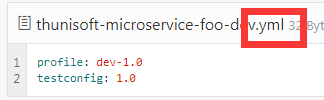
调用config server url后返回的json数据:
红框中为配置正确后解析样子:

否则无法解析!
一、简介
在分布式系统中,由于服务数量巨多,为了方便服务配置文件统一管理,实时更新,所以需要分布式配置中心组件。在Spring Cloud中,有分布式配置中心组件spring cloud config ,它支持配置服务放在配置服务的内存中(即本地),也支持放在远程Git仓库中。在spring cloud config 组件中,分两个角色,一是config server,二是config client。
二、构建Config Server
创建一个spring-boot项目,取名为config-server,pom.xml中引入依赖:

<dependencies>

      <dependency>

            <groupId>org.springframework.cloud</groupId>

            <artifactId>spring-cloud-starter-config</artifactId>

        </dependency>

        <!--表示为web工程-->

        <dependency>

            <groupId>org.springframework.boot</groupId>

            <artifactId>spring-boot-starter-web</artifactId>

        </dependency>

        <!--暴露各种指标  貌似是必须的  -->

        <dependency>

            <groupId>org.springframework.boot</groupId>

            <artifactId>spring-boot-starter-actuator</artifactId>

        </dependency>

    <dependency>

            <groupId>org.springframework.cloud</groupId>

            <artifactId>spring-cloud-config-server</artifactId>

        </dependency>

  </dependencies>
新建入口类BootApplication:
import org.springframework.boot.SpringApplication;

import org.springframework.boot.autoconfigure.SpringBootApplication;

import org.springframework.cloud.config.server.EnableConfigServer;

@SpringBootApplication

@EnableConfigServer

public class BootApplication {

    public static void main(String[] args) {

        SpringApplication.run(BootApplication.class, args);

    }

}
application.properties:
server.port=7010

spring.cloud.config.server.default-application-name=config-server

# 配置git仓库地址

spring.cloud.config.server.git.uri=https://github.com/shaweiwei/myspringcloudconfig

# 配置仓库路径

spring.cloud.config.server.git.search-paths=myconfigpath

# 配置仓库的分支

spring.cloud.config.label=master

# 访问git仓库的用户名

spring.cloud.config.server.git.username=xxxxoooo

# 访问git仓库的用户密码 如果Git仓库为公开仓库,可以不填写用户名和密码,如果是私有仓库需要填写

spring.cloud.config.server.git.password=xxxxoooo
远程仓库https://github.com/shaweiwei/myspringcloudconfig/ 中有个文件config-client-dev.properties文件中有一个属性:
myww=myww version 2
启动程序:访问http://localhost:7010/myww/dev
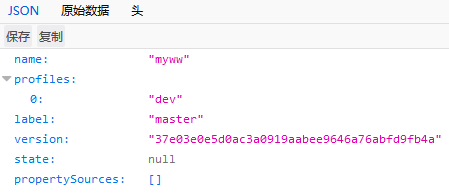
证明配置服务中心可以从远程程序获取配置信息。
http请求地址和资源文件映射如下:
- /{application}/{profile}[/{label}]
- /{application}-{profile}.yml
- /{label}/{application}-{profile}.yml
- /{application}-{profile}.properties
- /{label}/{application}-{profile}.properties
三、构建一个config client
重新创建一个springboot项目,取名为config-client,其pom文件引入依赖:
<dependency>

            <groupId>org.springframework.cloud</groupId>

            <artifactId>spring-cloud-starter-config</artifactId>

        </dependency>

        <dependency>

            <groupId>org.springframework.boot</groupId>

            <artifactId>spring-boot-starter-web</artifactId>

        </dependency>

        <dependency>

            <groupId>org.springframework.boot</groupId>

            <artifactId>spring-boot-starter-actuator</artifactId>

        </dependency>

        <dependency>

            <groupId>org.springframework.boot</groupId>

            <artifactId>spring-boot-starter-test</artifactId>

            <scope>test</scope>

        </dependency>
其配置文件bootstrap.properties:
# 和git里的文件名对应

spring.application.name=config-client

# 远程仓库的分支

spring.cloud.config.label=master

# dev 开发环境配置文件 |  test 测试环境  |  pro 正式环境

# 和git里的文件名对应

spring.cloud.config.profile=dev

# 指明配置服务中心的网址

spring.cloud.config.uri= http://localhost:7010/

server.port=7020
程序的入口类,写一个API接口“/hi”,返回从配置中心读取的foo变量的值,代码如下:
import org.springframework.beans.factory.annotation.Value;

import org.springframework.boot.SpringApplication;

import org.springframework.boot.autoconfigure.SpringBootApplication;

import org.springframework.web.bind.annotation.RequestMapping;

import org.springframework.web.bind.annotation.RestController;

@SpringBootApplication

@RestController

public class BootApplication {

    public static void main(String[] args) {

        SpringApplication.run(BootApplication.class, args);

    }

    @Value("${myww}") // git配置文件里的key

    String myww;

    @RequestMapping(value = "/hi")

    public String hi(){

        return myww;

    }

}
打开网址访问:http://localhost:7020/hi,网页显示:
myww version 2
这就说明,config-client从config-server获取了foo的属性,而config-server是从git仓库读取的,如图:

本文源码:http://download.csdn.net/download/u013081610/10152869
Spring Cloud Config 配置中心的更多相关文章
- 跟我学SpringCloud | 第七篇:Spring Cloud Config 配置中心高可用和refresh
SpringCloud系列教程 | 第七篇:Spring Cloud Config 配置中心高可用和refresh Springboot: 2.1.6.RELEASE SpringCloud: Gre ...
- 微服务SpringCloud之Spring Cloud Config配置中心Git
微服务以单个接口为颗粒度,一个接口可能就是一个项目,如果每个项目都包含一个配置文件,一个系统可能有几十或上百个小项目组成,那配置文件也会有好多,对后续修改维护也是比较麻烦,就和前面的服务注册一样,服务 ...
- 微服务SpringCloud之Spring Cloud Config配置中心服务化
在前面两篇Spring Cloud Config配置中心的博客中都是需要指定配置服务的地址url:spring.cloud.config.uri,客户端都是直接调用配置中心的server端来获取配置文 ...
- spring cloud --- config 配置中心 [本地、git获取配置文件]
spring boot 1.5.9.RELEASE spring cloud Dalston.SR1 1.前言 spring cloud config 配置中心是什么? 为了统一管理配 ...
- Spring Cloud Config 配置中心高可用
详细参见 <Spring Cloud 与 Docker微服务架构实战> p163-9.10 Spring Cloud Config 与 Eureka 配合使用 p163-9.12 Conf ...
- 微服务SpringCloud之Spring Cloud Config配置中心SVN
在回来的路上看到一个个的都抱着花,吃了一路的狗粮,原本想着去旁边的工业园里跑跑步呢,想想还是算了,人家过七夕,俺们过巴西.上一博客学习了Spring Cloud Config使用git作为配置中心,本 ...
- SpringCloud学习笔记(7):使用Spring Cloud Config配置中心
简介 Spring Cloud Config为分布式系统中的外部化配置提供了服务器端和客户端支持,服务器端统一管理所有配置文件,客户端在启动时从服务端获取配置信息.服务器端有多种配置方式,如将配置文件 ...
- Spring Cloud Config 配置中心实践过程中,你需要了解这些细节!
本文导读: Spring Cloud Config 基本概念 Spring Cloud Config 客户端加载流程 Spring Cloud Config 基于消息总线配置 Spring Cloud ...
- Spring Cloud Config 配置中心 自动加解密功能 jasypt方式
使用此种方式会存在一种问题:如果我配置了自动配置刷新,则刷新过后,加密过后的密文无法被解密.具体原因分析,看 SpringCloud 详解配置刷新的原理 使用 jasypt-spring-boot- ...
随机推荐
- 在ubuntu14系统中将redis-server设置为开机启动项
1.redis安装完成后(我装的是redis-3.0.7),修改配置文件redis.conf,修改的项目如下 注意:以下内容都是在root用户下进行操作的 gedit redis.conf打开文件进行 ...
- Oracle多表关联如何更新多个字段
注意点:1.被update主表一定要加上过滤条件.2.查询出来更新结果集,同时也要作为被更新主表的条件,作为同步大家都是更新这部分数据.update student stu set (stu.name ...
- Eclipse_Configure
原文链接:http://android.eoe.cn/topic/android_sdk 1. 下载Eclipse 在前面我们配置好了JDK环境后,就可以开始配置Android的集成开发环境了,官方G ...
- Vivado与SDK的联合调试方法-使用ILA
首先介绍一下我的硬件平台:使用的开发板为米联客出的MIZ702,这个开发板与ZedBoard是兼容的. Vivado硬件调试有几种手段:ILA(集成逻辑分析器Integrated Logic Anal ...
- 有关https安全的相关内容介绍
Https 介绍什么是Https HTTPS(全称:Hypertext Transfer Protocol over Secure Socket Layer),是以安全为目标的HTTP通道.简单讲是H ...
- pyenv管理多python版本
手动安装 cd ~ git clone git://github.com/yyuu/pyenv.git .pyenv echo 'export PYENV_ROOT="$HOME/.pyen ...
- 自动化运维工具SaltStack详细部署
==========================================================================================一.基础介绍==== ...
- 制做rpm包工具fpm安装
安装ruby模块 [root@c01 ~]# yum install ruby rubygems ruby-devel -y # 查看当前使用的rubygems仓库 [root@c01 ~]# gem ...
- mydqldump 备份数单库 然后还原数据的时候报:ERROR 1881 (HY000) at line 52: Operation not allowed when innodb_forced_recovery > 0.
修改my.cnf innodb_force_recovery = 1 修改为: innodb_force_recovery = 0
- 从tableview中拖动某个精灵
virtual void registerWithTouchDispatcher(void); virtual bool ccTouchBegan(CCTouch *pTouch,CCEvent *p ...