
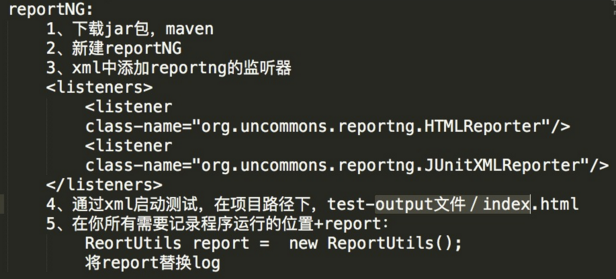
自动化生成html报告
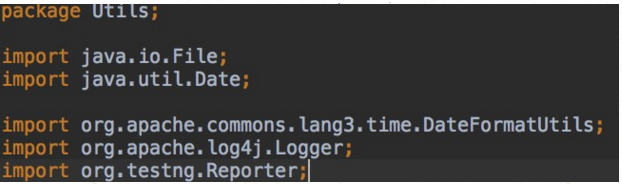
 package Utils;

 import java.io.File;

 import java.util.Date;

 import org.apache.commons.lang3.time.DateFormatUtils;

 import org.apache.log4j.Logger;

 import org.testng.Reporter;

 public class ReportUtils {

     private static Logger logger = Logger.getLogger(ReportUtils.class.getName());

     public ReportUtils() {

         System.setProperty("org.uncommons.reportng.escape-output", "false");

     }

     /*********************************************************************************************

      * 写log和报告操作

      *********************************************************************************************/

     /**

      * 写日志和报告

      *

      * @param comm

      */

     public void log(String... comm) {

         String time = DateFormatUtils.format(new Date(), "yyyy-MM-dd HH:mm:ss");

         if (comm.length == 0) {

             Reporter.log("[" + time + "] <br />");

             logger.info("");

         } else {

             Reporter.log("[" + time + "] " + comm[0] + "<br />");

             logger.info(comm[0]);

         }

     }

     /**

      * 写日志和报告

      *

      * @param comm

      * @comment 如果selenium.properties中【isPrintDebugMsg】值为0,则只打印looger,不打印report

      */

     public void debug(String... comm) {

         if (1 == 1) {

             log("[debug]" + comm[0]);

         } else {

             logger.info(comm[0]);

         }

     }

     /**

      * 写错误日志和报告

      *

      * @param comm

      */

     public void error(String comm) {

         String time = DateFormatUtils.format(new Date(), "yyyy-MM-dd HH:mm:ss");

         Reporter.log("<span style=\"color:#FF0000\"><b>[" + time + "] [ERROR] " + comm + "</b></span><br />");

         logger.error(comm);

     }

     /**

      * 写警告日志和报告

      *

      * @param comm

      */

     public void warn(String comm) {

         String time = DateFormatUtils.format(new Date(), "yyyy-MM-dd HH:mm:ss");

         Reporter.log("<span style=\"color:#FF7F27\"><b>[" + time + "] [WARNING] " + comm + "</b></span><br />");

         logger.warn(comm);

     }

     /**

      * 写重要的日志和报告

      *

      * @param comm

      */

     public void highLight(String comm) {

         log("<span style='background-color:#FFE500;'>" + comm + "</span>");

     }

     /**

      * 写绿色高亮的的日志和报告

      *

      * @param comm

      */

     public void greenLight(String comm) {

         log("<span style='background-color:#CFFFBA;'>" + comm + "</span>");

     }

     /**

      * 参数高亮

      *

      * @param comm

      */

     public void paraLight(String comm) {

         if (1 == 1) {

             log("<span style='background-color:#E4FFD9;'>" + comm + "</span>");

         } else {

             logger.info(comm);

         }

     }

     /**

      * 给MCDB用的日志和报告

      *

      * @param comm

      */

     public void mcdbLight(String comm) {

         if (1 == 1) {

             log("<span style='background-color:#C1E7F7;'>[MCDB]" + comm + "</span>");

         } else {

             logger.info("[MCDB]" + comm);

         }

     }

     /**

      * 写醒目的标题

      *

      * @param comm

      */

     public void title(String comm) {

         String str;

         str = "<p style=\"color:#0068BD;margin-top:25px;margin-bottom:8px\"><b>";

         str = str + "**********************************************************************************************<br>";

         str = str + "* " + comm + "<br>";

         str = str + "**********************************************************************************************</b>";

         str = str + "</p>";

         Reporter.log(str);

     }

     /**

      * 用于截图的log写入

      *

      * @param comm

      * @param file

      */

     public void screenShotLog(String comm, File file) {

         int width = 350;

         String absolute = "file:" + file.getAbsolutePath();

         Reporter.log("<a target='_blank' href=\"" + absolute + "\">");

         Reporter.log("<img width=\"" + width + "\" src=\"" + absolute + "\" />    " + comm);

         Reporter.log("</a><br />");

     }

 }
自动化生成html报告的更多相关文章
- 利用Python半自动化生成Nessus报告
0x01 前言 Nessus是一个功能强大而又易于使用的远程安全扫描器,Nessus对个人用户是免费的,只需要在官方网站上填邮箱,立马就能收到注册号了,对应商业用户是收费的.当然,个人用户是有16个I ...
- python+requests+excel+unittest+ddt接口自动化数据驱动并生成html报告(二)
可以参考 python+requests接口自动化完整项目设计源码(一)https://www.cnblogs.com/111testing/p/9612671.html 原文地址https://ww ...
- python+requests+excel+unittest+ddt接口自动化数据驱动并生成html报告(已弃用)
前言 1.环境准备: python3.6 requests xlrd openpyxl HTMLTestRunner_api 2.目前实现的功能: 封装requests请求方法 在excel填写接口请 ...
- [自动化]基于kolla-ansible部署的openstack自动化巡检生成xlsx报告
自动化巡检介绍 此巡检项目在kolla-ansible部署的openstack环境上开发,利用ansible-playbook编排的功能,对巡检的任务进行编排和数据处理.主要巡检的对象有IaaS平台和 ...
- [自动化]基于kolla部署的openstack自动化巡检生成xlsx报告
自动化巡检介绍 此巡检项目在kolla-ansible部署的openstack环境上开发,利用ansible-playbook编排的功能,对巡检的任务进行编排和数据处理.主要巡检的对象有IaaS平台和 ...
- python+requests+excel+unittest+ddt接口自动化数据驱动并生成html报告
1.环境准备: python3.6 requests xlrd openpyxl HTMLTestRunner_api 2.目前实现的功能: 封装requests请求方法 在excel填写接口请求参数 ...
- unittest同时支持参数化和生成html报告
最近在用python3.6+unittest+requests做自动化接口测试.发现一个问题,unittest中使用第3方插件parameterized进行参数化,再生成html报告时,运行就会失败. ...
- pytest文档13-allure2生成html报告(史上最详细)
前言 allure是一个report框架,支持java的Junit/testng等框架,当然也可以支持python的pytest框架,也可以集成到Jenkins上展示高大上的报告界面. 环境准备 1. ...
- pytest十五:pytest-html 生成 html 报告
pytest-HTML 是一个插件,pytest 用于生成测试结果的 HTML 报告.兼容 Python 2.7,3.6 pytest-html1.github 上源码地址[https://githu ...
随机推荐
- 【MongoDB】如何注册windows服务
一.为什么要注册windows服务 mongodb启动比较麻烦,每次都要cmd去开启.注册windows服务,可以设置开机启动,比较友好. 二.如何注册windows服务 1.安装mongodb 2. ...
- Zabbix学习之路(七)之Nginx的状态监控
1.安装nginx [root@linux-node2 ~]# yum install -y nginx [root@linux-node2 ~]# mkdir /etc/zabbix/zabbix_ ...
- TMDXEVM6678L EVM开发板初使用(1)
1. 板子上电风扇转个不停,震动很大. 2. 有点懵逼,第一步干啥,首先安装板子的软件开发包,资料下载地址http://www2.advantech.com/Support/TI-EVM/6678le ...
- jaron插件的用法
一.dict字典插件的基本用法: <%@ taglib prefix="dict" uri="http://www.evan.jaron.com/tags/dict ...
- python-python爬取妹子图片
# -*- conding=utf-8 -*- import requests from bs4 import BeautifulSoup import io url = "https:// ...
- Quartz学习--三 Hello Jdbc Quartz! 和 demo 结尾
四. Hello JDBC Quartz! JDBC方式: 就是说通过数据库的jdbc链接来进行quartz的一个配置 Quartz支持了很好的支持 demo用例 使用mysql作为例子进行演示 相比 ...
- 清空git缓存
git rm -r --cached .git add . git commit -m 'update .gitignore' 读了下git文档,才发现,这些东西其实很简单,很容易理解.cached其 ...
- CSS布局之圣杯布局和双飞翼布局
其实圣杯布局和双飞翼布局实现的都是三栏布局,两边的盒子宽度固定,中间盒子自适应,也就是我们常说的固比固布局.它们实现的效果都是一样的,差别在于其实现的思想. 一.圣杯布局 html代码中,将重要的内容 ...
- textarea中文提交乱码问题解决
在A.jsp中有如下语句: <textarea rows="10" cols="30" name="texts"><%=r ...
- 软工实践Beta冲刺答辩
福大软工 · 第十二次作业 - Beta答辩总结 组长本次博客作业链接 项目宣传视频链接 本组成员 1 . 队长:白晨曦 031602101 2 . 队员:蔡子阳 031602102 3 . 队员:陈 ...