
Jenkins内置环境变量的使用
一、查看Jenkins有哪些环境变量
1、新建任意一个job
2、增加构建步骤:Execute shell 或 Execute Windows batch command
3、点击输入框下方的“可用环境变量”
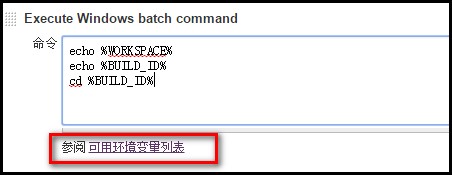
4、可以看到有如下变量供使用:
| 变量名 | 解释 |
| BUILD_NUMBER | The current build number, such as "153" |
| BUILD_ID | The current build ID, identical to BUILD_NUMBER for builds created in 1.597+, but a YYYY-MM-DD_hh-mm-ss timestamp for older builds |
| BUILD_DISPLAY_NAME | The display name of the current build, which is something like "#153" by default. |
| JOB_NAME | Name of the project of this build, such as "foo" or "foo/bar". (To strip off folder paths from a Bourne shell script, try: ${JOB_NAME##*/}) |
| BUILD_TAG | String of "jenkins-${JOB_NAME}-${BUILD_NUMBER}". Convenient to put into a resource file, a jar file, etc for easier identification. |
| EXECUTOR_NUMBER | The unique number that identifies the current executor (among executors of the same machine) that’s carrying out this build. This is the number you see in the "build executor status", except that the number starts from 0, not 1. |
| NODE_NAME | Name of the slave if the build is on a slave, or "master" if run on master |
| NODE_LABELS | Whitespace-separated list of labels that the node is assigned. |
| WORKSPACE | The absolute path of the directory assigned to the build as a workspace. |
| JENKINS_HOME | The absolute path of the directory assigned on the master node for Jenkins to store data. |
| JENKINS_URL | Full URL of Jenkins, like http://server:port/jenkins/ (note: only available if Jenkins URL set in system configuration) |
| BUILD_URL | Full URL of this build, like http://server:port/jenkins/job/foo/15/ (Jenkins URL must be set) |
| SVN_REVISION | Subversion revision number that's currently checked out to the workspace, such as "12345" |
| SVN_URL | Subversion URL that's currently checked out to the workspace. |
| JOB_URL | Full URL of this job, like http://server:port/jenkins/job/foo/ (Jenkins URL must be set) |
二、使用Jenkins的内置变量
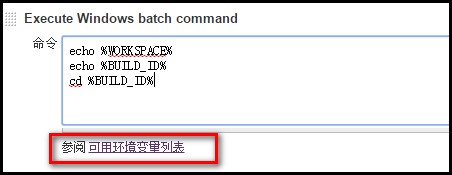
1、在Execute shell 或 Execute Windows batch command文本框中使用,使用方法:%变量名%,如下图
2、结合Ant,在build.xml文件中使用:
1、添加如下第4行代码:<property environment="env"/>
2、使用方法:${env.WORKSPACE}
 <?xml version="1.0" encoding="UTF-8"?>

 <project name="ant-test" default="run" basedir=".">

     <property environment="env"/>

     <target name="clean">

         <mkdir dir="${env.WORKSPACE}/results/${env.BUILD_ID}" />

     </target>

 </project>
Jenkins内置环境变量的使用的更多相关文章
- shell里的IFS内置环境变量
IFS 的全称是 Interal Field Separator ,即“内部区域分隔符”,它也是一个内置环境变量,存储着默认的文本分隔符,默认下这分隔符是空格符(space character),制表 ...
- jenkins 内置变量
Jenkins 有一些内置的变量可以使用.主要是: 邮件的配置变量,可以在发送邮件的时候使用. 环境变量 1. 邮件的配置变量 ${GIT_BRANCH} - build 的 Git 分支 ${FIL ...
- jenkins内置变量的使用
参考链接: https://www.cnblogs.com/puresoul/p/4828913.html 一.查看Jenkins有哪些环境变量 1.新建任意一个job 2.增加构建步骤:Execu ...
- GLSL语言内置的变量详解
GLSL语言内置的变量,包括内置的顶点属性(attribute).一致变量(uniform).易变变量(varying)以及常量(const),一方面加深印象,另一方面今天的文章可以为以后的编程做查询 ...
- Flask内置URL变量转换器
Flask内置URL变量转换器: 转换器通过特定的规则执行,”<转换器: 变量名>”.<int: year>把year的值转换为证书,因此我们可以在视图函数中直接对year变量 ...
- MySQL-配置环境变量及修改密码(附-mysql安装教程)
MySQL-配置环境变量和修改密码 mysql的安装教程:链接:https://pan.baidu.com/s/1rrPT2X0yRF58kN8jZZx-Mg 密码:55dh 一. 闪退问题 1.1. ...
- [原]Jenkins(十八) jenkins再出发之jenkins 内置变量
1.选择一个project的config选项: 2.选择build选项卡,选择Execute Windows batch command 3.会出现一个内置变量的list 连接按钮: 4.list表内 ...
- [Jenkins] 如何修改jenkins上的环境变量
现象 当本地的环境变量发生变化时,在jenkins 构建时里面访问的环境变量仍是之前旧的(未更新的)导致构建出现错误,比如我以我所遇到的问题进行简单写下,下面例子中我是涉及到修改 PYTHONPATH ...
- osg内置shader变量
uniform int osg_FrameNumber:当前OSG程序运行的帧数: uniform float osg_FrameTime:当前OSG程序的运行总时间: uniform float o ...
随机推荐
- 创建Flask实例对象时的参数和app.run()中的参数
app=Flask(name,static_folder=“static”,static_url_path="/aaa",template_folder=“templates”) ...
- Sql入门学习——基本语法函数
--------使用工具navicat 快捷键操作 --------基本操作DML &DDL --------运算比较 --------数据类型 --------常用函数 --------常用 ...
- python批量处理文件夹中文件的问题
用os模块读取文件夹中文件 原来的代码: import osfrom scipy.misc import imread filenames=os.listdir(r'./unprocess')for ...
- SQL Server截取字符串
--SQL Server截取字符串 , Len('hello@163.com')) ,charindex('.','hello@163.com'))
- 记一个jquery 无缝轮播的制作方法
接触前端也很久了,今天才发现,要做好一个轮播,其实有很多东西需要考虑进去,否则做出来的轮播效果并不好,下面我就来做一个轮播,是依赖jquery来写的 1.要做轮播,首先需要的是HTML的内容,css的 ...
- 尚硅谷springboot学习28-Docker简介
Docker是一个开源的应用容器引擎:是一个轻量级容器技术: Docker支持将软件编译成一个镜像:然后在镜像中各种软件做好配置,将镜像发布出去,其他使用者可以直接使用这个镜像: 运行中的这个镜像称为 ...
- python狂犬病大数据分析
一.被动物咬伤.抓伤者,年龄以45-59岁年龄组为最多(占30.66%). 45-59岁年龄段的人与动物接触较多.被侵害的机会最多.其次受伤机会较多的是15-44岁年龄阶段的人,而7岁及以下儿童受伤比 ...
- Python的基本用法
---恢复内容开始--- 一.函数 1.1 默认参数 想要计算一个数x的n次方,可以定义如下的函数.但是有时候我们仅仅只需要计算x^2,所以只想使用一个参数即power(x),这时如果仍用如下代码会报 ...
- 从汇编层面解释switch语句判断快速的原因
源码如下: #include <stdio.h> void main(){ int flag; flag=1; switch (flag){ ...
- 转)Ubuntu16.04下安装DDD(Data Display Debugger)
以下转自:http://www.linuxdiyf.com/linux/26393.html 前两天在Linux论坛偶然间看到了DDD这个软件,根据介绍是一个gdb界面化的调试软件,这正是我找了好 ...