
Vue案例——todolist
最近在学习vue,实现todolist案例,实现效果如下:
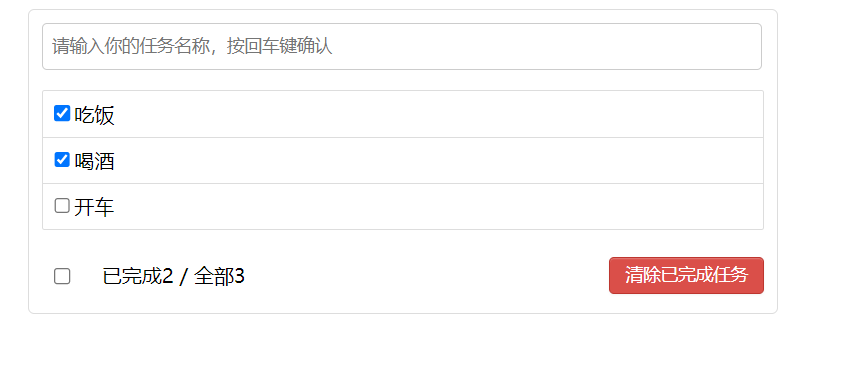
该案例分为四个部分:header为输入框,body为列表,item是列表中的条目,footer为最下方的统计。
实现步骤:
①创建项目
vue create 'vue_test'
②创建静态样式,创建vue组件,App统领全局,其他子组件在components中,UserHeader、UserList、UserItem、UserFooter
App:
<template>

  <div id="root">

    <div class="todo-container">

      <div class="todo-wrap">

      <!--将函数传给header-->

        <user-header></user-header>

<!--        将数据给list-->

        <user-list/>

        <user-footer />

      </div>

    </div>

  </div>

</template>

<script>

import userFooter from "@/components/UserFooter";

import userList from "@/components/UserList";

import userHeader from "@/components/UserHeader";

export default {

  name: "App",

  components: {

    userFooter,

    userHeader,

    userList

  },

  //将数据给list

  data(){

    return{

      todos:[

        {id:'001',title:'吃饭',done:true},

        {id:'002',title:'喝酒',done:true},

        {id:'003',title:'开车',done:false}

      ]

    }

  }</script>

<style>

/*base*/

body {

  background: #fff;

}

.btn {

  display: inline-block;

  padding: 4px 12px;

  margin-bottom: 0;

  font-size: 14px;

  line-height: 20px;

  text-align: center;

  vertical-align: middle;

  cursor: pointer;

  box-shadow: inset 0 1px 0 rgba(255, 255, 255, 0.2), 0 1px 2px rgba(0, 0, 0, 0.05);

  border-radius: 4px;

}

.btn-danger {

  color: #fff;

  background-color: #da4f49;

  border: 1px solid #bd362f;

}

.btn-danger:hover {

  color: #fff;

  background-color: #bd362f;

}

.btn:focus {

  outline: none;

}

.todo-container {

  width: 600px;

  margin: 0 auto;

}

.todo-container .todo-wrap {

  padding: 10px;

  border: 1px solid #ddd;

  border-radius: 5px;

}

</style>
Header:
<template>

  <div class="todo-header">

    <input type="text" placeholder="请输入你的任务名称,按回车键确认"/>

  </div>

</template>

<script>

export default {

  name: "userHeader",

}

</script>

<style scoped>

/*header*/

.todo-header input {

  width: 560px;

  height: 28px;

  font-size: 14px;

  border: 1px solid #ccc;

  border-radius: 4px;

  padding: 4px 7px;

}

.todo-header input:focus {

  outline: none;

  border-color: rgba(82, 168, 236, 0.8);

  box-shadow: inset 0 1px 1px rgba(0, 0, 0, 0.075), 0 0 8px rgba(82, 168, 236, 0.6);

}

</style>
list
<template>

  <ul class="todo-main">

<!--    将数据给item-->

    <user-item/>

  </ul>

</template>

<script>

import userItem from "@/components/UserItem";

export default {

  name: "userList",

  components:{userItem}

}

</script>

<style scoped>

/*main*/

.todo-main {

  margin-left: 0px;

  border: 1px solid #ddd;

  border-radius: 2px;

  padding: 0px;

}

.todo-empty {

  height: 40px;

  line-height: 40px;

  border: 1px solid #ddd;

  border-radius: 2px;

  padding-left: 5px;

  margin-top: 10px;

}

</style>
Item:
<template>

  <li>

    <label>

      <input type="checkbox"/>

      <span>xxxx</span>

    </label>

    <button class="btn btn-danger">删除</button>

  </li>

</template>

<script>

export default {

  name: "userItem",

}

</script>

<style scoped>

/*item*/

li {

  list-style: none;

  height: 36px;

  line-height: 36px;

  padding: 0 5px;

  border-bottom: 1px solid #ddd;

}

li label {

  float: left;

  cursor: pointer;

}

li label li input {

  vertical-align: middle;

  margin-right: 6px;

  position: relative;

  top: -1px;

}

li button {

  float: right;

  display: none;

  margin-top: 3px;

}

li:before {

  content: initial;

}

li:last-child {

  border-bottom: none;

}

li:hover{

  background-color: #42b983;

}

li:hover button{

  display: block;

}

</style>
Footer
<template>

  <div class="todo-footer">

    <label>

      <input type="checkbox"/>

    </label>

    <span>

          <span>已完成0</span> / 全部4

        </span>

    <button class="btn btn-danger">清除已完成任务</button>

  </div>

</template>

<script>

export default {

  name: "userFooter"

}

</script>

<style scoped>

/*footer*/

.todo-footer {

  height: 40px;

  line-height: 40px;

  padding-left: 6px;

  margin-top: 5px;

}

.todo-footer label {

  display: inline-block;

  margin-right: 20px;

  cursor: pointer;

}

.todo-footer label input {

  position: relative;

  top: -1px;

  vertical-align: middle;

  margin-right: 5px;

}

.todo-footer button {

  float: right;

  margin-top: 5px;

}

</style>
③进行数据交互
将App的数组传递给List显示
<!--App中-->

<user-list :todos="todos">

<!--List中-->
export default {
  name: "userList",
  components:{userItem},
  props:['todos']//接收数据
}
<!--传递数据-->
<user-item v-for="todo in todos" :obj="todo" :key="todo.id">

<!--在Item接收数据-->
props:['obj']
<label>
      <input type="checkbox"/>
      <span>{{obj.title}}</span>
</label>
④实现header的添加功能
<!--添加键盘事件-->

<div class="todo-header">

    <input type="text" @keyup.enter="add" placeholder="请输入你的任务名称,按回车键确认"/>

</div>

<!--实现方法-->
import {nanoid} from 'nanoid' //生成id,通过npm i nanoid引入,保证id的唯一性
methods:{
  add(e){
    //校验数据
    if(!e.target.value){
      alert("输入不能为空")
      return
    }
  //  将用户的输入包装成一个todo对象
    const todoObj={id:nanoid(),title:e.target.value,done:false}
    //通知app组件添加对象
    this.addTodo(todoObj)
    e.target.value=''
  }
}
<!--在App中实现addTodo-->
addTodo(obj){
  this.todos.unshift(obj)
}
④实现勾选功能
//  取消或勾选选择,在App中实现,同时将方法暴露出去,List作为中转站

    checkTodo(id){

      this.todos.forEach((todo)=>{

        if(todo.id === id){

          todo.done = !todo.done

        }

      })

    }
//在Item中进行数据交互
<input type="checkbox" :checked="obj.done" @change="handleChange(obj.id)"/>
//在item中获取对象id,传到App中的checkTodo
handleChange(id){
  this.checkTodo(id)
}
⑤实现删除功能
//通过过滤器实现

//  删除todo

    delTodo(id){

      this.todos = this.todos.filter((todo)=>{

        return todo.id !== id

      })

    }
//List作为中转,Item中操作,通过id删除
delObj(id){
  if(confirm('确定删除吗?')){
    this.delTodo(id)
  }
}
⑥实现底部已完成和未完成比例
<label>
  <input type="checkbox" :checked="isChecked" @click="checkAll"/>
</label>
<!--通过计算属性得出,已完成为done值为true,全部为对象个数-->
<span>

          <span>已完成{{doneTotal}}</span> / 全部{{total}}

</span>
computed:{
  doneTotal(){
    /*let count = 0
    this.todos.forEach((todo)=>{
      if(todo.done) count++
    })
    return count*/
    //调用次数为函数长度
    return this.todos.reduce((pre,todo)=>{
      return pre + (todo.done ? 1 : 0)
    },0)
  },
  total(){
    return this.todos.length
  },
//判断是否选中,防止所有条目删除后出现bug
isChecked(){
  return this.doneTotal === this.total && this.total > 0
}
}
⑦全选或取消全选,Footer
<user-footer :todos="todos"
             :checkAllTodo="checkAllTodo"
              :clearAllTodo="clearAllTodo"/>
//  全选或取消全选,在App中实现,传递到Footer

    checkAllTodo(done){

      this.todos.forEach((todo)=>{

        todo.done=done

      })

    },
//在Footer中实现
checkAll(e){
  this.checkAllTodo(e.target.checked)
},
⑧清除已完成任务
//  清除已经完成的todo

    clearAllTodo() {

      this.todos = this.todos.filter((todo)=>{

        return !todo.done

      })

    }
clearChecked(){
  this.clearAllTodo()
}
以下是完整代码:


<template>

  <div id="root">

    <div class="todo-container">

      <div class="todo-wrap">

      <!--将函数传给header-->

        <user-header :addTodo="addTodo"></user-header>

<!--        将数据给list-->

        <user-list

            :todos="todos"

            :checkTodo="checkTodo"

            :delTodo="delTodo"

        />

        <user-footer :todos="todos"

                     :checkAllTodo="checkAllTodo"

                      :clearAllTodo="clearAllTodo"/>

      </div>

    </div>

  </div>

</template>

<script>

import userFooter from "@/components/UserFooter";

import userList from "@/components/UserList";

import userHeader from "@/components/UserHeader";

export default {

  name: "App",

  components: {

    userFooter,

    userHeader,

    userList

  },

  //将数据给list

  data(){

    return{

      todos:[

        {id:'001',title:'吃饭',done:true},

        {id:'002',title:'喝酒',done:true},

        {id:'003',title:'开车',done:false}

      ]

    }

  },

  methods:{

    //添加todo

    addTodo(obj){

      this.todos.unshift(obj)

    },

  //  取消或勾选选择

    checkTodo(id){

      this.todos.forEach((todo)=>{

        if(todo.id === id){

          todo.done = !todo.done

        }

      })

    },

  //  删除todo

    delTodo(id){

      this.todos = this.todos.filter((todo)=>{

        return todo.id !== id

      })

    },

  //  全选或取消全选

    checkAllTodo(done){

      this.todos.forEach((todo)=>{

        todo.done=done

      })

    },

  //  清除已经完成的todo

    clearAllTodo() {

      this.todos = this.todos.filter((todo)=>{

        return !todo.done

      })

    }

  }

}

</script>

<style>

/*base*/

body {

  background: #fff;

}

.btn {

  display: inline-block;

  padding: 4px 12px;

  margin-bottom: 0;

  font-size: 14px;

  line-height: 20px;

  text-align: center;

  vertical-align: middle;

  cursor: pointer;

  box-shadow: inset 0 1px 0 rgba(255, 255, 255, 0.2), 0 1px 2px rgba(0, 0, 0, 0.05);

  border-radius: 4px;

}

.btn-danger {

  color: #fff;

  background-color: #da4f49;

  border: 1px solid #bd362f;

}

.btn-danger:hover {

  color: #fff;

  background-color: #bd362f;

}

.btn:focus {

  outline: none;

}

.todo-container {

  width: 600px;

  margin: 0 auto;

}

.todo-container .todo-wrap {

  padding: 10px;

  border: 1px solid #ddd;

  border-radius: 5px;

}

</style>
App
<template>

  <ul class="todo-main">

<!--    将数据给item-->

    <user-item

        :checkTodo="checkTodo"

        :delTodo="delTodo"

        v-for="todo in todos"

        :key="todo.id"

        :obj="todo" />

  </ul>

</template>

<script>

import userItem from "@/components/UserItem";

export default {

  name: "userList",

  components:{userItem},

  props:['todos','checkTodo','delTodo']

}

</script>

<style scoped>

/*main*/

.todo-main {

  margin-left: 0px;

  border: 1px solid #ddd;

  border-radius: 2px;

  padding: 0px;

}

.todo-empty {

  height: 40px;

  line-height: 40px;

  border: 1px solid #ddd;

  border-radius: 2px;

  padding-left: 5px;

  margin-top: 10px;

}

</style>
UserList
<template>

  <li>

    <label>

      <input type="checkbox" :checked="obj.done" @change="handleChange(obj.id)"/>

<!--      <input type="checkbox" v-model="obj.done"/> 使用双向数据绑定v-model修改props中的值,不建议使用-->

      <span>{{obj.title}}</span>

    </label>

    <button class="btn btn-danger" @click="delObj(obj.id)">删除</button>

  </li>

</template>

<script>

export default {

  name: "userItem",

  props:['obj','checkTodo','delTodo'],

  methods:{

    handleChange(id){

      this.checkTodo(id)

    },

    delObj(id){

      if(confirm('确定删除吗?')){

        this.delTodo(id)

      }

    }

  }

}

</script>

<style scoped>

/*item*/

li {

  list-style: none;

  height: 36px;

  line-height: 36px;

  padding: 0 5px;

  border-bottom: 1px solid #ddd;

}

li label {

  float: left;

  cursor: pointer;

}

li label li input {

  vertical-align: middle;

  margin-right: 6px;

  position: relative;

  top: -1px;

}

li button {

  float: right;

  display: none;

  margin-top: 3px;

}

li:before {

  content: initial;

}

li:last-child {

  border-bottom: none;

}

li:hover{

  background-color: #42b983;

}

li:hover button{

  display: block;

}

</style>
UserItem
<template>

  <div class="todo-footer" v-show="total">

    <label>

      <input type="checkbox" :checked="isChecked" @click="checkAll"/>

    </label>

    <span>

          <span>已完成{{doneTotal}}</span> / 全部{{total}}

        </span>

    <button class="btn btn-danger" @click="clearChecked">清除已完成任务</button>

  </div>

</template>

<script>

export default {

  name: "userFooter",

  props:['todos','checkAllTodo','clearAllTodo'],

  computed:{

    doneTotal(){

      /*let count = 0

      this.todos.forEach((todo)=>{

        if(todo.done) count++

      })

      return count*/

      //调用次数为函数长度

      return this.todos.reduce((pre,todo)=>{

        return pre + (todo.done ? 1 : 0)

      },0)

    },

    total(){

      return this.todos.length

    },

    isChecked(){

      return this.doneTotal === this.total && this.total > 0

    }

  },

  methods:{

    checkAll(e){

      this.checkAllTodo(e.target.checked)

    },

    clearChecked(){

      this.clearAllTodo()

    }

  }

}

</script>

<style scoped>

/*footer*/

.todo-footer {

  height: 40px;

  line-height: 40px;

  padding-left: 6px;

  margin-top: 5px;

}

.todo-footer label {

  display: inline-block;

  margin-right: 20px;

  cursor: pointer;

}

.todo-footer label input {

  position: relative;

  top: -1px;

  vertical-align: middle;

  margin-right: 5px;

}

.todo-footer button {

  float: right;

  margin-top: 5px;

}

</style>
UserFooter
Vue案例——todolist的更多相关文章
- vue案例todolist备忘录
项目效果:https://cinderellastory.github.io/todolist/dist/index.html#/ 项目链接:https://github.com/Cinderella ...
- Vue案例之todoLIst实现
使用Vue实现todolist案例,如有不对敬请大佬多多指教 功能: 1.增加功能:在新增版块里面的输入框内输入数据,点击后面的"添加"按钮,将输入的数据添加到列表中,默认是未完成 ...
- vue demo todo-list
html <input type='text' v-model="todoItem" v-on:keyup.enter='addItem'> <ul> &l ...
- vue 实现todolist,包含添加,删除,统计,清空,隐藏功能
vue 实现todolist,包含添加,删除,统计,清空,隐藏功能 添加:生成列表结构(v-for+数组).获取用户输入(v-model).通过回车新增数据(v-on+.enter) 删除:点击删除指 ...
- 黑马eesy_15 Vue:04.Vue案例(ssm环境搭建)
黑马eesy_15 Vue:02.常用语法 黑马eesy_15 Vue:03.生命周期 黑马eesy_15 Vue:04.Vue案例(ssm环境搭建) 黑马eesy_15 Vue:04.综合案例(前端 ...
- vue - Vue脚手架/TodoList案例
今天做了一个案例,可以好好做做能够将之前的内容结合起来,最主要的是能对组件化编码流程有一个大概的清晰认知,这一套做下来,明天自己再做一遍复习一下,其实组件化流程倒是基本上没什么问题了,主要是很多vue ...
- [vue案例的知识点]todo-list
文章的原材料来自于vue的官方示例:https://cn.vuejs.org/v2/examples/todomvc.html,我们在学习过程中,试着对其中的一些知识点进行记录: 一.浏览器数据存储, ...
- Vue完成TodoList案例
写一个简单的TodoList的更实用(文末有彩蛋). 一,使用VUE-CLI脚手架快速搭建一个框架 利用VUE-CLI来自动生成我们项目的前端目录及文件,方法: npm install -g vue- ...
- React组件开发经典案例--todolist
点开查看代码 <!DOCTYPE html> <html> <head> <meta charset="utf-8"> <me ...
- 用vue做todolist
<template> <div class="hello"> <div style="height:25px;line-height:25p ...
随机推荐
- ubuntu lnmp环境搭建 LNMP(Ubuntu 20.04 + Nginx + PHP 7.1 + Mysql5.7)
转载csdn: ubuntu lnmp环境搭建 LNMP(Ubuntu 20.04 + Nginx + PHP 7.1 + Mysql5.7)_ts3211的博客-CSDN博客_lnmp环境搭建
- Vulhub 漏洞学习之:ElasticSearch
Vulhub 漏洞学习之:ElasticSearch 目录 Vulhub 漏洞学习之:ElasticSearch 1 ElasticSearch 命令执行漏洞(CVE-2014-3120)测试环境 1 ...
- 自己从零写操作系统GrapeOS系列教程——4.GrapeOS开发环境介绍
1. 开发环境简介 为了减少开发过程中不必要的麻烦,希望大家的开发环境尽量与我的保持一致. 我的开发环境如下: Windows10电脑一台 Visual Studio Code(最好是最新版) Vir ...
- 深入解读.NET MAUI音乐播放器项目(三):界面交互
UI设计的本质是对于产品的理解在界面中多种形式的映射,当需求和定位不同时,对相同的功能表达出了不同的界面和交互方式. 作为播放器,界面可以是千差万别的.<番茄播放器>的iOS平台上我开发了 ...
- Mybatis-概览地图
思考: "为什么在使用 Mybatis 的时候,只需定义一个接口,不用写实现类就能使用XML中或者注解上配置好的SQL语句,就能完成对数据库 CRUD 的操作呢?" 这是因为用到了 ...
- 关于js对象的键
面试的时候,多次被问到Object和Map的区别,我都没答上,我以为可能问原理的可能多一些... 于是今天就仔细地看了一下Object和Map的区别.网上各文章都说Object的键只能是字符串或Sym ...
- C#窗体控件,文字随电脑分辨率自动调整大小
一.在类中添加方法,代码如下: #region 窗体控件.字体随分辨率调整,自动调整大小 public static void SetTag(Control cons) { foreach (Cont ...
- djangoDRF查询
DRF全部查询基础示例 from django.db.models import Q, F, Sum, Avg, Count, Min, Max from rest_framework.respons ...
- datax缺少clickhouse reader插件
背景:想要把click house的数据源同步到clickhouse,发现Datax没有clickhousereader组件. 1.把clickhousewriter/libs下的所有jar包复制到r ...
- 2022-04-28内部群每日三题-清辉PMP
1.为了降低项目的质量成本(COQ)并增加验收产品的几率,需要进行质量审计.质量审计需要什么? A.质量管理计划和质量测量指标 B.过程分析 C.质量管理计划和质量核对单 D.过程决策程序平图(PDP ...