
topthink/think-swoole 扩展包的使用 之 WebSocket
嗯~ o(* ̄▽ ̄*)o,没错欢迎收看继续爬坑系列233...话不多说直接开撸
今天的题材是websocket,没有特殊说明的话默认环境都和此系列第一篇文章中申明一致,此后不再赘述。
websocket相关知识:
http://www.ruanyifeng.com/blog/2017/05/websocket.html
一、配置文件及源码解读
swoole.php
use Swoole\WebSocket\Server;

use think\facade\Env;// +----------------------------------------------------------------------

// | Swoole设置 php think swoole命令行下有效

// +----------------------------------------------------------------------

return [

    // 扩展自身配置

    'host'                  => '0.0.0.0', // 监听地址

    'port'                  => 9501, // 监听端口

    'mode'                  => '', // 运行模式 默认为SWOOLE_PROCESS

    'sock_type'             => '', // sock type 默认为SWOOLE_SOCK_TCP

    'server_type'           => 'websocket', // 服务类型 支持 http websocket

    'app_path'              => '', // 应用地址 如果开启了 'daemonize'=>true 必须设置(使用绝对路径)

    'file_monitor'          => false, // 是否开启PHP文件更改监控(调试模式下自动开启)

    'file_monitor_interval' => 2, // 文件变化监控检测时间间隔(秒)

    'file_monitor_path'     => [], // 文件监控目录 默认监控application和config目录

    // 可以支持swoole的所有配置参数

    'pid_file'              => Env::get('runtime_path') . 'swoole.pid',

    'log_file'              => Env::get('runtime_path') . 'swoole.log',

    'document_root'         => Env::get('root_path') . 'public',

    'enable_static_handler' => true,

    'timer'                 => true,//是否开启系统定时器

    'interval'              => 500,//系统定时器 时间间隔

    'task_worker_num'       => 1,//swoole 任务工作进程数量

    /**

     * 注意:系统内定义了Message,Close回调,在此配置的是不会执行滴

     */

    'Open' => function (Server $server, $request) {

        echo "server: handshake success with fd {$request->fd}\n";

    }

];
系统内定义了Message,Close回调,在此配置的是不会执行滴(上源码)
vendor\topthink\think-swoole\src\Http.php
<?php

    public function option(array $option)

    {

        // 设置参数

        if (!empty($option)) {

            $this->swoole->set($option);

        }

        foreach ($this->event as $event) {

            // 自定义回调

            if (!empty($option[$event])) {

                $this->swoole->on($event, $option[$event]);

            } elseif (method_exists($this, 'on' . $event)) {

                $this->swoole->on($event, [$this, 'on' . $event]);

            }

        }

        if ("websocket" == $this->server_type) {

            foreach ($this->event as $event) {

                if (method_exists($this, 'Websocketon' . $event)) {

                    $this->swoole->on($event, [$this, 'Websocketon' . $event]);

                }

            }

        }

    }

    /**

     * Message回调

     * @param $server

     * @param $frame

     */

    public function WebsocketonMessage($server, $frame)

    {

        // 执行应用并响应

        $this->app->swooleWebSocket($server, $frame);

    }

    /**

     * Close

     */

    public function WebsocketonClose($server, $fd, $reactorId)

    {

        $data = [$server, $fd, $reactorId];

        $hook = Container::get('hook');

        $hook->listen('swoole_websocket_on_close', $data);

    }
看到标红的那段没,就算你设置了也会被覆盖掉,而是用内置的 WebsocketonMessage() 、WebsocketonClose() 这两个方法,不过不用担心,既然直接定义不可以那就绕一下呗。
先看 WebsocketonMessage() 会执行swooleWebSocket()方法:
vendor\topthink\think-swoole\src\Application.php
public function swooleWebSocket($server, $frame)

    {

        try {

            // 重置应用的开始时间和内存占用

            $this->beginTime = microtime(true);

            $this->beginMem  = memory_get_usage();

            // 销毁当前请求对象实例

            $this->delete('think\Request');

            WebSocketFrame::destroy();

            $request = $frame->data;

            $request = json_decode($request, true);

            // 重置应用的开始时间和内存占用

            $this->beginTime = microtime(true);

            $this->beginMem  = memory_get_usage();

            WebSocketFrame::getInstance($server, $frame);

            $_COOKIE = isset($request['arguments']['cookie']) ? $request['arguments']['cookie'] : [];

            $_GET    = isset($request['arguments']['get']) ? $request['arguments']['get'] : [];

            $_POST   = isset($request['arguments']['post']) ? $request['arguments']['post'] : [];

            $_FILES  = isset($request['arguments']['files']) ? $request['arguments']['files'] : [];

            $_SERVER["PATH_INFO"]       = $request['url'] ?: '/';

            $_SERVER["REQUEST_URI"]     = $request['url'] ?: '/';

            $_SERVER["SERVER_PROTOCOL"] = 'http';

            $_SERVER["REQUEST_METHOD"]  = 'post';

            // 重新实例化请求对象 处理swoole请求数据

            $this->request

                ->withServer($_SERVER)

                ->withGet($_GET)

                ->withPost($_POST)

                ->withCookie($_COOKIE)

                ->withFiles($_FILES)

                ->setBaseUrl($request['url'])

                ->setUrl($request['url'])

                ->setHost(Config::get("app_host"))

                ->setPathinfo(ltrim($request['url'], '/'));

            // 更新请求对象实例

            $this->route->setRequest($this->request);

            $resp = $this->run();

            $resp->send();

        } catch (HttpException $e) {

            $this->webSocketException($server, $frame, $e);

        } catch (\Exception $e) {

            $this->webSocketException($server, $frame, $e);

        } catch (\Throwable $e) {

            $this->webSocketException($server, $frame, $e);

        }

    }
还是注意标红标粗的那几段,他把onMessage的参数传给了 WebSocketFrame 类,且从获取的参数看,传递参数是有要求的,继续走着
<?php

/**

 * 参考think-swoole2.0开发

 * author:xavier

 * email:49987958@qq.com

 * 可以配合https://github.com/xavieryang007/xavier-swoole/blob/master/src/example/websocketclient.js 使用

 */

namespace think\swoole;

use think\Container;

class WebSocketFrame implements \ArrayAccess

{

    private static $instance = null;

    private $server;

    private $frame;

    private $data;

    public function __construct($server, $frame)

    {

        $this->server = $server;

        $this->data   = null;

        if (!empty($frame)) {

            $this->frame  = $frame;

            $this->data   = json_decode($this->frame->data, true);

        }

    }

    public static function getInstance($server = null, $frame = null)

    {

        if (empty(self::$instance)) {

            if (empty($server)) {

                $swoole = Container::get('swoole');

                $server = $swoole;

            }

            self::$instance = new static($server, $frame);

        }

        return self::$instance;

    }

    public static function destroy()

    {

        self::$instance = null;

    }

    public function getServer()

    {

        return $this->server;

    }

    public function getFrame()

    {

        return $this->frame;

    }

    public function getData()

    {

        return $this->data;

    }

    public function getArgs()

    {

        return isset($this->data['arguments']) ? $this->data['arguments'] : null;

    }

    public function __call($method, $params)

    {

        return call_user_func_array([$this->server, $method], $params);

    }

    public function pushToClient($data, $event = true)

    {

        if ($event) {

            $eventname = isset($this->data['event']) ? $this->data['event'] : false;

            if ($eventname) {

                $data['event'] = $eventname;

            }

        }

        $this->sendToClient($this->frame->fd, $data);

    }

    public function sendToClient($fd, $data)

    {

        if (is_string($data)) {

            $this->server->push($fd, $data);

        } elseif (is_array($data)) {

            $this->server->push($fd, json_encode($data));

        }

    }

    public function pushToClients($data)

    {

        foreach ($this->server->connections as $fd) {

            $this->sendToClient($fd, $data);

        }

    }

    public function offsetSet($offset, $value)

    {

        $this->data[$offset] = $value;

    }

    public function offsetExists($offset)

    {

        return isset($this->data[$offset]) ? true : false;

    }

    public function offsetUnset($offset)

    {

        unset($this->data[$offset]);

    }

    public function offsetGet($offset)

    {

        return isset($this->data[$offset]) ? $this->data[$offset] : null;

    }

}
看源码后你发现,你要获取onMessage的数据,就需要用这个类咯。
再看 WebsocketonClose() 方法:
$hook->listen('swoole_websocket_on_close', $data);
直接是调用了 一个 swoole_websocket_on_close 钩子,那么这就好办了,咱只要添加这个钩子就能获取 onClose 的数据了。
二、实操
至此,就可以变向的自定义 onMessage, onClose 了,上个 demo....
Index.php 控制器 (自定义onMessage)
<?php

namespace app\index\controller;

use think\Controller;

use think\facade\Hook;

use think\swoole\WebSocketFrame;

class Index extends Controller

{

    // 自定义 onMessage

    public function websocket()

    {

        $server = WebSocketFrame::getInstance()->getServer();

        $frame = WebSocketFrame::getInstance()->getFrame();

        $data = WebSocketFrame::getInstance()->getData();

        $server->push($frame->fd, json_encode($data));

        echo "receive from {$frame->fd}:{$frame->data},opcode:{$frame->opcode},fin:{$frame->finish}\n";

//        Hook::add('swoole_websocket_on_close', 'app\\http\\behavior\\SwooleWebsocketOnclose');

    }

}
自定义 onClose
定义一个行为
<?php

namespace app\http\behavior;

class SwooleWebsocketOnClose

{

    public function run($params)

    {

        list($server, $fd, $reactorId) = $params;

        echo "client {$fd} closed\n";

    }

}
再行为绑定
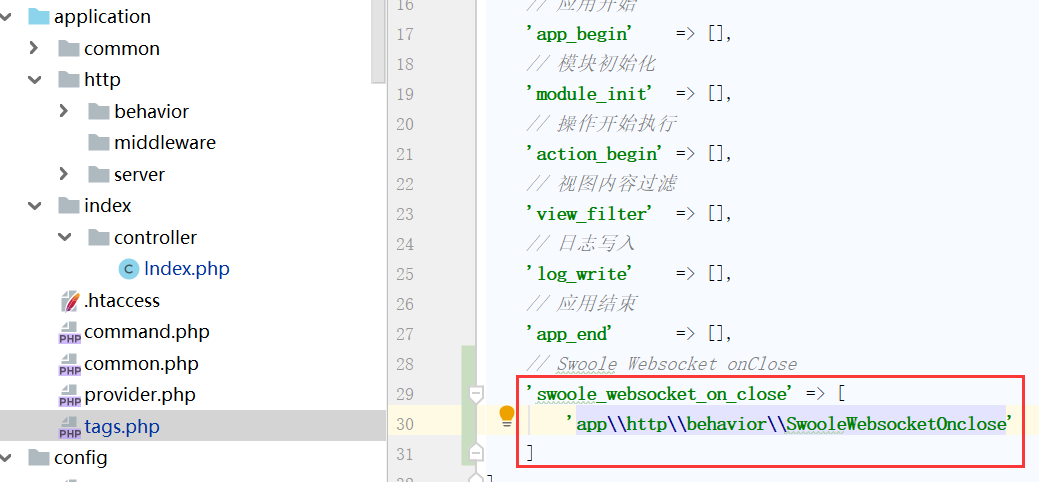
当系统执行
$hook->listen('swoole_websocket_on_close', $data);
时,就会调用行为中的 run() 方法。
三、执行
首先需要一个客户端:
<!DOCTYPE html>

<html lang="en">

<head>

    <meta charset="UTF-8">

    <meta name="viewport" content="width=device-width, initial-scale=1.0">

    <meta http-equiv="X-UA-Compatible" content="ie=edge">

    <title>websocket client</title>

</head>

<button type="button" id="send">发送</button>

<body>

<h1>swoole-ws测试</h1>

<script>

    var wsUrl = 'ws://tp-live.test:9501';

    var websocket = new WebSocket(wsUrl);

    websocket.onopen = function (evt) {

        console.log("ws client 连接成功!");

    };

    document.getElementById('send').onclick = function () {

        websocket.send('{"url":"index/index/websocket"}');

        console.log('ws client 发送数据');

    };

    websocket.onmessage = function (evt) {

        console.log("server return data: " + evt.data);

    };

    websocket.onclose = function (evt) {

        console.log("connect close");

    };

    websocket.onerror = function (evt, e) {

        console.log("error: " + evt.data);

    }

</script>

</body>

</html>
整个过程,服务端输出结果:

四、结束语
还有一种方法就是使用 swoole_server.php 的配置
具体方法可参照 : https://somsan.cc/archives/5a303a8b/
咳咳,保温杯里泡枸杞,书写不易,转载请申明出处 https://www.cnblogs.com/cshaptx4869/ 啦。。。
topthink/think-swoole 扩展包的使用 之 WebSocket的更多相关文章
- Ubuntu 16.04 swoole扩展安装注意!!!
前言:目前很多项目估计常常会用到swoole扩展,如个人使用Ubuntu虚拟机安装扩展,这里总结一下遇到的问题: 一.先保证服务器时间同步当前地区时间,如北京时间: 1.设定时区 如:设定时区:dpk ...
- topthink/think-swoole 扩展包的使用 之 Task
本想自己适配的,奈何keng貌似不少,所以果断选择官方提供的包来适配233... 默认条件:thinkphp5.1.*版本下,且安装了swoole扩展 主要演示:task 任务的投递 友情提示:在sw ...
- 【原】用PHP搭建基于swoole扩展的socket服务(附PHP扩展的安装步骤及Linux/shell在线手册)
最近公司的一项目中,需要用PHP搭建一个socket服务. 本来PHP是不适合做服务的,因为和第三方合作,需要采用高效而稳定的TCP协议进行数据通信.经过多次尝试,最终选择了开源的PHP扩展:swoo ...
- Windows下用Composer引入官方GitHub扩展包
Windows下用Composer引入官方GitHub扩展包 1. 当你打开威武RC4版本的链接的时候,往下拉你可以看到这个,然后你要做的就是想到,百度Composer,看看是个什么鬼,别想太多,跟着 ...
- Windows下swoole扩展的编译安装部署
1. 到cygwin官网下载cygwin. 官网地址:https://www.cygwin.com/ 2. 打开下载好的cygwin安装包,开始安装cygwin. 选择cygwin的安装目录(这个同时 ...
- linux下搭建lamp环境以及安装swoole扩展
linux下搭建lamp环境以及安装swoole扩展 一.CentOS 6.5使用yum快速搭建LAMP环境 准备工作:先更新一下yum源 我安装的环境是:apache2.2.15+mysql5 ...
- Mac系统下 PHP7安装Swoole扩展 教程
转载自 https://www.fujieace.com/php/php-extensions/swoole.html 今天我用的PHP版本是:PHP7.1 环境依赖: php-5.3.10 或更高版 ...
- thinkphp5 Windows下用Composer引入官方GitHub扩展包
很多新手,比如说我,写代码就是在windows下,所以总会遇到很多不方便的地方,比如说GitHub上面的代码更新了,要是你在linux,只要几行命令就可以搞定更新了,在windows下面,你需要用到C ...
- php swoole扩展安装
一波三折. 首先下载swoole安装包(由于我这里php是7,所以说应该去官网下载最新的swoole包,否则会发生意想不到的错误) wget https://github.com/swoole/swo ...
随机推荐
- 「JSOI2015」salesman
「JSOI2015」salesman 传送门 显然我们为了使收益最大化就直接从子树中选大的就好了. 到达次数的限制就是限制了可以选的子树的数量,因为每次回溯上来都会减一次到达次数. 多种方案的判断就是 ...
- 计算机二级-C语言-程序修改题-190114记录-对整型变量进行取余操作可以取得各个位上的值。
//给定程序中fun函数的功能是:从低位开始取出长整形变量s中奇数位上的数,依次构成一个新的数放在t中.高位仍在高位,低位仍在低位.例如:当s中的数为7654321时,t中的数为7531. //重难点 ...
- 「CF815C」Karen and Supermarket
传送门 Luogu 解题思路 树形背包. 设 \(f[i][j][0/1]\) 表示在以 \(i\) 为根的子树中选 \(j\) 件商品的最少花费. 边界条件: \(f[i][j][0] = \min ...
- python学习之rabbitmq
0.讲述rabbit中各部分的含义及作用 https://www.jb51.net/article/75647.htm 1.rabbitMQ的安装 1)在安装rabbitmq之前需要先安装erlang ...
- C:clock() 计算代码执行时间
clock():捕捉从程序开始运行到clock()被调用时所耗费的事件. 这个时间的单位是 clock tick,即时钟打点 常数 CLK_TCK:机器时钟每秒走的时钟打点数 要使用这个函数需要包含头 ...
- PTA----7-3树的遍历
7-3 树的遍历 (25 分) 给定一棵二叉树的后序遍历和中序遍历,请你输出其层序遍历的序列.这里假设键值都是互不相等的正整数. 输入格式: 输入第一行给出一个正整数N(≤30),是二叉树中结点的个数 ...
- PyQt5中Web操作与多线程定时器
1.装载外部网页页面'''用web浏览器控件QWebEngineView控件显示网页PyQt5和Web的交互技术 同时使用python和Web开发程序,混合开发 Python+JavaScript+H ...
- 进程的用户ID
进程创建时,系统会在进程上设置几个用户相关的ID 实际用户ID,实际用户组ID,系统根据当前会话登陆的用户信息设置 有效用户ID,有效用户组ID,系统根据所打开的执行文件的模式位,进行设置.set_u ...
- ROS机器人系统学习——踩坑之路
推荐学习教程:深蓝学院 机器人操作系统ROS理论与实践学习 在学习到第2讲ROS基础的分布式通信时,一直卡在这里,主机开启小海龟后,从机虽然可以通过 rostopic list 列出当前的所有topi ...
- 原生js的表单验证
最近在学原生的js,把一些练手的代码往博客放一放,权当积累经验,若有错漏,或是觉得浅显,大家不要见怪. 这是一个原生js编写的简单的表单验证: <!DOCTYPE html><htm ...