
Element Plus使用
- Element:是饿了么团队研发的,基于 Vue 3,面向设计师和开发者的组件库。
- 组件:组成网页的部件,例如 超链接、按钮、图片、表格、表单、分页条等等。
- 官网:https://element-plus.org/zh-CN/#/zh-CN
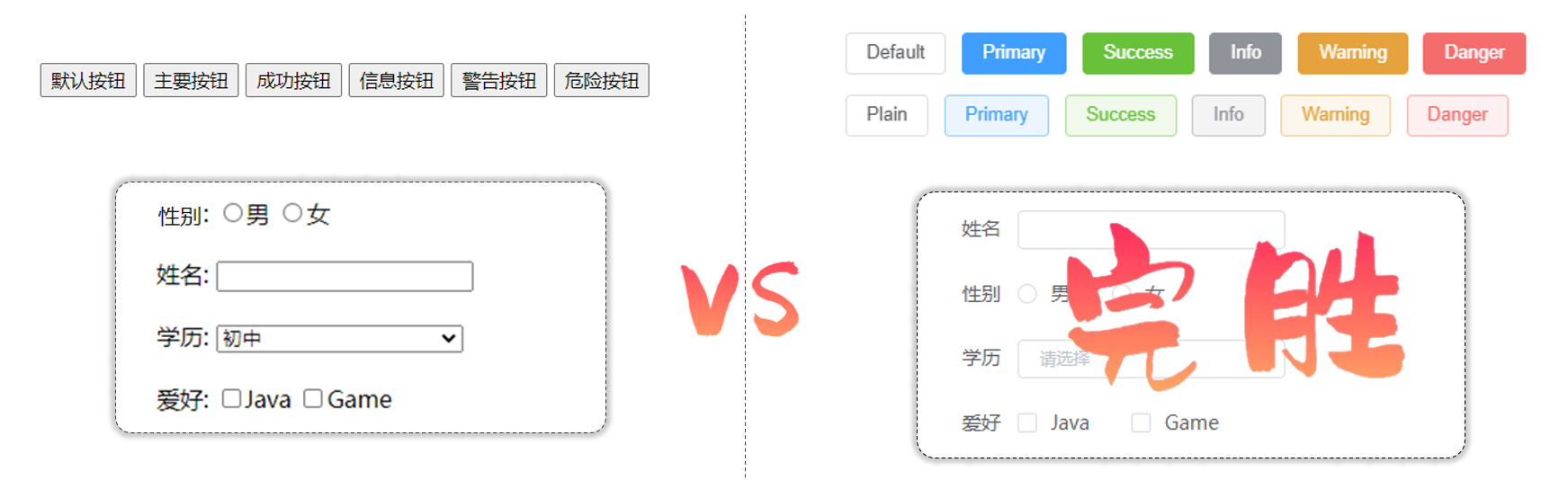
Element Plus快速入门
准备工作:
- 创建一个工程化的vue项目
- 参照官方文档,安装Element Plus组件库(在当前工程的目录下):npm install element-plus --save
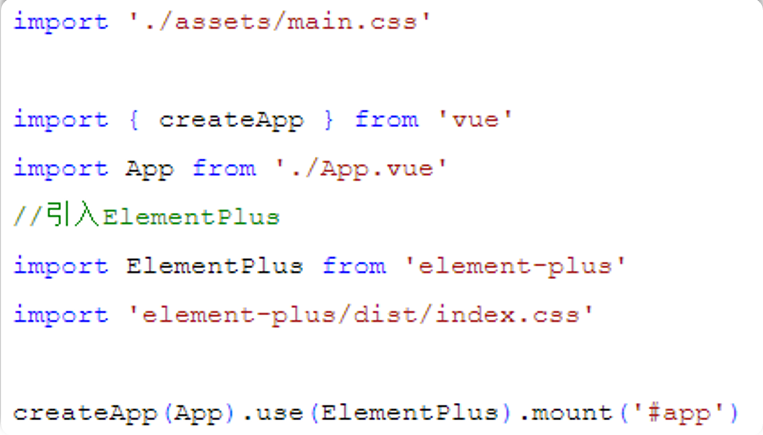
- main.js中引入Element Plus组件库(参照官方文档)
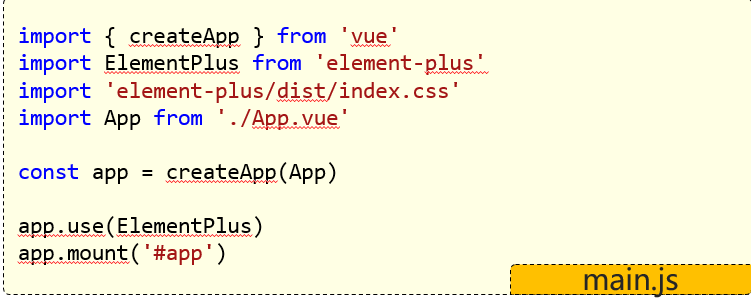
制作组件:
访问Element官方文档,复制组件代码,调整
ElementPlus的使用步骤:
- 安装:npm install element-plus –save
- 引入:在main.js中引入Element Plus(参照官方文档)
- 组件:访问官方文档中的组件,调整成我们需要的样子即可
常用组件
案例展示:
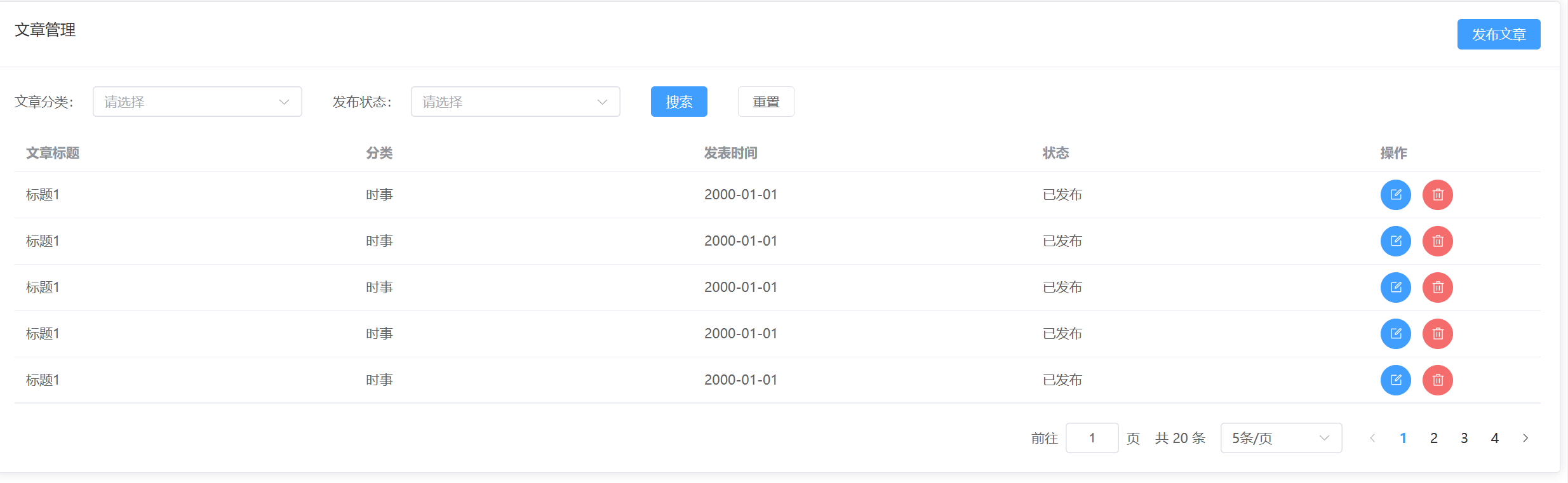
代码:
<template>

     <el-card class="box-card">

      <template #header>

      <div class="card-header">

        <span>文章管理</span>

        <el-button type="primary" >发布文章</el-button>

      </div>

    </template>

    <el-form :inline="true" :model="formInline" class="demo-form-inline">

    <el-form-item label="文章分类:">

      <el-select

        v-model="formInline.region"

        placeholder="请选择"

        clearable

      >

        <el-option label="时事" value="时事" />

        <el-option label="篮球" value="篮球" />

      </el-select>

    </el-form-item>

    <el-form-item label="发布状态:">

      <el-select

        v-model="formInline.region"

        placeholder="请选择"

        clearable

      >

        <el-option label="已发布" value="已发布" />

        <el-option label="草稿" value="草稿" />

      </el-select>

    </el-form-item>

    <el-form-item>

      <el-button type="primary" @click="onSubmit">搜索</el-button>

    </el-form-item>

    <el-form-item>

      <el-button type="default" @click="onSubmit">重置</el-button>

    </el-form-item>

  </el-form>

    <el-table :data="tableData" style="width: 100%">

      <el-table-column prop="title" label="文章标题"  />

      <el-table-column prop="category" label="分类"  />

      <el-table-column prop="time" label="发表时间" />

      <el-table-column prop="state" label="状态" />

      <el-table-column  label="操作" width="180">

        <el-row>

            <el-button type="primary" :icon="Edit" circle />

            <el-button type="danger" :icon="Delete" circle />

        </el-row>

      </el-table-column>

    </el-table>

    <el-pagination

      class = "el-p"

      v-model:current-page="currentPage4"

      v-model:page-size="pageSize4"

      :page-sizes="[5, 10, 15, 20]"

      :size="size"

      :disabled="disabled"

      :background="background"

      layout="jumper,total, sizes, prev, pager, next, "

      :total="20"

      @size-change="handleSizeChange"

      @current-change="handleCurrentChange"

    />

  </el-card>

  </template>

  <script lang="ts" setup>

    import { reactive } from 'vue'

    const formInline = reactive({

    user: '',

    region: '',

    date: '',

    })

const onSubmit = () => {

  console.log('submit!')

}

    import { ref } from 'vue'

    import type { ComponentSize } from 'element-plus'

    const currentPage4 = ref(1)

    const pageSize4 = ref(5)

    const size = ref<ComponentSize>('default')

    const background = ref(false)

    const disabled = ref(false)

    const handleSizeChange = (val: number) => {

    console.log(`${val} items per page`)

    }

    const handleCurrentChange = (val: number) => {

    console.log(`current page: ${val}`)

    }

    import {

        Delete,

        Edit,

    }from '@element-plus/icons-vue'

    const tableData = [

        {

        title: '标题1',

        category: '时事',

        time: '2000-01-01',

        state: '已发布',

        },

        {

        title: '标题1',

        category: '时事',

        time: '2000-01-01',

        state: '已发布',

        },

        {

        title: '标题1',

        category: '时事',

        time: '2000-01-01',

        state: '已发布',

        },

        {

        title: '标题1',

        category: '时事',

        time: '2000-01-01',

        state: '已发布',

        },

        {

        title: '标题1',

        category: '时事',

        time: '2000-01-01',

        state: '已发布',

        },

    ]

  </script>

<style sccoped>

    .el-p{

        margin-top: 20px;

        display: flex;

        justify-content: flex-end;

    }

    .demo-form-inline .el-input {

    --el-input-width: 220px;

    }

    .demo-form-inline .el-select {

    --el-select-width: 220px;

    }

    .card-header{

        display: flex;

        justify-content: space-between;

    }

</style>
Element Plus使用的更多相关文章
- Spring配置文件标签报错:The prefix "XXX" for element "XXX:XXX" is not bound. .
例如:The prefix "context" for element "context:annotation-config" is not bound. 这种 ...
- 【解决方案】cvc-complex-type.2.4.a: Invalid content was found starting with element 'init-param'. One of '{"http://java.sun.com/xml/ns/javaee":run-as, "http://java.sun.com/xml/ns/javaee":security-role-r
[JAVA错误] cvc-complex-type.2.4.a: Invalid content was found starting with element 'init-param'. One o ...
- WebComponent魔法堂:深究Custom Element 之 从过去看现在
前言 说起Custom Element那必然会想起那个相似而又以失败告终的HTML Component.HTML Component是在IE5开始引入的新技术,用于对原生元素作功能"增强& ...
- WebComponent魔法堂:深究Custom Element 之 标准构建
前言 通过<WebComponent魔法堂:深究Custom Element 之 面向痛点编程>,我们明白到其实Custom Element并不是什么新东西,我们甚至可以在IE5.5上定 ...
- WebComponent魔法堂:深究Custom Element 之 面向痛点编程
前言 最近加入到新项目组负责前端技术预研和选型,一直偏向于以Polymer为代表的WebComponent技术线,于是查阅各类资料想说服老大向这方面靠,最后得到的结果是:"资料99%是英语 ...
- 深入理解DOM节点类型第五篇——元素节点Element
× 目录 [1]特征 [2]子节点 [3]特性操作[4]attributes 前面的话 元素节点Element非常常用,是DOM文档树的主要节点:元素节点是html标签元素的DOM化结果.元素节点主要 ...
- cvc-complex-type.2.4.c: The matching wildcard is strict, but no declaration can be found for element 'mvc:annotation-driven'.
spring 配置文件报错报错信息:cvc-complex-type.2.4.c: The matching wildcard is strict, but no declaration can be ...
- MongoDB查询转对象是出错Element '_id' does not match any field or property of class
MongoDB查询转对象是出错Element '_id' does not match any field or property of class 解决方法: 1.在实体类加:[BsonIgno ...
- [LeetCode] Kth Smallest Element in a Sorted Matrix 有序矩阵中第K小的元素
Given a n x n matrix where each of the rows and columns are sorted in ascending order, find the kth ...
- [LeetCode] Kth Smallest Element in a BST 二叉搜索树中的第K小的元素
Given a binary search tree, write a function kthSmallest to find the kth smallest element in it. Not ...
随机推荐
- Vue2 整理(二):核心篇(组件化开发)
前言 上一篇连接:vue2 整理:基础篇. 组件化开发 组件概念 组件,对于学Java的人来说的话,这个词所要表达的意思再熟悉不过了. 所谓组件就是:面向对象中的抽象.封装思想:而所谓的组件化就是:把 ...
- Mac下Eclipse打不开了怎么办
其实这个问题能搜到很多答案,但是对我有效的只有下面这一种. 背景 我需要使用到Eclipse,就下载了它的特定版本,用于开发RAP的. 连续两次都是使用后关闭,就再也打不开了. 选定的解决方案 试了好 ...
- FFmpeg开发笔记(三十六)Linux环境安装SRS实现视频直播推流
<FFmpeg开发实战:从零基础到短视频上线>一书在第10章介绍了轻量级流媒体服务器MediaMTX,通过该工具可以测试RTSP/RTMP等流媒体协议的推拉流.不过MediaMTX的功能 ...
- 使用过 Vue SSR 吗?说说 SSR?
先说下基本概念: ssr 的全称是 server side render,服务端渲染,vue ssr 的意思就是在服务端进行 vue 的渲染,直接对前端返回带有数据,并且是渲染好的HTML页面: 而不 ...
- [oeasy]python0094_视频游戏_双人网球_pong_atari_mos_6502_雅达利_米洛华
编码进化 回忆上次内容 上次 我们回顾了 微软之前的 比尔盖茨和保罗艾伦 mits 迎来的 是帮手 还是隐患? intel-8080 遇到了 mos-6502 底层硬件 驱动 游戏行业进化 不光是扑克 ...
- CF1359A 题解
洛谷链接&CF 链接 题目简述 共有 \(T\) 组数据. 对于每组数据给出 \(n,m,k\),表示 \(k\) 名玩家打牌,共 \(n\) 张牌,\(m\) 张王,保证 \(k \mid ...
- 字符—字符与整数的关系&&常用的库函数_C
// Code file created by C Code Develop #include "ccd.h" #include "stdio.h" #incl ...
- 那些血淋淋的教训——math
1. 方程的解要写 x= 2023.12.10 晚上周测填空题第 \(2\) 题,方程的解写成了 \(7\) 而不是 \(x=7\). 2. 分类讨论 选填的最后一题. 3. 去绝对值看清楚符号(某个 ...
- 涨见识了!脱离vue项目竟然也可以使用响应式API
前言 vue3的响应式API大家应该都特别熟悉,比如ref.watch.watchEffect等.平时大家都是在vue-cli或者vite创建的vue项目里面使用的这些响应式API,今天欧阳给大家带来 ...
- 巧用 QLineF 从 QTransform 提取角度
我们在对 QGraphicsItem 进行变换时,QT 提供了很多便捷的方法.但当我们想获取当前变换的角度时却有些困难,因为 QTransform 没有提供获取角度的方法.在文章Qt 从 QTrans ...