
SSH整合之spring整合hibernate
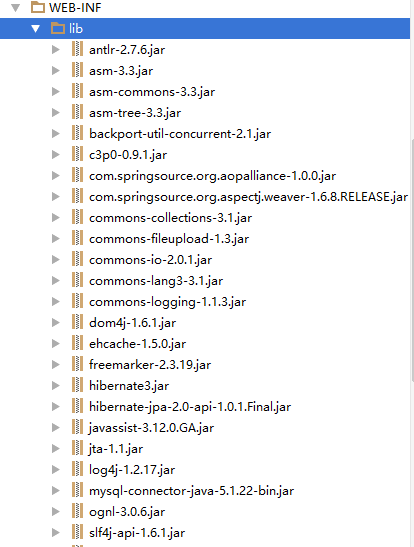
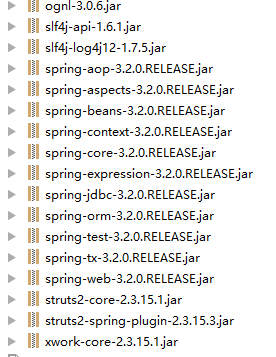
SSH整合要导入的jar包:
MySQL中创建数据库
create database ssh_db;
ssh_db
一、spring整合hibernate带有配置文件hibernate.cfg.xml
1、项目结构:
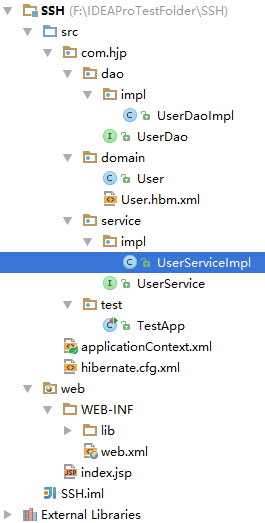
2、新建接口UserDao及实现类UserDaoImpl;实现类中有HibernateTemplate 字段及setter方法,是用来执行数据库操作的。
package com.hjp.dao;

import com.hjp.domain.User;

/**

 * Created by JiaPeng on 2015/11/21.

 */

public interface UserDao {

    void save(User user);

}
接口UserDao
package com.hjp.dao.impl;

import com.hjp.dao.UserDao;

import com.hjp.domain.User;

import org.hibernate.HibernateException;

import org.hibernate.Session;

import org.springframework.orm.hibernate3.HibernateCallback;

import org.springframework.orm.hibernate3.HibernateTemplate;

import java.sql.SQLException;

/**

 * Created by JiaPeng on 2015/11/21.

 */

public class UserDaoImpl implements UserDao {

    HibernateTemplate hibernateTemplate;

    public void setHibernateTemplate(HibernateTemplate hibernateTemplate) {

        this.hibernateTemplate = hibernateTemplate;

    }

    @Override

    public void save(User user) {

        this.hibernateTemplate.save(user);

    }

}
UserDao实现类UserDaoImpl
3、新建接口UserService及实现类UserServiceImpl;实现类中有UserDao字段级setter方法,调用userDao中的公共方法
package com.hjp.service;

import com.hjp.domain.User;

/**

 * Created by JiaPeng on 2015/11/21.

 */

public interface UserService {

    void register(User user);

}
接口UserService
package com.hjp.service.impl;

import com.hjp.dao.UserDao;

import com.hjp.domain.User;

import com.hjp.service.UserService;

/**

 * Created by JiaPeng on 2015/11/21.

 */

public class UserServiceImpl implements UserService {

    private UserDao userDao;

    public void setUserDao(UserDao userDao) {

        this.userDao = userDao;

    }

    @Override

    public void register(User user) {

        this.userDao.save(user);

    }

}
UserService实现类UserServiceImpl
4、新建hibernate.cfg.xml文件
<?xml version="1.0" encoding="UTF-8"?>

<!DOCTYPE hibernate-configuration PUBLIC

        "-//Hibernate/Hibernate Configuration DTD 3.0//EN"

        "http://www.hibernate.org/dtd/hibernate-configuration-3.0.dtd">

<hibernate-configuration>

    <session-factory>

        <!--基本四项-->

        <property name="hibernate.connection.driver_class">com.mysql.jdbc.Driver</property>

        <property name="hibernate.connection.url">jdbc:mysql://localhost:3306/ssh_db</property>

        <property name="hibernate.connection.username">root</property>

        <property name="hibernate.connection.password">hjp123</property>

        <!--方言-->

        <property name="hibernate.dialect">org.hibernate.dialect.MySQL5Dialect</property>

        <!--sql优化,显示,格式化-->

        <property name="hibernate.show_sql">true</property>

        <property name="hibernate.format_sql">true</property>

        <!--自动创建表-->

        <property name="hibernate.hbm2ddl.auto">update</property>

        <!--整合C3P0-->

        <property name="hibernate.connection.provider_class">org.hibernate.connection.C3P0ConnectionProvider</property>

        <!--添加映射文件-->

        <mapping resource="com/hjp/domain/User.hbm.xml"></mapping>

    </session-factory>

</hibernate-configuration>
hibernate.cfg.xml
5、新建applicationContext.xml文件
<?xml version="1.0" encoding="UTF-8"?>

<beans xmlns="http://www.springframework.org/schema/beans"

       xmlns:xsi="http://www.w3.org/2001/XMLSchema-instance"

       xmlns:context="http://www.springframework.org/schema/context"

       xmlns:aop="http://www.springframework.org/schema/aop"

       xmlns:tx="http://www.springframework.org/schema/tx"

       xsi:schemaLocation="http://www.springframework.org/schema/beans

                           http://www.springframework.org/schema/beans/spring-beans.xsd

                           http://www.springframework.org/schema/context

                           http://www.springframework.org/schema/context/spring-context.xsd

                           http://www.springframework.org/schema/aop

                           http://www.springframework.org/schema/aop/spring-aop.xsd

                           http://www.springframework.org/schema/tx

                           http://www.springframework.org/schema/tx/spring-tx.xsd">

    <!--获得sessionFactory,spring加载hibernate.cfg.xml文件-->

    <bean id="sessionFactory" class="org.springframework.orm.hibernate3.LocalSessionFactoryBean">

        <property name="configLocation" value="classpath:hibernate.cfg.xml"></property>

    </bean>

    <!--hibernateTemplate模板-->

    <bean id="hibernateTemplate" class="org.springframework.orm.hibernate3.HibernateTemplate">

        <property name="sessionFactory" ref="sessionFactory"></property>

    </bean>

    <!--dao-->

    <bean id="userDao" class="com.hjp.dao.impl.UserDaoImpl">

        <property name="hibernateTemplate" ref="hibernateTemplate"></property>

    </bean>

    <!--service-->

    <bean id="userService" class="com.hjp.service.impl.UserServiceImpl">

       <property name="userDao" ref="userDao"></property>

    </bean>

    <!--事务管理,首先有事务管理器-->

    <bean id="txManager" class="org.springframework.orm.hibernate3.HibernateTransactionManager">

        <property name="sessionFactory" ref="sessionFactory"></property>

    </bean>

    <!--事务通知-->

    <tx:advice id="txAdvice" transaction-manager="txManager">

        <tx:attributes>

            <tx:method name="register"/>

        </tx:attributes>

    </tx:advice>

    <!--aop配置-->

    <aop:config>

        <aop:advisor advice-ref="txAdvice" pointcut="execution(* com.hjp.service..*.*(..))"></aop:advisor>

    </aop:config>

</beans>
applicationContext
6、新建测试类TestApp
package com.hjp.test;

import com.hjp.domain.User;

import com.hjp.service.UserService;

import org.junit.Test;

import org.springframework.context.ApplicationContext;

import org.springframework.context.support.ClassPathXmlApplicationContext;

/**

 * Created by JiaPeng on 2015/11/21.

 */

public class TestApp {

    @Test

    public void demo1() {

        User user=new User();

        user.setUsername("Jack");

        user.setPassword("123");

        String xmlPath = "applicationContext.xml";

        ApplicationContext applicationContext= (ApplicationContext) new ClassPathXmlApplicationContext(xmlPath);

        UserService userService= (UserService) applicationContext.getBean("userService");

        userService.register(user);

    }

}
TestApp
二、spring整合hibernate,没有hibernate.cfg.xml配置文件
从含有hibernate.cfg.xml配置文件中项目进行删改
1、删除hibernate.cfg.xml配置文件,修改applicationContext.xml文件
<?xml version="1.0" encoding="UTF-8"?>

<beans xmlns="http://www.springframework.org/schema/beans"

       xmlns:xsi="http://www.w3.org/2001/XMLSchema-instance"

       xmlns:context="http://www.springframework.org/schema/context"

       xmlns:aop="http://www.springframework.org/schema/aop"

       xmlns:tx="http://www.springframework.org/schema/tx"

       xsi:schemaLocation="http://www.springframework.org/schema/beans

                           http://www.springframework.org/schema/beans/spring-beans.xsd

                           http://www.springframework.org/schema/context

                           http://www.springframework.org/schema/context/spring-context.xsd

                           http://www.springframework.org/schema/aop

                           http://www.springframework.org/schema/aop/spring-aop.xsd

                           http://www.springframework.org/schema/tx

                           http://www.springframework.org/schema/tx/spring-tx.xsd">

    <!--配置数据源-->

    <bean id="dataSource" class="com.mchange.v2.c3p0.ComboPooledDataSource">

        <property name="driverClass" value="com.mysql.jdbc.Driver"></property>

        <property name="jdbcUrl" value="jdbc:mysql://localhost:3306/ssh_db"></property>

        <property name="user" value="root"></property>

        <property name="password" value="hjp123"></property>

    </bean>

    <!--获得sessionFactory,spring不再加载hibernate.cfg.xml文件-->

    <bean id="sessionFactory" class="org.springframework.orm.hibernate3.LocalSessionFactoryBean">

        <!--注入数据源-->

        <property name="dataSource" ref="dataSource"></property>

        <!--其他属性设置-->

        <property name="hibernateProperties">

            <props>

                <prop key="hibernate.dialect">org.hibernate.dialect.MySQL5Dialect</prop>

                <prop key="hibernate.show_sql">true</prop>

                <prop key="hibernate.format_sql">true</prop>

                <prop key="hibernate.hbm2ddl.auto">update</prop>

            </props>

        </property>

        <!--添加映射文件,一般用mappingLocations

            mappingResources 加载映射文件,从src下获取,必须确定指定资源 com/hjp/domain/User.hbm.xml

            mappingLocations 建议带着"classpath:",可用通配符

                classpath:com/hjp/*/User.hbm.xml 代表目录任意

                classpath:com/hjp/domain/*.hbm.xml 代表文件名任意

            mappingDirectoryLocations 设置目录 classpath:com/hjp/domain

            mappingJarLocations 从jar中获得配置文件

        -->

        <property name="mappingLocations" value="classpath:com/hjp/domain/User.hbm.xml"></property>

    </bean>

    <!--hibernateTemplate模板-->

    <bean id="hibernateTemplate" class="org.springframework.orm.hibernate3.HibernateTemplate">

        <property name="sessionFactory" ref="sessionFactory"></property>

    </bean>

    <!--dao-->

    <bean id="userDao" class="com.hjp.dao.impl.UserDaoImpl">

        <property name="hibernateTemplate" ref="hibernateTemplate"></property>

    </bean>

    <!--service-->

    <bean id="userService" class="com.hjp.service.impl.UserServiceImpl">

       <property name="userDao" ref="userDao"></property>

    </bean>

    <!--事务管理,首先有事务管理器-->

    <bean id="txManager" class="org.springframework.orm.hibernate3.HibernateTransactionManager">

        <property name="sessionFactory" ref="sessionFactory"></property>

    </bean>

    <!--事务通知-->

    <tx:advice id="txAdvice" transaction-manager="txManager">

        <tx:attributes>

            <tx:method name="register"/>

        </tx:attributes>

    </tx:advice>

    <!--aop配置-->

    <aop:config>

        <aop:advisor advice-ref="txAdvice" pointcut="execution(* com.hjp.service..*.*(..))"></aop:advisor>

    </aop:config>

</beans>
applicationContext.xml
2、删除hibernate模板,修改applicationContext.xml文件及使UserDao继承HibernateDaoSupport类
package com.hjp.dao.impl;

import com.hjp.dao.UserDao;

import com.hjp.domain.User;

import org.hibernate.HibernateException;

import org.hibernate.Session;

import org.springframework.orm.hibernate3.HibernateCallback;

import org.springframework.orm.hibernate3.HibernateTemplate;

import org.springframework.orm.hibernate3.support.HibernateDaoSupport;

import java.sql.SQLException;

/**

 * Created by JiaPeng on 2015/11/21.

 */

public class UserDaoImpl extends HibernateDaoSupport implements UserDao {

//    HibernateTemplate hibernateTemplate;

//

//    public void setHibernateTemplate(HibernateTemplate hibernateTemplate) {

//        this.hibernateTemplate = hibernateTemplate;

//    }

    @Override

    public void save(User user) {

        this.getHibernateTemplate().save(user);

    }

}
UserDaoImpl
<?xml version="1.0" encoding="UTF-8"?>

<beans xmlns="http://www.springframework.org/schema/beans"

       xmlns:xsi="http://www.w3.org/2001/XMLSchema-instance"

       xmlns:context="http://www.springframework.org/schema/context"

       xmlns:aop="http://www.springframework.org/schema/aop"

       xmlns:tx="http://www.springframework.org/schema/tx"

       xsi:schemaLocation="http://www.springframework.org/schema/beans

                           http://www.springframework.org/schema/beans/spring-beans.xsd

                           http://www.springframework.org/schema/context

                           http://www.springframework.org/schema/context/spring-context.xsd

                           http://www.springframework.org/schema/aop

                           http://www.springframework.org/schema/aop/spring-aop.xsd

                           http://www.springframework.org/schema/tx

                           http://www.springframework.org/schema/tx/spring-tx.xsd">

    <!--配置数据源-->

    <bean id="dataSource" class="com.mchange.v2.c3p0.ComboPooledDataSource">

        <property name="driverClass" value="com.mysql.jdbc.Driver"></property>

        <property name="jdbcUrl" value="jdbc:mysql://localhost:3306/ssh_db"></property>

        <property name="user" value="root"></property>

        <property name="password" value="hjp123"></property>

    </bean>

    <!--获得sessionFactory,spring不再加载hibernate.cfg.xml文件-->

    <bean id="sessionFactory" class="org.springframework.orm.hibernate3.LocalSessionFactoryBean">

        <!--注入数据源-->

        <property name="dataSource" ref="dataSource"></property>

        <!--其他属性设置-->

        <property name="hibernateProperties">

            <props>

                <prop key="hibernate.dialect">org.hibernate.dialect.MySQL5Dialect</prop>

                <prop key="hibernate.show_sql">true</prop>

                <prop key="hibernate.format_sql">true</prop>

                <prop key="hibernate.hbm2ddl.auto">update</prop>

            </props>

        </property>

        <!--添加映射文件,一般用mappingLocations

            mappingResources 加载映射文件,从src下获取,必须确定指定资源 com/hjp/domain/User.hbm.xml

            mappingLocations 建议带着"classpath:",可用通配符

                classpath:com/hjp/*/User.hbm.xml 代表目录任意

                classpath:com/hjp/domain/*.hbm.xml 代表文件名任意

            mappingDirectoryLocations 设置目录 classpath:com/hjp/domain

            mappingJarLocations 从jar中获得配置文件

        -->

        <property name="mappingLocations" value="classpath:com/hjp/domain/User.hbm.xml"></property>

    </bean>

    <!--hibernateTemplate模板

    <bean id="hibernateTemplate" class="org.springframework.orm.hibernate3.HibernateTemplate">

        <property name="sessionFactory" ref="sessionFactory"></property>

    </bean>-->

    <!--dao

        UserDaoImpl继承了HibernateDaoSupport类,所以只注入sessionFactory即可,在UserDaoImpl实现类

        中可以通过getHibernateTemplate()方法得到hibernate模板对象

    -->

    <bean id="userDao" class="com.hjp.dao.impl.UserDaoImpl">

        <property name="sessionFactory" ref="sessionFactory"></property>

    </bean>

    <!--service-->

    <bean id="userService" class="com.hjp.service.impl.UserServiceImpl">

       <property name="userDao" ref="userDao"></property>

    </bean>

    <!--事务管理,首先有事务管理器-->

    <bean id="txManager" class="org.springframework.orm.hibernate3.HibernateTransactionManager">

        <property name="sessionFactory" ref="sessionFactory"></property>

    </bean>

    <!--事务通知-->

    <tx:advice id="txAdvice" transaction-manager="txManager">

        <tx:attributes>

            <tx:method name="register"/>

        </tx:attributes>

    </tx:advice>

    <!--aop配置-->

    <aop:config>

        <aop:advisor advice-ref="txAdvice" pointcut="execution(* com.hjp.service..*.*(..))"></aop:advisor>

    </aop:config>

</beans>
applicationContext.xml
补充
package com.hjp.domain;

/**

 * Created by JiaPeng on 2015/11/21.

 */

public class User {

    private Integer id;

    private String username;

    private String password;

    private Integer age;

    public Integer getId() {

        return id;

    }

    public void setId(Integer id) {

        this.id = id;

    }

    public String getUsername() {

        return username;

    }

    public void setUsername(String username) {

        this.username = username;

    }

    public String getPassword() {

        return password;

    }

    public void setPassword(String password) {

        this.password = password;

    }

    public Integer getAge() {

        return age;

    }

    public void setAge(Integer age) {

        this.age = age;

    }

}
User
<?xml version="1.0" encoding="UTF-8"?>

<!DOCTYPE hibernate-mapping PUBLIC

        "-//Hibernate/Hibernate Mapping DTD 3.0//EN"

        "http://www.hibernate.org/dtd/hibernate-mapping-3.0.dtd">

<hibernate-mapping>

    <class name="com.hjp.domain.User" table="t_user">

        <id name="id">

            <generator class="native"/>

        </id>

        <property name="username" length="50"/>

        <property name="password" length="32"/>

        <property name="age"/>

    </class>

</hibernate-mapping>
SSH整合之spring整合hibernate的更多相关文章
- Maven环境下搭建SSH框架之Spring整合Hibernate
© 版权声明:本文为博主原创文章,转载请注明出处 1.搭建环境 Spring:4.3.8.RELEASE Hibernate:5.1.7.Final MySQL:5.7.17 注意:其他版本在某些特性 ...
- 【Saas-export项目】--项目整合(spring整合MVC)
转: [Saas-export项目]--项目整合(spring整合MVC) 文章目录 Spring整合SpringMVC(export_web_manager子工程) (1)log4j.propert ...
- 二 SSH整合:Spring整合Hibernate,无障碍整合&无核心配置整合,Hibernate模版常用方法,
重建SSH项目 java项目可以直接复制,但是web项目除了改名字还要该配置,如下: 方式一:无障碍整合:带Hibernate配置文件 <?xml version="1.0" ...
- JAVAEE——SSH三大框架整合(spring+struts2+hibernate)
一.整合原理 二.导包(41个) 1.hibernate (1)hibernate/lib/required (2)hibernate/lib/jpa | java persist api java的 ...
- ssh整合思想 Spring与Hibernate的整合 项目在服务器启动则自动创建数据库表
Spring整合Hibernate Spring的Web项目中,web.xml文件会自动加载,以出现欢迎首页.也可以在这个文件中对Spring的配置文件进行监听,自启动配置文件, 以及之前Struts ...
- ssh整合思想 Spring与Hibernate的整合ssh整合相关JAR包下载 .MySQLDialect方言解决无法服务器启动自动update创建表问题
除之前的Spring相关包,还有structs2包外,还需要Hibernate的相关包 首先,Spring整合其他持久化层框架的JAR包 spring-orm-4.2.4.RELEASE.jar ( ...
- SSH框架之Spring+Struts2+Hibernate整合篇
回顾 -Hibernate框架 ORM: 对象关系映射.把数据库表和JavaBean通过映射的配置文件映射起来, 操作JavaBean对象,通过映射的配置文件生成SQL语句,自动执行.操作数据库. 1 ...
- SSH(Struts、Spring、Hibernate)三大框架整合
1. 新建数据库ssh_db -> 新建表user_tb(id为主键,自动递增) 2. 导入jar包(struts.hibernate 和 spring) 3. 注册页面reg.jsp,将表单的 ...
- SSH Struts2+hiberante+Spring整合
使用SSH框架编写学生信息: 一.新建Java工程: (1)建立好Java各层级之间的结构:业务处理层dao,数据模型层domain,页面请求处理层(Struts2 MVC层)action,servi ...
随机推荐
- 第二章 rabbitmq在mac上的安装
下载页: http://www.rabbitmq.com/install-standalone-mac.html 1.下载页面首部的文件(页面下载可能比较慢,使用迅雷下载就好),之后解压到一个合适的路 ...
- [TCPIP]代理arp
一 理论概述 \ 二 实验 实验一:代理arp在nat中的作用(实验发现一下是错的) 实验二.代理arp pc访问服务器想让走路由器(写32bit静态路由),右边的R arp server的时 ...
- C语言 野指针与空指针
//野指针与空指针的区别 #define _CRT_SECURE_NO_WARNINGS #include<stdio.h> #include<stdlib.h> //野指针是 ...
- windows 批处理把所有java源码导入一个txt文件中
首先在src下搜*.java,把搜到的文件全拷出来放在allsrc目录下, 然后在allsrc目录下建个run.bat,键入以下内容for %%i in (*.java) do type %%i&g ...
- no.4 抽奖测试
#-*-coding=gbk-*- import sys import random a=[] try: for x in range(1,20+1,1): #打印20人数编号 a.append(x) ...
- Android Fragment 完全解析
参考文章:http://blog.csdn.net/guolin_blog/article/details/8881711 http://blog.csdn.net/guolin_blog/artic ...
- echo "scale=100; a(1)*4" | bc -l 输出圆周率
突然看到echo "scale=100; a(1)*4" | bc -l可以输出圆周率,很惊奇,后来发现很简单. 首先bc是“basic calculator”的缩写,就是初级的计 ...
- MVC3迁移MVC4相关问题
mvc3迁移到mvc4后,发布到服务器,出现了如下错误: [A]System.Web.WebPages.Razor.Configuration.RazorPagesSection cannot be ...
- 信息安全系统设计基础实验四 20135210&20135218
北京电子科技学院(BESTI) 实 验 报 告 课程:信息安全系统设计基础 班级: 1352 姓名:程涵,姬梦馨 学号:20135210,20135218 ...
- 我的权限系统设计实现MVC4 + WebAPI + EasyUI + Knockout(四)授权代码维护
一.前言 权限系统设计中,授权代码是用来控制数据访问权限的.授权代码说白了只是一树型结构的数据,没有什么其它的业务意义.那么这个页面的功能也就非常简单授权代码维护:新增.修改.删除授权代码数据. 二. ...