
docker仓库harbor搭建
1、安装docker-compose
 [root@docker02 ~]# yum install epel-release

 [root@docker02 ~]# pip install docker-compose
2、安装harbor
harbor下载地址
https://github.com/vmware/harbor/releases
     [root@docker02 ~]# mv harbor-offline-installer-0.5..tgz  /opt/

     [root@docker02 opt]# tar zxvf harbor-offline-installer-0.5..tgz

     [root@docker02 harbor]# vim harbor.cfg

     ## Configuration file of Harbor

     #The IP address or hostname to access admin UI and registry service.

     #DO NOT use localhost or 127.0.0.1, because Harbor needs to be accessed by external clients.

     hostname = 172.16.138.101   修改hostname

     #The protocol for accessing the UI and token/notification service, by default it is http.

     #It can be set to https if ssl is enabled on nginx.

     ui_url_protocol = http

     #Email account settings for sending out password resetting emails.

     #Email server uses the given username and password to authenticate on TLS connections to host and act as identity.

     #Identity left blank to act as username.

     email_identity =

     email_server = smtp.mydomain.com
3、使用docker节点push 镜像到harbor
修改docker仓库地址
 [root@docker03 images]# vim /etc/sysconfig/docker

 ....

 # If you want to add your own registry to be used for docker search and docker

 # pull use the ADD_REGISTRY option to list a set of registries, each prepended

 # with --add-registry flag. The first registry added will be the first registry

 # searched.

 ADD_REGISTRY='--add-registry harbor.suixingpay.com'

 # If you want to block registries from being used, uncomment the BLOCK_REGISTRY

 # option and give it a set of registries, each prepended with --block-registry

 # flag. For example adding docker.io will stop users from downloading images

 # from docker.io

 # BLOCK_REGISTRY='--block-registry'

 # If you have a registry secured with https but do not have proper certs

 # distributed, you can tell docker to not look for full authorization by

 # adding the registry to the INSECURE_REGISTRY line and uncommenting it.

 INSECURE_REGISTRY='--insecure-registry harbor.suixingpay.com'

 # On an SELinux system, if you remove the --selinux-enabled option, you

 .....
重启docker服务
[root@docker03 images]# systemctl restart docker.service
登录Harbor(密码:Harbor12345)
 [root@docker03 images]# docker login harbor.suixingpay.com

 Username: admin

 Password:

 Login Succeeded
导入镜像
 [root@docker03 images]# docker load -i heapster_grafana_v2.6.0-.tar

 78dbfa5b7cbc: Loading layer [==================================================>] 130.9 MB/130.9 MB

 5f70bf18a086: Loading layer [==================================================>] 1.024 kB/1.024 kB

 0828a6c7d921: Loading layer [==================================================>] 90.27 MB/90.27 MB

 8683f0f614c9: Loading layer [==================================================>] 2.048 kB/2.048 kB

 a89b3190964f: Loading layer [==================================================>] 16.26 MB/16.26 MB

 ca627f7178ed: Loading layer [==================================================>] 110.1 kB/110.1 kB

 edec8b16494f: Loading layer [==================================================>] 4.096 kB/4.096 kB

 Loaded image ID: sha256:b4344393062633aad3f68fdee2ac195cfe9d618d6994ef3f3e03dba088a15fa8

 [root@docker03 images]#
给镜像打tag
 [root@docker03 images]# docker images

 REPOSITORY                                         TAG                 IMAGE ID            CREATED             SIZE

 harbor.suixingpay.com/kube/dnsmasq-metrics-amd64   1.0                 5271aabced07         months ago         MB

 <none>                                             <none>              b43443930626         months ago        MB

 [root@docker03 images]# docker tag b43443930626 harbor.suixingpay.com/kube/heapster_grafana:v2.6.0-

 [root@docker03 images]# docker images

 REPOSITORY                                         TAG                 IMAGE ID            CREATED             SIZE

 harbor.suixingpay.com/kube/dnsmasq-metrics-amd64   1.0                 5271aabced07         months ago         MB

 harbor.suixingpay.com/kube/heapster_grafana        v2.6.0-            b43443930626         months ago        MB

 [root@docker03 images]#
上次镜像到harbor
 [root@docker03 images]# docker push harbor.suixingpay.com/kube/heapster_grafana:v2.6.0-

 The push refers to a repository [harbor.suixingpay.com/kube/heapster_grafana]

 5f70bf18a086: Mounted from kube/dnsmasq-metrics-amd64

 edec8b16494f: Pushed

 ca627f7178ed: Pushed

 a89b3190964f: Pushed

 8683f0f614c9: Pushed

 0828a6c7d921: Pushed

 78dbfa5b7cbc: Pushed

 v2.6.0-: digest: sha256:daea3fd319873e0f460b26885698a18c0dfcea404d0e03969aeaefeb35d4c278 size:

 [root@docker03 images]#

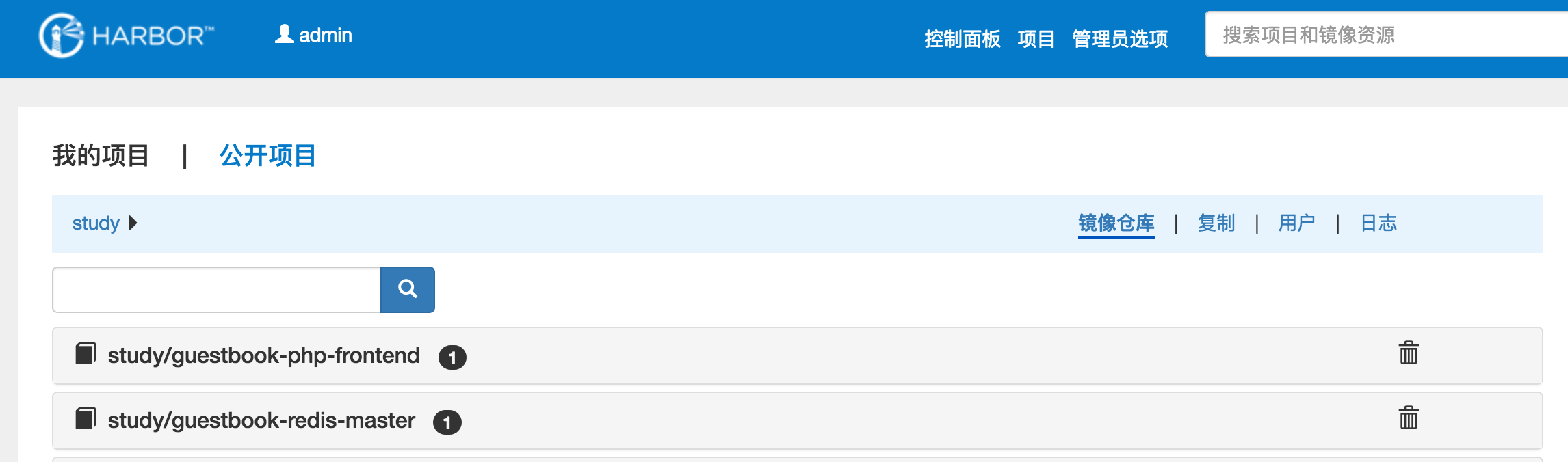
Harbor页面展示
docker仓库harbor搭建的更多相关文章
- docker仓库harbor搭建随笔
docker除了自己的registry仓库工具外,还有vmware出品的harbor,harbor集成了ui界面,用户级别认证,重要的是对镜像管理比较全面,可以删除镜像,下面是 简单的部署指南 首先: ...
- 企业级镜像仓库harbor搭建
企业级镜像仓库harbor搭建 一. Harbor概述 VMware公司最近开源了企业级Registry项目Harbor,其的目标是帮助用户迅速搭建一个企业级的Docker registry 服 ...
- docker仓库harbor镜像列表获取命令
2019-03-14 搭建好docker仓库harbor之后,在服务器上获取harbor的所有镜像列表命令 curl -u "harbor账号:密码" -X GET -H &quo ...
- docker的私有化仓库harbor搭建
目前比较流行的docker私有化仓库是harbor,harbor是一个github开源的项目,直接在github上搜索即可,下载地址:https://github.com/goharbor/harbo ...
- 企业级仓库harbor搭建
1.Harbor是什么? Harbor是Vmvare中国团队开发的开源registry仓库,相比docker官方拥有更丰富的权限权利和完善的架构设计,适用大规模docker集群部署提供仓库服务.在企业 ...
- Kubernets二进制安装(5)之私有仓库harbor搭建
在IP地址为192.168.80.50,机器名为mfyxw50上搭建私有仓库harbor harbor下载地址: harbor下载连接地址:https://github.com/goharbor/ha ...
- 企业级Docker Registry —— Harbor搭建和使用
本节内容: Harbor介绍 安装部署Harbor 环境要求 环境信息 安装部署harbor 配置harbor 配置存储 完成安装和启动harbor 访问Harbor 修改管理员密码 启动后相关容器 ...
- 微服务探索之路03篇-docker私有仓库Harbor搭建+Kubernetes(k8s)部署私有仓库的镜像
❝ 目录: 微服务探索之路01篇.net6.0项目本地win10系统docker到服务器liunx系统docker的贯通 微服务探索之路02篇liunx ubuntu服务器部署k8s(kubernet ...
- Docker镜像仓库Harbor搭建及配置
一.harbor简介 Harbor是一个用于存储和分发Docker镜像的企业级Registry服务器,通过添加一些企业必需的功能特性,例如安全.标识和管理等,扩展了开源Docker Distribut ...
随机推荐
- pycharm中查看源码的快捷键
将光标移动至要查看的方法处,按住ctrl 点击鼠标左键,即可查看该方法的源码
- 模板-layui
table数据格式化 {field:'IsTop',title:'是否置顶',width:150,templet:'#isTop'} <!-- 模板 --> <script type ...
- GitHub大佬:供计算机学习鉴黄功能的图片数据库
ps:学无止境 想要构建一套鉴黄系统,必须有大量的真实图片供计算机进行学习,以便于区分开正常图片和黄色图片. 近期有位加拿大程序员在Github上传了图片列表,里面包含了大量图片地址可以供计算机进行学 ...
- 4、new一个对象的时候,初始化顺序:
父类静态块>子类静态块> 父类属性(先系统默认值,后直接你赋予的值) >父类构造器>子类属性>子类构造器
- P1055 书号
P1055 题目描述 每一本正式出版的图书都有一个ISBN号码与之对应,ISBN码包括99位数字.11位识别码和33位分隔符,其规定格式如x-xxx-xxxxx-x,其中符号-就是分隔符(键盘上的减号 ...
- 爬虫_拉勾网(解析ajax)
拉勾网反爬虫做的比较严,请求头多添加几个参数才能不被网站识别 找到真正的请求网址,返回的是一个json串,解析这个json串即可,而且注意是post传值 通过改变data中pn的值来控制翻页 job_ ...
- MT【310】均值不等式
(2014北约自主招生)已知正实数$x_1,x_2,\cdots,x_n$满足$x_1x_2\cdots x_n=1,$求证:$(\sqrt{2}+x_1)(\sqrt{2}+x_2)\cdots(\ ...
- 对比cp和scp命令 将数据从一台linux服务器复制到另一台linux服务器
cp命令用来将一个或多个源文件或者目录复制到指定的目的文件或目录.它可以将单个源文件复制成一个指定文件名的具体的文件或一个已经存在的目录下.cp命令还支持同时复制多个文件,当一次复制多个文件时,目标文 ...
- [bzoj2288][pojChallenge]生日礼物【贪心+堆+链表】
题目描述 ftiasch 18岁生日的时候,lqp18_31给她看了一个神奇的序列 A1, A2, -, AN. 她被允许选择不超过 M 个连续的部分作为自己的生日礼物. 自然地,ftiasch想要知 ...
- 如何减少UI设计师产品与前端工程师的沟通成本
在日常工作中,UI设计师/产品与前端工程师难免会有一些冲突,这是我的一些小建议. 1.如何减少时间成本 先制作UI组件,再拼接页面 如果UI给前端的是一堆页面,前端需要花一些时间去整理提取UI组件.另 ...