
docker仓库harbor搭建
1、安装docker-compose
 [root@docker02 ~]# yum install epel-release

 [root@docker02 ~]# pip install docker-compose
2、安装harbor
harbor下载地址
https://github.com/vmware/harbor/releases
     [root@docker02 ~]# mv harbor-offline-installer-0.5..tgz  /opt/

     [root@docker02 opt]# tar zxvf harbor-offline-installer-0.5..tgz

     [root@docker02 harbor]# vim harbor.cfg

     ## Configuration file of Harbor

     #The IP address or hostname to access admin UI and registry service.

     #DO NOT use localhost or 127.0.0.1, because Harbor needs to be accessed by external clients.

     hostname = 172.16.138.101   修改hostname

     #The protocol for accessing the UI and token/notification service, by default it is http.

     #It can be set to https if ssl is enabled on nginx.

     ui_url_protocol = http

     #Email account settings for sending out password resetting emails.

     #Email server uses the given username and password to authenticate on TLS connections to host and act as identity.

     #Identity left blank to act as username.

     email_identity =

     email_server = smtp.mydomain.com
3、使用docker节点push 镜像到harbor
修改docker仓库地址
 [root@docker03 images]# vim /etc/sysconfig/docker

 ....

 # If you want to add your own registry to be used for docker search and docker

 # pull use the ADD_REGISTRY option to list a set of registries, each prepended

 # with --add-registry flag. The first registry added will be the first registry

 # searched.

 ADD_REGISTRY='--add-registry harbor.suixingpay.com'

 # If you want to block registries from being used, uncomment the BLOCK_REGISTRY

 # option and give it a set of registries, each prepended with --block-registry

 # flag. For example adding docker.io will stop users from downloading images

 # from docker.io

 # BLOCK_REGISTRY='--block-registry'

 # If you have a registry secured with https but do not have proper certs

 # distributed, you can tell docker to not look for full authorization by

 # adding the registry to the INSECURE_REGISTRY line and uncommenting it.

 INSECURE_REGISTRY='--insecure-registry harbor.suixingpay.com'

 # On an SELinux system, if you remove the --selinux-enabled option, you

 .....
重启docker服务
[root@docker03 images]# systemctl restart docker.service
登录Harbor(密码:Harbor12345)
 [root@docker03 images]# docker login harbor.suixingpay.com

 Username: admin

 Password:

 Login Succeeded
导入镜像
 [root@docker03 images]# docker load -i heapster_grafana_v2.6.0-.tar

 78dbfa5b7cbc: Loading layer [==================================================>] 130.9 MB/130.9 MB

 5f70bf18a086: Loading layer [==================================================>] 1.024 kB/1.024 kB

 0828a6c7d921: Loading layer [==================================================>] 90.27 MB/90.27 MB

 8683f0f614c9: Loading layer [==================================================>] 2.048 kB/2.048 kB

 a89b3190964f: Loading layer [==================================================>] 16.26 MB/16.26 MB

 ca627f7178ed: Loading layer [==================================================>] 110.1 kB/110.1 kB

 edec8b16494f: Loading layer [==================================================>] 4.096 kB/4.096 kB

 Loaded image ID: sha256:b4344393062633aad3f68fdee2ac195cfe9d618d6994ef3f3e03dba088a15fa8

 [root@docker03 images]#
给镜像打tag
 [root@docker03 images]# docker images

 REPOSITORY                                         TAG                 IMAGE ID            CREATED             SIZE

 harbor.suixingpay.com/kube/dnsmasq-metrics-amd64   1.0                 5271aabced07         months ago         MB

 <none>                                             <none>              b43443930626         months ago        MB

 [root@docker03 images]# docker tag b43443930626 harbor.suixingpay.com/kube/heapster_grafana:v2.6.0-

 [root@docker03 images]# docker images

 REPOSITORY                                         TAG                 IMAGE ID            CREATED             SIZE

 harbor.suixingpay.com/kube/dnsmasq-metrics-amd64   1.0                 5271aabced07         months ago         MB

 harbor.suixingpay.com/kube/heapster_grafana        v2.6.0-            b43443930626         months ago        MB

 [root@docker03 images]#
上次镜像到harbor
 [root@docker03 images]# docker push harbor.suixingpay.com/kube/heapster_grafana:v2.6.0-

 The push refers to a repository [harbor.suixingpay.com/kube/heapster_grafana]

 5f70bf18a086: Mounted from kube/dnsmasq-metrics-amd64

 edec8b16494f: Pushed

 ca627f7178ed: Pushed

 a89b3190964f: Pushed

 8683f0f614c9: Pushed

 0828a6c7d921: Pushed

 78dbfa5b7cbc: Pushed

 v2.6.0-: digest: sha256:daea3fd319873e0f460b26885698a18c0dfcea404d0e03969aeaefeb35d4c278 size:

 [root@docker03 images]#

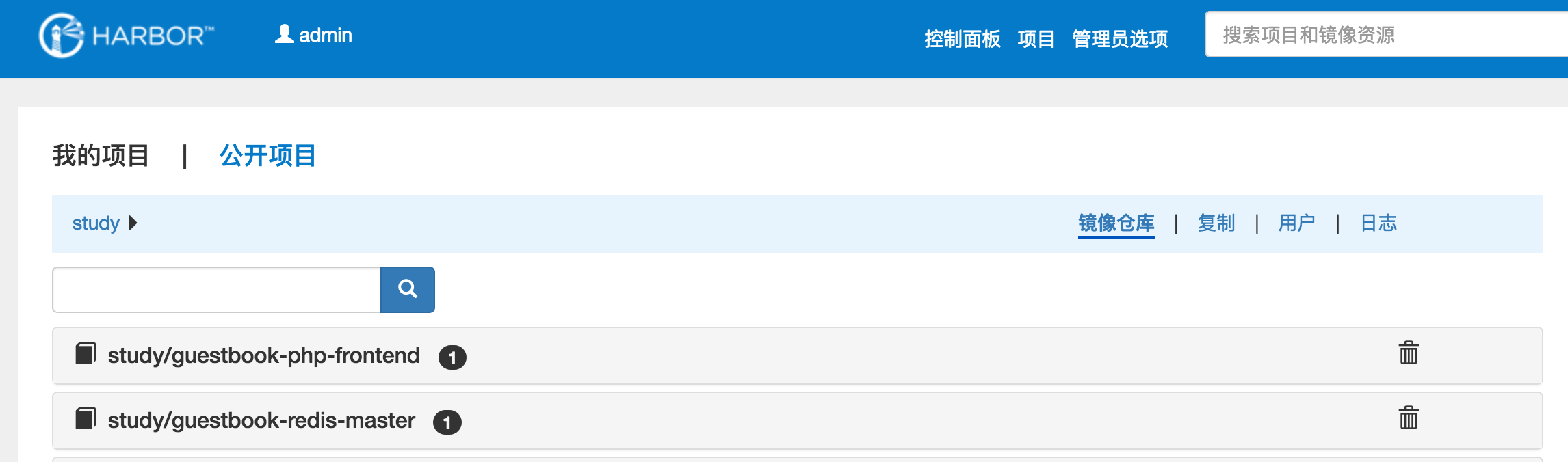
Harbor页面展示
docker仓库harbor搭建的更多相关文章
- docker仓库harbor搭建随笔
docker除了自己的registry仓库工具外,还有vmware出品的harbor,harbor集成了ui界面,用户级别认证,重要的是对镜像管理比较全面,可以删除镜像,下面是 简单的部署指南 首先: ...
- 企业级镜像仓库harbor搭建
企业级镜像仓库harbor搭建 一. Harbor概述 VMware公司最近开源了企业级Registry项目Harbor,其的目标是帮助用户迅速搭建一个企业级的Docker registry 服 ...
- docker仓库harbor镜像列表获取命令
2019-03-14 搭建好docker仓库harbor之后,在服务器上获取harbor的所有镜像列表命令 curl -u "harbor账号:密码" -X GET -H &quo ...
- docker的私有化仓库harbor搭建
目前比较流行的docker私有化仓库是harbor,harbor是一个github开源的项目,直接在github上搜索即可,下载地址:https://github.com/goharbor/harbo ...
- 企业级仓库harbor搭建
1.Harbor是什么? Harbor是Vmvare中国团队开发的开源registry仓库,相比docker官方拥有更丰富的权限权利和完善的架构设计,适用大规模docker集群部署提供仓库服务.在企业 ...
- Kubernets二进制安装(5)之私有仓库harbor搭建
在IP地址为192.168.80.50,机器名为mfyxw50上搭建私有仓库harbor harbor下载地址: harbor下载连接地址:https://github.com/goharbor/ha ...
- 企业级Docker Registry —— Harbor搭建和使用
本节内容: Harbor介绍 安装部署Harbor 环境要求 环境信息 安装部署harbor 配置harbor 配置存储 完成安装和启动harbor 访问Harbor 修改管理员密码 启动后相关容器 ...
- 微服务探索之路03篇-docker私有仓库Harbor搭建+Kubernetes(k8s)部署私有仓库的镜像
❝ 目录: 微服务探索之路01篇.net6.0项目本地win10系统docker到服务器liunx系统docker的贯通 微服务探索之路02篇liunx ubuntu服务器部署k8s(kubernet ...
- Docker镜像仓库Harbor搭建及配置
一.harbor简介 Harbor是一个用于存储和分发Docker镜像的企业级Registry服务器,通过添加一些企业必需的功能特性,例如安全.标识和管理等,扩展了开源Docker Distribut ...
随机推荐
- BZOJ3196二逼平衡树——线段树套平衡树(treap)
此为平衡树系列最后一道:二逼平衡树您需要写一种数据结构(可参考题目标题),来维护一个有序数列,其中需要提供以下操作: 1.查询k在区间内的排名2.查询区间内排名为k的值3.修改某一位值上的数值4.查询 ...
- 【XSY1642】Another Boring Problem 树上莫队
题目大意 给你一棵\(n\)个点的树,每个点有一个颜色\(c_i\),每次给你\(x,y,k\),求从\(x\)到\(y\)的路径上出现次数第\(k\)多的颜色的出现次数 \(n,q\leq 1000 ...
- Android stadio 生成项目 Plugin with id 'com.android.application' not found
buildscript { repositories { jcenter() } dependencies { classpath 'com.android.tools.build:gradle:2. ...
- 「UVA10766」Organising the Organisation(生成树计数)
BUPT 2017 Summer Training (for 16) #6C 题意 n个点,完全图减去m条边,求生成树个数. 题解 注意可能会给重边. 然后就是生成树计数了. 代码 #include ...
- python学习日记(基础数据类型及其方法02)
python的变量 python中的变量不需要声明,变量载使用前必须被赋值,变量被赋值以后才会被创建. 在python中变量就是变量,没有数据类型.我们所说的类型是变量所指向内存中的对象的类型. py ...
- 执行sql脚本保留操作日志
需求场景,操作数据库场景较多,无专业dba,腾讯云mysql虽然提供了类似于phpmyadmin的管理后台,但是操作卡,效率低 #!/usr/bin CDATE=`date +%Y%m%d-%H%M% ...
- 一点理解之 CmBacktrace: ARM Cortex-M 系列 MCU 错误追踪库
@2019-02-14 [小记] CmBacktrace: ARM Cortex-M 系列 MCU 错误追踪库,用来将单片机故障状态寄存器值翻译出来输出至终端上以便排错 CmBacktrace: AR ...
- 537. Complex Number Multiplication
题目大意: 给出a, b两个用字符串表示的虚数,求a*b 题目思路: 偷了个懒,Python3的正则表达式匹配了一下,当然acm里肯定是不行的 class Solution: def complexN ...
- layui记录
layui 官网 layui 独立版 layui mobile layui 社区
- [luogu1503][鬼子进村]
题目链接 思路 将哪些村庄已经被摧毁了放到treap里.查询的时候如果当前村庄已经被毁了,那么就可以直接输出0.不然就输出这个村庄的后继-前驱-1.原因显然 代码 #include<cstdio ...