
C# TcpListener TcpClient
C# TcpListener TcpClient 使用,新建从控制台项目,引用System.Net
代码如下:
using System;

using System.Collections.Generic;

using System.Diagnostics;

using System.Globalization;

using System.IO;

//using System.IO.Pipes;

using System.Net;

using System.Net.Mail;

using System.Reflection;

using System.Text;

using System.Text.RegularExpressions;

namespace LongtengSupremeConsole

{

    class Program

    {

        static void Main(string[] args)

        {

             new Thread(new ThreadStart(TcpListenerMethod)).Start();

            Thread.Sleep(TimeSpan.FromSeconds());

            TcpClientSendDataMethod();

            Console.ReadKey();

        }

     public static void TcpClientSendDataMethod()

        {

            try

            {

                int i = ;

                while (true)

                {

                    TcpClient client = new TcpClient();

                    client.Connect("127.0.0.1", );

                    using (NetworkStream n = client.GetStream())

                    {

                        BinaryWriter binaryWriter = new BinaryWriter(n);

                        binaryWriter.Write($"{i}");

                        binaryWriter.Flush();

                        Console.ForegroundColor = ConsoleColor.Green;

                        Console.WriteLine($"客户端 发送数据是:{i}");

                        string  binaryReader = new BinaryReader(n).ReadString();

                        Console.ForegroundColor = ConsoleColor.Blue;

                        Console.WriteLine($"客户端 收到数据是:{binaryReader}");

                        //using (StreamWriter streamWriter = new StreamWriter(n))

                        //{

                        //    Console.ForegroundColor = ConsoleColor.Yellow;

                        //    Console.WriteLine($"客户端 发送数据是:{i}");

                        //    streamWriter.WriteLine("{i}");

                        //}

                        //using (StreamReader streamReader = new StreamReader(n))

                        //{

                        //    Console.ForegroundColor = ConsoleColor.Green;

                        //    Console.WriteLine($"客户端 收到数据是:{streamReader.ReadToEnd()}");

                        //}

                        i++;

                    }

                    Thread.Sleep(TimeSpan.FromSeconds());

                }

            }

            catch (Exception)

            {

                throw;

            }

        }

        public static TcpListener listener = null;

        public static void TcpListenerMethod()

        {

            try

            {

                //listener = new TcpListener(new IPEndPoint(new IPAddress(new byte[] { 127, 0, 0, 1 }), 49153));

                listener = new TcpListener(IPAddress.Any, );

                //listener.Server.SetSocketOption(SocketOptionLevel.Socket, SocketOptionName.ReuseAddress, 1);

                listener.Start();

                while (true)

                {

                    using (TcpClient c = listener.AcceptTcpClient())

                    {

                        //c.LingerState.Enabled = false;

                        using (NetworkStream n = c.GetStream())

                        {

                            string binaryReader = new BinaryReader(n).ReadString();

                            Console.ForegroundColor = ConsoleColor.Blue;

                            Console.WriteLine($"服务端 收到数据是:{binaryReader}");

                            BinaryWriter binaryWriter = new BinaryWriter(n);

                            binaryWriter.Write($"服务端 回复 {binaryReader}");

                            binaryWriter.Flush();

                            Console.ForegroundColor = ConsoleColor.Green;

                            Console.WriteLine($"服务端 回复 {binaryReader}");

                            //using (StreamReader streamReader = new StreamReader(n))

                            //{

                            //    Console.ForegroundColor = ConsoleColor.Green;

                            //    Console.WriteLine($"服务端:收到数据:{streamReader.ReadToEnd()}");

                            //}

                            //using (StreamWriter streamWriter = new StreamWriter(n))

                            //{

                            //    Console.ForegroundColor = ConsoleColor.Yellow;

                            //    Console.WriteLine($"服务端:发送数据:我已经收到数据了");

                            //    streamWriter.WriteLine("我已经收到数据了。。。。");

                            //}

                        }

                    }

                }

            }

            catch (Exception)

            {

                listener.Stop();

                throw;

            }

        }

        public static void TcpListenerStopMethod()

        {

            try

            {

                listener.Stop();

            }

            catch (Exception)

            {

                throw;

            }

        }

    }

}
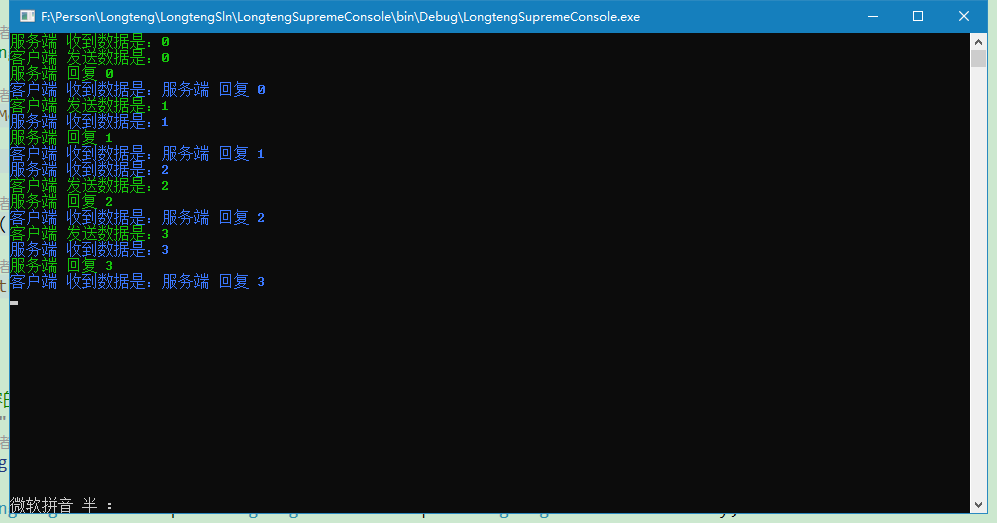
测试结果如下:
C# TcpListener TcpClient的更多相关文章
- Socket聊天室-TcpListener,TcpClient
参考自:http://blog.csdn.net/liguo9860/article/details/6148614 服务端:
- 【socket】一分钟理清 socket udpsocket tcpsocket tcplistener TCPClient和 UDPClient
socket 套接字接口是各种语言tcp udp的网络操作的基础. 直接用socket 对象开发 可以选择 udpsocket 或者 tcpsocket ,两者在使用上仅一些方法和参数不同,所有的底 ...
- .net 网络编程
1.首先说下计算机网络中的TCP/IP参考模型 TCP/IP把网络分为5层,每一层负责完成不同的功能 1)应用层:传输报文,提供各种网络应用,有FTP.SMTP.HTTP等协议 2)运输层:传输报文段 ...
- TCP同步传送数据示例以及可能出现问题分析
TCP传送数据可以分为同步传送和异步传送,首先这里使用了TCP的同步传送方式,学习了TCP同步传送数据的原理. 同步工作方式是指利用TCP编写的程序执行到监听或者接受数据语句的时候,在未完成当前工作( ...
- Simple TCP/IP Echo Server & Client Application in C#
1. TCP Server The server’s job is to set up an endpoint for clients to connect to and passively wait ...
- TCP listener
调试时未关闭之前开启的TCP SERVER: 应该关闭: TcpListener TcpClient 1.开启TCP listener (1)Start()方法失败 异常位置:该异常的产生位置为 tc ...
- C# - 网络编程 之 TcpClient与TcpListener
TcpClient类 TcpListener类 TCP通信 UDP通信 参考:
- TcpClient类与TcpListener类
TcpClient类 //构造方法1 TcpClient t = new TcpClient(); t.Connect(); //构造方法2 IPEndPoint iep = ); TcpClient ...
- Socket的三个功能类TCPClient、TCPListener 和 UDPClient (转)
应用程序可以通过 TCPClient.TCPListener 和 UDPClient 类使用传输控制协议 (TCP) 和用户数据文报协议 (UDP) 服务.这些协议类建立在 System.Net.So ...
随机推荐
- nginx服务器除了更目录可以访问,其他都出现404
配置如下: listen 80; server_name www.hongtaofei.com; location / { root /home/www/shop/public; index inde ...
- python基础-模块(全是理论,没有代码)
模块 概念:一系列功能的结合体.相当于模块包着一堆函数与代码.本质上是py文件. 来源: python内置的模块----→ python解释器的模块 第三方的模块 -----→ 其他人编写提供的 自定 ...
- 解决加载WEB页面时,由于JS文件引用过多影响页面打开速度的问题
1.一般做法 一般我们会把所有的<script>元素都应该放在页面的<head>标签里,但由于是顺序加载,因此只有当所有JavaScript代码都被依次下载.解析和执行完之后, ...
- 洛谷 P1219 八皇后题解
题目描述 检查一个如下的6 x 6的跳棋棋盘,有六个棋子被放置在棋盘上,使得每行.每列有且只有一个,每条对角线(包括两条主对角线的所有平行线)上至多有一个棋子. 上面的布局可以用序列2 4 6 1 3 ...
- 当电脑上有两个mysql时,如何让jmeter连接自己需要的那个mysql
1.当有两个mysql时,修改其中一个的mysql端口号为3307 ,也可以是其他8788, 在文件my.ini中修改端口号为:3307:修改完之后记得重启mysql哦:dos下命令可以用net st ...
- Linux——自定义服务命令
前言 这个写部署禅道的时候包含了这个内容,但是今天弄的时候突然忘记了,所以还是重新写下. 步骤 有的同学可能会不知道一些系统自带的目录是什么意思,所以我这里就拆分下,不直接创建 进入到系统服务目录 c ...
- modbus-poll和modbus-slave工具的学习使用——环境搭建
在modbus的学习工具中,非modbus-poll和modbus-slave莫属了,在电脑上模拟的过程中,两者缺一不可 ,当然还需要虚拟串口工具:Configure Virtual Serial P ...
- The 10th Shandong Provincial Collegiate Programming Contest 2019山东省赛游记+解题报告
比赛结束了几天...这篇博客其实比完就想写了...但是想等补完可做题顺便po上题解... 5.10晚的动车到了济南,没带外套有点凉.酒店还不错. 5.11早上去报道,济南大学好大啊...感觉走了一个世 ...
- AJax的三种响应
AJax的响应 1.普通文本方式(字符串) resp.getWriter().print("你好"); 2.JSON格式当要给前台页面传输 集合或者对象时 使用普通文本传输的时St ...
- C/C++中double类型的比较
由于double浮点数的精度问题,所以在比较大小的时候,不能像int整数型那样,直接if(a==b),if(a<b),if(a>b) 要使用一个精度EPS: ; //一般这样子就够,但有时 ...