
SpringSecurity权限管理系统实战—三、主要页面及接口实现
系列目录
前言
后端五分钟,前端半小时。。
每次写js都头疼。
自己写前端是不可能的,这辈子不可能自己写前端的,只能找找别人的模板才能维持的了生存这样子。github,gitee上的模板又多,帮助文档又详细,我超喜欢这两个平台的。
(下一节进入springsecurity)
一、菜单页面
我们稍微分析一下数据表,只有菜单页面的增删改查几乎是没有涉及多个表的,所以我们最先从菜单页面的逻辑开始写。
在templates/system目录下新建menu文件夹,将PearAdmin自带的power.html移动到menu下,修改一下路由。
页面最终效果是这样的
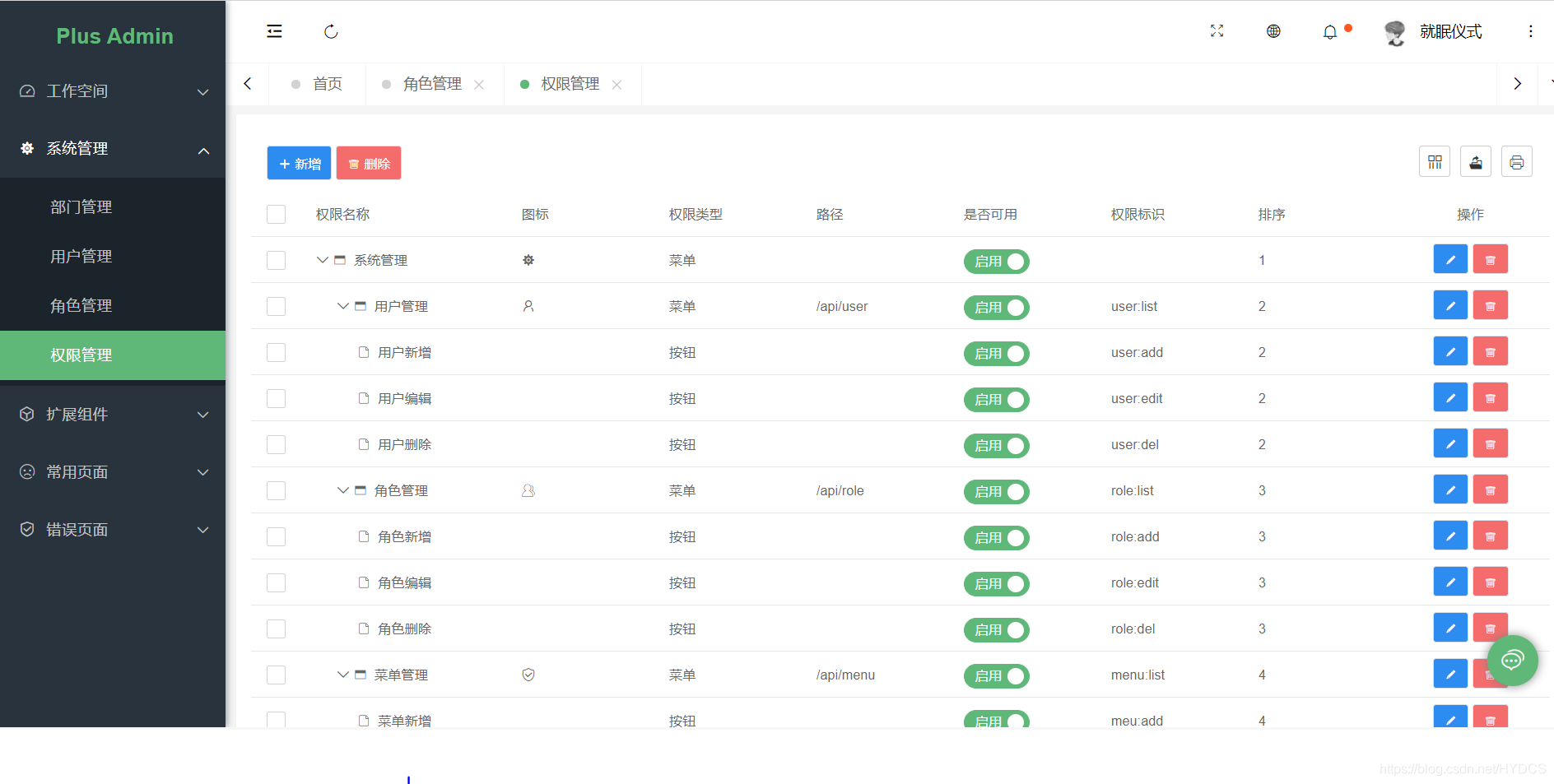
layui的table数据表格的用法可以在layui官网上找到示例,我这里对于前端部分就不详细解释了,因为前端我也不咋会,都是根据别人的代码改了改。
我直接贴上完整的power.html完整代码
<!DOCTYPE html>

<html lang="en" xmlns:th="http://www.thymeleaf.org">

<head>

    <meta charset="UTF-8">

    <title>Title</title>

    <link rel="stylesheet" th:href="@{/PearAdmin/component/layui/css/layui.css}" />

    <link rel="stylesheet" th:href="@{/PearAdmin/admin/css/pearCommon.css}"/>

</head>

<body class="pear-container">

<div class="layui-card">

    <div class="layui-card-body">

        <form class="layui-form" action="">

            <div class="layui-form-item">

                <label class="layui-form-label">菜单标题</label>

                <div class="layui-input-inline">

                    <input type="text" name="name" placeholder="请输入菜单标题" class="layui-input">

                </div>

				<label class="layui-form-label">类型</label>

				<div class="layui-input-inline">

					<select name="type">

					        <option value=""></option>

					        <option value="1">菜单</option>

					        <option value="2">按钮</option>

					      </select>

				</div>

                <button class="pear-btn pear-btn-md pear-btn-primary" lay-submit lay-filter="menu-query">

                    <i class="layui-icon layui-icon-search"></i>

                    查询

                </button>

                <button type="reset" class="pear-btn pear-btn-md">

                    <i class="layui-icon layui-icon-refresh"></i>

                    重置

                </button>

            </div>

        </form>

    </div>

</div>

<div class="layui-card">

    <div class="layui-card-body">

        <table id="power-table" lay-filter="power-table"></table>

    </div>

</div>

<script type="text/html" id="power-toolbar">

    <button class="pear-btn pear-btn-primary pear-btn-md" lay-event="add">

        <i class="layui-icon layui-icon-add-1"></i>

        新增

    </button>

    <button class="pear-btn pear-btn-danger pear-btn-md" lay-event="batchRemove">

        <i class="layui-icon layui-icon-delete"></i>

        删除

    </button>

</script>

<script type="text/html" id="power-bar">

    <button class="pear-btn pear-btn-primary pear-btn-sm" lay-event="edit"><i class="layui-icon layui-icon-edit"></i></button>

    <button class="pear-btn pear-btn-danger pear-btn-sm" lay-event="remove"><i class="layui-icon layui-icon-delete"></i></button>

</script>

<script type="text/html" id="power-type">

    {{#if (d.type == '1') { }}

    <span>菜单</span>

    {{# }else if(d.type == '2'){ }}

    <span>按钮</span>

    {{# } }}

</script>

<script type="text/html" id="power-status">

    <input type="checkbox" name="status" value="{{d.id}}" lay-skin="switch" lay-text="启用|禁用" lay-filter="user-status" checked = "{{ d.id == 10003 ? 'true' : 'false' }}">

</script>

<script type="text/html" id="icon">

    <i class="layui-icon {{d.icon}}"></i>

</script>

<script th:src="@{/PearAdmin/component/layui/layui.js}" charset="utf-8"></script>

<script>

    layui.use(['table','form','jquery','treetable'],function () {

        let table = layui.table;

        let form = layui.form;

        let $ = layui.jquery;

        let treetable = layui.treetable;

        let MODULE_PATH = "operate/";

        window.render = function(){

            treetable.render({

                treeColIndex: 1,

                treeSpid: 0,

                treeIdName: 'powerId',

                treePidName: 'parentId',

                skin:'line',

                method:'post',

                treeDefaultClose: true,

                toolbar:'#power-toolbar',

                elem: '#power-table',

                url: '/api/menu',

                page: false,

                cols: [

                    [

                    {type: 'checkbox'},

                    {field: 'name', minWidth: 200, title: '菜单标题'},

                    {field: 'icon', title: '图标',templet:'#icon'},

                    {field: 'type', title: '类型',templet:'#power-type'},

                    {field: 'url', title: '路径'},

                    {field: 'status', title: '是否可用',templet:'#power-status'},

                    {field: 'permission', title: '权限标识'},

                    {field: 'sort', title: '排序'},

                    {field: 'createTime', title: '创建日期'},

                    {title: '操作',templet: '#power-bar', width: 150, align: 'center'}

                    ]

                ]

            });

        }

        render();

        table.on('tool(power-table)',function(obj){

            if (obj.event === 'remove') {

                window.remove(obj);

            } else if (obj.event === 'edit') {

                window.edit(obj);

            }

        })

        table.on('toolbar(power-table)', function(obj){

            if(obj.event === 'add'){

                window.add();

            } else if(obj.event === 'refresh'){

                window.refresh();

            } else if(obj.event === 'batchRemove'){

                window.batchRemove(obj);

            }

        });

        form.on('submit(menu-query)', function(data){ //模糊查询方法

            var formData = data.field;

            var name = formData.name;

            var type = formData.type;

            table.reload(('power-table'),{ // table重载

                where: {//这里传参  向后台

                    queryName: name,

                    queryType: type

                    //可传多个参数到后台...  ,分隔

                }

                , url: '/api/menu'//后台做模糊搜索接口路径

                , method: 'get'

            });

            return false;

        });

        window.add = function(){

            layer.open({

                type: 2,

                title: '新增',

                shade: 0.1,

                area: ['450px', '500px'],

                content: '/api/menu/add'

            });

        }

        window.edit = function(obj){

            var data = obj.data;

            layer.open({

                type: 2,

                title: '修改',

                shade: 0.1,

                area: ['450px', '500px'],

                content: '/api/menu/edit/?id='+data.id

            });

        }

        window.remove = function(obj){

            var data = obj.data;

            layer.confirm('确定删除吗,如果存在下级节点则一并删除,此操作不能撤销!', {icon: 3, title:'提示'}, function(index){

                layer.close(index);

                let loading = layer.load();

                $.ajax({

                    url: "/api/menu/?id=" + data.id,

                    dataType:'json',

                    type:'delete',

                    success:function(result){

                        layer.close(loading);

                        if(result.success){

                            layer.msg(result.msg,{icon:1,time:1000},function(){

                                obj.del();

                            });

                        }else{

                            layer.msg(result.msg,{icon:2,time:1000});

                        }

                    }

                })

            });

        }

    })

</script>

</body>

</html>
那么首先我们要给的是table的数据,因为考虑到有一个模糊查询返回的数据格式是一样,所以可以合在一起写。
MenuDao新建方法
	 /**

     *

     * @param queryName 查询的表题

     * @param queryType 查询类型

     * @return

     */

    List<MyMenu> getFuzzyMenu(String queryName,Integer queryType);
因为之前在yml中已经配置了mapper.xml的路径是在classpath:/mybatis-mappers/下,所以在resources目录下新建mybatis-mappers文件夹,在其中新建MenuMapper.xml文件。
如果大家不想写一些简单的sql语句,推荐大家使用MybatisPlus或者JPA。MybatisPlus可能还要写一些多表的sql语句,JPA几乎见不到SQL。
<?xml version="1.0" encoding="UTF-8" ?>

<!DOCTYPE mapper

        PUBLIC "-//mybatis.org//DTD Mapper 3.0//EN"

        "http://mybatis.org/dtd/mybatis-3-mapper.dtd">

<mapper namespace="com.codermy.myspringsecurityplus.dao.MenuDao">

    <select id="getFuzzyMenu" resultType="com.codermy.myspringsecurityplus.entity.MyMenu">

        -- 建议大家在写查询语句的时候不要写select * ,可以通过这篇文章了解(https://blog.csdn.net/qq_36101933/article/details/93973266)

        select t.id,t.parent_id,t.name,t.icon,t.url,t.permission,t.sort,t.type,t.create_time,t.update_time

        from my_menu t

        <where>

            <if test="queryName != null and queryName != ''">

                AND t.name like CONCAT('%', #{queryName}, '%')

            </if>

            <if test="queryType != null and queryType != ''">

                AND t.type = #{queryType}

            </if>

        </where>

        order by t.sort

    </select>

</mapper>
这里再给大家安利一款idea的插件Free Mybatis plugin,它的作用就是可以快速通过xml找到mapper,或者mapper找到xml。效果如下图
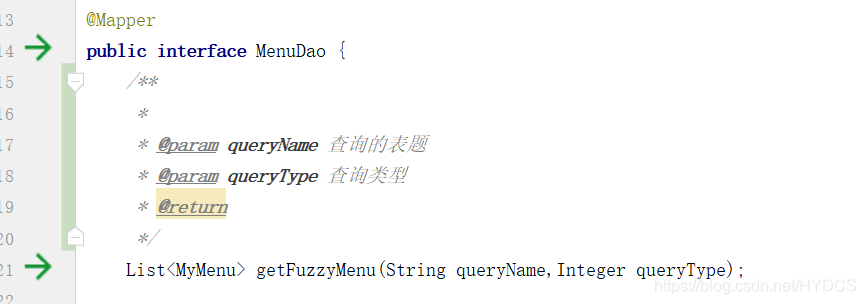
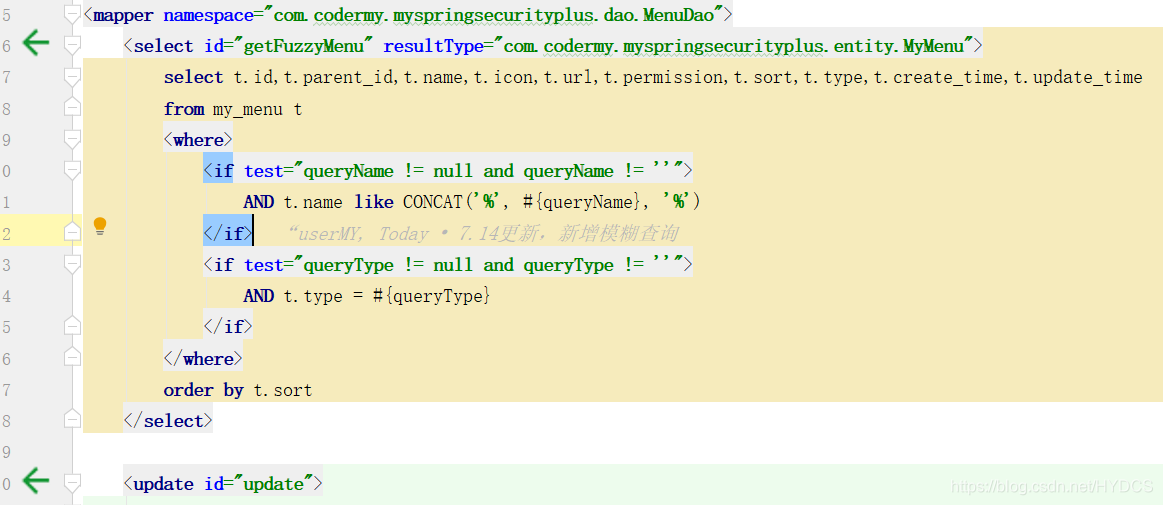
点击箭头就能快速定位到相应方法,非常好用。
然后就是service,impl,controller
/**

 * @author codermy

 * @createTime 2020/7/10

 */

public interface MenuService {

    List<MyMenu> getMenuAll(String queryName,Integer queryType);

}
@Service//别忘了注解

public class MenuServiceImpl implements MenuService {

    @Autowired

    private MenuDao menuDao;

    @Override

    public List<MyMenu> getMenuAll(String queryName,Integer queryType) {

        return menuDao.getFuzzyMenu(queryName,queryType);

    }

}
@Controller

@RequestMapping("/api/menu")

@Api(tags = "系统:菜单管理")

public class MenuController {

    @Autowired

    private MenuService menuService;

    @GetMapping

    @ResponseBody

    @ApiOperation(value = "菜单列表")

    public Result getMenuAll(String queryName,Integer queryType){//这里没选择接收json字符串,前端传参通过/api/menu?queryName=测试的方式

        return Result.ok().data(menuService.getMenuAll(queryName,queryType)).code(ResultCode.TABLE_SUCCESS);

    }

}
前端代码我已经给出来了,重启项目,打开就是那个效果。
这里稍微提一下RestFul风格
- GET :请求从服务器获取特定资源。举个例子:
GET /blog(获取所有博客) - POST :在服务器上创建一个新的资源。举个例子:
POST /blog(新建博客) - PUT :更新服务器上的资源。举个例子:
PUT /blog/12(更新id为 12 的博客) - DELETE :从服务器删除特定的资源。举个例子:
DELETE /blog/12(删除id为 12 的博客)
还有就是不要类似getAllBlog这种,冗余没有意义,形式不固定,不同的开发者还需要了解文档才能调用。
详细看这篇文章
查已经完成了(模糊查询同样是这个接口,在前端页面逻辑已经写好了,里面给了注释),接下来就是增删改了。
MenuDao中添加如下方法
	@Select("select t.id,t.parent_id,t.name,t.icon,t.url,t.permission,t.sort,t.type,t.create_time,t.update_time from my_menu t where t.id = #{id}")

    MyMenu getMenuById(Integer id);

	int update(MyMenu menu);

    @Options(useGeneratedKeys = true, keyProperty = "id")

    @Insert("insert into my_menu(parent_id, name, icon, url, permission, sort, type, create_time, update_time)values(#{parentId}, #{name}, #{icon}, #{url}, #{permission}, #{sort}, #{type}, now(), now())")

    int save(MyMenu menu);

    @Delete("delete from my_menu where id = #{id}")

    int deleteById(Integer id);

    @Delete("delete from my_menu where parent_id = #{parentId}")

    int deleteByParentId(Integer parentId);
MenuMapper.xml中添加
<update id="update">

        update my_menu t

        <set>

            <if test="parentId != null">

                parent_id = #{parentId},

            </if>

            <if test="name != null">

                `name` = #{name},

            </if>

            <if test="icon != null">

                `icon` = #{icon},

            </if>

            <if test="url != null">

                url = #{url},

            </if>

            <if test="permission != null">

                permission = #{permission},

            </if>

            <if test="sort != null">

                sort = #{sort},

            </if>

            <if test="type != null">

                type = #{type},

            </if>

            update_time = #{updateTime}

        </set>

        where t.id = #{id}

    </update>
MapperService
	MyMenu getMenuById(Integer id)

	Result updateMenu(MyMenu menu);

    Result<MyMenu> save(MyMenu menu);

    Result delete(Integer id);
MapperServiceImpl
 	@Override

    public MyMenu getMenuById(Integer id) {

        return menuDao.getMenuById(id);

    }

	@Override

    public Result updateMenu(MyMenu menu) {

        return (menuDao.update(menu) > 0) ? Result.ok().message("修改成功") : Result.error().message("修改失败");

    }

    @Override

    public Result<MyMenu> save(MyMenu menu) {

        return (menuDao.save(menu) > 0) ? Result.ok().message("添加成功") : Result.error().message("添加失败");

    }

	//如果这里删除了菜单树的父节点,把它的子节点一并删除

    @Override

    public Result delete(Integer id) {

        menuDao.deleteById(id);

        menuDao.deleteByParentId(id);

        return Result.ok().message("删除成功");

    }
我的后端逻辑写的不是很完善,比如插入时菜单名是否为空等等,只是在前端写了一些。这样普通用户用是没有什么问题,但是有些别有用心的人直接用你的接口,就会疯狂报错,造成服务器压力。
MenuController中添加
	@GetMapping(value = "/edit")

    @ApiOperation(value = "跳转修改菜单页面")

    public String editPermission(Model model, MyMenu myMenu) {

        model.addAttribute("myMenu",menuService.getMenuById(myMenu.getId()));

        return "system/menu/menu-edit";

    }

    @PutMapping

    @ResponseBody

    @ApiOperation(value = "修改菜单")

    public Result updateMenu(@RequestBody MyMenu menu) {

        return menuService.updateMenu(menu);

    }

    @GetMapping(value = "/add")

    @ApiOperation(value = "跳转添加菜单页面")

    public String addMenu(Model model) {

        model.addAttribute("myMenu",new MyMenu());

        return "system/menu/menu-add";

    }

    @PostMapping

    @ResponseBody

    @ApiOperation(value = "添加菜单")

    public Result<MyMenu> savePermission(@RequestBody MyMenu myMenu) {

        return menuService.save(myMenu);

    }

    //todo 批量删除

    @DeleteMapping

    @ResponseBody

    @ApiOperation(value = "删除菜单")

    public Result deleteMenu(Integer id) {

        return menuService.delete(id);

    }
那么不难发现我们还需要两个页面,分别是menu-add.html和menu-edit.html。
在对应位置创建,我直接给代码
menu-add
<!DOCTYPE html>

<html lang="en"  xmlns:th="http://www.thymeleaf.org">

    <head>

        <meta charset="UTF-8">

        <title>Title</title>

        <link rel="stylesheet" th:href="@{/PearAdmin/component/layui/css/layui.css}" />

        <link rel="stylesheet" th:href="@{/PearAdmin/admin/css/pearCommon.css}"/>

        <link rel="stylesheet" th:href="@{/PearAdmin/admin/css/pear-tree/dtree.css}" />

        <link rel="stylesheet" th:href="@{/PearAdmin/admin/css/pear-tree/font/dtreefont.css}"/>

    </head>

    <body>

        <form class="layui-form" action="">

            <div class="mainBox">

                <div class="main-container">

                    <div class="main-container">

                        <input type="text" id="id" th:value="${myMenu.id}" name="id" style="display:none;" autocomplete="off" class="layui-input">

                        <div class="layui-form-item">

                            <label class="layui-form-label">

                                <span style="color: red">*</span>菜单名

                            </label>

                            <div class="layui-input-block">

                                <input type="text" th:value="${myMenu.name}" name="name" lay-verify="name" autocomplete="off" placeholder="请输入菜单名" class="layui-input">

                            </div>

                        </div>

                        <div class="layui-form-item">

                            <label class="layui-form-label">图标</label>

                            <div class="layui-input-block">

                                <input type="text" id="iconPicker" name="icon" class="hide" th:value="${myMenu.icon}">

                            </div>

                        </div>

                        <div class="layui-form-item">

                            <label class="layui-form-label">路径</label>

                            <div class="layui-input-block">

                                <input type="text"  name="url" th:value="${myMenu.url}" autocomplete="off" class="layui-input">

                            </div>

                        </div>

                        <div class="layui-form-item">

                            <label class="layui-form-label">权限标识</label>

                            <div class="layui-input-block">

                                <input type="text"  name="permission" th:value="${myMenu.permission}" autocomplete="off" class="layui-input">

                            </div>

                        </div>

                        <div class="layui-form-item">

                            <label class="layui-form-label">

                                <span style="color: red">*</span>排序

                            </label>

                            <div class="layui-input-block">

                                <input type="text"  name="sort" th:value="${myMenu.sort}" lay-verify="sort" autocomplete="off" placeholder="请输入排序值" class="layui-input">

                            </div>

                        </div>

                        <div class="layui-form-item">

                            <label class="layui-form-label">类型</label>

                            <div class="layui-input-block">

                                <input type="radio" name="type" value="1" title="菜单"  th:checked="${myMenu.type == 1}? 'true':'false'">

                                <input type="radio" name="type" value="2" title="按钮" th:checked="${myMenu.type == 2}? 'true':'false'">

                            </div>

                        </div>

                        <div class="layui-form-item">

                            <label class="layui-form-label">

                                上级菜单

                            </label>

                            <div class="layui-input-block">

                                <input type="number" id="parentId" th:value="${myMenu.parentId}" name="parentId"  lay-verify="parentId" style="display:none;width: 0px" autocomplete="off" class="layui-input">

                                <ul id="dataTree" class="dtree" data-id="0" th:data-value="${myMenu.parentId}"></ul>

                            </div>

                        </div>

                    </div>

                </div>

            </div>

            <div class="bottom">

                <div class="button-container">

                    <button type="submit" class="layui-btn layui-btn-normal layui-btn-sm" lay-submit="" lay-filter="user-save">

                        <i class="layui-icon layui-icon-ok"></i>

                        提交

                    </button>

                    <button type="reset" class="layui-btn layui-btn-primary layui-btn-sm">

                        <i class="layui-icon layui-icon-refresh"></i>

                        重置

                    </button>

                </div>

            </div>

        </form>

        <script th:src="@{/PearAdmin/component/layui/layui.js}" charset="utf-8"></script>

        <script>

            layui.use(['iconPicker','dtree','form','jquery'],function(){

                let form = layui.form;

                let $ = layui.jquery;

                let dtree = layui.dtree;

                let formDate = null;

                var iconPicker = layui.iconPicker;

                // 初始化树

                dtree.render({

                    elem: "#dataTree",

                    initLevel: "1",

                    width: "100%",

                    method: 'get',

                    dataStyle: "layuiStyle",  //使用layui风格的数据格式

                    response:{message:"msg",statusCode:200},  //修改response中返回数据的定义

                    url: "/api/menu/build",

                    dataFormat: "list",  //配置data的风格为list

                    select: true, //指定下拉树模式

                    selectTips: "不选默认是顶级目录",

                    selectCardHeight: "150"

                });

                iconPicker.render({

                    // 选择器,推荐使用input

                    elem: '#iconPicker',

                    // 数据类型:fontClass/unicode,推荐使用fontClass

                    type: 'fontClass',

                    // 是否开启搜索:true/false,默认true

                    search: true,

                    // 是否开启分页:true/false,默认true

                    page: true,

                    // 每页显示数量,默认12

                    limit: 16,

                    // 点击回调

                    click: function (data) {

                        console.log(data);

                    },

                    // 渲染成功后的回调

                    success: function(d) {

                        console.log(d);

                    }

                });

                var param = dtree.getNowParam("dataTree");

                formDate = $("#parentId");

                dtree.on("node('dataTree')" ,function(obj){

                    var param = dtree.getNowParam("dataTree");

                    $("#parentId").val(param.nodeId);

                    formDate = $("#parentId");

                });

                form.verify({

                    name: function(value){

                        if(value.length < 2){

                            return '菜单名至少2个字符';

                        }

                    },

                    sort:  [

                        /^[1-9]\d*$/

                        ,'只能是整数哦'

                    ]

                });

                form.on('submit(user-save)', function(data){

                    var permissionId = formDate;

                    var bs = data.field.parentId

                    data.field.parentId = Number (bs)

                    var json = JSON.stringify(data.field)

                    $.ajax({

                        url:'/api/menu',

                        data:json,

                        dataType:'json',

                        contentType:'application/json',

                        type:'post',

                        success:function(result){

                            if(result.success){

                                layer.msg(result.msg,{icon:1,time:1000},function(){

                                    parent.layer.close(parent.layer.getFrameIndex(window.name));//关闭当前页

                                    parent.location.reload();

                                });

                            }else{

                                layer.msg(result.msg,{icon:2,time:1000});

                            }

                        }

                    })

                    return false;

                });

            })

        </script>

    </body>

</html>
menu-edit
<!DOCTYPE html>

<html xmlns:th="http://www.thymeleaf.org">

<head>

    <meta charset="UTF-8">

    <title>Title</title>

    <link rel="stylesheet" th:href="@{/PearAdmin/component/layui/css/layui.css}" />

    <link rel="stylesheet" th:href="@{/PearAdmin/admin/css/pearCommon.css}"/>

    <link rel="stylesheet" th:href="@{/PearAdmin/admin/css/pear-tree/dtree.css}" />

    <link rel="stylesheet" th:href="@{/PearAdmin/admin/css/pear-tree/font/dtreefont.css}"/>

</head>

<body>

<form class="layui-form" action="">

    <div class="mainBox">

        <div class="main-container">

            <div class="main-container">

                <input type="text" id="id" th:value="${myMenu.id}" name="id" style="display:none;" autocomplete="off" class="layui-input">

                <div class="layui-form-item">

                    <label class="layui-form-label">

                        <span style="color: red">*</span>菜单名

                    </label>

                    <div class="layui-input-block">

                        <input type="text" th:value="${myMenu.name}" name="name" lay-verify="name" autocomplete="off" placeholder="请输入菜单名" class="layui-input">

                    </div>

                </div>

                <div class="layui-form-item">

                    <label class="layui-form-label">图标</label>

                    <div class="layui-input-block">

                        <input type="text" id="iconPicker" name="icon" class="hide" th:value="${myMenu.icon}">

                    </div>

                </div>

                <div class="layui-form-item">

                    <label class="layui-form-label">路径</label>

                    <div class="layui-input-block">

                        <input type="text"  name="url" th:value="${myMenu.url}" autocomplete="off" class="layui-input">

                    </div>

                </div>

                <div class="layui-form-item">

                    <label class="layui-form-label">权限标识</label>

                    <div class="layui-input-block">

                        <input type="text"  name="permission" th:value="${myMenu.permission}" autocomplete="off" class="layui-input">

                    </div>

                </div>

                <div class="layui-form-item">

                    <label class="layui-form-label">

                        <span style="color: red">*</span>排序

                    </label>

                    <div class="layui-input-block">

                        <input type="text"  name="sort" th:value="${myMenu.sort}" lay-verify="sort" autocomplete="off" placeholder="请输入排序值" class="layui-input">

                    </div>

                </div>

                <div class="layui-form-item">

                    <label class="layui-form-label">类型</label>

                    <div class="layui-input-block">

                        <input type="radio" name="type" value="1" title="菜单"  th:checked="${myMenu.type == 1}? 'true':'false'">

                        <input type="radio" name="type" value="2" title="按钮" th:checked="${myMenu.type == 2}? 'true':'false'">

                    </div>

                </div>

                <div class="layui-form-item">

                    <label class="layui-form-label">

                        上级菜单

                    </label>

                    <div class="layui-input-block">

                        <input type="number" id="parentId" th:value="${myMenu.parentId}" name="parentId"  lay-verify="parentId" style="display:none;width: 0px" autocomplete="off" class="layui-input">

                        <ul id="dataTree" class="dtree" data-id="0" th:data-value="${myMenu.parentId}"></ul>

                    </div>

                </div>

            </div>

        </div>

    </div>

    <div class="bottom">

        <div class="button-container">

            <button type="submit" class="layui-btn layui-btn-normal layui-btn-sm" lay-submit="" lay-filter="user-save">

                <i class="layui-icon layui-icon-ok"></i>

                提交

            </button>

            <button type="reset" class="layui-btn layui-btn-primary layui-btn-sm">

                <i class="layui-icon layui-icon-refresh"></i>

                重置

            </button>

        </div>

    </div>

</form>

<script th:src="@{/PearAdmin/component/layui/layui.js}" charset="utf-8"></script>

<script type="text/javascript">

    layui.use(['iconPicker','dtree','form','jquery'],function(){

        let form = layui.form;

        let $ = layui.jquery;

        let dtree = layui.dtree;

        var iconPicker = layui.iconPicker;

        // 初始化树

        dtree.render({

            elem: "#dataTree",

            initLevel: "1",

            width: "100%",

            method: 'get',

            dataStyle: "layuiStyle",  //使用layui风格的数据格式

            response:{message:"msg",statusCode:200},  //修改response中返回数据的定义

            url: "/api/menu/build",

            dataFormat: "list",  //配置data的风格为list

            select: true, //指定下拉树模式

            selectTips: "不选默认是顶级目录",

            selectCardHeight: "200",

        });

        iconPicker.render({

            // 选择器,推荐使用input

            elem: '#iconPicker',

            // 数据类型:fontClass/unicode,推荐使用fontClass

            type: 'fontClass',

            // 是否开启搜索:true/false,默认true

            search: true,

            // 是否开启分页:true/false,默认true

            page: true,

            // 每页显示数量,默认12

            limit: 12,

            // 点击回调

            click: function (data) {

                console.log(data);

            },

            // 渲染成功后的回调

            success: function(d) {

                console.log(d);

            }

        });

        form.verify({

            name: function(value){

                if(value.length < 2){

                    return '菜单名至少2个字符';

                }

            },

            sort:  [

                /^[1-9]\d*$/

            ,'只能是整数哦'

        ]

    });

        form.on('submit(user-save)', function(data){

            $.ajax({

                url:'/api/menu',

                data:JSON.stringify(data.field),

                dataType:'json',

                contentType:'application/json',

                type:'put',

                success:function(result){

                    if(result.success){

                        layer.msg(result.msg,{icon:1,time:1000},function(){

                            parent.layer.close(parent.layer.getFrameIndex(window.name));//关闭当前页

                            parent.location.reload();//刷新页面

                        });

                    }else{

                        layer.msg(result.msg,{icon:2,time:1000});

                    }

                }

            })

            return false;

        });

    })

</script>

<script type="text/javascript">

</script>

</body>

</html>
重启项目,访问一下
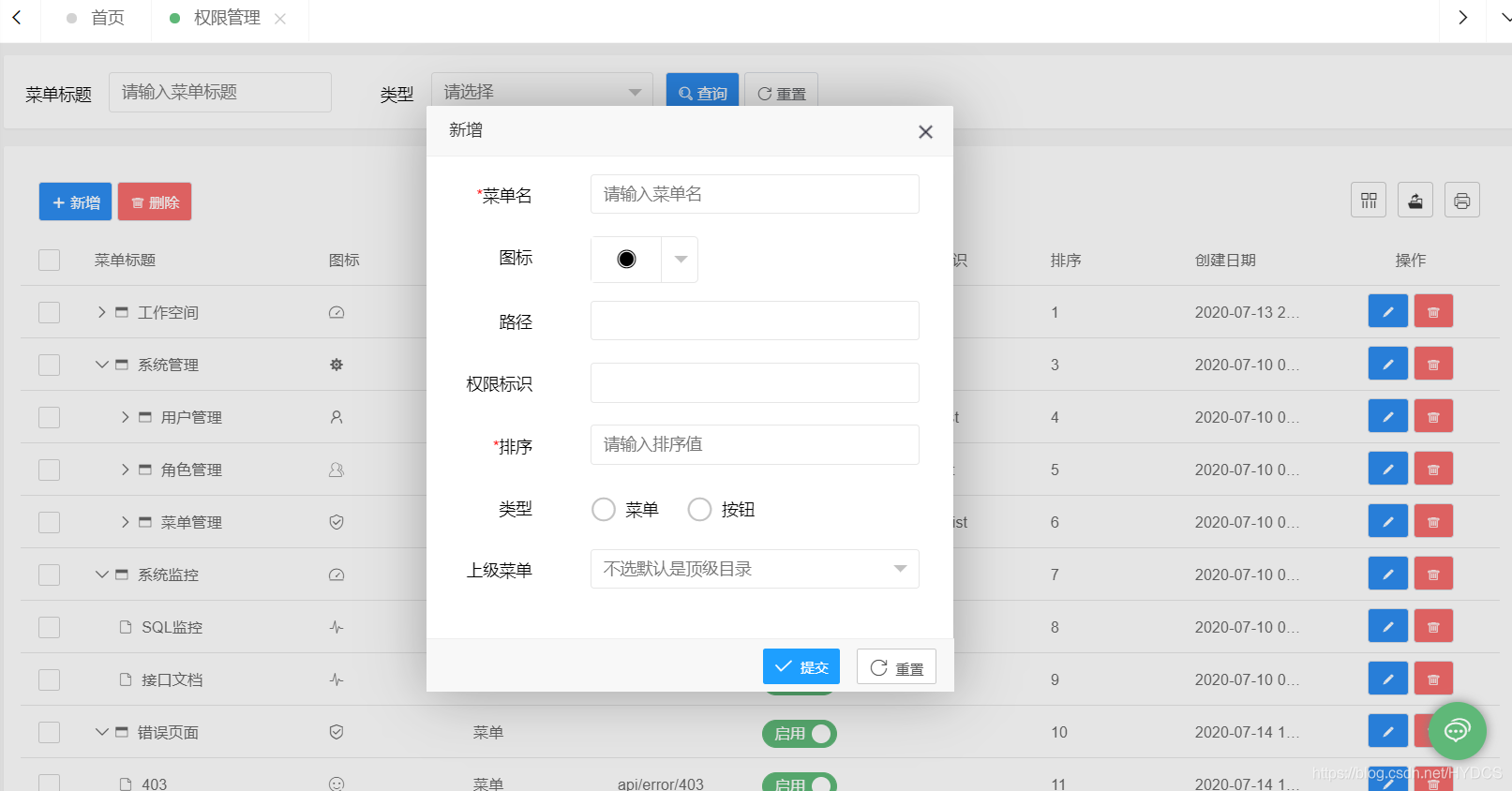
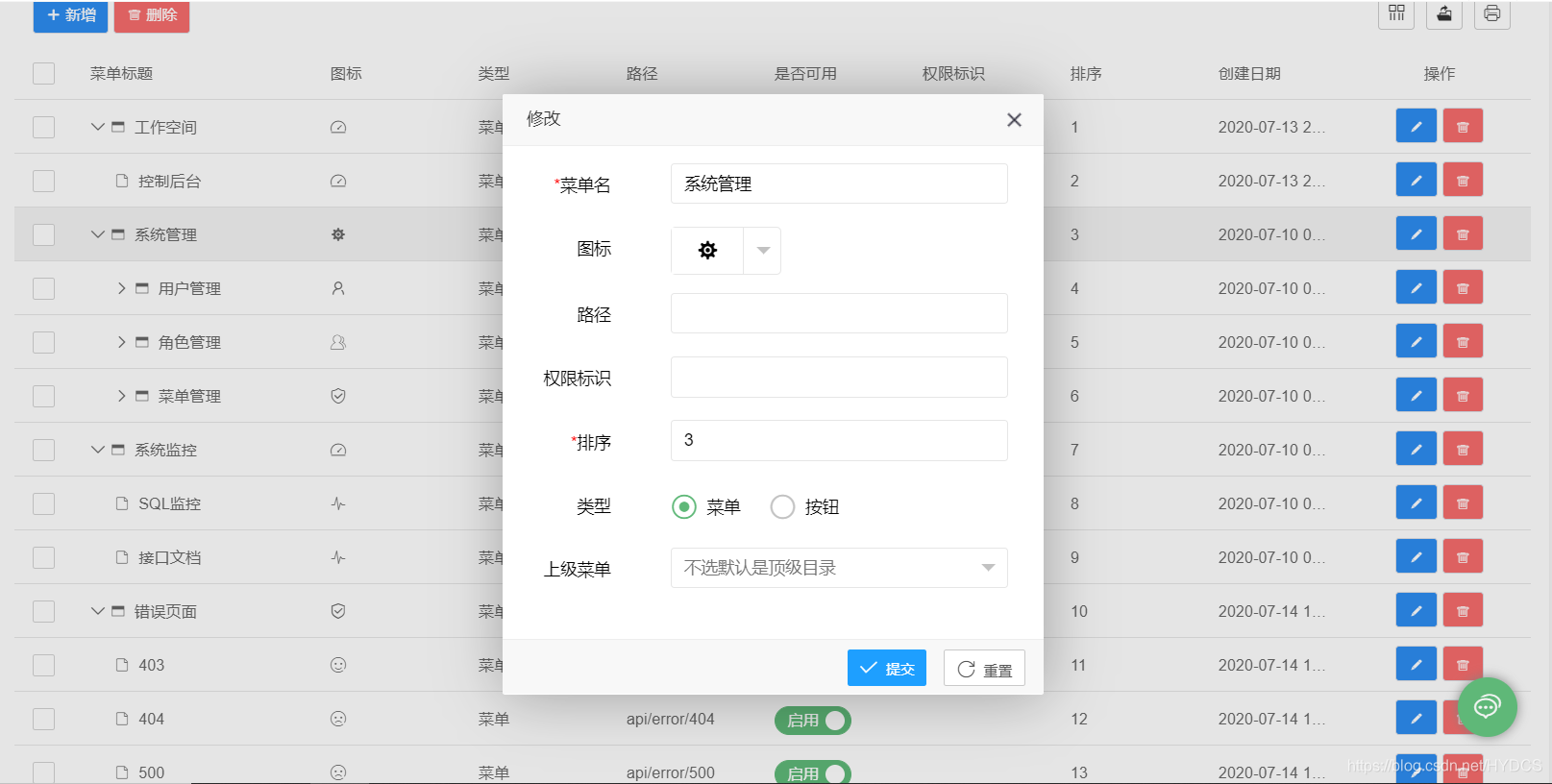
这里的修改是通过model传来的数据,.通过getMenuById方法返回数据存入model,通过Thymeleaf模板引擎放入指定位置。这里批量删除的功能尚未实现,有兴趣的同学可以自己实现。
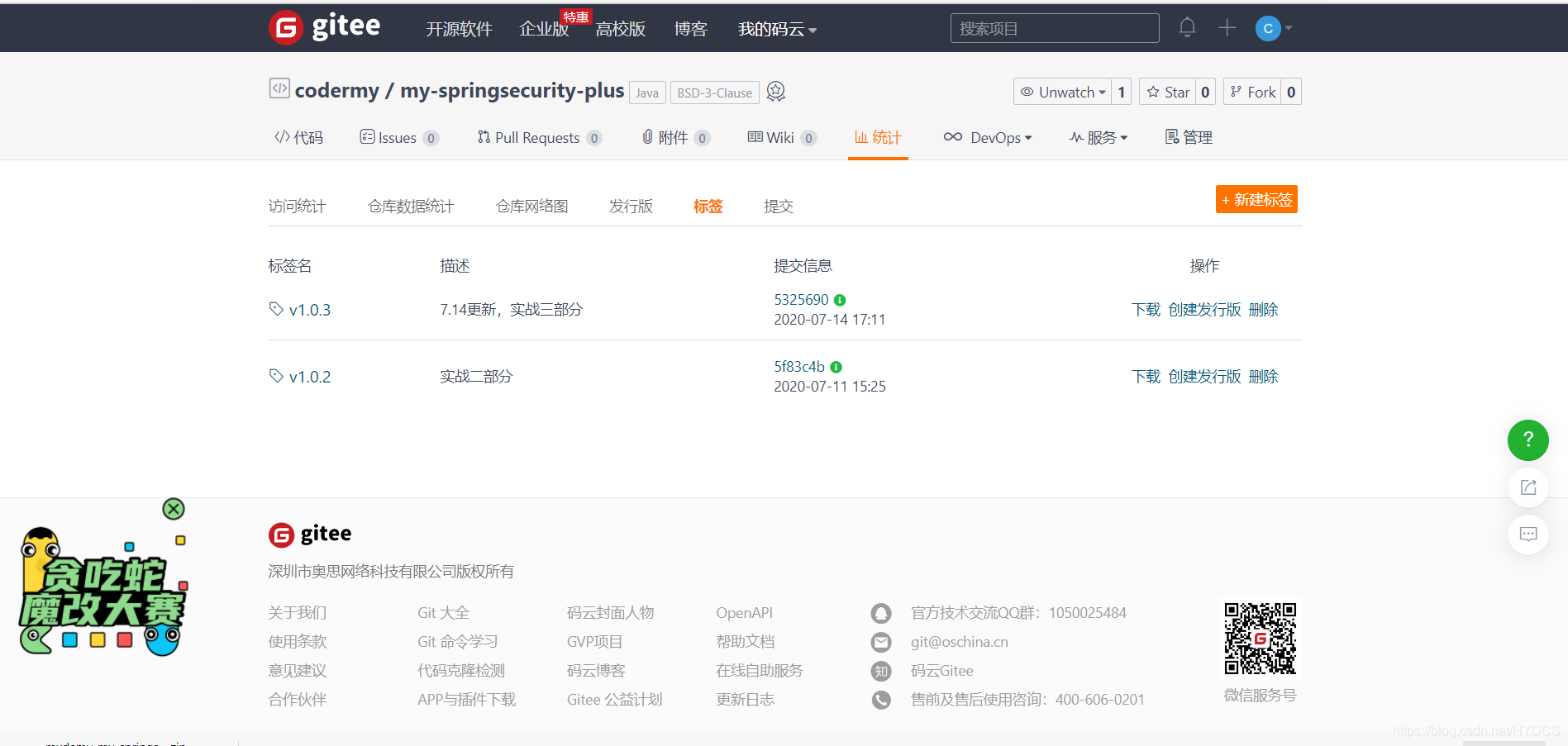
这样我们这个页面基本就完成了,接下来的页面基本都是一个套路。我就不贴全部的代码了,挑其中部分来说说,全部的代码可以在gitee和github中获取,我已经按照每篇文章的进度添加tag,如果哪个部分没出来的同学可以直接下载哪个部分.。
二、角色页面
这个部分主要是有个菜单树,PearAdmin是选用的dtree来实现的。详细用法请看官网 (我认为很全面了,基本的用法都能找到示例)
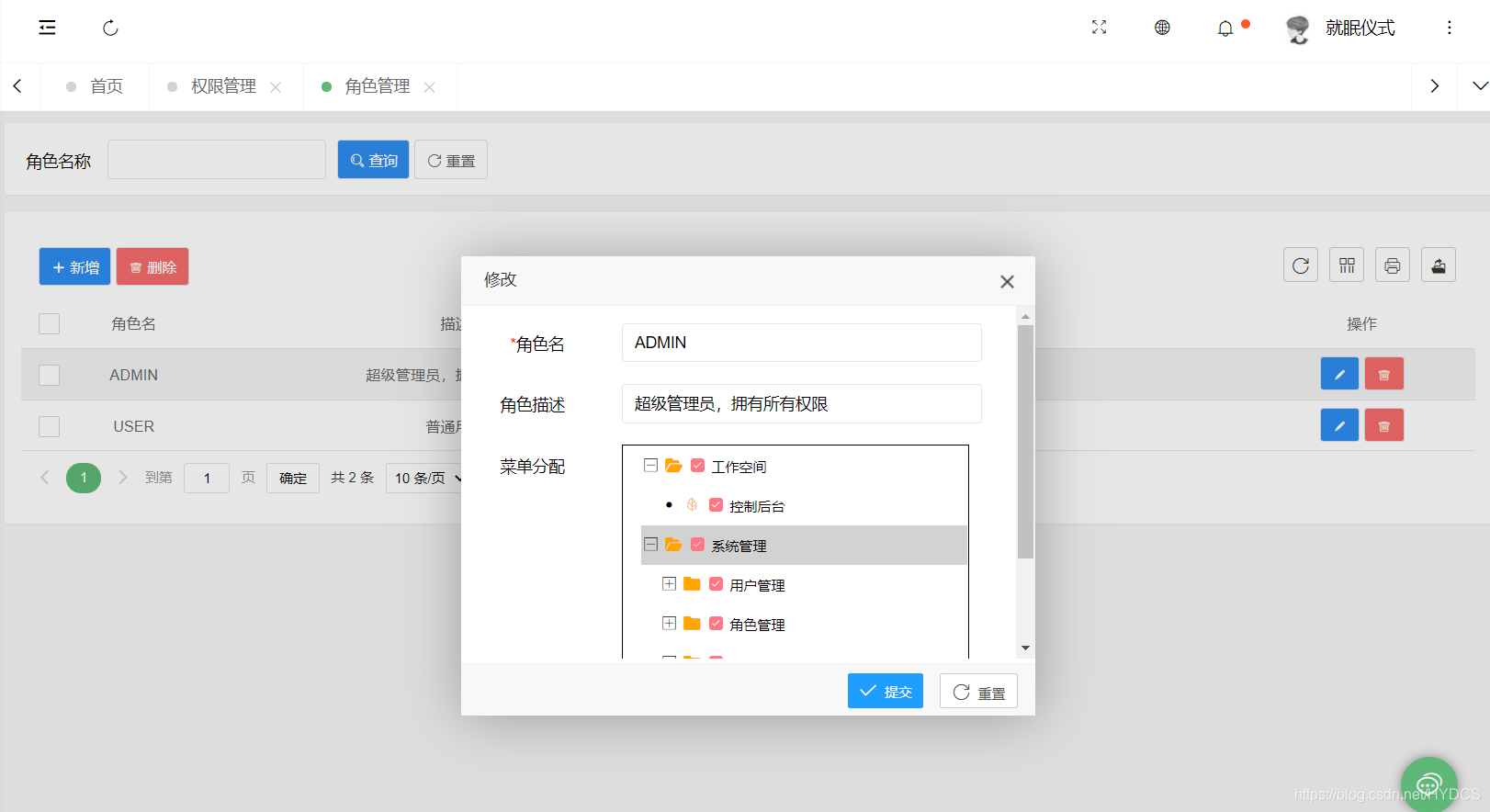
主要就是这个菜单树的数据怎么传,在dtree官网上可以看到开启复选框需要json中有个checkArr值,为0是未选中,1是选中。
那么我们新建一个MenuDto,来封装一下我们需要的参数
@Data

public class MenuDto implements Serializable {

    private Integer id;

    private Integer parentId;

    private String checkArr = "0";

    private String title;

}
在MenuDao中添加如下方法
	@Select("select 					t.id,t.parent_id,t.name,t.icon,t.url,t.permission,t.sort,t.type,t.create_time,t.update_time from my_menu t where t.id = #{id}")

    MyMenu getMenuById(Integer id);

	@Select("select p.id,p.parent_id,p.name from my_menu p inner join my_role_menu rp on p.id = rp.menu_id where rp.role_id = #{roleId}")

    @Result(property = "title",column = "name")

    List<MenuDto> listByRoleId(Integer roleId);
MenuServiceImpl中
 @Override

    public List<MenuDto> buildMenuAllByRoleId(Integer roleId) {

        List<MenuDto> listByRoleId = menuDao.listByRoleId(roleId);

        List<MenuDto> permissionDtos = menuDao.buildAll();

        List<MenuDto> tree = TreeUtil.tree(listByRoleId, permissionDtos);

        return tree;

    }
这里我写了一个TreeUtil工具类
public class TreeUtil {

    //todo 判断list是否为空

     /**

     *

     * @param listByRoleId 通过角色id查询的menuid

     * @param menuDtos 返回的menutree

     * @return

     */

    public static List<MenuDto> tree(List<MenuDto> listByRoleId, List<MenuDto> menuDtos ){

        List<Integer> collect = listByRoleId.stream().map(MenuDto::getId).collect(Collectors.toList());

        List<Integer> collect1 = menuDtos.stream().map(MenuDto::getId).collect(Collectors.toList());

        for (Integer item : collect) {// 遍历list2

            if (collect1.contains(item)) {// 如果存在这个数

                MenuDto menuDto = new MenuDto();

                menuDto = menuDtos.get(item-1);

                menuDto.setCheckArr("1");

                menuDtos.set(item-1,menuDto);

            }

        }

        return menuDtos;

    }

}
这个工具类的作用就是通过角色id查询这个角色所拥有的菜单id,然后再查出所有的菜单id,把他们比较,如果这其中有重复的菜单id,就把这个id对应的MenuDto对象里的checkArr换成1。我这个方法可能会有点绕,如果有小伙伴有更好的方法,欢迎留言告诉我。
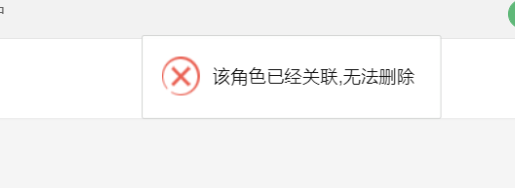
然后这个页面的有需要注意的部分,就是再删除角色时,要先查询是否已经有用户是这个角色了,如果有就不能删除
三、用户界面

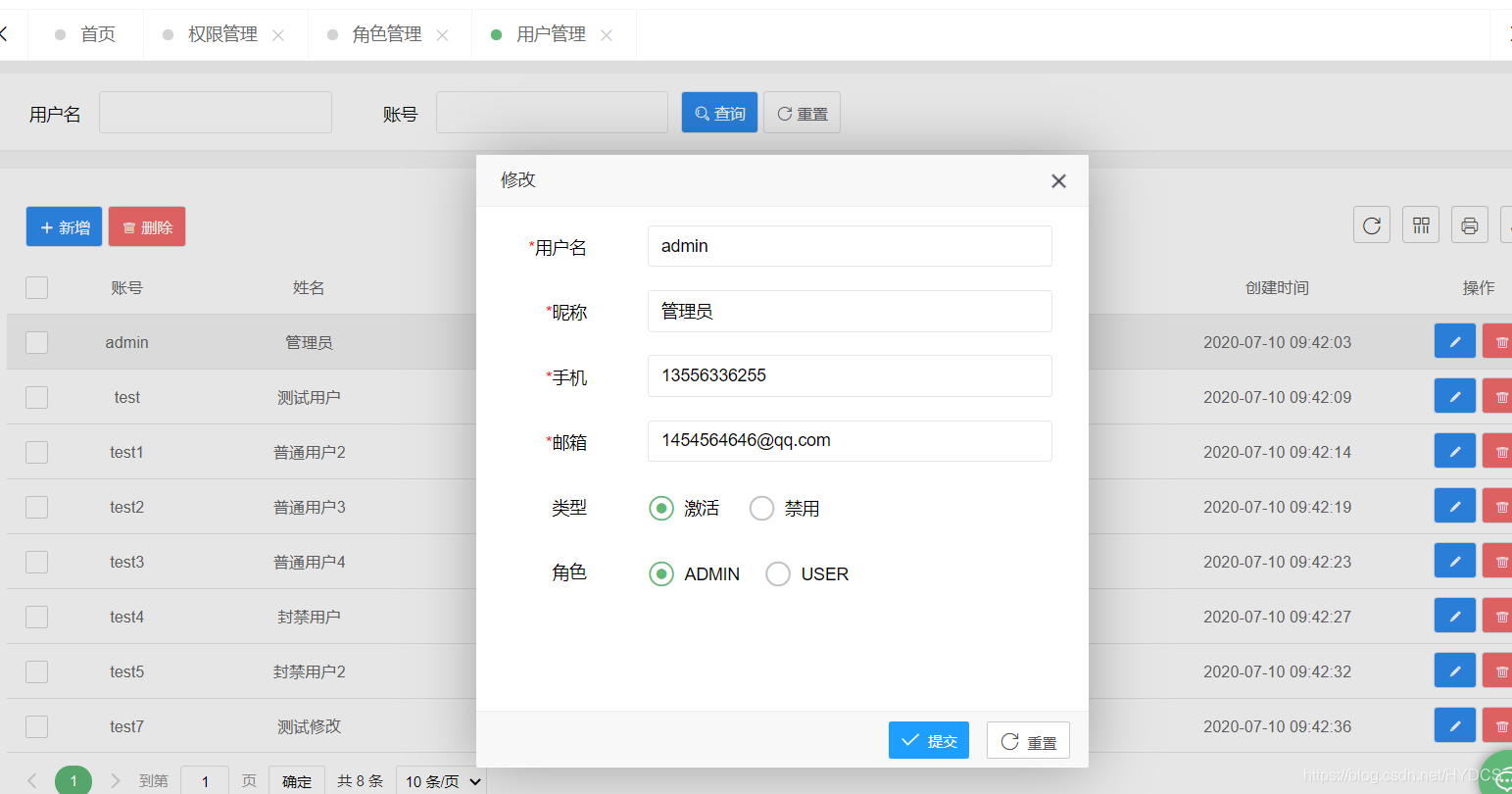
这里无非也就是一些增删改查,要写的完善点的话也就是新增用户时手机号是否能相同等等。我这里新增用户时,会给他一个默认的密码123456
  	@PostMapping

    @ResponseBody

    @ApiOperation(value = "添加用户")

    public Result<MyUser> saveUser(@RequestBody UserDto userDto){

        MyUser myUser = null;

        myUser = userService.getUserByPhone(userDto.getPhone());

        if(myUser !=null && !(myUser.getId().equals(userDto.getId())) ){

            return Result.error().code(20001).message("手机号已存在");

        }

        userDto.setPassword(MD5.crypt("123456"));

        return userService.save(userDto,userDto.getRoleId());

    }
目前用的时MD5的加密,但是这种密码仅仅是加密了,相对而言会安全一些,但是如果两个用户的密码是一样的那么他们加密后的密码也是一样的。那么这其实也有办法解决,就是给密码加盐,加盐就是给密码再加一个值,这样即使不同用户的相同的密码在加密后也会不同。详细解释。之后会基于SpringSecurity的BCryptPasswordEncoder()方法进行加密,此方法自带盐。
那么这个部分的代码就完成了,下一章正式进入SpringSecurity部分。
如果有同学不想写前面部分,可以直接在gitee和github中下载v1.03的tag,里面是到本篇文章结束的所有代码。
注意: 里面的是sql没有更新,需要重新在仓库中下载。
SpringSecurity权限管理系统实战—三、主要页面及接口实现的更多相关文章
- SpringSecurity权限管理系统实战—二、日志、接口文档等实现
系列目录 SpringSecurity权限管理系统实战-一.项目简介和开发环境准备 SpringSecurity权限管理系统实战-二.日志.接口文档等实现 SpringSecurity权限管理系统实战 ...
- SpringSecurity权限管理系统实战—一、项目简介和开发环境准备
目录 SpringSecurity权限管理系统实战-一.项目简介和开发环境准备 SpringSecurity权限管理系统实战-二.日志.接口文档等实现 SpringSecurity权限管理系统实战-三 ...
- SpringSecurity权限管理系统实战—四、整合SpringSecurity(上)
目录 SpringSecurity权限管理系统实战-一.项目简介和开发环境准备 SpringSecurity权限管理系统实战-二.日志.接口文档等实现 SpringSecurity权限管理系统实战-三 ...
- SpringSecurity权限管理系统实战—六、SpringSecurity整合jwt
目录 SpringSecurity权限管理系统实战-一.项目简介和开发环境准备 SpringSecurity权限管理系统实战-二.日志.接口文档等实现 SpringSecurity权限管理系统实战-三 ...
- SpringSecurity权限管理系统实战—七、处理一些问题
目录 SpringSecurity权限管理系统实战-一.项目简介和开发环境准备 SpringSecurity权限管理系统实战-二.日志.接口文档等实现 SpringSecurity权限管理系统实战-三 ...
- SpringSecurity权限管理系统实战—八、AOP 记录用户、异常日志
目录 SpringSecurity权限管理系统实战-一.项目简介和开发环境准备 SpringSecurity权限管理系统实战-二.日志.接口文档等实现 SpringSecurity权限管理系统实战-三 ...
- SpringSecurity权限管理系统实战—九、数据权限的配置
目录 SpringSecurity权限管理系统实战-一.项目简介和开发环境准备 SpringSecurity权限管理系统实战-二.日志.接口文档等实现 SpringSecurity权限管理系统实战-三 ...
- SpringSecurity权限管理系统实战—五、整合SpringSecurity(下)
系列目录 前言 上篇文章SpringSecurity整合了一半,这次把另一半整完,所以本篇的序号接着上一篇. 七.自定义用户信息 前面我们登录都是用的指定的用户名和密码或者是springsecurit ...
- Spring Cloud实战: 基于Spring Cloud Gateway + vue-element-admin 实现的RBAC权限管理系统,实现网关对RESTful接口方法权限和自定义Vue指令对按钮权限的细粒度控制
一. 前言 信我的哈,明天过年. 这应该是农历年前的关于开源项目 的最后一篇文章了. 有来商城 是基于 Spring Cloud OAuth2 + Spring Cloud Gateway + JWT ...
随机推荐
- 题解 洛谷 P6640 【[BJOI2020] 封印】
设\(lenth_i\)为\(s\)在\(i\)位置的前缀的后缀为\(t\)的一个子串的最长长度,即为从\(i\)位置开始往前和\(t\)的最长公共子串长度.其可以通过对\(t\)建后缀自动机,然后让 ...
- Zookeeper ----- ZAB算法
介绍 Zookeeper没有使用Paxos实现,而是使用ZAB(Zookeeper原子消息广播协议)作为数据一致性的核心算法. ZAB是一种专为Zookeeper设计的支持崩溃恢复的原子广播协议. Z ...
- Python3的一些基本输入输出
# python3 # 基本输入输出 #学会使用split()的使用是关键,input()的返回值一定是字符类型 .-.-.-.-.-.-.-.-.-.-.-.-.-.-.-.-.-.-.-.-.-. ...
- Spring bean初始化
- ELK5.6.4+Redis+Filebeat+Nginx(CentOS7.4)
下载地址: Elasticsearhc: https://artifacts.elastic.co/downloads/elasticsearch/elasticsearch-5.6.4.tar.gz ...
- ken桑带你读源码 之scrapy scrapy\extensions
logstats.py 爬虫启动时 打印抓取网页数 item数 memdebug.py 爬虫结束 统计还被引用的内存 也就是说gc 回收不了的内存 memusage.py 监控爬虫 内存占用 ...
- KMP算法图解
字符串匹配是计算机的基本任务之一. 举例来说,有一个字符串"BBC ABCDAB ABCDABCDABDE",我想知道,里面是否包含另一个字符串"ABCDABD" ...
- Python os.lchown() 方法
概述 os.lchown() 方法用于更改文件所有者,类似 chown,但是不追踪链接.高佣联盟 www.cgewang.com 只支持在 Unix 下使用. 语法 lchown()方法语法格式如下: ...
- PHP linkinfo() 函数
定义和用法 linkinfo() 函数返回有关一个硬连接的信息. 该函数返回设备 ID,如果失败则返回 FALSE. 语法 linkinfo(path) 参数 描述 path 必需.规定要检查的路径. ...
- 安装ElasticSearch遇到的深坑
实验需要ES,安装过程中遇到一些奇葩的问题,记录下.下面介绍下安装步骤: 第一步:安装java ES是运行在java虚拟机上面的,所以首先需要安装java环境,安装过程不再赘述,唯一需要注意的是ES对 ...