
SpringMVC执行流程源码分析
SpringMVC执行流程源码分析
我们先来看张图片,帮助我们理解整个流程
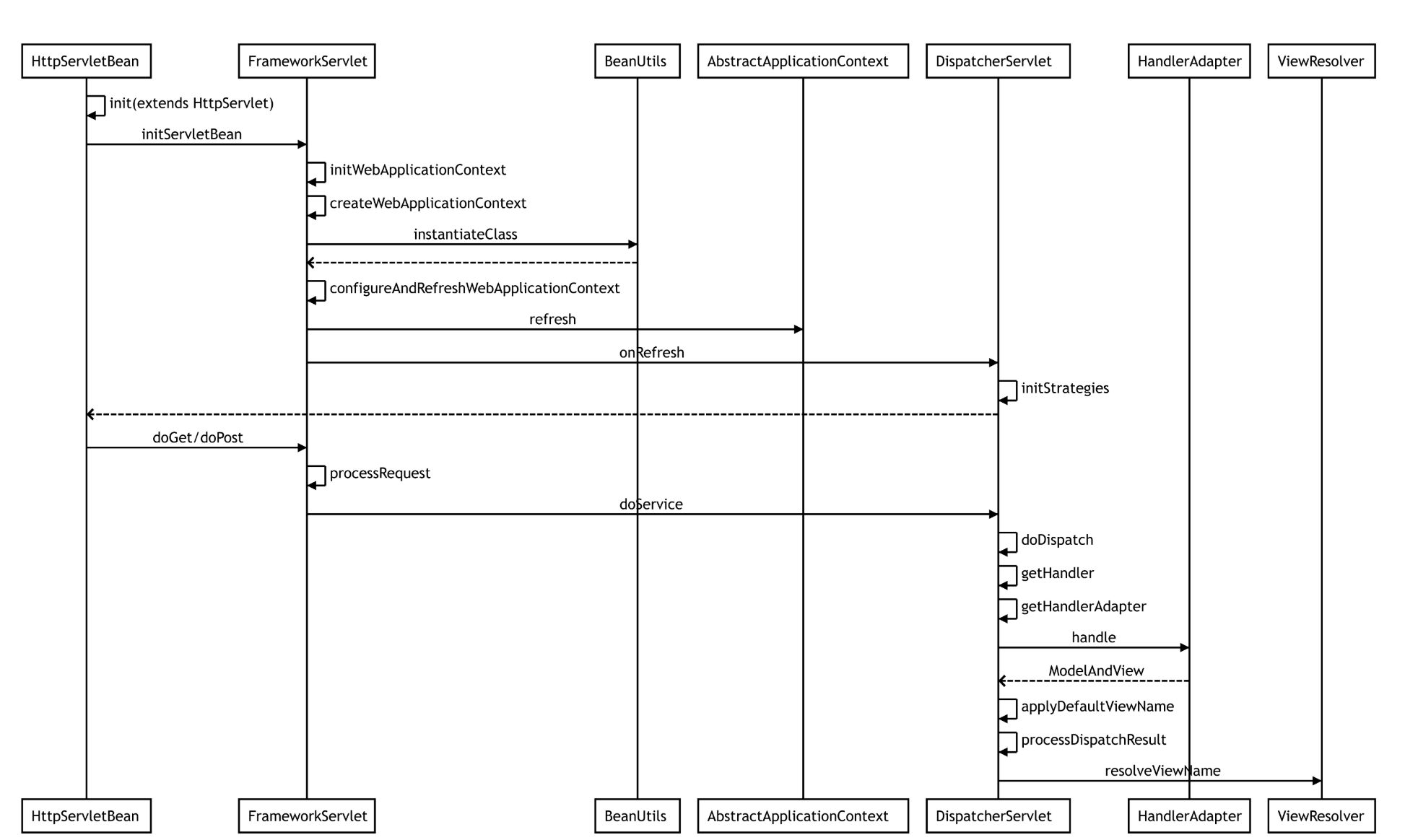
然后我们开始来解析
首先SpringMVC基于Servlet来运行 那么我们首先来看HttpServletBean这个类 他继承HttpServlet,所以这个HttpServletBean为一个Servlet,我们直接看Init方法,因为init方法在Servlet初始化的时候会执行的一个方法
public final void init() throws ServletException {

   if (logger.isDebugEnabled()) {

      logger.debug("Initializing servlet '" + getServletName() + "'");

   }

   // 在Web.xml中读取配置文件.

   PropertyValues pvs = new ServletConfigPropertyValues(getServletConfig(), this.requiredProperties);

   if (!pvs.isEmpty()) {

      try {

          //通过BeanWrapper代理器创建DispatcherServlet

         BeanWrapper bw = PropertyAccessorFactory.forBeanPropertyAccess(this);

         ResourceLoader resourceLoader = new ServletContextResourceLoader(getServletContext());

         bw.registerCustomEditor(Resource.class, new ResourceEditor(resourceLoader, getEnvironment()));

         initBeanWrapper(bw);

        //设置DispatcherServlet属性

         bw.setPropertyValues(pvs, true);

      }

      catch (BeansException ex) {

         if (logger.isErrorEnabled()) {

            logger.error("Failed to set bean properties on servlet '" + getServletName() + "'", ex);

         }

         throw ex;

      }

   }

   // 该类为空实现,由他的子类实现也就是FrameworkServlet

   initServletBean();

   if (logger.isDebugEnabled()) {

      logger.debug("Servlet '" + getServletName() + "' configured successfully");

   }

}
那我们来看FrameworkServlet里的实现
protected final void initServletBean() throws ServletException {

   getServletContext().log("Initializing Spring FrameworkServlet '" + getServletName() + "'");

   if (this.logger.isInfoEnabled()) {

      this.logger.info("FrameworkServlet '" + getServletName() + "': initialization started");

   }

   long startTime = System.currentTimeMillis();

   try {

      this.webApplicationContext = initWebApplicationContext();

      initFrameworkServlet();

   }

   catch (ServletException ex) {

      this.logger.error("Context initialization failed", ex);

      throw ex;

   }

   catch (RuntimeException ex) {

      this.logger.error("Context initialization failed", ex);

      throw ex;

   }

   if (this.logger.isInfoEnabled()) {

      long elapsedTime = System.currentTimeMillis() - startTime;

      this.logger.info("FrameworkServlet '" + getServletName() + "': initialization completed in " +

            elapsedTime + " ms");

   }

}
this.webApplicationContext = initWebApplicationContext();
可以看到在这里进行webApplicationContext的初始化,initFrameworkServlet()也可也为空方法,此方法将在设置任何bean属性之后调用,已加载WebApplicationContext,默认实现为空,子类可以覆盖此方法来执行它们需要的任何初始化.
我们点进initWebApplicationContext详细来看
protected WebApplicationContext initWebApplicationContext() {

   WebApplicationContext rootContext =

         WebApplicationContextUtils.getWebApplicationContext(getServletContext());

   WebApplicationContext wac = null;

   if (this.webApplicationContext != null) {

      // A context instance was injected at construction time -> use it

      wac = this.webApplicationContext;

      if (wac instanceof ConfigurableWebApplicationContext) {

         ConfigurableWebApplicationContext cwac = (ConfigurableWebApplicationContext) wac;

         if (!cwac.isActive()) {

            // The context has not yet been refreshed -> provide services such as

            // setting the parent context, setting the application context id, etc

            if (cwac.getParent() == null) {

               // The context instance was injected without an explicit parent -> set

               // the root application context (if any; may be null) as the parent

               cwac.setParent(rootContext);

            }

            configureAndRefreshWebApplicationContext(cwac);

         }

      }

   }

   if (wac == null) {

      // No context instance was injected at construction time -> see if one

      // has been registered in the servlet context. If one exists, it is assumed

      // that the parent context (if any) has already been set and that the

      // user has performed any initialization such as setting the context id

      wac = findWebApplicationContext();

   }

   if (wac == null) {

      // No context instance is defined for this servlet -> create a local one

      wac = createWebApplicationContext(rootContext);

   }

   if (!this.refreshEventReceived) {

      // Either the context is not a ConfigurableApplicationContext with refresh

      // support or the context injected at construction time had already been

      // refreshed -> trigger initial onRefresh manually here.

      onRefresh(wac);

   }

   if (this.publishContext) {

      // Publish the context as a servlet context attribute.

      String attrName = getServletContextAttributeName();

      getServletContext().setAttribute(attrName, wac);

      if (this.logger.isDebugEnabled()) {

         this.logger.debug("Published WebApplicationContext of servlet '" + getServletName() +

               "' as ServletContext attribute with name [" + attrName + "]");

      }

   }

   return wac;

}
可以看到这里有个 onRefresh(wac);方法 他就是初始化我们SpringMVC的九大组件 他在DispatcherServlet核心类里,等会我们在细说,我们继续看这里有个createWebApplicationContext方法创建实例
protected WebApplicationContext createWebApplicationContext(ApplicationContext parent) {

   Class<?> contextClass = getContextClass();

   if (this.logger.isDebugEnabled()) {

      this.logger.debug("Servlet with name '" + getServletName() +

            "' will try to create custom WebApplicationContext context of class '" +

            contextClass.getName() + "'" + ", using parent context [" + parent + "]");

   }

   if (!ConfigurableWebApplicationContext.class.isAssignableFrom(contextClass)) {

      throw new ApplicationContextException(

            "Fatal initialization error in servlet with name '" + getServletName() +

            "': custom WebApplicationContext class [" + contextClass.getName() +

            "] is not of type ConfigurableWebApplicationContext");

   }

   ConfigurableWebApplicationContext wac =

         (ConfigurableWebApplicationContext) BeanUtils.instantiateClass(contextClass);

   wac.setEnvironment(getEnvironment());

   wac.setParent(parent);

   wac.setConfigLocation(getContextConfigLocation());

   //刷新并配置web应用上下文

   configureAndRefreshWebApplicationContext(wac);

   return wac;
ConfigurableWebApplicationContext wac = (ConfigurableWebApplicationContext) BeanUtils.instantiateClass(contextClass);
可以看到通过反射实例化Web上下文,我们继续来看configureAndRefreshWebApplicationContext(wac);
protected void configureAndRefreshWebApplicationContext(ConfigurableWebApplicationContext wac) {

   if (ObjectUtils.identityToString(wac).equals(wac.getId())) {

      // The application context id is still set to its original default value

      // -> assign a more useful id based on available information

      if (this.contextId != null) {

         wac.setId(this.contextId);

      }

      else {

         // Generate default id...

         wac.setId(ConfigurableWebApplicationContext.APPLICATION_CONTEXT_ID_PREFIX +

               ObjectUtils.getDisplayString(getServletContext().getContextPath()) + '/' + getServletName());

      }

   }

   wac.setServletContext(getServletContext());

   wac.setServletConfig(getServletConfig());

   wac.setNamespace(getNamespace());

   wac.addApplicationListener(new SourceFilteringListener(wac, new ContextRefreshListener()));

   // The wac environment's #initPropertySources will be called in any case when the context

   // is refreshed; do it eagerly here to ensure servlet property sources are in place for

   // use in any post-processing or initialization that occurs below prior to #refresh

   ConfigurableEnvironment env = wac.getEnvironment();

   if (env instanceof ConfigurableWebEnvironment) {

      ((ConfigurableWebEnvironment) env).initPropertySources(getServletContext(), getServletConfig());

   }

   postProcessWebApplicationContext(wac);

   applyInitializers(wac);

   wac.refresh();

}
我们注意最后一个调用方法 wac.refresh(); 在这里面可以看到IOC的初始化流程 。我们现在继续回到刚刚说的onRefresh他没有实现 而让他的子类DispatchServlet实现
//DispatchServlet

protected void onRefresh(ApplicationContext context) {

   initStrategies(context);

}
protected void initStrategies(ApplicationContext context) {

    // 初始化文件上传处理

   initMultipartResolver(context);

   //初始化本地化处理

   initLocaleResolver(context);

   //初始化主题处理

   initThemeResolver(context);

  // 初始化处理器映射器(用来保存controller中配置的RequestMapping与Method对应关系)

   initHandlerMappings(context);

   // 初始化处理器适配器(用来动态匹配Method参数 包括类转换 动态赋值)

   initHandlerAdapters(context);

  // 初始化处理器异常处理

   initHandlerExceptionResolvers(context);

  // 初始化请求至视图名转换

   initRequestToViewNameTranslator(context);

  // 初始化视图解析器

   initViewResolvers(context);

  // 初始化flash映射管理器

   initFlashMapManager(context);

}
我们再来看DispatcherServlet的配置文件DispatcherServlet.properties
org.springframework.web.servlet.LocaleResolver=org.springframework.web.servlet.i18n.AcceptHeaderLocaleResolver

org.springframework.web.servlet.ThemeResolver=org.springframework.web.servlet.theme.FixedThemeResolver

org.springframework.web.servlet.HandlerMapping=org.springframework.web.servlet.handler.BeanNameUrlHandlerMapping,\

   org.springframework.web.servlet.mvc.annotation.DefaultAnnotationHandlerMapping

org.springframework.web.servlet.HandlerAdapter=org.springframework.web.servlet.mvc.HttpRequestHandlerAdapter,\

   org.springframework.web.servlet.mvc.SimpleControllerHandlerAdapter,\

   org.springframework.web.servlet.mvc.annotation.AnnotationMethodHandlerAdapter

org.springframework.web.servlet.HandlerExceptionResolver=org.springframework.web.servlet.mvc.annotation.AnnotationMethodHandlerExceptionResolver,\

   org.springframework.web.servlet.mvc.annotation.ResponseStatusExceptionResolver,\

   org.springframework.web.servlet.mvc.support.DefaultHandlerExceptionResolver

org.springframework.web.servlet.RequestToViewNameTranslator=org.springframework.web.servlet.view.DefaultRequestToViewNameTranslator

org.springframework.web.servlet.ViewResolver=org.springframework.web.servlet.view.InternalResourceViewResolver

org.springframework.web.servlet.FlashMapManager=org.springframework.web.servlet.support.SessionFlashMapManager
这个是DispatcherServlet策略接口的默认实现类。
那我们再捋一次执行过程,我们回到FrameworkServlet 比如用户在前台发送一个请求POST或GET,会调用 FrameworkServlet的doPost/doGet方法,这里以 post请求为例
protected final void doPost(HttpServletRequest request, HttpServletResponse response)

      throws ServletException, IOException {

   processRequest(request, response);

}
protected final void processRequest(HttpServletRequest request, HttpServletResponse response)

      throws ServletException, IOException {

   long startTime = System.currentTimeMillis();

   Throwable failureCause = null;

   LocaleContext previousLocaleContext = LocaleContextHolder.getLocaleContext();

   LocaleContext localeContext = buildLocaleContext(request);

   RequestAttributes previousAttributes = RequestContextHolder.getRequestAttributes();

   ServletRequestAttributes requestAttributes = buildRequestAttributes(request, response, previousAttributes);

   WebAsyncManager asyncManager = WebAsyncUtils.getAsyncManager(request);

   asyncManager.registerCallableInterceptor(FrameworkServlet.class.getName(), new RequestBindingInterceptor());

   initContextHolders(request, localeContext, requestAttributes);

   try {

     //执行请求

      doService(request, response);

   }

   catch (ServletException ex) {

      failureCause = ex;

      throw ex;

   }

   catch (IOException ex) {

      failureCause = ex;

      throw ex;

   }

   catch (Throwable ex) {

      failureCause = ex;

      throw new NestedServletException("Request processing failed", ex);

   }

   finally {

      resetContextHolders(request, previousLocaleContext, previousAttributes);

      if (requestAttributes != null) {

         requestAttributes.requestCompleted();

      }

      if (logger.isDebugEnabled()) {

         if (failureCause != null) {

            this.logger.debug("Could not complete request", failureCause);

         }

         else {

            if (asyncManager.isConcurrentHandlingStarted()) {

               logger.debug("Leaving response open for concurrent processing");

            }

            else {

               this.logger.debug("Successfully completed request");

            }

         }

      }

      publishRequestHandledEvent(request, response, startTime, failureCause);

   }

}
我们点进doService(request, response);这时又到我们的DispatcherServlet类
protected void doService(HttpServletRequest request, HttpServletResponse response) throws Exception {

   if (logger.isDebugEnabled()) {

      String resumed = WebAsyncUtils.getAsyncManager(request).hasConcurrentResult() ? " resumed" : "";

      logger.debug("DispatcherServlet with name '" + getServletName() + "'" + resumed +

            " processing " + request.getMethod() + " request for [" + getRequestUri(request) + "]");

   }

   // Keep a snapshot of the request attributes in case of an include,

   // to be able to restore the original attributes after the include.

   Map<String, Object> attributesSnapshot = null;

   if (WebUtils.isIncludeRequest(request)) {

      attributesSnapshot = new HashMap<String, Object>();

      Enumeration<?> attrNames = request.getAttributeNames();

      while (attrNames.hasMoreElements()) {

         String attrName = (String) attrNames.nextElement();

         if (this.cleanupAfterInclude || attrName.startsWith(DEFAULT_STRATEGIES_PREFIX)) {

            attributesSnapshot.put(attrName, request.getAttribute(attrName));

         }

      }

   }

   // Make framework objects available to handlers and view objects.

   request.setAttribute(WEB_APPLICATION_CONTEXT_ATTRIBUTE, getWebApplicationContext());

   request.setAttribute(LOCALE_RESOLVER_ATTRIBUTE, this.localeResolver);

   request.setAttribute(THEME_RESOLVER_ATTRIBUTE, this.themeResolver);

   request.setAttribute(THEME_SOURCE_ATTRIBUTE, getThemeSource());

   FlashMap inputFlashMap = this.flashMapManager.retrieveAndUpdate(request, response);

   if (inputFlashMap != null) {

      request.setAttribute(INPUT_FLASH_MAP_ATTRIBUTE, Collections.unmodifiableMap(inputFlashMap));

   }

   request.setAttribute(OUTPUT_FLASH_MAP_ATTRIBUTE, new FlashMap());

   request.setAttribute(FLASH_MAP_MANAGER_ATTRIBUTE, this.flashMapManager);

   try {

      doDispatch(request, response);

   }

   finally {

      if (!WebAsyncUtils.getAsyncManager(request).isConcurrentHandlingStarted()) {

         // Restore the original attribute snapshot, in case of an include.

         if (attributesSnapshot != null) {

            restoreAttributesAfterInclude(request, attributesSnapshot);

         }

      }

   }

}
我们点进 doDispatch(request, response);
protected void doDispatch(HttpServletRequest request, HttpServletResponse response) throws Exception {

   HttpServletRequest processedRequest = request;

   HandlerExecutionChain mappedHandler = null;

   boolean multipartRequestParsed = false;

   WebAsyncManager asyncManager = WebAsyncUtils.getAsyncManager(request);

   try {

      ModelAndView mv = null;

      Exception dispatchException = null;

      try {

         // 如果是MultipartContent类型则转换为MultiHttpServletRequest类型的request

         processedRequest = checkMultipart(request);

         multipartRequestParsed = (processedRequest != request);

         // 确定当前请求的处理程序,根据request寻找对应的handler

         mappedHandler = getHandler(processedRequest);

         if (mappedHandler == null || mappedHandler.getHandler() == null) {

            noHandlerFound(processedRequest, response);

            return;

         }

         //  // 根据处理器获取handler适配器

         HandlerAdapter ha = getHandlerAdapter(mappedHandler.getHandler());

         // Process last-modified header, if supported by the handler.

         String method = request.getMethod();

         boolean isGet = "GET".equals(method);

         if (isGet || "HEAD".equals(method)) {

            long lastModified = ha.getLastModified(request, mappedHandler.getHandler());

            if (logger.isDebugEnabled()) {

               logger.debug("Last-Modified value for [" + getRequestUri(request) + "] is: " + lastModified);

            }

            if (new ServletWebRequest(request, response).checkNotModified(lastModified) && isGet) {

               return;

            }

         }

         // 拦截器postHandle方法处理

         if (!mappedHandler.applyPreHandle(processedRequest, response)) {

            return;

         }

         // Actually invoke the handler.

         mv = ha.handle(processedRequest, response, mappedHandler.getHandler());

         if (asyncManager.isConcurrentHandlingStarted()) {

            return;

         }

         // 结果视图对象的处理

         applyDefaultViewName(processedRequest, mv);

        // 拦截器postHandle方法处理

         mappedHandler.applyPostHandle(processedRequest, response, mv);

      }

      catch (Exception ex) {

         dispatchException = ex;

      }

      catch (Throwable err) {

         // As of 4.3, we're processing Errors thrown from handler methods as well,

         // making them available for @ExceptionHandler methods and other scenarios.

         dispatchException = new NestedServletException("Handler dispatch failed", err);

      }

      // 处理最终结果 渲染视图等

      processDispatchResult(processedRequest, response, mappedHandler, mv, dispatchException);

   }

   catch (Exception ex) {

      triggerAfterCompletion(processedRequest, response, mappedHandler, ex);

   }

   catch (Throwable err) {

      triggerAfterCompletion(processedRequest, response, mappedHandler,

            new NestedServletException("Handler processing failed", err));

   }

   finally {

      if (asyncManager.isConcurrentHandlingStarted()) {

         // 请求成功响应之后的方法

         if (mappedHandler != null) {

            mappedHandler.applyAfterConcurrentHandlingStarted(processedRequest, response);

         }

      }

      else {

         // Clean up any resources used by a multipart request.

         if (multipartRequestParsed) {

            cleanupMultipart(processedRequest);

         }

      }

   }

}
我们来看getHandler()方法
protected HandlerExecutionChain getHandler(HttpServletRequest request) throws Exception {

   for (HandlerMapping hm : this.handlerMappings) {

      if (logger.isTraceEnabled()) {

         logger.trace(

               "Testing handler map [" + hm + "] in DispatcherServlet with name '" + getServletName() + "'");

      }

      HandlerExecutionChain handler = hm.getHandler(request);

      if (handler != null) {

         return handler;

      }

   }

   return null;

}
我们继续看hm.getHandler(request);方法的实现来自于HandlerMapping这个接口由AbstractHandlerMapping来实现
public final HandlerExecutionChain getHandler(HttpServletRequest request) throws Exception {

  // 根据request获取handler

   Object handler = getHandlerInternal(request);

  // 没有查找到使用默认handler

   if (handler == null) {

      handler = getDefaultHandler();

   }

   if (handler == null) {

      return null;

   }

   //  如果handler是字符串类型 说明是bean名称 需要获取handler bean对象

   if (handler instanceof String) {

      String handlerName = (String) handler;

      handler = getApplicationContext().getBean(handlerName);

   }

 // 封装handler执行链

   HandlerExecutionChain executionChain = getHandlerExecutionChain(handler, request);

   if (CorsUtils.isCorsRequest(request)) {

      CorsConfiguration globalConfig = this.globalCorsConfigSource.getCorsConfiguration(request);

      CorsConfiguration handlerConfig = getCorsConfiguration(handler, request);

      CorsConfiguration config = (globalConfig != null ? globalConfig.combine(handlerConfig) : handlerConfig);

      executionChain = getCorsHandlerExecutionChain(request, executionChain, config);

   }

   return executionChain;

}
我们继续来看getHandlerInternal
//AbstractHandlerMethodMapping

protected HandlerMethod getHandlerInternal(HttpServletRequest request) throws Exception {

  // 获取request中的url 用来匹配handler

   String lookupPath = getUrlPathHelper().getLookupPathForRequest(request);

   if (logger.isDebugEnabled()) {

      logger.debug("Looking up handler method for path " + lookupPath);

   }

   this.mappingRegistry.acquireReadLock();

   try {

      // 根据路径寻找handler

      HandlerMethod handlerMethod = lookupHandlerMethod(lookupPath, request);

      if (logger.isDebugEnabled()) {

         if (handlerMethod != null) {

            logger.debug("Returning handler method [" + handlerMethod + "]");

         }

         else {

            logger.debug("Did not find handler method for [" + lookupPath + "]");

         }

      }

      return (handlerMethod != null ? handlerMethod.createWithResolvedBean() : null);

   }

   finally {

      this.mappingRegistry.releaseReadLock();

   }

}
protected HandlerMethod lookupHandlerMethod(String lookupPath, HttpServletRequest request) throws Exception {

   List<Match> matches = new ArrayList<Match>();

   // 直接匹配

   List<T> directPathMatches = this.mappingRegistry.getMappingsByUrl(lookupPath);

  // 存在匹配 则添加到匹配列表中

   if (directPathMatches != null) {

      addMatchingMappings(directPathMatches, matches, request);

   }

   // 没有匹配 遍历所有处理方法查找

   if (matches.isEmpty()) {

      // No choice but to go through all mappings...

      addMatchingMappings(this.mappingRegistry.getMappings().keySet(), matches, request);

   }

    // 存在匹配

   if (!matches.isEmpty()) {

      Comparator<Match> comparator = new MatchComparator(getMappingComparator(request));

      Collections.sort(matches, comparator);

      if (logger.isTraceEnabled()) {

         logger.trace("Found " + matches.size() + " matching mapping(s) for [" +

               lookupPath + "] : " + matches);

      }

      // 排序之后获取第一个

      Match bestMatch = matches.get(0);

      // 有多个匹配 会找出第二个进行比较

      if (matches.size() > 1) {

         if (CorsUtils.isPreFlightRequest(request)) {

            return PREFLIGHT_AMBIGUOUS_MATCH;

         }

         Match secondBestMatch = matches.get(1);

         if (comparator.compare(bestMatch, secondBestMatch) == 0) {

            Method m1 = bestMatch.handlerMethod.getMethod();

            Method m2 = secondBestMatch.handlerMethod.getMethod();

            throw new IllegalStateException("Ambiguous handler methods mapped for HTTP path '" +

                  request.getRequestURL() + "': {" + m1 + ", " + m2 + "}");

         }

      }

      // 设置request参数

      handleMatch(bestMatch.mapping, lookupPath, request);

      // 返回匹配的url处理方法

      return bestMatch.handlerMethod;

   }

   else {

      return handleNoMatch(this.mappingRegistry.getMappings().keySet(), lookupPath, request);

   }

}
我们回到 getHandlerExecutionChain继续来看
protected HandlerExecutionChain getHandlerExecutionChain(Object handler, HttpServletRequest request) {

  // // 如果当前handler不是执行链类型 则创建一个新的执行链封装

   HandlerExecutionChain chain = (handler instanceof HandlerExecutionChain ?

         (HandlerExecutionChain) handler : new HandlerExecutionChain(handler));

//   当前url

   String lookupPath = this.urlPathHelper.getLookupPathForRequest(request);

   // 遍历拦截器 与当前url匹配的添加至执行链中

   for (HandlerInterceptor interceptor : this.adaptedInterceptors) {

      if (interceptor instanceof MappedInterceptor) {

         MappedInterceptor mappedInterceptor = (MappedInterceptor) interceptor;

         if (mappedInterceptor.matches(lookupPath, this.pathMatcher)) {

            chain.addInterceptor(mappedInterceptor.getInterceptor());

         }

      }

      else {

         chain.addInterceptor(interceptor);

      }

   }

   return chain;

}
private void processDispatchResult(HttpServletRequest request, HttpServletResponse response,

      HandlerExecutionChain mappedHandler, ModelAndView mv, Exception exception) throws Exception {

   boolean errorView = false;

   if (exception != null) {

      if (exception instanceof ModelAndViewDefiningException) {

         logger.debug("ModelAndViewDefiningException encountered", exception);

         mv = ((ModelAndViewDefiningException) exception).getModelAndView();

      }

      else {

         Object handler = (mappedHandler != null ? mappedHandler.getHandler() : null);

         mv = processHandlerException(request, response, handler, exception);

         errorView = (mv != null);

      }

   }

   // Did the handler return a view to render?

   if (mv != null && !mv.wasCleared()) {

     //渲染

      render(mv, request, response);

      if (errorView) {

         WebUtils.clearErrorRequestAttributes(request);

      }

   }

   else {

      if (logger.isDebugEnabled()) {

         logger.debug("Null ModelAndView returned to DispatcherServlet with name '" + getServletName() +

               "': assuming HandlerAdapter completed request handling");

      }

   }

   if (WebAsyncUtils.getAsyncManager(request).isConcurrentHandlingStarted()) {

      // Concurrent handling started during a forward

      return;

   }

   if (mappedHandler != null) {

      mappedHandler.triggerAfterCompletion(request, response, null);

   }

}
点进render来看
protected void render(ModelAndView mv, HttpServletRequest request, HttpServletResponse response) throws Exception {

   // Determine locale for request and apply it to the response.

   Locale locale = this.localeResolver.resolveLocale(request);

   response.setLocale(locale);

   View view;

   if (mv.isReference()) {

      // 解析视图名获取视图对象

      view = resolveViewName(mv.getViewName(), mv.getModelInternal(), locale, request);

      if (view == null) {

         throw new ServletException("Could not resolve view with name '" + mv.getViewName() +

               "' in servlet with name '" + getServletName() + "'");

      }

   }

   else {

      // No need to lookup: the ModelAndView object contains the actual View object.

      view = mv.getView();

      if (view == null) {

         throw new ServletException("ModelAndView [" + mv + "] neither contains a view name nor a " +

               "View object in servlet with name '" + getServletName() + "'");

      }

   }

   // Delegate to the View object for rendering.

   if (logger.isDebugEnabled()) {

      logger.debug("Rendering view [" + view + "] in DispatcherServlet with name '" + getServletName() + "'");

   }

   try {

      if (mv.getStatus() != null) {

         response.setStatus(mv.getStatus().value());

      }

      view.render(mv.getModelInternal(), request, response);

   }

   catch (Exception ex) {

      if (logger.isDebugEnabled()) {

         logger.debug("Error rendering view [" + view + "] in DispatcherServlet with name '" +

               getServletName() + "'", ex);

      }

      throw ex;

   }

}
那我们总结一个核心问题?请求如何路由到具体的Controller上的方法进行处理? 根据请求路径,与已知的handlerMapping进行匹配,并加入interceptors,dispatcherServlet.getHandler()最终调用AbstracteHandlerMapping.getHandlerExecutionChain(..)中进行url与handlerMapping进行匹配,并加入interceptors;
好的 到这里我们解析结束.
SpringMVC执行流程源码分析的更多相关文章
- Mybatis执行流程源码分析
第一部分:项目结构 user_info表:只有id和username两个字段 User实体类: public class User { private String username; private ...
- SpringMVC流程源码分析及DispatcherServlet核心源码
一.源码分析前还是需要一张流程图作为指导,如下: 二.简单介绍以及源码定位 DispatcherServlet其实就是一个HttpServlet,他是HttpServlet的子类,所以它和普通的Htt ...
- mybatis-sql执行流程源码分析
1. SqlSessionFactory 与 SqlSession. 通过前面的章节对于mybatis 的介绍及使用,大家都能体会到SqlSession的重要性了吧, 没错,从表面上来看,咱们都是通过 ...
- Spring Cloud学习 之 Spring Cloud Ribbon(执行流程源码分析)
Spring Boot版本:2.1.4.RELEASE Spring Cloud版本:Greenwich.SR1 文章目录 分析: 总结: 分析: 在上篇文章中,我们着重分析了RestTempla ...
- Spring aop(1)--- 寻找切面和代理对象执行流程源码分析
1.基于注解,首先我们是通过@EnableAspectJAutoProxy()这个注解开起AOP功能,这个注解会导入AspectJAutoProxyRegistrar组件从而将AnnotationAw ...
- SpringBoot中Tomcat和SpringMVC整合源码分析
概述 SpringBoot中集成官方的第三方组件是通过在POM文件中添加组件的starter的Maven依赖来完成的.添加相关的Maven依赖之后,会引入具体的jar包,在SpringBoot启动 ...
- [Android]从Launcher开始启动App流程源码分析
以下内容为原创,欢迎转载,转载请注明 来自天天博客:http://www.cnblogs.com/tiantianbyconan/p/5017056.html 从Launcher开始启动App流程源码 ...
- [Android]Android系统启动流程源码分析
以下内容为原创,欢迎转载,转载请注明 来自天天博客:http://www.cnblogs.com/tiantianbyconan/p/5013863.html Android系统启动流程源码分析 首先 ...
- Android系统默认Home应用程序(Launcher)的启动过程源码分析
在前面一篇文章中,我们分析了Android系统在启动时安装应用程序的过程,这些应用程序安装好之后,还须要有一个Home应用程序来负责把它们在桌面上展示出来,在Android系统中,这个默认的Home应 ...
随机推荐
- Java 变量及运算符
Java概述 Java的发展可以归纳如下的几个阶段: (1)第一阶段(完善期):JDK 1.0 ( 1995年推出)一JDK 1.2 (1998年推出,Java更名为Java 2): (2)第二阶段( ...
- GitHub上最火的SpringCloud微服务商城系统项目,附全套教程
项目介绍 mall-swarm是一套微服务商城系统,采用了 Spring Cloud Greenwich.Spring Boot 2.MyBatis.Docker.Elasticsearch等核心技术 ...
- C#LeetCode刷题之#15-三数之和(3Sum)
目录 问题 示例 分析 问题 该文章的最新版本已迁移至个人博客[比特飞],单击链接 https://www.byteflying.com/archives/3618 访问. 给定一个包含 n 个整数的 ...
- Spring Boot系列(二):Spring Boot自动装配原理解析
一.Spring Boot整合第三方组件(Redis为例) 1.加依赖 <!--redis--> <dependency> <groupId>org.springf ...
- RPC 框架通俗解释 转自知乎(洪春涛)
本地过程调用 RPC就是要像调用本地的函数一样去调远程函数.在研究RPC前,我们先看看本地调用是怎么调的.假设我们要调用函数Multiply来计算lvalue * rvalue的结果: 那么在第8行时 ...
- 重学c#系列——盛派自定义异常源码分析(八)
前言 接着异常七后,因为以前看过盛派这块代码,正好重新整理一下. 正文 BaseException 首先看下BaseException 类: 继承:public class BaseException ...
- shell 三剑客之 sed
sed 在shell 编程里也很常用,功能强大! 同grep一样,sed提供两种方式: 方式一:stdout | sed [option] "pattern command" 从文 ...
- Windows10 上的国产锁屏广告?
不知从什么时候开始,我的笔记本(Windows 10 Home,联想X1)在开机.锁屏时都会显示一些国产的“公益广告”(可惜不能截屏),有时是关于时令节气,有时是一些鸡汤短句,有时节假日则是叫我爱党爱 ...
- Vue项目——Supermall移动端购物商城
一.项目描述 基于Vue全家桶构建的移动端购物商城APP.页面一共分为:首页.详情页.分类页.购物车页面.登录页面和个人信息页面. 二.使用技术 使用Vue CLI3快速搭建Vue开发环境以及对应的w ...
- 记一个Selenium自动化测试网页
今天想跟大家分享的是Selenium自动化测试网页,就是关于selenium的自动化测试一些基础的东西,如有不对的地方请多多指教. 一.安装环境 1.Python环境 安装完成后通过Windows命令 ...