
CSS数据样式
CSS数据样式
表格
定制表格
我们除了可以使用<table>标签进行绘制表格,在css3中display也支持进行表格的样式绘制。
| 样式规则 | 说明 |
|---|---|
| table | 对应 table |
| table-caption | 对应 caption |
| table-row | 对表 tr |
| table-cell | 对于th或td |
| table-row-group | 对应 tbody |
| table-header-group | 对应 thead |
| table-footer-group | 对应 tfoot |
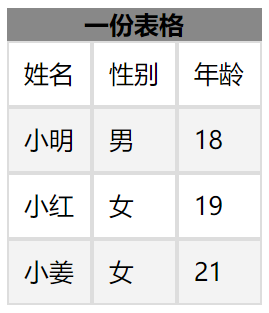


<!DOCTYPE html>

<html lang="en">

<head>

    <meta charset="UTF-8">

    <meta name="viewport" content="width=device-width, initial-scale=1.0">

    <title>Document</title>

    <link rel="stylesheet" href="./css学习.css">

</head>

<body>

    <article>

        <nav>一份表格</nav>

        <section>

            <ul>

                <li>姓名</li>

                <li>性别</li>

                <li>年龄</li>

            </ul>

        </section>

        <section>

            <ul>

                <li>小明</li>

                <li>男</li>

                <li>18</li>

            </ul>

        </section>

        <section>

            <ul>

                <li>小红</li>

                <li>女</li>

                <li>19</li>

            </ul>

        </section>

        <section>

            <ul>

                <li>小姜</li>

                <li>女</li>

                <li>21</li>

            </ul>

        </section>

    </article>

</body>

</html>
元素表单HTML
body article {

  display: table;

}

body article nav {

  display: table-caption;

  font-weight: bolder;

  text-align: center;

  vertical-align: middle;

}

body article section:nth-of-type(1) {

  display: table-header-group;

}

body article section:nth-of-type(2) {

  display: table-row-group;

}

body article section:nth-of-type(3) {

  display: table-row-group;

}

body article section:nth-of-type(4) {

  display: table-footer-group;

}

body article section ul {

  display: table-row;

}

body article section ul li {

  display: table-cell;

  border: solid 1px #ddd;

  padding: 10px;

}
元素表单CSS
表格标题
我们可以使用caption-side设置表格标题的位置,值可以是top或者bottom。
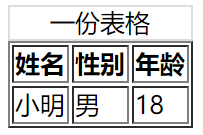
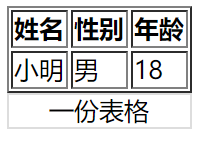
<!DOCTYPE html>
<html lang="en">
<head>
<meta charset="UTF-8">
<meta name="viewport" content="width=device-width, initial-scale=1.0">
<title>Document</title>
<style>
table>caption:first-child{
caption-side: bottom;
border: solid 1px #ddd;
}
</style>
</head>
<body>
<table border="1px">
<caption>一份表格</caption>
<thead>
<tr>
<th>姓名</th>
<th>性别</th>
<th>年龄</th>
</tr>
</thead>
<tbody>
<tr>
<td>小明</td>
<td>男</td>
<td>18</td>
</tr>
</tbody>
</table>
</body>
</html>
表格标题位置
内容对齐
表格中内容对齐方式可以使用text-aligen以及vertical-aligen来进行控制。
水平对齐text-aligent。
| 值 | 描述 |
|---|---|
| left | 左对齐 |
| right | 右对齐 |
| center | 居中对齐 |
垂直对齐vertical-aligen。
| 属性 | 说明 |
|---|---|
| top | 顶对齐 |
| middle | 垂直居中 |
| bottom | 底部对齐 |
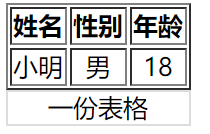
<!DOCTYPE html>

<html lang="en">

<head>

    <meta charset="UTF-8">

    <meta name="viewport" content="width=device-width, initial-scale=1.0">

    <title>Document</title>

    <style>

        table>caption:first-child{

            caption-side: bottom;

            border: solid 1px #ddd;

        }

        table tr td{

            /* 垂直与水平居中 */

            vertical-align: middle;

            text-align: center;

        }

    </style>

</head>

<body>

    <table border="1px">

        <caption>一份表格</caption>

        <thead>

            <tr>

                <th>姓名</th>

                <th>性别</th>

                <th>年龄</th>

            </tr>

        </thead>

        <tbody>

            <tr>

                <td>小明</td>

                <td>男</td>

                <td>18</td>

            </tr>

        </tbody>

    </table>

</body>

</html>
表格内容对齐
颜色设置
我们可以为<table>中的任何HTML元素进行颜色设置。
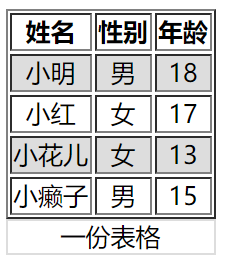
<!DOCTYPE html>

<html lang="en">

<head>

    <meta charset="UTF-8">

    <meta name="viewport" content="width=device-width, initial-scale=1.0">

    <title>Document</title>

    <style>

        table>caption:first-child{

            caption-side: bottom;

            border: solid 1px #ddd;

        }

        table tr td{

            /* 垂直与水平居中 */

            vertical-align: middle;

            text-align: center;

        }

        table tbody tr:nth-child(odd){

        }

    </style>

</head>

<body>

    <table border="1px">

        <caption>一份表格</caption>

        <thead>

            <tr>

                <th>姓名</th>

                <th>性别</th>

                <th>年龄</th>

            </tr>

        </thead>

        <tbody>

            <tr>

                <td>小明</td>

                <td>男</td>

                <td>18</td>

            </tr>

            <tr>

                <td>小红</td>

                <td>女</td>

                <td>17</td>

            </tr>

            <tr>

                <td>小花儿</td>

                <td>女</td>

                <td>13</td>

            </tr>

            <tr>

                <td>小癞子</td>

                <td>男</td>

                <td>15</td>

            </tr>

        </tbody>

    </table>

</body>

</html>
颜色设置
边框间距
我们可以使用border-spacing来设置边框的间距。两个值,一个对应上下,一个对应左右,单位可以是px,em,rem,%等等。
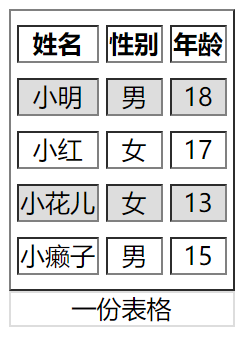
<!DOCTYPE html>
<html lang="en">
<head>
<meta charset="UTF-8">
<meta name="viewport" content="width=device-width, initial-scale=1.0">
<title>Document</title>
<style> table{
border-spacing: 5px 10px;
}
table>caption:first-child{
caption-side: bottom;
border: solid 1px #ddd;
}
table tr td{
/* 垂直与水平居中 */
vertical-align: middle;
text-align: center;
}
table tbody tr:nth-child(odd){ } </style>
</head>
<body>
<table border="1px">
<caption>一份表格</caption>
<thead>
<tr>
<th>姓名</th>
<th>性别</th>
<th>年龄</th>
</tr>
</thead>
<tbody>
<tr>
<td>小明</td>
<td>男</td>
<td>18</td>
</tr>
<tr>
<td>小红</td>
<td>女</td>
<td>17</td>
</tr>
<tr>
<td>小花儿</td>
<td>女</td>
<td>13</td>
</tr>
<tr>
<td>小癞子</td>
<td>男</td>
<td>15</td>
</tr>
</tbody>
</table>
</body>
</html>
边框间距
边框合并
我们可以看一下上面图的表格,他们的表格边框都是由间距的。如果我们想把它设置为单线的可以使用border-collapse: collapse;进行设置。
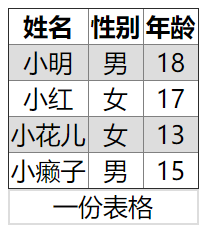
<!DOCTYPE html>
<html lang="en">
<head>
<meta charset="UTF-8">
<meta name="viewport" content="width=device-width, initial-scale=1.0">
<title>Document</title>
<style>
table{
border-spacing: 5px 10px;
border-collapse: collapse;
}
table>caption:first-child{
caption-side: bottom;
border: solid 1px #ddd;
}
table tr td{
/* 垂直与水平居中 */
vertical-align: middle;
text-align: center;
}
table tbody tr:nth-child(odd){ } </style>
</head>
<body>
<table border="1px">
<caption>一份表格</caption>
<thead>
<tr>
<th>姓名</th>
<th>性别</th>
<th>年龄</th>
</tr>
</thead>
<tbody>
<tr>
<td>小明</td>
<td>男</td>
<td>18</td>
</tr>
<tr>
<td>小红</td>
<td>女</td>
<td>17</td>
</tr>
<tr>
<td>小花儿</td>
<td>女</td>
<td>13</td>
</tr>
<tr>
<td>小癞子</td>
<td>男</td>
<td>15</td>
</tr>
</tbody>
</table>
</body>
</html>
边框合并
隐藏单元格
如果想隐藏没有内容的单元格,可使用empty-cells: hide;进行设置。
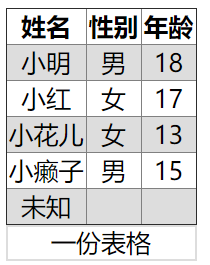
<!DOCTYPE html>
<html lang="en">
<head>
<meta charset="UTF-8">
<meta name="viewport" content="width=device-width, initial-scale=1.0">
<title>Document</title>
<style>
table{
border-spacing: 5px 10px;
border-collapse: collapse;
empty-cells: hide;
}
table>caption:first-child{
caption-side: bottom;
border: solid 1px #ddd;
}
table tr td{
/* 垂直与水平居中 */
vertical-align: middle;
text-align: center;
}
table tbody tr:nth-child(odd){ } </style>
</head>
<body>
<table border="1px">
<caption>一份表格</caption>
<thead>
<tr>
<th>姓名</th>
<th>性别</th>
<th>年龄</th>
</tr>
</thead>
<tbody>
<tr>
<td>小明</td>
<td>男</td>
<td>18</td>
</tr>
<tr>
<td>小红</td>
<td>女</td>
<td>17</td>
</tr>
<tr>
<td>小花儿</td>
<td>女</td>
<td>13</td>
</tr>
<tr>
<td>小癞子</td>
<td>男</td>
<td>15</td>
</tr>
<tr>
<td>未知</td>
<td></td>
<td></td>
</tr>
</tbody>
</table>
</body>
</html>
隐藏单元格
无边框表格
无边框表格需要用到之前结合的知识,使用很多选择器进行设置。
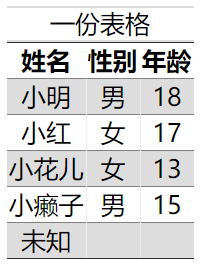
<!DOCTYPE html>

<html lang="en">

<head>

    <meta charset="UTF-8">

    <meta name="viewport" content="width=device-width, initial-scale=1.0">

    <title>Document</title>

    <style>

        table{

            border-spacing: 5px 10px;

            border-collapse: collapse;

            empty-cells: hide;

        }

        table>caption:first-child{

            caption-side: top;

            border: solid 1px #ddd;

            border-left: unset;

            border-right: unset;

        }

        table tr td{

            /* 垂直与水平居中 */

            vertical-align: middle;

            text-align: center;

            vertical-align: middle;

            text-align: center;

        }

        table tbody tr:nth-child(odd){

            background-color: #ddd;

        }

        table,table tr th,table tr td:last-child,table tr td:first-child{

            border-left: unset;

            border-right: unset;

        }

    </style>

</head>

<body>

    <table border="1px">

        <caption>一份表格</caption>

        <thead>

            <tr>

                <th>姓名</th>

                <th>性别</th>

                <th>年龄</th>

            </tr>

        </thead>

        <tbody>

            <tr>

                <td>小明</td>

                <td>男</td>

                <td>18</td>

            </tr>

            <tr>

                <td>小红</td>

                <td>女</td>

                <td>17</td>

            </tr>

            <tr>

                <td>小花儿</td>

                <td>女</td>

                <td>13</td>

            </tr>

            <tr>

                <td>小癞子</td>

                <td>男</td>

                <td>15</td>

            </tr>

            <tr>

                <td>未知</td>

                <td></td>

                <td></td>

            </tr>

        </tbody>

    </table>

</body>

</html>
无边框表格
数据表格
我们可以利用hover对<tr>进行一些样式上的调整。比如变色,鼠标变小手等等,让用户知道自己目前鼠标所在的表格区域。
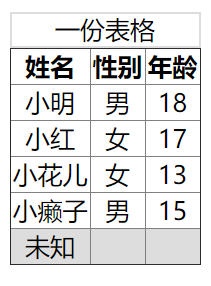
<!DOCTYPE html>

<html lang="en">

<head>

    <meta charset="UTF-8">

    <meta name="viewport" content="width=device-width, initial-scale=1.0">

    <title>Document</title>

    <style>

        table{

            border-spacing: 5px 10px;

            border-collapse: collapse;

            empty-cells: hide;

        }

        table>caption:first-child{

            caption-side: top;

            border: solid 1px #ddd;

        }

        table tr td{

            /* 垂直与水平居中 */

            vertical-align: middle;

            text-align: center;

            vertical-align: middle;

            text-align: center;

        }

        tr:hover{

            /* 鼠标停留留变色 */

            background-color: #ddd;

            /* 小手 */

            cursor: pointer;

        }

    </style>

</head>

<body>

    <table border="1px">

        <caption>一份表格</caption>

        <thead>

            <tr>

                <th>姓名</th>

                <th>性别</th>

                <th>年龄</th>

            </tr>

        </thead>

        <tbody>

            <tr>

                <td>小明</td>

                <td>男</td>

                <td>18</td>

            </tr>

            <tr>

                <td>小红</td>

                <td>女</td>

                <td>17</td>

            </tr>

            <tr>

                <td>小花儿</td>

                <td>女</td>

                <td>13</td>

            </tr>

            <tr>

                <td>小癞子</td>

                <td>男</td>

                <td>15</td>

            </tr>

            <tr>

                <td>未知</td>

                <td></td>

                <td></td>

            </tr>

        </tbody>

    </table>

</body>

</html>
数据表格
列表
列表符号
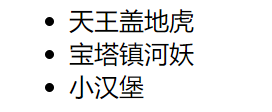
默认的<ul>标签都有一个小黑点,我们可以对<ul>进行list-style-type的设置,让每个<li>都取消掉(继承性)。也可以自定义我们的列表符号。
| 值 | 描述 |
|---|---|
| none | 无标记。 |
| disc | 默认。标记是实心圆。 |
| circle | 标记是空心圆。 |
| square | 标记是实心方块。 |
| decimal | 标记是数字。 |
| decimal-leading-zero | 0开头的数字标记。(01, 02, 03, 等。) |
| lower-roman | 小写罗马数字(i, ii, iii, iv, v, 等。) |
| upper-roman | 大写罗马数字(I, II, III, IV, V, 等。) |
| lower-alpha | 小写英文字母The marker is lower-alpha (a, b, c, d, e, 等。) |
| upper-alpha | 大写英文字母The marker is upper-alpha (A, B, C, D, E, 等。) |
| lower-greek | 小写希腊字母(alpha, beta, gamma, 等。) |
| lower-latin | 小写拉丁字母(a, b, c, d, e, 等。) |
| upper-latin | 大写拉丁字母(A, B, C, D, E, 等。) |
| hebrew | 传统的希伯来编号方式 |
| armenian | 传统的亚美尼亚编号方式 |
| georgian | 传统的乔治亚编号方式(an, ban, gan, 等。) |
| cjk-ideographic | 简单的表意数字 |
| hiragana | 标记是:a, i, u, e, o, ka, ki, 等。(日文片假名) |
| katakana | 标记是:A, I, U, E, O, KA, KI, 等。(日文片假名) |
| hiragana-iroha | 标记是:i, ro, ha, ni, ho, he, to, 等。(日文片假名) |
| katakana-iroha | 标记是:I, RO, HA, NI, HO, HE, TO, 等。(日文片假名) |
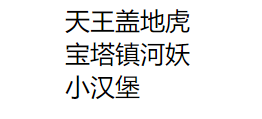
ul{

    list-style-type: none;

}
自定义列表符号可以使用list-style-image。可以是图片,或者渐变色等等。

ul{

    /* 线性渐变 */

    list-style-image:linear-gradient(45deg, red, black);

}
符号位置
我们可以使用list-style-position来定义列表符号的位置。
| 选项 | 说明 |
|---|---|
| inside | 内部 |
| outside | 外部 |
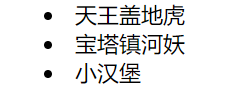
ul{

    list-style-position: inside;

}
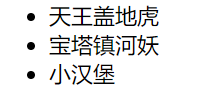
ul{

    list-style-position: outside;

}
组合定义
我们可以使用list-style来一次性指定list-style-tpye与list-style-position。
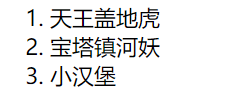
ul{

    list-style:decimal outside;

}
背景符号
我们可以为<li>来增加一个背景,然后将它调小作为列表样式符号。

ul li{

    background: url(huaji.png) no-repeat 0 6px;

    background-size: 10px 10px;

    list-style-position: inside;

    list-style: none;

    /* 文本缩进 */

    text-indent: 1em;

}
我们可以为<li>增加多背景,一个背景做列表样式符号,一个背景做标签背景。
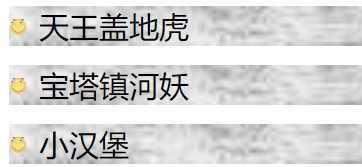
ul li{

    background: url(./huaji.png) no-repeat 0 6px,url(./bj.jpg) no-repeat;

    background-size: 10px 10px,100%;

    list-style-position: inside;

    list-style: none;

    /* 文本缩进 */

    text-indent: 1em;

    margin-bottom: 10px;

}
追加内容
基本使用
我们可以使用伪元素选择器::after向后追加内容,以及::before向前追加内容。
内容放在content中,我们可以将content增加的内容当做一个元素去看待。

<!DOCTYPE html>

<html lang="en">

<head>

    <meta charset="UTF-8">

    <meta name="viewport" content="width=device-width, initial-scale=1.0">

    <title>Document</title>

    <style>

        a{

            text-decoration: none;

        }

        a::after{

            content: "<--你就知道";

            color: blue;

        }

        a::before{

            content: "请点击-->";

            color: blue;

        }

    </style>

</head>

<body>

    <a href="http://www.baidu.com/">百度一下</a>

</body>

</html>
基本使用
提取属性
我们可以使用attr()将属性提取出来。当鼠标放到连接上时,给予用户一些提示信息,如下:

<!DOCTYPE html>

<html lang="en">

<head>

    <meta charset="UTF-8">

    <meta name="viewport" content="width=device-width, initial-scale=1.0">

    <title>Document</title>

    <style>

        a{

            text-decoration: none;

        }

        a:hover::before{

            content: "您将访问:"attr(href);

            background-color: #555;

            color: white;

            position: absolute;

            top: 30px;

            padding: 5px 2px;

            border-radius: 10px;

        }

    </style>

</head>

<body>

    <a href="http://www.baidu.com/">百度一下</a>

</body>

</html>
提取属性
自定义输入框
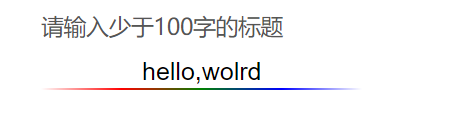
原本的表单输入框实在太丑了,我们可以给他做一些改变。
<!DOCTYPE html>

<html lang="en">

<head>

    <meta charset="UTF-8">

    <meta name="viewport" content="width=device-width, initial-scale=1.0">

    <title>Document</title>

    <style>

        body {

            padding: 80px;

        }

        .field {

            position: relative;

        }

        input {

            border: none;

            /* 去除轮廓线 */

            outline: none;

            text-align: center;

            vertical-align: middle;

        }

        .field::after {

            content: '';

            /* content的背景为渐变,高度为1px */

            background: linear-gradient(to right, white, red, green, blue, white);

            height: 30px;

            position: relative;

            /* 与输入框的大小相同 */

            width: 171px;

            height: 1px;

            display: block;

            left: 0px;

            right: 0px;

        }

        .field:hover::before {

            /* data开头的属性都是让我们提取用的....这是一种规范。 */

            content: attr(data-placeholder);

            position: absolute;

            top: -20px;

            left: 0px;

            color: #555;

            font-size: 12px;

        }

</style>

</head>

<body>

    <div class="field" data-placeholder="请输入少于100字的标题">

        <input type="text" id="name">

    </div>

</body>

</html>
自定义输入框
CSS数据样式的更多相关文章
- 纯CSS菜单样式,及其Shadow DOM,Json接口 实现
先声明,要看懂这篇博客要求你具备少量基础CSS知识, 当然如果你只是要用的话就随便了,不用了解任何知识 完整项目github链接:https://github.com/git-Code-Shelf/M ...
- 精简的网站reset 和 css通用样式库
参考链接:http://www.zhangxinxu.com/wordpress/2010/07/我是如何对网站css进行架构的/ reset.css body{ line-height:1.4; c ...
- css初始化样式代码
为什么要初始化CSS? CSS初始化是指重设浏览器的样式.不同的浏览器默认的样式可能不尽相同,所以开发时的第一件事可能就是如何把它们统一.如果没对CSS初始化往往会出现浏览器之间的页面差异.每次新开发 ...
- 漂亮的CSS按钮样式集以及在线生成工具
以前我们制作一样带带阴影.圆角或3D感的按钮都需要用图片来制作,但CSS3出来后就可以不用图片了,由于是代码写的按钮样式,在Retina上浏览依然清晰美观.虽然不错,但我们写一个阴影+质感的按钮还是挺 ...
- WEB前端开发CSS基础样式全面总结
Web前端开发css基础样式全面总结 颜色和单位的使用 颜色 用颜色的名字表示颜色,比如:red 用16进制表示演示 比如:#FF0000 用rgb数值表示颜色,rgb(红,绿,蓝),每个值都在0-2 ...
- html / css打印样式
最近做公司后台系统,需要打印贴箱标签,按照正常打印A4纸的标准,测试的效果不是自己想要的,文字排版布局都乱了,查了一些资料,需要设置的东西我总结了一下: 显示器(screen)和打印机(printer ...
- CSS常用样式及示例
CSS常用样式及示例 一.简介 层叠样式表(英文全称:Cascading Style Sheets)是一种用来表现HTML(标准通用标记语言的一个应用)或XML(标准通用标记语言的一个子集) ...
- 第 15 章 CSS 文本样式[下]
学习要点: 1.文本总汇 2.文本样式 3.文本控制 主讲教师:李炎恢 本章主要探讨 HTML5 中 CSS 文本样式,通过文本样式的设置,更改字体的大小.样式以及文本的方位. 一.文本总汇 本节课, ...
- 第 15 章 CSS 文本样式[上]
学习要点: 1.字体总汇 2.字体设置 3.Web 字体 主讲教师:李炎恢 本章主要探讨 HTML5 中 CSS 文本样式,通过文本样式的设置,更改字体的大小.样式以及文本的方位. 一.字体总汇 本节 ...
随机推荐
- TensorFlow从0到1之TensorFlow优化器(13)
高中数学学过,函数在一阶导数为零的地方达到其最大值和最小值.梯度下降算法基于相同的原理,即调整系数(权重和偏置)使损失函数的梯度下降. 在回归中,使用梯度下降来优化损失函数并获得系数.本节将介绍如何使 ...
- mysql内连接
inner join(等值连接) 只返回两个表中联结字段相等的行 select * from role_action ra INNER JOIN action a on ra.action_id = ...
- 0.1---selenium+java自动化测试进阶02----项目实战之登录代码重构
一.测试登录功能实现 以慕课网的登录为例,分析登录的功能需求,编写测试用例,找到要定位的元素以及需要的操作,编写登录功能的测试代码.代码实现如下: public static void main(St ...
- 使用vscode 开发go项目的最新姿势. go版本1.14.2
使用了go 1.14.2. 版本, 再也不用建src, pkg, bin 目录了, 以及再也不用强制配置GOPATH了 前提条件: 必须是 go mod 项目. 在工程目录下, 执行这样的命令生成 ...
- 【Python爬虫】HTTP基础和urllib库、requests库的使用
引言: 一个网络爬虫的编写主要可以分为三个部分: 1.获取网页 2.提取信息 3.分析信息 本文主要介绍第一部分,如何用Python内置的库urllib和第三方库requests库来完成网页的获取.阅 ...
- Day8-微信小程序实战-交友小程序-首页用户列表渲染及多账号调试及其点赞功能的实现
在这之前已经把编辑个人的所有信息的功能已经完成了 之后先对首页的列表搞动态的,之前都是写死的静态 1.之前都是把好友写死的,现在就在js里面定义一个数组,用循环来动态的绑定 在onReady中定义,取 ...
- WeChair项目Alpha冲刺(4/10)
团队项目进行情况 1.昨日进展 Alpha冲刺第四天 昨日进展: 前端完成小程序登录态的定义 LoginController编写初步完成同时修改并更新了代码,但是在将编码好的项目部署到服务器上时 ...
- Redis - (Linux)安装与配置
Redis 是完全开源免费的,遵守BSD协议,是一个高性能的key-value数据库. Redis 与其他 key - value 缓存产品有以下三个特点: 1:Redis支持数据的持久化,可以将内存 ...
- java scoket Blocking 阻塞IO socket通信二
在上面一节中,服务端收到客户端的连接之后,都是new一个新的线程来处理客户端发送的请求,每次new 一个线程比较耗费系统资源,如果100万个客户端,我们就要创建100万个线程,相当的 耗费系统的资源, ...
- Web安全之暴力破解
暴力破解,顾名思义简单粗暴直接,我理解为将所有的“答案”都进行尝试直到找到正确的“答案", 当然我们不可能将所有的“答案”都进行尝试,所以我们只能将所有最有可能是正确的“答案”进行尝试即可 ...