
python3爬取墨迹天气并发送给微信好友,附源码
需求:
1. 爬取墨迹天气的信息,包括温湿度、风速、紫外线、限号情况,生活tips等信息
2. 输入需要查询的城市,自动爬取相应信息
3. 链接微信,发送给指定好友
思路比较清晰,主要分两块,一是爬虫,二是用python链接微信(非企业版微信)
先随便观察一个城市的墨迹天气,例如石家庄市的url为“https://tianqi.moji.com/weather/china/hebei/shijiazhuang”,多观察几个城市的url可发现共同点就是,前面的都一样,后面的是以省拼音/市拼音结尾的。当然直辖市两者拼音一样。当然还有一些额外情况,比如山西和陕西,后者的拼音是Shaanxi,这个用户输入的时候注意一下
 prov = input("请输入省份:")

 city = input("请输入城市:")

 pin = Pinyin()

 prov_pin = pin.get_pinyin(prov,'')#将汉字转为拼音

 city_pin = pin.get_pinyin(city,'')

 url = "https://tianqi.moji.com/weather/china/"

 url = url + prov_pin +'/'+ city_pin

 print(url)
将用户输入的省、市与开头不变的做字符串连接,形成需要爬取的完整的url。我这里用户输入的是中文,而url中需要的是拼音,因此安装了第三方库xpinyin
 #获取天气信息begin#

 htmlData = request.urlopen(url).read().decode('utf-8')

 soup = BeautifulSoup(htmlData, 'lxml')

 #print(soup.prettify())

 weather = soup.find('div',attrs={'class':"wea_weather clearfix"})

 #print(weather)

 temp1 = weather.find('em').get_text()

 temp2 = weather.find('b').get_text()

 # 使用select标签时,如果class中有空格,将空格改为“.”才能筛选出来

 # 空气质量AQI

 AQI = soup.select(".wea_alert.clearfix > ul > li > a > em")[0].get_text()

 H = soup.select(".wea_about.clearfix > span")[0].get_text()#湿度

 S = soup.select(".wea_about.clearfix > em")[0].get_text()#风速

 if prov == '北京' or prov == '天津':

     F = soup.select(".wea_about.clearfix > b")[0].get_text()#查找尾号限行,只有北京、天津有

 A = soup.select(".wea_tips.clearfix em")[0].get_text()#今日天气提示

 U = soup.select(".live_index_grid > ul > li")[-3].find('dt').get_text() #紫外线强度

 #print(AQI,H,S,A,U)

 DATE = str(datetime.date.today())#获取当天日期****-**-**

 if prov == '北京' or prov =='天津' or prov =='上海' or prov =='重庆':

     if prov == '北京' or prov =='天津':

         info = '来自大明明的天气问候\n' + city + '市' + ',' + DATE + '\n'+ '实时温度:' + temp1 + '℃' + ',' + temp2 + '\n'  '湿度:' + H + '\n' '风速:' + S + '\n' '紫外线:' + U +'\n' '今日提示:' + A + '\n' +'今日限行:' + F

     else:

         info = '来自大明明的天气问候\n' + city + '市' + ',' + DATE + '\n'+ '实时温度:' + temp1 + '℃' + ',' + temp2 + '\n'  '湿度:' + H + '\n' '风速:' + S + '\n' '紫外线:' + U +'\n' '今日提示:' + A

 else:

     info = '来自大明明的天气问候\n' + prov +'省' + city + '市' + ',' + DATE + '\n'+ '实时温度:' + temp1 + '℃' + ',' + temp2 + '\n'  '湿度:' + H + '\n' '风速:' + S + '\n' '紫外线:' + U +'\n' '今日提示:' + A

 #print(info)

 #获取明日天气

 tomorrow = soup.select(".days.clearfix ")[1].find_all('li')

 temp_t = tomorrow[2].get_text().replace('°','℃')+ ','  + tomorrow[1].find('img').attrs['alt']#明日温度

 S_t1 = tomorrow[3].find('em').get_text()

 S_t2 = tomorrow[3].find('b').get_text()

 S_t = S_t1 + S_t2#明日风速

 AQI_t = tomorrow[-1].get_text().strip()#明日空气质量

 info_t = '\n明日天气:\n' + '温度:' + temp_t + '\n' + '风速:' + S_t + '\n' '空气质量:' + AQI_t + '\n'

 #print(info_t)

 #获取天气信息结束
有几点注意的是:
1、 尾号限行不是每个城市都有的,需要判断下
2、 直辖市输出的时候,最好不要写成“北京省北京市”,这样很别扭
3. 使用select筛选的的是class名或者id名,注意同级和下一级的书写形式;find和find_all是查找的标签
4. 查找单标签中的内容,例如<img alt=**** src=‘***************************.jpg’>这种,想查alt等号后面的内容,或者src后面的连接,用正则感觉很麻烦
 #获取生活tips开始

 # url1 = 'https://tianqi.moji.com/'

 # url3 = '/china/beijing/beijing'

 #定义一个tips的字典

 tips_dict = {'cold':'感冒预测','makeup':'化妆指数','uray':'紫外线量','dress':'穿衣指数','car':'关于洗车','sport':'运动事宜'}

 info_tips = ''

 for i in list(tips_dict.keys()):

       url_tips = url.replace('weather',i)

       #url_tips = url1 + i + url3

       #print(url_tips)

       htmlData = request.urlopen(url_tips).read().decode('utf-8')

       soup = BeautifulSoup(htmlData, 'lxml')

       tips = soup.select(".aqi_info_tips > dd")[0].get_text()

       #print(tips)

       info_tips =  info_tips + tips_dict.get(i) + ':' +tips +'\n'

 #print(info_tips)

 #获取生活tips结束
生活tips在另外的网页中,可以观察到网页的形式是一样的,只是中间的weather换成了其他,因此写一段做循环就ok了
这里用到了字典是因为输出的时候想用中文做提示
链接微信需要安装第三方库itchat,链接只需要这一句话,很简单。初次链接会弹出二维码,手机扫二维码登陆
#链接微信

itchat.auto_login(hotReload=True)#在一段时间内运行不需要扫二维码登陆
全部代码:
 """

 从墨迹天气中获取天气信息,推送给微信好友

 """

 from bs4 import BeautifulSoup

 from urllib import request

 import datetime

 import itchat

 from xpinyin import Pinyin

 prov = input("请输入省份:")

 city = input("请输入城市:")

 pin = Pinyin()

 prov_pin = pin.get_pinyin(prov,'')#将汉字转为拼音

 city_pin = pin.get_pinyin(city,'')

 url = "https://tianqi.moji.com/weather/china/"

 url = url + prov_pin +'/'+ city_pin

 print(url)

 #获取天气信息begin#

 htmlData = request.urlopen(url).read().decode('utf-8')

 soup = BeautifulSoup(htmlData, 'lxml')

 #print(soup.prettify())

 weather = soup.find('div',attrs={'class':"wea_weather clearfix"})

 #print(weather)

 temp1 = weather.find('em').get_text()

 temp2 = weather.find('b').get_text()

 # 使用select标签时,如果class中有空格,将空格改为“.”才能筛选出来

 # 空气质量AQI

 AQI = soup.select(".wea_alert.clearfix > ul > li > a > em")[0].get_text()

 H = soup.select(".wea_about.clearfix > span")[0].get_text()#湿度

 S = soup.select(".wea_about.clearfix > em")[0].get_text()#风速

 if prov == '北京' or prov == '天津':

     F = soup.select(".wea_about.clearfix > b")[0].get_text()#查找尾号限行,只有北京、天津有

 A = soup.select(".wea_tips.clearfix em")[0].get_text()#今日天气提示

 U = soup.select(".live_index_grid > ul > li")[-3].find('dt').get_text() #紫外线强度

 #print(AQI,H,S,A,U)

 DATE = str(datetime.date.today())#获取当天日期****-**-**

 if prov == '北京' or prov =='天津' or prov =='上海' or prov =='重庆':

     if prov == '北京' or prov =='天津':

         info = '来自大明明的天气问候\n' + city + '市' + ',' + DATE + '\n'+ '实时温度:' + temp1 + '℃' + ',' + temp2 + '\n'  '湿度:' + H + '\n' '风速:' + S + '\n' '紫外线:' + U +'\n' '今日提示:' + A + '\n' +'今日限行:' + F

     else:

         info = '来自大明明的天气问候\n' + city + '市' + ',' + DATE + '\n'+ '实时温度:' + temp1 + '℃' + ',' + temp2 + '\n'  '湿度:' + H + '\n' '风速:' + S + '\n' '紫外线:' + U +'\n' '今日提示:' + A

 else:

     info = '来自大明明的天气问候\n' + prov +'省' + city + '市' + ',' + DATE + '\n'+ '实时温度:' + temp1 + '℃' + ',' + temp2 + '\n'  '湿度:' + H + '\n' '风速:' + S + '\n' '紫外线:' + U +'\n' '今日提示:' + A

 #print(info)

 #获取明日天气

 tomorrow = soup.select(".days.clearfix ")[1].find_all('li')

 #<img alt=*****   src="*************************.jpg">标签的查找

 temp_t = tomorrow[2].get_text().replace('°','℃')+ ','  + tomorrow[1].find('img').attrs['alt']#明日温度

 S_t1 = tomorrow[3].find('em').get_text()

 S_t2 = tomorrow[3].find('b').get_text()

 S_t = S_t1 + S_t2#明日风速

 AQI_t = tomorrow[-1].get_text().strip()#明日空气质量

 info_t = '\n明日天气:\n' + '温度:' + temp_t + '\n' + '风速:' + S_t + '\n' '空气质量:' + AQI_t + '\n'

 #print(info_t)

 #获取天气信息结束

 #获取生活tips开始

 # url1 = 'https://tianqi.moji.com/'

 # url3 = '/china/beijing/beijing'

 #定义一个tips的字典

 tips_dict = {'cold':'感冒预测','makeup':'化妆指数','uray':'紫外线量','dress':'穿衣指数','car':'关于洗车','sport':'运动事宜'}

 info_tips = ''

 for i in list(tips_dict.keys()):

       url_tips = url.replace('weather',i)

       #url_tips = url1 + i + url3

       #print(url_tips)

       htmlData = request.urlopen(url_tips).read().decode('utf-8')

       soup = BeautifulSoup(htmlData, 'lxml')

       tips = soup.select(".aqi_info_tips > dd")[0].get_text()

       #print(tips)

       info_tips =  info_tips + tips_dict.get(i) + ':' +tips +'\n'

 #print(info_tips)

 #获取生活tips结束

 #链接微信

 itchat.auto_login(hotReload=True)#在一段时间内运行不需要扫二维码登陆

 #给自己的文件助手filehelper发送信息,此时无需访问通讯录

 #itchat.send('❤来自大明明的天气问候❤',toUserName='filehelper')

 #I = itchat.search_friends()# 获取自己的信息,返回自己的属性字典

 #friends = itchat.get_friends(update=True)#返回值类型<class 'itchat.storage.templates.ContactList'>。可以看做是列表,列表里的每个元素是一个字典,对应一个好友信息

 #userName=itchat.search_friends(userName='@b895b018931614e8d30a16b15a8db2da')# 获取特定UserName的用户信息,列表

 info_all = '❤❤❤❤❤❤❤❤❤❤❤\n'+info + '\n' + info_tips + info_t + '❤❤❤❤❤❤❤❤❤❤❤'

 print(info_all)

 #发送微信个人

 def sendToPerson(nickName):

     user = itchat.search_friends(name=nickName)# 使用备注名或者昵称搜索,微信号不行;若有重名的则全部返回,列表

     #print(user)

     userName = user[0]['UserName']

     itchat.send(info_all, toUserName=userName)

     print('succeed')

 #发送微信群

 def sendToRoom(nickName):

     user = itchat.search_chatrooms(name=nickName)# 支持模糊匹配

     #print(user)

     userName = user[0]['UserName']

     itchat.send(info_all, toUserName=userName)

     print('succeed')

 sendToPerson(input("你要问候哪位小宝贝呀?"))

 sendToRoom(input("你要轰炸那个群呀?"))
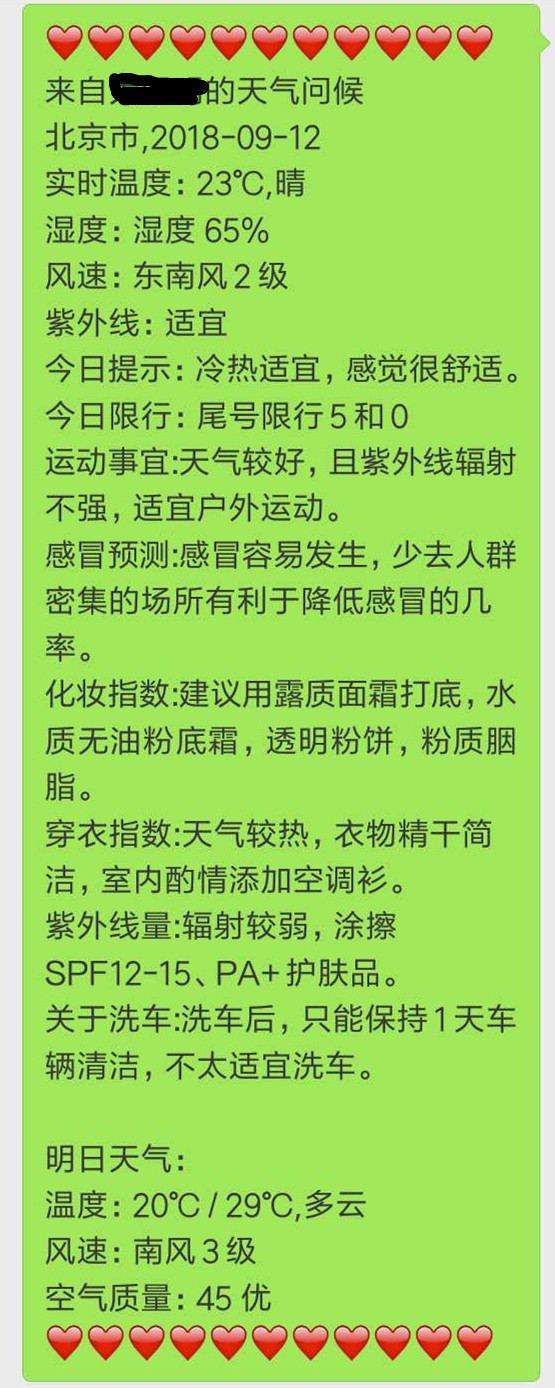
微信中的显示:
需要改进之处:
1. 有些地名url和汉字拼音不是匹配的,例如齐齐哈尔,拼音是qiqihaer,但是url中是qiqihar,这种情况很多。因此最好是提前有对应的字典
2. 微信无法长连接,过一段时间就会退出,没法做到每日定时推送
3. 本程序只做到了市一层,墨迹天气还可以在细分到下面的区,这里更需要中国城区字典的支持
"""
从墨迹天气中获取天气信息,推送给微信好友

"""

from bs4 import BeautifulSoup
from urllib import request
import datetime
import itchat
from xpinyin import Pinyin

prov = input("请输入省份:")
city = input("请输入城市:")
pin = Pinyin()

prov_pin = pin.get_pinyin(prov,'')#将汉字转为拼音
city_pin = pin.get_pinyin(city,'')

url = "https://tianqi.moji.com/weather/china/"
url = url + prov_pin +'/'+ city_pin
print(url)

#获取天气信息begin#

htmlData = request.urlopen(url).read().decode('utf-8')
soup = BeautifulSoup(htmlData, 'lxml')
#print(soup.prettify())
weather = soup.find('div',attrs={'class':"wea_weather clearfix"})
#print(weather)
temp1 = weather.find('em').get_text()
temp2 = weather.find('b').get_text()
# 使用select标签时,如果class中有空格,将空格改为“.”才能筛选出来
# 空气质量AQI
AQI = soup.select(".wea_alert.clearfix > ul > li > a > em")[].get_text()
H = soup.select(".wea_about.clearfix > span")[].get_text()#湿度
S = soup.select(".wea_about.clearfix > em")[].get_text()#风速

if prov == '北京' or prov == '天津':
    F = soup.select(".wea_about.clearfix > b")[].get_text()#查找尾号限行,只有北京、天津有

A = soup.select(".wea_tips.clearfix em")[].get_text()#今日天气提示
U = soup.select(".live_index_grid > ul > li")[-].find('dt').get_text() #紫外线强度
#print(AQI,H,S,A,U)
DATE = str(datetime.date.today())#获取当天日期****-**-**

if prov == '北京' or prov =='天津' or prov =='上海' or prov =='重庆':
    if prov == '北京' or prov =='天津':
        info = '来自大明明的天气问候\n' + city + '市' + ',' + DATE + '\n'+ '实时温度:' + temp1 + '℃' + ',' + temp2 + '\n'  '湿度:' + H + '\n' '风速:' + S + '\n' '紫外线:' + U +'\n' '今日提示:' + A + '\n' +'今日限行:' + F
    else:
        info = '来自大明明的天气问候\n' + city + '市' + ',' + DATE + '\n'+ '实时温度:' + temp1 + '℃' + ',' + temp2 + '\n'  '湿度:' + H + '\n' '风速:' + S + '\n' '紫外线:' + U +'\n' '今日提示:' + A
else:
    info = '来自大明明的天气问候\n' + prov +'省' + city + '市' + ',' + DATE + '\n'+ '实时温度:' + temp1 + '℃' + ',' + temp2 + '\n'  '湿度:' + H + '\n' '风速:' + S + '\n' '紫外线:' + U +'\n' '今日提示:' + A

#print(info)

#获取明日天气
tomorrow = soup.select(".days.clearfix ")[].find_all('li')
#<img alt=*****   src="*************************.jpg">标签的查找
temp_t = tomorrow[].get_text().replace('°','℃')+ ','  + tomorrow[].find('img').attrs['alt']#明日温度
S_t1 = tomorrow[].find('em').get_text()
S_t2 = tomorrow[].find('b').get_text()
S_t = S_t1 + S_t2#明日风速
AQI_t = tomorrow[-].get_text().strip()#明日空气质量

info_t = '\n明日天气:\n' + '温度:' + temp_t + '\n' + '风速:' + S_t + '\n' '空气质量:' + AQI_t + '\n'
#print(info_t)

#获取天气信息结束

#获取生活tips开始

# url1 = 'https://tianqi.moji.com/'
# url3 = '/china/beijing/beijing'
#定义一个tips的字典
tips_dict = {'cold':'感冒预测','makeup':'化妆指数','uray':'紫外线量','dress':'穿衣指数','car':'关于洗车','sport':'运动事宜'}
info_tips = ''
for i in list(tips_dict.keys()):
      url_tips = url.replace('weather',i)
      #url_tips = url1 + i + url3
      #print(url_tips)
htmlData = request.urlopen(url_tips).read().decode('utf-8')
      soup = BeautifulSoup(htmlData, 'lxml')
      tips = soup.select(".aqi_info_tips > dd")[].get_text()
      #print(tips)
info_tips =  info_tips + tips_dict.get(i) + ':' +tips +'\n'
#print(info_tips)
#获取生活tips结束

#链接微信
itchat.auto_login(hotReload=True)#在一段时间内运行不需要扫二维码登陆
#给自己的文件助手filehelper发送信息,此时无需访问通讯录
#itchat.send('❤来自大明明的天气问候❤',toUserName='filehelper')

#I = itchat.search_friends()# 获取自己的信息,返回自己的属性字典
#friends = itchat.get_friends(update=True)#返回值类型<class 'itchat.storage.templates.ContactList'>。可以看做是列表,列表里的每个元素是一个字典,对应一个好友信息
#userName=itchat.search_friends(userName='@b895b018931614e8d30a16b15a8db2da')# 获取特定UserName的用户信息,列表
info_all = '❤❤❤❤❤❤❤❤❤❤❤\n'+info + '\n' + info_tips + info_t + '❤❤❤❤❤❤❤❤❤❤❤'
print(info_all)

#发送微信个人
def sendToPerson(nickName):
    user = itchat.search_friends(name=nickName)# 使用备注名或者昵称搜索,微信号不行;若有重名的则全部返回,列表
#print(user)
userName = user[]['UserName']
    itchat.send(info_all, toUserName=userName)
    print('succeed')

#发送微信群
def sendToRoom(nickName):
    user = itchat.search_chatrooms(name=nickName)# 支持模糊匹配
#print(user)
userName = user[]['UserName']
    itchat.send(info_all, toUserName=userName)
    print('succeed')

sendToPerson(input("你要问候哪位小宝贝呀?"))
sendToRoom(input("你要轰炸那个群呀?"))
python3爬取墨迹天气并发送给微信好友,附源码的更多相关文章
- 关于js渲染网页时爬取数据的思路和全过程(附源码)
于js渲染网页时爬取数据的思路 首先可以先去用requests库访问url来测试一下能不能拿到数据,如果能拿到那么就是一个普通的网页,如果出现403类的错误代码可以在requests.get()方法里 ...
- Python爬虫教程-爬取5K分辨率超清唯美壁纸源码
简介 壁纸的选择其实很大程度上能看出电脑主人的内心世界,有的人喜欢风景,有的人喜欢星空,有的人喜欢美女,有的人喜欢动物.然而,终究有一天你已经产生审美疲劳了,但你下定决定要换壁纸的时候,又发现网上的壁 ...
- .Net高并发解决思路(附源码)
本文如有不对之处,欢迎各位拍砖扶正.另源码在文章最下面,大家下载过后先还原一下nuget包,需要改一下redis的配置,rabbitmq的配置以及Ef的连接字符串.另外使用的是CodeFirst,先u ...
- Python3 爬取微信好友基本信息,并进行数据清洗
Python3 爬取微信好友基本信息,并进行数据清洗 1,登录获取好友基础信息: 好友的获取方法为get_friends,将会返回完整的好友列表. 其中每个好友为一个字典 列表的第一项为本人的账号信息 ...
- python3爬取女神图片,破解盗链问题
title: python3爬取女神图片,破解盗链问题 date: 2018-04-22 08:26:00 tags: [python3,美女,图片抓取,爬虫, 盗链] comments: true ...
- Python爬取中国天气网
Python爬取中国天气网 基于requests库制作的爬虫. 使用方法:打开终端输入 “python3 weather.py 北京(或你所在的城市)" 程序正常运行需要在同文件夹下加入一个 ...
- Python3爬取人人网(校内网)个人照片及朋友照片,并一键下载到本地~~~附源代码
题记: 11月14日早晨8点,人人网发布公告,宣布人人公司将人人网社交平台业务相关资产以2000万美元的现金加4000万美元的股票对价出售予北京多牛传媒,自此,人人公司将专注于境内的二手车业务和在美国 ...
- python3爬取网页
爬虫 python3爬取网页资源方式(1.最简单: import'http://www.baidu.com/'print2.通过request import'http://www.baidu.com' ...
- PHP爬取历史天气
PHP爬取历史天气 PHP作为宇宙第一语言,爬虫也是非常方便,这里爬取的是从天气网获得中国城市历史天气统计结果. 程序架构 main.php <?php include_once(". ...
随机推荐
- mysql issue:
####0 https://yq.aliyun.com/ziliao/53466 首先,很荣幸你找到了这篇文章... 如果你忘记了mysql的密码不妨试试以下这个方法. 1.打开my.cnf 代码如 ...
- zabbix agent 配置
http://blog.csdn.net/z644041867/article/details/76618644 https://www.cnblogs.com/miclesvic/p/6144924 ...
- setState异步函数
changeLeader(value){ console.log(value) this.setState({ leader:value },() => { console.lo ...
- 牛客网Java刷题知识点之子类继承不了父类里的(private属性、private方法、构造方法)
不多说,直接上干货! 子类可以继承父类的属性和方法,除了那些private的外还有一样是子类继承不了的---构造器.对于构造器而言,它只能够被子类调用,而不能被子类继承. 调用父类的构造方法我们使用s ...
- Win7环境下配置FTP
1.打开 控制面板-->程序和功能-->打开或关闭Windows资源,在弹出的窗体里找到 “Internet信息服务”,展开后选择“Ftp服务器",然后点击"确定&qu ...
- marquee标签(跑马灯)
- 使用Calendar来获取当前日期和时间
1 package com.java.test; 2 3 import java.text.SimpleDateFormat; 4 import java.util.Calendar; 5 6 pub ...
- 1979 第K个数
1979 第K个数 时间限制: 1 s 空间限制: 1000 KB 题目等级 : 黄金 Gold 题目描述 Description 给定一个长度为N(0<n<=10000) ...
- windows server 2008 R2 的 FTP 防火墙的正确配置方法
存在问题 FTP搭建完成后,仅本机可以访问,其他机器无法访问. 解决方案 这时,将C:\Windows\System32\svchost.exe添加到例外即可正常访问,如下图所示.将20及21端口添加 ...
- 机器学习&深度学习资料分享
感谢:https://github.com/ty4z2008/Qix/blob/master/dl.md <Brief History of Machine Learning> 介绍:这是 ...