
Red Hat Enterprise Linux AS4, C++ OCCI connect Oracle 9i
前提是已经安装好Oracle 9i。
1. 下载对应的ORACLE client安装。
http://www.oracle.com/technetwork/database/features/instant-client/index-097480.html
因为没有9i的client提供下载了,我选择最接近的版本下载:
Version 10.1.0.5
Instant Client Package - Basic: All files required to run OCI, OCCI, and JDBC-OCI applications
Download instantclient-basic-linux32-10.1.0.5-20060511.zip (31,413,713 bytes) (cksum - 384697539)
下载之后解压。
2. 先把示例代码给出来:
//oci.cpp
#include <iostream>

#include <string>

#include <occi.h>

using namespace std;

using namespace oracle::occi;

int main()

{

    Connection *conn;

    Environment *env;

    Statement *stmt;

    //build a connection

    string struser("scott");

    string strpwd("tiger");

    string strconn_string("");

    cout << "" << endl;

    env = Environment::createEnvironment(Environment::OBJECT);

    cout << "" << endl;

    conn = env->createConnection(struser, strpwd, strconn_string);

    cout << "" << endl;

    if( NULL != conn)

        cout << "conn success" << endl;

    else

        cout << "conn failed" << endl;

    //execute sql statement

    string strsql("select to_char(sysdate,'yyyy-mm-dd hh24:mi:ss') from dual");

    stmt = conn->createStatement(strsql);

    ResultSet *rset = stmt->executeQuery();

    while(rset->next())

    {

        string time = rset->getString();

        cout << "now time:" << time << endl;

    }

    //close resourses

    stmt->closeResultSet(rset);

    conn->terminateStatement(stmt);

    env->terminateConnection(conn);

    Environment::terminateEnvironment(env);

    return ;

}
3. 编译
这里对g++的版本有要求,如果是g++ 3.x.x的,可能会爆出如下错误:
undefined reference to `oracle::occi::Environment::createEnvironment(orac le::occi::Environment::Mode, void*, void* (*)(void*, unsigned int), void* (*)(void*, void*, unsigned int), void (*)(void*, void*))'
网上很多讨论这个错误的,解决办法是安装低版本的g++。
资料(可以不看):解决方案的出处:http://www.dbforums.com/showthread.php?1619980-Makefile-problem-for-OCCI-on-Oracle-9i
If you're getting the following error messages:
undefined reference to `oracle:occi::Environment::createEnvironment(oracle:occi::Environment::Mode, void*, void* (*)(void*, unsigned), void* (*)(void*, void*, unsigned), void (*)(void*, void*))'
and
undefined reference to `oracle:occi::Environment::terminateEnvironment(oracle:occi::Environment*)'
then you're probably running oracle9i on redhat 8.0. to solve this, download and install the following rpm's from this redhat link:
* compat-gcc-7.3-2.96.118.i386.rpm
* compat-gcc-c++-7.3-2.96.118.i386.rpm
* compat-libstdc++-7.3-2.96.118.i386.rpm
* compat-libstdc++-devel-7.3-2.96.118.i386.rpm
and compile with g++296 instead of g++. sure you'll be stuck with g++-2.96, but at least it will compile and run.
在谷歌搜索如下4个rpm包安装:
* compat-gcc-7.3-2.96.118.i386.rpm
* compat-libstdc++-7.3-2.96.118.i386.rpm
* compat-libstdc++-devel-7.3-2.96.118.i386.rpm
* compat-gcc-c++-7.3-2.96.118.i386.rpm
请按照安装上述顺序安装rpm包,因为最后一个依赖于第一二三个。
如果安装的时候报错说“正在安装的g++与系统上存在的g++有冲突”,在rpm后加上-aid --force参数,如下:
sudo rpm -ivh xxx.rpm -aid --force
详情可见这篇文:http://www.cnblogs.com/duanguyuan/p/4118210.html
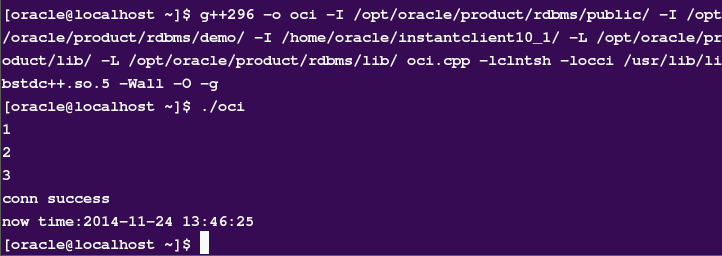
安装好此版本的g++后,就可以用以下命令编译了:
g++ -o oci -I /opt/oracle/product/rdbms/public/ -I /opt/oracle/product/rdbms/demo/ -I /home/oracle/instantclient10_1/ -L /opt/oracle/product/lib/ -L /opt/oracle/product/rdbms/lib/ oci.cpp -lclntsh -locci /usr/lib/libstdc++.so. -Wall -O -g
注意仔细看上边所包含的编译目录,先看看自己的$ORACLE_HOME在哪里,看看上述的目录都在不在。其中instantclient10_1目录便是第一步下载的Oracle client。
4. 运行
结果如下图
其他参考:
http://blog.csdn.net/gyanp/article/details/6107044
http://oradim.blogspot.com/2009/08/getting-started-with-occi-linux-version.html
Red Hat Enterprise Linux AS4, C++ OCCI connect Oracle 9i的更多相关文章
- Red Hat Enterprise Linux 7.4上安装Oracle 11.2.0.4
1. 配置Yum源及关闭SeLinux [root@localhost ~]# mkdir /media/rhel [root@localhost ~]# mount /dev/cdrom /medi ...
- Deploy Oracle 10.2.0.5 DataGuard on Red Hat Enterprise Linux 6.4
系统:Red Hat Enterprise Linux 6.4 数据库:Oracle 10.2.0.5.0 Patch Set 4 主机:10dg1 192.168.1.91 10dg2192.168 ...
- setting up a IPSEC/L2TP vpn on CentOS 6 or Red Hat Enterprise Linux 6 or Scientific Linux
This is a guide on setting up a IPSEC/L2TP vpn on CentOS 6 or Red Hat Enterprise Linux 6 or Scientif ...
- SQL Server on Red Hat Enterprise Linux——RHEL上的SQL Server(全截图)
本文从零开始一步一步介绍如何在Red Hat Enterprise Linux上搭建SQL Server 2017,包括安装系统.安装SQL等相关步骤和方法(仅供测试学习之用,基础篇). 一. 创 ...
- Configure Always On Availability Group for SQL Server on RHEL——Red Hat Enterprise Linux上配置SQL Server Always On Availability Group
下面简单介绍一下如何在Red Hat Enterprise Linux上一步一步创建一个SQL Server AG(Always On Availability Group),以及配置过程中遇到的坑的 ...
- SQL Server on Red Hat Enterprise Linux
本文从零开始一步一步介绍如何在Red Hat Enterprise Linux上搭建SQL Server 2017,包括安装系统.安装SQL等相关步骤和方法(仅供测试学习之用,基础篇). 一. 创 ...
- Red Hat Enterprise Linux 6.6安装体验
Red Hat Enterprise Linux 6.6的安装首界面有五个选项,这跟以前的Red Hat Enterprise Linux 5.x的安装界面是有一些区别的. 安装或者升级现有系统( ...
- Red Hat Enterprise Linux 各个版本以及发布日期
Red Hat Enterprise Linux 7 Release/Update General Availability Date redhat-release Errata Date* Kern ...
- 如何安装win10+Red Hat Enterprise Linux双系统?
1,如何安装win10+Red Hat Enterprise Linux双系统???? 有很多人(没做过调查,可能就我自己想装吧)想要安装Red Hat Enterprise Linux系统,但是又不 ...
随机推荐
- JS数组Sort方法的使用
想用sort方法对数组排下序,代码如下: var nums = "12 645 6 85 81 0 9 365 4 752".split(" ").map(fu ...
- 关于flutter插件地图的使用flutter_map
关于flutter插件地图的使用flutter_map flutter_map A Dart implementation of Leaflet for Flutter apps.一个基于leafle ...
- python实例一
https://www.cnblogs.com/evablogs/p/6754839.html 有四个数字:1.2.3.4,能组成多少个互不相同且无重复数字的三位数?各是多少? 程序分析: 方法一:该 ...
- 【转载】DSP基础--定点小数运算
在FPGA实现算法过程中,大多数情况是用占用资源较少,延迟较低的定点数代替浮点数参与运算.那么浮点与定点数之间的区别以及转换方式是怎么的?下边这篇博文详细说明了这一问题.虽然是针对DSP芯片的,但思想 ...
- Python爬虫之Selenium库的基本使用
Selenium 是一个用于Web应用程序测试的工具.Selenium测试直接运行在浏览器中,就像真正的用户在操作一样.支持的浏览器包括IE(7, 8, 9, 10, 11),Mozilla Fire ...
- DWH中增量数据的抽取
1. Truncate-Load 全量加载 简单直观.不易出错,适合数据量不太大的操作 性能问题 2. Increamental-Load 只考虑新增.修改.删除的记录 良好的数据源设计(主要是 ...
- Linux学习之路(二)
4.Linux文件查找工具. Linux经常使用locate与find作为文件查找命令.find可以认为是系统自带的命令,功能也挺多但是使用方法相对有点繁琐.find查找的是实时文件数据,一般用于查询 ...
- 微信小程序上手项目
小程序刚发布的时候何其风光,可能大家习惯性的对微信给予了过高的期待,加上一开始小程序的功能确实很孱弱,扫了很多人的兴. 经过最开始的热闹和喧嚣,如今微信小程序热度大减,但随着不断迭代,如今小程序的功能 ...
- springMVC DispatcherServlet类关系图
- YAML详解
1 YAML简介 YAML,即YAML Ain’t Markup Language的缩写,YAML 是一种简洁的非标记语言.YAML以数据为中心,使用空白,缩进,分行组织数据,从而使得表示更加简洁 ...