
Spring Security构建Rest服务-1205-Spring Security OAuth开发APP认证框架之Token处理
token处理之二使用JWT替换默认的token
JWT(Json Web Token) 特点:
1,自包含:jwt token包含有意义的信息
spring security oauth默认生成的token是uuid,是无意义的,本身并不包含任何信息。这个token所包含的信息,如果用redis存储token ,会在redis里存储这些信息(数据库也一样):
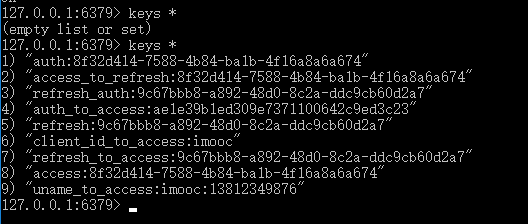
这样当用这个token去访问接口的时候,需要根据这个token 从redis中取出来存储的相关的信息,才能知道这个token所包含的信息。这中存储策略的特点是,如果redis或数据库服务挂了,这个token 就失效了,因为这个token本身是不包含信息的。
而JWT自包含的意思就是,JWT令牌本身是有信息的,拿到令牌后,解析令牌就能拿到包含的信息,不用去存储里取。
2,密签
发的令牌根据指定的秘钥签名(防止信息被篡改,不是加密)
3,可扩展
所包含的信息可以扩展
要将uuid换成JWT,需要做两件事,使用JWT ,有两个增强器:
1,第一个叫JwtAccessTokenConverter,作用是添加JWT签名,将uuid的token转为jwt,用秘钥签名
2,第二个叫 TokenEnhancer ,作用是往jwt里添加自定义的信息。由于默认生成uuid token的方法是private,所以通过ImoocJwtTokenEnhancer 往jwt里添加一些自定义的信息
最后在认证服务器ImoocAuthenticationServerConfig里,拿到增强器链TokenEnhancerChain,判断系统里这两个增强器是不是空,非空的话把这两个增强器连起来,加到TokenEndpoint 。
实现:
1,配置JwtAccessTokenConverter,新建一个配置类,先配置TokenStore 为JwtTokenStore ,然后JwtTokenStore 需要JwtAccessTokenConverter 这个转换器,在转换器里设置签名。
/**

 * token存储到redis,默认是在内存不行

 * ClassName: TokenStoreConfig

 * @Description:  token存储策略

 * @author lihaoyang

 * @date 2018年3月15日

 */

@Configuration

public class TokenStoreConfig {

    @Autowired

    private RedisConnectionFactory redisConnectionFactory;

    /**

     * 配置redis存储token

     * @Description: 配置文件有 imooc.security.oauth2.storeType = redis 时才生效

     * @param @return

     * @return TokenStore

     * @throws

     * @author lihaoyang

     * @date 2018年3月16日

     */

    @Bean

    @ConditionalOnProperty(prefix = "imooc.security.oauth2" , name = "storeType" , havingValue = "redis")

    public TokenStore redisTokenStore(){

        return new RedisTokenStore(redisConnectionFactory);

    }

    /**

     * JWT配置

     * ClassName: JwtTokenConfig

     * @Description:\

     *     @ConditionalOnProperty是说,有前缀imooc.security.oauth2.storeType = jwt 的配置时,这个类里的配置才生效

     *     matchIfMissing =true 意思是当配置文件里不配置imooc.security.oauth2.storeType = jwt时,配置是生效的

     * @author lihaoyang

     * @date 2018年3月16日

     */

    @Configuration

    @ConditionalOnProperty(prefix = "imooc.security.oauth2" , name = "storeType" , havingValue = "jwt" , matchIfMissing = true)

    public static class JwtTokenConfig{

        @Autowired

        private SecurityProperties securityProperties;

        @Bean

        public TokenStore jwtTokenStore(){

            return new JwtTokenStore(jwtAccessTokenConverter());

        }

        @Bean

        public JwtAccessTokenConverter jwtAccessTokenConverter(){

            JwtAccessTokenConverter jwtAccessTokenConverter = new JwtAccessTokenConverter();

            jwtAccessTokenConverter.setSigningKey(securityProperties.getOauth2().getJetSigningKey());//jwt签名

            return jwtAccessTokenConverter;

        }

    }

}
2,配置增强器 ImoocJwtTokenEnhancer往jwt增加自定义信息:
/**

 * jwt增强器

 * ClassName: ImoocJwtTokenEnhancer

 * @Description:

 *   往jwt的 token增加自己的信息

 *   spring默认生成token的方法在DefaultTokenService里,是private,生成的是uuid,没办法重写,只能是增强器把uuid转换成jwt,添加一些信息

 * @author lihaoyang

 * @date 2018年3月16日

 */

public class ImoocJwtTokenEnhancer implements TokenEnhancer {

    @Override

    public OAuth2AccessToken enhance(OAuth2AccessToken accessToken, OAuth2Authentication authentication) {

        //往jwt添加的自定义信息

        Map<String , Object> info = new HashMap<>();

        info.put("company", "imooc");

        info.put("product_code", "100");

        ((DefaultOAuth2AccessToken)accessToken).setAdditionalInformation(info);

        return accessToken;

    }

},
3,在认证服务器ImoocAuthenticationServerConfig判断是否存在2个增强器,并添加到TokenEndpoint ( /oauth/token处理的入口点)
/**

 * 认证服务器

 * ClassName: ImoocAuthenticationServerConfig

 * @Description:

 * extends AuthorizationServerConfigurerAdapter 自定义token生成

 * @author lihaoyang

 * @date 2018年3月12日

 */

@Configuration

@EnableAuthorizationServer //这个注解就是实现了一个认证服务器

public class ImoocAuthenticationServerConfig extends AuthorizationServerConfigurerAdapter{

    /*

     * 不继承AuthorizationServerConfigurerAdapter,这些bean会自己找,配了,就要自己实现

     */

    @Autowired

    private AuthenticationManager authenticationManager;

    @Autowired

    private  UserDetailsService userDetailsService;

    //配置文件

    @Autowired

    private SecurityProperties securityProperties;

    //token存在redis,默认是在内存

    @Autowired

    private TokenStore tokenStore;

    /**

     * jwt需要的两个增强器之一:将uuid转换为jwt

     * 有jwt配置时才生效

     */

    @Autowired(required = false)

    private JwtAccessTokenConverter jwtAccessTokenConverter;

    /**

     * jwt需要的两个增强器之二:往jwt添加自定义信息

     */

    @Autowired(required = false)

    private TokenEnhancer jwtTokenEnhancer;

    /**

     * 配置TokenEndpoint 是  /oauth/token处理的入口点

     */

    @Override

    public void configure(AuthorizationServerEndpointsConfigurer endpoints) throws Exception {

        endpoints.tokenStore(tokenStore)

                 .authenticationManager(authenticationManager)

                 .userDetailsService(userDetailsService);

        /**

         * 使用JWT ,有两个增强器:

         *     1,使用JwtAccessTokenConverter将uuid的token转为jwt,用秘钥签名

         *  2,由于默认生成uuid token的方法是private,所以通过ImoocJwtTokenEnhancer 往jwt里添加一些自定义的信息

         *

         *  在这里拿到增强器的链,把这两个增强器连起来

         */

        if(jwtAccessTokenConverter != null && jwtTokenEnhancer != null){

            //拿到增强器链

            TokenEnhancerChain enhancerChain = new TokenEnhancerChain();

            List<TokenEnhancer> enhancers = new ArrayList<TokenEnhancer>();

            enhancers.add(jwtAccessTokenConverter);

            enhancers.add(jwtTokenEnhancer);

            enhancerChain.setTokenEnhancers(enhancers);

            endpoints.tokenEnhancer(enhancerChain)

                    .accessTokenConverter(jwtAccessTokenConverter);

        }

    }

    /**

     * 功能:认证服务器会给哪些第三方应用发令牌

     *        覆盖了该方法,application.properties里配置的

     *                 security.oauth2.client.clientId = imooc

     *                security.oauth2.client.clientSecret = imoocsecret

     *     就失效了

     */

    @Override

    public void configure(ClientDetailsServiceConfigurer clients) throws Exception {

        //1,写死

//        clients.jdbc(dataSource)就是qq场景用的,有第三方公司注册过来,目前场景是给自己的应用提供接口,所以用内存就行

//        clients.inMemory()

//                //~========================== 在这里配置和写配置文件一样================

//                .withClient("imooc") //第三方应用用户名

//                .secret("imoocsecret") //密码

//                .accessTokenValiditySeconds(7200)//token有效期

//                .authorizedGrantTypes("password","refresh_token") //支持的授权模式

//                .scopes("all","read","write") //相当于oauth的权限,这里配置了,请求里的必须和这里匹配

//                //~=======如果有多个client,这里继续配置

//                .and()

//                .withClient("xxxxx");

        //2,读取配置文件

        InMemoryClientDetailsServiceBuilder builder = clients.inMemory();

        //判断是否配置了客户端

        if(ArrayUtils.isNotEmpty(securityProperties.getOauth2().getClients())){

            for (OAuth2ClientProperties config : securityProperties.getOauth2().getClients()) {

                builder.withClient(config.getClientId())

                        .secret(config.getClientSecret())

                        .accessTokenValiditySeconds(config.getAccessTokenValiditySeconds())

                        .authorizedGrantTypes("password","refresh_token") //这些也可以配置也可以写死,看心情

                        .scopes("all","read","write");

            }

        }

    }

}
重新获取token:
{

"access_token": "eyJhbGciOiJIUzI1NiIsInR5cCI6IkpXVCJ9.eyJleHAiOjE1MjExNjYwNDksInVzZXJfbmFtZSI6IjEzODEyMzQ5ODc2IiwiYXV0aG9yaXRpZXMiOlsiYWRtaW4iLCJST0xFX1VTRVIiXSwianRpIjoiYzRkYWQzYTMtM2I0Ni00N2FlLTgzYzAtYzkyNjg2MzU5ZjI0IiwiY2xpZW50X2lkIjoiaW1vb2MiLCJzY29wZSI6WyJhbGwiLCJyZWFkIiwid3JpdGUiXX0.R6-l64ogfHGRACNLiz3_-d-KT8AnN0jmSYzplpkSy-0",

"token_type": "bearer",

"refresh_token": "eyJhbGciOiJIUzI1NiIsInR5cCI6IkpXVCJ9.eyJ1c2VyX25hbWUiOiIxMzgxMjM0OTg3NiIsInNjb3BlIjpbImFsbCIsInJlYWQiLCJ3cml0ZSJdLCJhdGkiOiJjNGRhZDNhMy0zYjQ2LTQ3YWUtODNjMC1jOTI2ODYzNTlmMjQiLCJleHAiOjE1MjM3NTc5ODksImF1dGhvcml0aWVzIjpbImFkbWluIiwiUk9MRV9VU0VSIl0sImp0aSI6ImQ3N2Y3ZjVkLTE1OTctNGI5My1hNzU5LWUyYWVlYTBjM2UxMSIsImNsaWVudF9pZCI6Imltb29jIn0.ZKMUKmprgtFbsWBAFAI_BKsBVQ9RUGdbhViG3OyyIJU",

"expires_in": 59,

"scope": "all read write",

"jti": "c4dad3a3-3b46-47ae-83c0-c92686359f24"

}
此时redis中就没有token信息了

访问https://www.jsonwebtoken.io/ 可以解析jwt

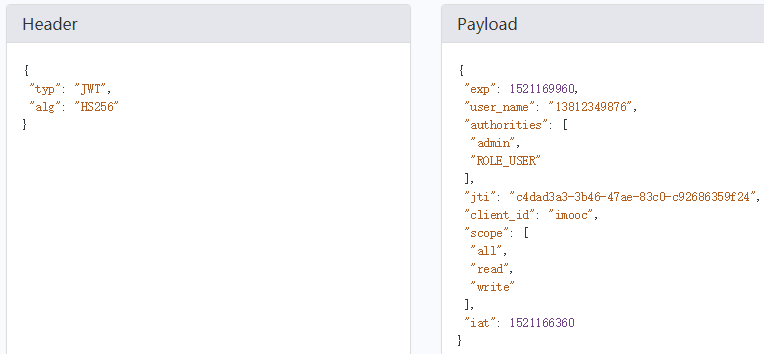
至此已完成JWT配置,但是如果想在controller 获取到往JWT里自定义的信息,还需要添加一些配置
在demo项目(应用的项目)添加maven依赖:
<!-- 解析jwt  -->

        <dependency>

            <groupId>io.jsonwebtoken</groupId>

            <artifactId>jjwt</artifactId>

            <version>0.7.0</version>

        </dependency>
在controller里:
@GetMapping("/me2")

    public Object getCurrentUser2(Authentication  user,HttpServletRequest request) throws Exception{

        String header = request.getHeader("Authorization");

        String token = StringUtils.substringAfter(header, "bearer ");

        Claims claims = Jwts.parser().setSigningKey(securityProperties.getOauth2().getJwtSigningKey().getBytes("UTF-8")).parseClaimsJws(token).getBody();

        String company = (String) claims.get("company");

        String productId = (String) claims.get("product_id");

System.err.println("token decode ------>company:"+company+",productId:"+productId);

        return user;

    }
但是我一直打印不了,不知道为什么?谁知道告诉我
Token刷新:

token是有有效期的,当token过期后,响应信息会提示token过期,又得重新登录才能访问接口, 有个token的刷新机制,我们请求 token的时候,会返回一个 refresh_token ,这个就是在token过期后,可以拿着它去换取一个新的token,这个过程应该是在用户无感知的情况下进行的。实验表明,对于没有过期的token也可以刷新,会返回一个新的token,但是之前的还可以用(这样做没有什么意义)
刷新token访问的url还是 http://127.0.0.1:8080/oauth/token
需要的参数

具体代码放在了github:https://github.com/lhy1234/spring-security
Spring Security构建Rest服务-1205-Spring Security OAuth开发APP认证框架之Token处理的更多相关文章
- Spring Security构建Rest服务-1204-Spring Security OAuth开发APP认证框架之Token处理
token处理之一基本参数配置 处理token时间.存储策略,客户端配置等 以前的都是spring security oauth默认的token生成策略,token默认在org.springframe ...
- Spring Security构建Rest服务-1300-Spring Security OAuth开发APP认证框架之JWT实现单点登录
基于JWT实现SSO 在淘宝( https://www.taobao.com )上点击登录,已经跳到了 https://login.taobao.com,这是又一个服务器.只要在淘宝登录了,就能直接访 ...
- Spring Security构建Rest服务-1201-Spring Security OAuth开发APP认证框架之实现服务提供商
实现服务提供商,就是要实现认证服务器.资源服务器. 现在做的都是app的东西,所以在app项目写代码 认证服务器: 新建 ImoocAuthenticationServerConfig 类,@Ena ...
- Spring Security构建Rest服务-1200-SpringSecurity OAuth开发APP认证框架
基于服务器Session的认证方式: 前边说的用户名密码登录.短信登录.第三方登录,都是普通的登录,是基于服务器Session保存用户信息的登录方式.登录信息都是存在服务器的session(服务器的一 ...
- Spring Security构建Rest服务-1202-Spring Security OAuth开发APP认证框架之重构3种登录方式
SpringSecurityOAuth核心源码解析 蓝色表示接口,绿色表示类 1,TokenEndpoint 整个入口点,相当于一个controller,不同的授权模式获取token的地址都是 /oa ...
- Spring Security构建Rest服务-1203-Spring Security OAuth开发APP认证框架之短信验证码登录
浏览器模式下验证码存储策略 浏览器模式下,生成的短信验证码或者图形验证码是存在session里的,用户接收到验证码后携带过来做校验. APP模式下验证码存储策略 在app场景下里是没有cookie信息 ...
- Spring Cloud构建微服务架构(三)消息总线
注:此文不适合0基础学习者直接阅读,请先完整的将作者关于微服务的博文全部阅读一遍,如果还有疑问,可以再来阅读此文,地址:http://blog.csdn.net/sosfnima/article/d ...
- 构建微服务:Spring boot
构建微服务:Spring boot 在上篇文章构建微服务:Spring boot 提高篇中简单介绍了一下spring data jpa的基础性使用,这篇文章将更加全面的介绍spring data jp ...
- Spring Cloud构建微服务架构(二)服务消费者
Netflix Ribbon is an Inter Process Communication (IPC) cloud library. Ribbon primarily provides clie ...
随机推荐
- 《Linux多线程服务端编程——使用muduo C++网络库》读书笔记
第一章 线程安全的对象生命期管理 第二章 线程同步精要 第三章 多线程服务器的适用场合与常用编程模型 第四章 C++多线程系统编程精要 1.(P84)11个常用的最基本Pthreads函数: 2个:线 ...
- VHDL的库
STD_LOGIC_ARITH 扩展了UNSIGNED.SIGNED.SMALL_INT(短整型)三个数据类型,并定义了相关的算术运算和转换函数. --======================== ...
- (KMP 暴力)Corporate Identity -- hdu -- 2328
http://acm.hdu.edu.cn/showproblem.php?pid=2328 Corporate Identity Time Limit: 9000/3000 MS (Java/Oth ...
- 图片适应bitmap的大小 http上传文件
image.setAdjustViewBounds(true); http上传文件 http://www.eoeandroid.com/thread-90209-1-1.html http://www ...
- Delphi for iOS开发指南(1):在Mac上配置你的开发环境
http://cache.baiducontent.com/c?m=9d78d513d99516f11ab7cf690d678c3b584380122ba7a0020fd18438e4732b4050 ...
- 论文笔记(3)-Extracting and Composing Robust Features with Denoising Autoencoders
这篇文章是Bengio研究的在传统的autoencoder基础上增加了噪声参数,也就是说在输入X的时候,并不直接用X的数据,而是按照一定的概率来清空输入为0.paper中的名词为corrupted.这 ...
- 在centos docker中安装nvidia驱动
因为计算需要用到GPU加速, 今天尝试在centos 机器的Docker里安装了GTX980驱动, 记录一下详细安装过程. 首先安装Docker和镜像: sudo yum install docker ...
- React server rendering —— 网易美学主站同构实录
此文已由作者张硕授权网易云社区发布. 欢迎访问网易云社区,了解更多网易技术产品运营经验. 网易美学主站在最初开发时,因为各种历史原因,引入了例如JQuery,Bootstrop,Angular, Re ...
- 使用math.js进行javascript精确计算
javascript进行浮点运算会有尾差,比如算个0.1+0.7试试,得到的不是0.8 .这个问题可以使用math.js解决. Math.js是一款开源的JavaScript和Node.js数学库,用 ...
- Flask系列02--Flask中的request
一.Flask中的request方法 1.数据相关 #flask中request,render_template等方法要通过引包的方式引入 from flask import request re ...