
WPF 精修篇 非UI进程后台更新UI进程
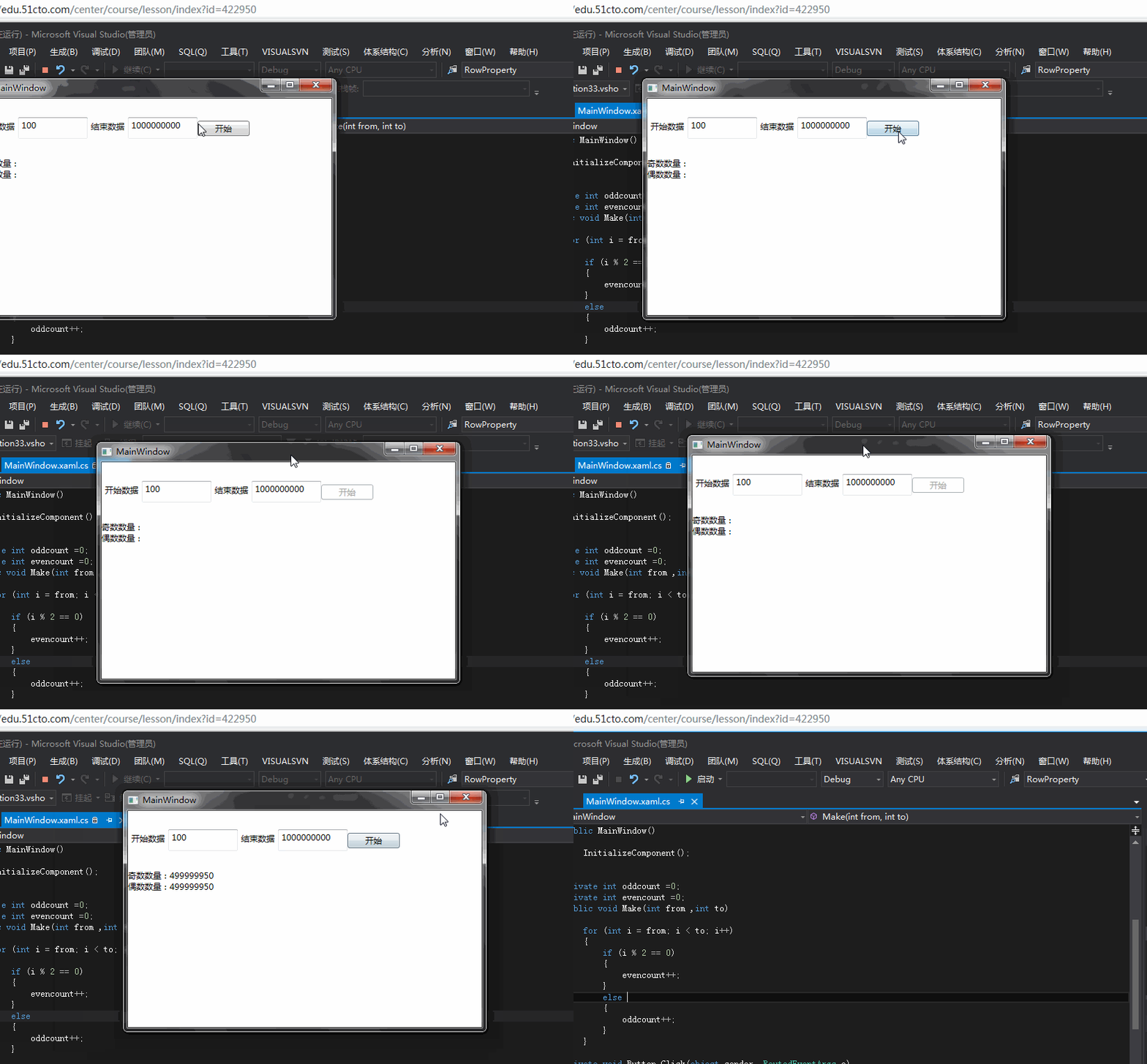
-
<Grid>
-
<Grid.RowDefinitions>
-
<RowDefinition Height="11*"/>
-
<RowDefinition Height="29*"/>
-
</Grid.RowDefinitions>
-
<StackPanel Orientation="Horizontal" Margin="0" VerticalAlignment="Center">
-
<Label>开始数据</Label>
-
<TextBox x:Name="beginText" HorizontalAlignment="Left" Height="31" TextWrapping="Wrap" Text="100" VerticalAlignment="Top" Width="100"/>
-
<Label>结束数据</Label>
-
<TextBox x:Name="endText" HorizontalAlignment="Left" Height="31" TextWrapping="Wrap" Text="1000000000" VerticalAlignment="Top" Width="100"/>
-
<Button x:Name="button" Content="开始" HorizontalAlignment="Center" VerticalAlignment="Center" Width="75" Click="Button_Click"/>
-
</StackPanel>
-
<StackPanel Margin="0" Grid.Row="1">
-
<TextBlock x:Name="odd" TextWrapping="Wrap" Text="奇数数量:"/>
-
<TextBlock x:Name="even" TextWrapping="Wrap" Text="偶数数量:"/>
-
</StackPanel>
-
</Grid>
-
private int oddcount =0;
-
private int evencount =0;
-
public void Make(int from ,int to)
-
{
-
for (int i = from; i < to; i++)
-
{
-
if (i % 2 == 0)
-
{
-
evencount++;
-
}
-
else
-
{
-
oddcount++;
-
}
-
}
-
}
-
private void Button_Click(object sender, RoutedEventArgs e)
-
{
-
int from=0;
-
int to = 0;
-
if(int.TryParse(beginText.Text,out from)&&int.TryParse(endText.Text,out to) )
-
{
-
button.IsEnabled = false;
-
ThreadPool.QueueUserWorkItem(_ =>
-
{
-
Make(from, to);
-
Dispatcher.BeginInvoke(new Action(() =>
-
{
-
odd.Text = "奇数数量:" + oddcount;
-
even.Text = "偶数数量:" + evencount;
-
button.IsEnabled = true;
-
}));
-
-
});
-
-
}
-
-
}
-
Dispatcher.BeginInvoke(new Action(() =>
-
{
-
//UI线程
-
}));
WPF 精修篇 非UI进程后台更新UI进程的更多相关文章
- WPF 精修篇 数据绑定 更新通知
原文:WPF 精修篇 数据绑定 更新通知 开始更新一点有意思的了 首先 数据绑定 其中之一 Element 绑定 看例子 <Window x:Class="WpfApplicatio ...
- WPF 精修篇 用户控件
原文:WPF 精修篇 用户控件 增加用户控件 数据绑定还是用依赖属性 使用的事件 就委托注册一下 public delegate void ButtonClick(object b,EventArgs ...
- WPF 精修篇 依赖属性
原文:WPF 精修篇 依赖属性 依赖属性使用场景 1. 希望可在样式中设置属性. 2. 希望属性支持数据绑定. 3. 希望可使用动态资源引用设置属性. 4. 希望从元素树中的父元素自动继承属性值. 5 ...
- WPF 精修篇 WPF 使用ActiveX
原文:WPF 精修篇 WPF 使用ActiveX WPF 实现远程桌面功能 首先使用 开发人员命令提示 进入 自己的项目文件根目录下 输入 aximp C:\windows\System32\msts ...
- WPF 精修篇 调用Win32Api
原文:WPF 精修篇 调用Win32Api 栗子是 调用WIn32API 让窗口最前 后台代码 [DllImport("user32.dll")] private static e ...
- WPF 精修篇 动态资源
原文:WPF 精修篇 动态资源 动态资源 使用 DynamicResource 关键字 静态 就是 StaticResource 原则上是 能用静态就用静态 动态会让前台界面压力很大~ 动态资源引用 ...
- Android开之在非UI线程中更新UI
当在非UI线程中更新UI(程序界面)时会出现例如以下图所看到的的异常: 那怎样才干在非UI线程中更细UI呢? 方法有非常多种.在这里主要介绍三种: 第一种:调用主线程mHandler的post(Run ...
- WPF 精修篇 数据触发器
原文:WPF 精修篇 数据触发器 数据触发器 可以使用Binding 来绑定控件 或者数据源 来触发相关动作 举栗子 <Window.Resources> <Style Target ...
- WPF 精修篇 属性触发器
原文:WPF 精修篇 属性触发器 属性触发器是通过 某个条件触发改变属性 通过无代码实现功能 <Style TargetType="{x:Type Label}"> ...
随机推荐
- PHP json中文
json_encode 和 json_decode 只支持utf-8编码的字符串,GBK的字符串要用json就得转换成utf-8字符串 看效果 <?php header("Conten ...
- 了解iOS各个版本新特性总结
参考了一下的文章:https://blog.csdn.net/zxtc19920/article/details/54341836 iOS7新特性 · 在iOS7当中,使用麦克风也需要取得用户同意了. ...
- The listener supports no services oracle注册监听
问题登场: [oracle@my-e450 ~]$ lsnrctl status …… The listener supports no servicesThe command completed s ...
- 9. [mmc subsystem] host(第三章)——sdhci-pltfm说明
一.sdhci-pltfm说明 sdhci-pltfm并不是实际某个host的driver. sdhci-pltfm是指在sdhci core的基础上,提供了统一对sdhci_host的必要属性进行解 ...
- LSB MSB
#LSB:(Least Significant,Bit) 最低有效位 :MSB(Most Significant Bit):最高有效位,若MSB=1,则表示数据为负值,若MSB=0则表示数据为正. 在 ...
- 安装教程-VMware 12 安装 Windows 10 企业版
VMware 12 安装 Windows 10 企业版 1.实验描述 在虚拟机中,手动安装 Windows10 企业版操作系统,为一些实验提供平台,因此,有关系统激活问题不再演示.可自行百度,或者加入 ...
- Jenkins + pipeline + Git + PHP (九)
一.准备环境介绍 192.168.5.71 # gitlab 仓库IP 192.168.5.72 # 开发环境,用于提交代码等 192.168.5.150 # www.leon.com 运行wordp ...
- lf 前后端分离 (2) 课程数据获取,Serializer的返回
一.关于课程数据的返回 在进行前后端分离时,会通过def 进行前后端传值, 本质上遵循rest 网址规范 增删改查查 get,post,put,del get(\d+) 1.在从数据库获取数据后,进 ...
- LeetCode24-Swap_Pairs
swapPairs public ListNode swapPairs(ListNode head) { if(head==null ||head.next==null) return head; L ...
- ESP8266 LUA脚本语言开发: 准备工作-LUA开发是怎么来的
前言 当前8266有各种开发 1.在官方已经封装好的C库上开发(SDK开发) 2.官方在SDK的基础上封装的AT指令程序(AT指令开发) 3.在SDK的基础上嵌入脚本语言(Lua,Python等开发方 ...