
cudaGetDevice() failed. Status: cudaGetErrorString symbol not found.怎么解决
我是在使用anaconda的Spyder写一个数字识别的任务的时候遇到这个问题的,当时我以为是我的函数库有问题,然后安装了很多东西都没用,然后百度的答案都很模糊,在我尝试了一天一下午之后,找到了问题原因所在。
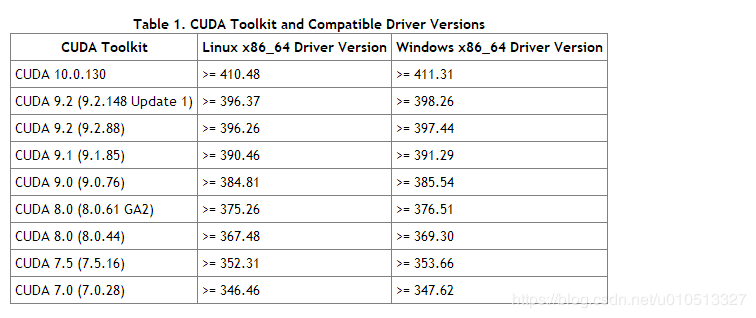
首先我用的keras,它是基于TensorFlow2.0,而TensorFlow2.0基于的显卡驱动版本是cuda10.0,cuda10.0需要的Driver Version必须大于411.31。
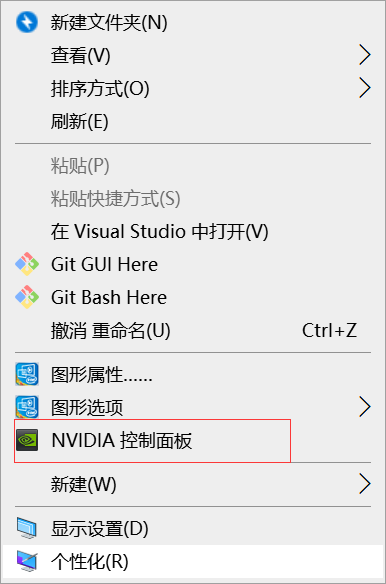
1、在桌面右键打开NVIDIA面板
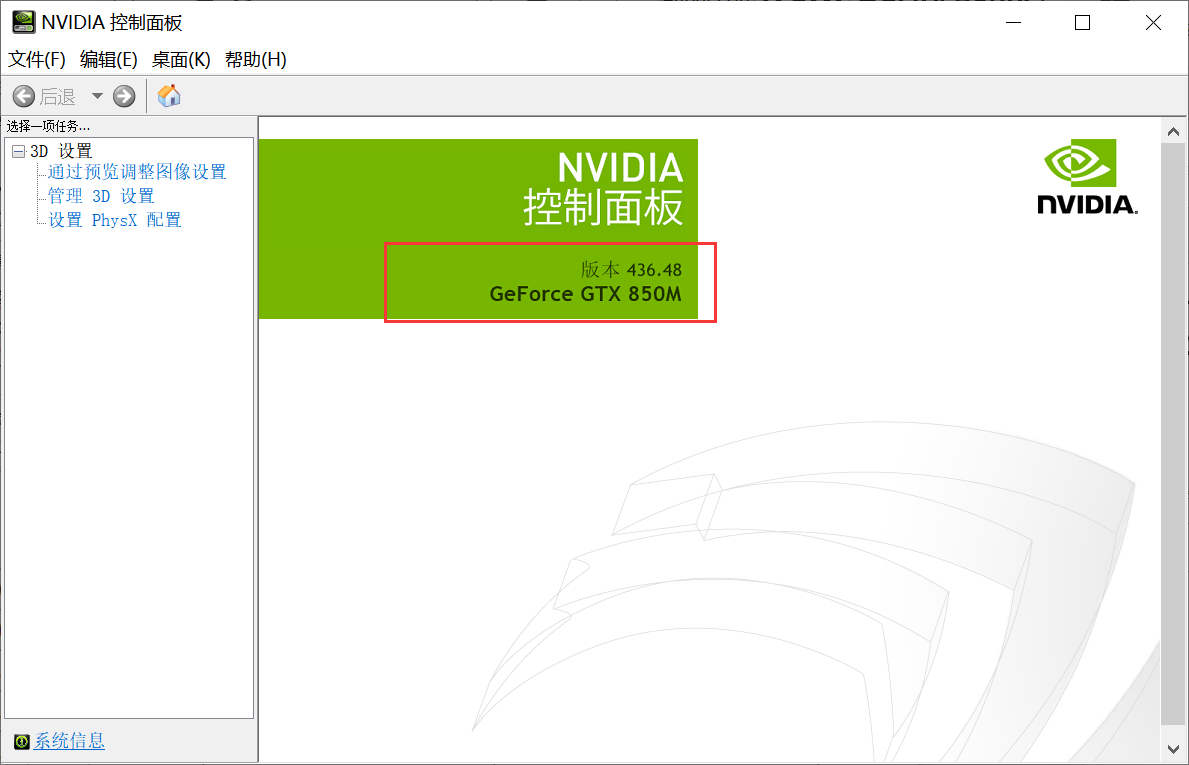
2、找到自己的driver版本
3、若是发现自己与下图的版本匹配不一样,TensorFlow2.0必须基于cuda10.0
3、先升级自己的driver版本,去英伟达官网https://www.nvidia.cn/
(1)
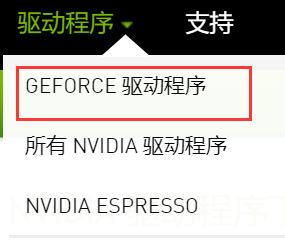
(2)在这里找到自己的显卡,要是不知道的话2、步骤有显卡版本
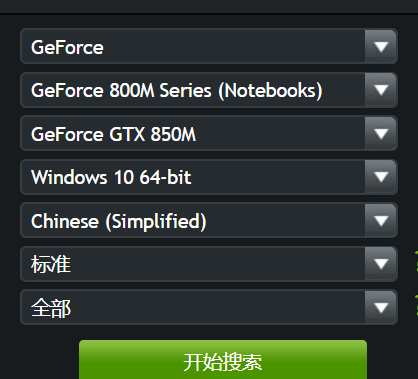

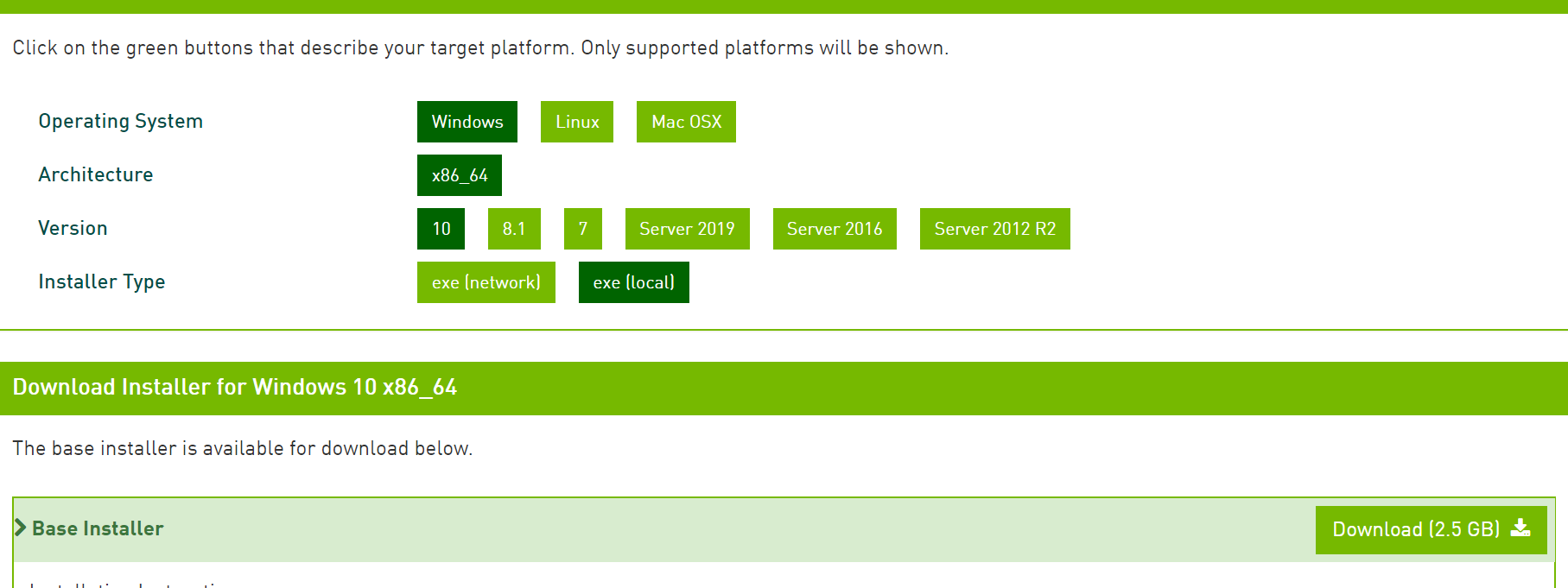
(3)一般需要安装最新的版本,安装过程为傻瓜式安装,安装完这个之后,就需要安装cuda了,下面是cuda10.0的下载界面,这个也是傻瓜式安装。
cudaGetDevice() failed. Status: cudaGetErrorString symbol not found.怎么解决的更多相关文章
- NDK编译库执行时报dlopen failed: cannot locate symbol "__exidx_end" 解决的方法
当用NDK编译的库在执行载入时报例如以下错: dlopen("/data/data/xxx.xxx.xxx/lib/libxxx.so") failed: dlopen faile ...
- [转载]关于机器上已安装CUDA,但在anaconda下tensorflow出现cudaGetDevice() failed问题的解决
机器已经安装了CUDA 9.1,驱动为390.58,我补装了对应的cudnn,并且测试通过,但是在anaconda环境下,用conda install tensorflow-gpu=1.12后,运行s ...
- check failed status == cudnn_status_success (4 vs. 0) cudnn_status_internal_error
Check failed: error == cudaSuccess (30 vs. 0) unknown error 这个有可能是显存不足造成的,或者网络参数不对造成的 check failed ...
- Check failed: status == CUBLAS_STATUS_SUCCESS (11 vs. 0) CUBLAS_STATUS_MAPPING_ERROR
I0930 21:23:15.115576 30918 solver.cpp:281] Learning Rate Policy: multistepF0930 21:23:17.263314 310 ...
- CUDA报错: Cannot create Cublas handle. Cublas won't be available. 以及:Check failed: status == CUBLAS_STATUS_SUCCESS (1 vs. 0) CUBLAS_STATUS_NOT_INITIALIZED
Error描述: aita@aita-Alienware-Area-51-R5:~/AITA2/daisida/ssd-github/caffe$ make runtest -j8 .build_re ...
- [转]NDK编译库运行时报dlopen failed: cannot locate symbol "__exidx_end" 解决办法
原文链接:http://blog.csdn.net/acm2008/article/details/41040015 当用NDK编译的库在运行加载时报如下错: dlopen("/data/d ...
- Android - Error: "java.io.IOException: setDataSource failed.: status=0x80000000"
Error: "java.io.IOException: setDataSource failed.: status=0x80000000" 本文地址: http://blog.c ...
- git rebase与 git合并(error: failed to push some refs to)解决方法
1.遇到的问题 本地有一个git仓库,在github上新建了一个空的仓库,但是更新了REWADME.md的信息,即在github上多了一个提交. 关联远程仓库,操作顺序如下: git remote a ...
- 安装tomcat出现failed to install tomcat8 service错误及解决方法
failed to install tomcat8 service 如下图所示: 一.安装tomcat出现failed to install tomcat6 service错误及解决方法(转载 ...
随机推荐
- 特别的表格(overflow:hidden的一个小应用)
做多个li,对各个边的边框有不同的要求,三层盒子,第一层盒子放li,设置右边和下边的虚线边框,浮动,第二层盒子ul设置宽度使li排列,第三层盒子最大的盒子,使用overflow:hidden,宽度高度 ...
- pt
https://www.hdarea.co/torrents.php http://hdhome.org/torrents.php https://ourbits.club/torrents.php ...
- leetcode解题报告(26):Add Binary
描述 Given two binary strings, return their sum (also a binary string). For example, a = "11" ...
- lixuxmint系统定制与配置(5)-效率配置
小书匠Linux 目录: 1.zsh安装与配置 1.1 安装 1.1.1 检查当前的终端类型 1.1.2 安装zsh 1.2 美化zsh 1.3 配置zsh 1.3.1 别名设置 2.自动登录服务器 ...
- 编译安装和二进制安装mysql
二进制安装mysql-5.6.46 mysql二进制安装,已经编译成二进制了,只需要做一些配置即可 [root@localhost ~]$ yum install autoconf libaio -y ...
- Java 输入流和字符串互相转换
import java.io.BufferedReader; import java.io.ByteArrayInputStream; import java.io.InputStream; impo ...
- Nginx 负载均衡演示之 upstream 参数 & location 参数
upstream 参数nginx关于upstream参数官方文档:http://nginx.org/en/docs/http/ngx_http_upstream_module.html upstrea ...
- 记录vsCode配置node开发环境
环境:win10,idea:vscode 1:安装Visual Studio Code 下一步下一步.(很早之前就安装了). 2:安装node. http://nodejs.cn/download/ ...
- git提交报错:Updates were rejected because the tip of your current branch is behind
提交代码push时报错:上网查询了一下解决办法有很多种,1.使用强制push的方法:(上网查询说这种会使远程修改丢失,一般是不可取的,尤其是多人协作开发的时候.) git push -u origin ...
- Android根据内网外网连接情况配置服务器访问IP
新项目的app,可通过内网和外网的服务器ip进行请求访问,但是客户提供了专业终端,终端在wifi情况下走外网内网都可以,但关闭wifi则只能走4G专网,也就是只能走内网. 可前往我的小站查看:Andr ...