
纯代码Autolayout的三种方法
Autolayout讲解较多的就是xib和storyboard用法,本文主要记录纯代码的Autolayout使用方法:
方法1.苹果原生的方法,这种方法虽然简单但是太过繁杂,可用性很差
    //宽度=superView高度

    [superView addConstraint:[NSLayoutConstraint constraintWithItem:view1 attribute:NSLayoutAttributeWidth relatedBy:NSLayoutRelationEqual toItem:superView attribute:NSLayoutAttributeWidth multiplier: constant:]];

    //高度=40

    [superView addConstraint:[NSLayoutConstraint constraintWithItem:view1 attribute:NSLayoutAttributeHeight relatedBy:NSLayoutRelationEqual toItem:nil attribute:NSLayoutAttributeHeight multiplier: constant:]];

    //view1底部距离superView底部距离为0

    [superView addConstraint:[NSLayoutConstraint constraintWithItem:view1 attribute:NSLayoutAttributeBottom relatedBy:NSLayoutRelationEqual toItem:superView attribute:NSLayoutAttributeBottom multiplier: constant:]];
方法2.VFL方法:
//view1距离superview两端距离都为0

  [superView addConstraints:[NSLayoutConstraint constraintsWithVisualFormat:@"H:|[view1]|" options: metrics:nil views:NSDictionaryOfVariableBindings(view1)]];

    //view1高度为40,距离底端距离为0

  [superView addConstraints:[NSLayoutConstraint constraintsWithVisualFormat:@"V:|[view1(==40)]" options: metrics:nil views:NSDictionaryOfVariableBindings(view1)]];
- V:[view1][view2(==view1)]|
- V表示竖直布局(vertical),先是一个view1,其下方紧接一个宽度等于view1宽度的view2,view2距离父视图底部边缘距离为0
- H:|-[view1]-[view2]-[view3(>=20)]-|
- H表示水平布局,view1距离父视图左边缘默认间隔宽度,之后是view2距离view1间隔默认宽度;再之后是宽度不小于20的view3,它和view2以及父视图右边缘的间距都是默认宽度。(竖线'|‘ 表示superview的边缘,“-|”表示默认距离,“|”表示距离边缘为0)
注意:
-(void)addConstraint:(NSLayoutConstraint *)constraint;
用来将约束添加到view。在添加时唯一要注意的是添加的目标view要遵循以下规则:
1.对于两个同层级view之间的约束关系,添加到他们的父view上
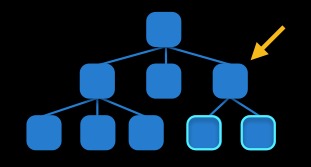
2对于两个不同层级view之间的约束关系,添加到他们最近的共同父view上
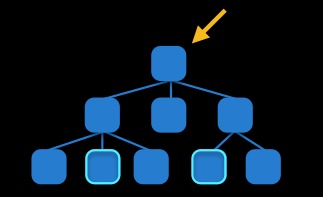
3对于有层次关系的两个view之间的约束关系,添加到层次较高的父view上
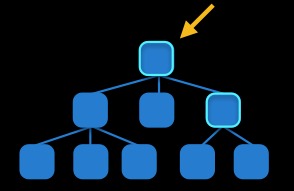
方法3.第三方库Masonry
[view1 setTranslatesAutoresizingMaskIntoConstraints:NO];
[view1 mas_makeConstraints:^(MASConstraintMaker *make) {
make.leading.width.equalTo(superView);
make.height.equalTo(@40);
}];
//上下左右边距

-(void)masonryTest1{

    UIView *blueView=[[UIView alloc]init];

    blueView.backgroundColor=[UIColor blueColor];

    [self.view addSubview:blueView];

    UIView *redView=[[UIView alloc]init];

    redView.backgroundColor=[UIColor redColor];

    [self.view addSubview:redView];

    [blueView mas_makeConstraints:^(MASConstraintMaker *make) {

//        make.width.mas_equalTo(100);

//        make.height.mas_equalTo(100);

//        make.left.equalTo(self.view.mas_left).with.offset(10);

//        make.top.equalTo(self.view.mas_top).with.offset(20);

        make.edges.equalTo(self.view).with.insets(UIEdgeInsetsMake(, , , ));

    }];

    [redView mas_makeConstraints:^(MASConstraintMaker *make) {

        make.height.mas_equalTo(blueView.mas_height);

        make.left.equalTo(blueView.mas_right).with.offset();

        make.right.equalTo(self.view.mas_right).with.offset(-);

        make.top.equalTo(blueView.mas_top).with.offset();

    }];

}

// test2: 中心点与self.view相同,宽度为400*400

-(void)masonryTest2{

    UIView *view = [UIView new];

    [view setBackgroundColor:[UIColor redColor]];

    [self.view addSubview:view];

    [view mas_makeConstraints:^(MASConstraintMaker *make) {

        make.center.equalTo(self.view);

        make.size.mas_equalTo(CGSizeMake(,));

    }];

}
参考原文档:
http://blog.csdn.net/sxfcct/article/details/8776928
http://www.zhihu.com/question/37095424
masonry下载网址:
https://github.com/SnapKit/Masonry
纯代码Autolayout的三种方法的更多相关文章
- YbSoftwareFactory 代码生成插件【二十五】:Razor视图中以全局方式调用后台方法输出页面代码的三种方法
上一篇介绍了 MVC中实现动态自定义路由 的实现,本篇将介绍Razor视图中以全局方式调用后台方法输出页面代码的三种方法. 框架最新的升级实现了一个页面部件功能,其实就是通过后台方法查询数据库内容,把 ...
- 编写Java程序_输入三个整数x,y,z,请把这三个数由小到大输出,请写出实现代码。(3种方法)
要求说明: 输入三个整数x,y,z,请把这三个数由小到大输出. 实现代码: 第1种方法: import java.util.Scanner; public class xyzMaxMin{ publi ...
- Eclipse远程调试Java代码的三种方法
Eclipse远程调试Java代码的三种方法, 第1种方法是用来调试已经启动的Java程序,Eclipse可以随时连接到远程Java程序进行调试, 第2种方法可以调试Java程序启动过程,但是Ecli ...
- 纯Css绘制三角形箭头三种方法
在制作网页的过程中少不了绘制类似图片的三角形箭头效果,虽然工程量不大,但是确实麻烦.在学习的过程中,总结了以下三种方法,以及相关的例子. 一.三种绘制三角形箭头方法 1.方法一:利用overflow: ...
- Viewing the interface of your Swift code,查看Swift代码的头文件的三种方法
Technical Q&A QA1914 Viewing the interface of your Swift code Q: How do I view the interface ...
- Vue-Vue文本渲染三种方法 {{}}、v-html、v-text
{{ }} 将元素当成纯文本输出 v-htmlv-html会将元素当成HTML标签解析后输出 v-textv-text会将元素当成纯文本输出 代码: <!DOCTYPE html> < ...
- Java实现ping功能的三种方法及Linux的区分
前大半部份转自:https://blog.csdn.net/futudeniaodan/article/details/52317650 检测设备的运行状态,有的是使用ping的方式来检测的.所以需要 ...
- 像画笔一样慢慢画出Path的三种方法(补充第四种)
今天大家在群里大家非常热闹的讨论像画笔一样慢慢画出Path的这种效果该如何实现. 北京-LGL 博客号@ligl007发起了这个话题.然后各路高手踊跃发表意见.最后雷叔 上海-雷蒙 博客号@雷蒙之星 ...
- JAVA之线程同步的三种方法
最近接触到一个图片加载的项目,其中有声明到的线程池等资源需要在系统中线程共享,所以就去研究了一下线程同步的知识,总结了三种常用的线程同步的方法,特来与大家分享一下.这三种方法分别是:synchroni ...
随机推荐
- java从txt文档读写数据
package com.abin.facade.ws.mail.function; import java.io.BufferedReader; import java.io.File; import ...
- [Objective-C语言教程]结构体(17)
Objective-C数组可定义包含多个相同类型的数据项的变量类型,但结构体是Objective-C编程中的另一个用户定义数据类型,它可组合不同类型的数据项. 结构体用于表示记录,假设要图书馆中跟踪书 ...
- Microsoft Visual C++ 14.0 is required
building 'twisted.test.raiser' extensionerror: Microsoft Visual C++ 14.0 is required. Get it with &q ...
- finally语句块一定会执行吗?
public class SystemExitAndFinally { public static void main(String[] args) { try{ System.out.println ...
- Python turtle库学习笔记
1.简介 Python的turtle库的易操作,对初学者十分友好.对于初学者来说,刚学编程没多久可以写出许多有趣的可视化东西,这是对学习编程极大的鼓舞,可以树立对编程学习的信心.当然turtle本身也 ...
- 【性能测试】:loadrunner直压MYSQL数据库的脚本开发
有时性能测试,会涉及到直接压测数据库,测试数据库处理sql的水平,或者通过sql脚本向数据库写数据做铺地数据 这里贴上一个自己用的对数据库操作的脚本 一,首先要去下载一个LR压MYSQL的一个库文件, ...
- Android手游2048核心功能
private void swipeUp(){ //向上滑动函数 for (int x = 0; x < 4; x++) { //行从上到下 for (int y = 0; y < 4; ...
- Android:刚6瓶啤酒4两56度白酒下肚,居然20分钟做了一手机版网站 !
刚6瓶啤酒4两56度白酒下肚,居然20分钟不到时间做了一手机版网站 !人有多大潜力你知道吗? 大家有兴趣的可以用手机或微信打开 http://xh.yunxunmi.com/ 看看俺这酒后之做! 更 ...
- (转)DB2下载地址总结
原文:https://blog.csdn.net/huozengguang/article/details/58602910 DB2 v8.2,v9.1,v9.5,v9.7下载地址 下列都是完全版包含 ...
- shiro学习笔记_0600_自定义realm实现授权
博客shiro学习笔记_0400_自定义Realm实现身份认证 介绍了认证,这里介绍授权. 1,仅仅通过配置文件来指定权限不够灵活且不方便.在实际的应用中大多数情况下都是将用户信息,角色信息,权限信息 ...