
Qt-QML-Canvas写个小小的闹钟
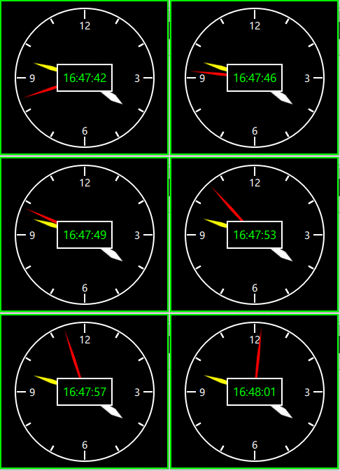
先看下演示效果
大致过程
先绘制仪表盘,圆圈和刻度
剩下再绘制三个指针
最后在绘制上面的电子时钟
下面写源代码
import QtQuick 2.0

Rectangle

{

    id:root

    anchors.centerIn: parent

    width: 200

    height: 200

    color: "transparent"

    property int time_H : 0;

    property int time_M : 0;

    property int time_S : 0;

    Timer

    {

            interval: 500; running: true; repeat: true

            onTriggered:

            {

                time.text = Qt.formatDateTime(new Date(), "hh:mm:ss")

                root.time_H = Qt.formatDateTime(new Date(), "hh")

                root.time_M = Qt.formatDateTime(new Date(), "mm")

                root.time_S = Qt.formatDateTime(new Date(), "ss")

            }

    }

    Canvas

    {

        anchors.fill: parent

        onPaint:

        {

            var ctx = getContext("2d");

            ctx.lineWidth = 2;

            ctx.strokeStyle = "#FFFFFF";

            ctx.globalAlpha = 1.0;

            ctx.beginPath();

            ctx.arc(100,100,99,0,2*Math.PI);

            ctx.stroke();

            ctx.restore();

            for(var i =0;i<32;i++)

            {

                ctx.save();

                ctx.translate(width/2,height/2);

                ctx.rotate(((i)*30)*Math.PI/180);

                ctx.beginPath();

                //判定长短线

                if(i%3 == 0)

                {

                    ctx.moveTo(0,-99+15);

                    ctx.lineTo(0,-99+2);

                }

                else

                {

                    ctx.moveTo(0,-99+10);

                    ctx.lineTo(0,-99+2);

                }

                //绘制

                ctx.stroke();

                ctx.restore();

            }

        }

    }

    Rectangle

    {

        width: 20

        height: 20

        anchors.horizontalCenter: parent.horizontalCenter

        anchors.top: parent.top

        anchors.topMargin: 15

        color: "#00000000"

        Text {

            anchors.centerIn: parent

            font.family: "微软雅黑"

            font.pixelSize: 14

            color: "#FFFFFF"

            text: qsTr("12")

        }

    }

    Rectangle

    {

        width: 20

        height: 20

        anchors.verticalCenter: parent.verticalCenter

        anchors.right: parent.right

        anchors.rightMargin: 15

        color: "#00000000"

        Text {

            anchors.centerIn: parent

            font.family: "微软雅黑"

            font.pixelSize: 14

            color: "#FFFFFF"

            text: qsTr("3")

        }

    }

    Rectangle

    {

        width: 20

        height: 20

        anchors.verticalCenter: parent.verticalCenter

        anchors.left: parent.left

        anchors.leftMargin: 15

        color: "#00000000"

        Text {

            anchors.centerIn: parent

            font.family: "微软雅黑"

            font.pixelSize: 14

            color: "#FFFFFF"

            text: qsTr("9")

        }

    }

    Rectangle

    {

        width: 20

        height: 20

        anchors.horizontalCenter: parent.horizontalCenter

        anchors.bottom: parent.bottom

        anchors.bottomMargin: 15

        color: "#00000000"

        Text {

            anchors.centerIn: parent

            font.family: "微软雅黑"

            font.pixelSize: 14

            color: "#FFFFFF"

            text: qsTr("6")

        }

    }

    Canvas

    {

        id:m_Hour

        property int m_Radius: (root.width>=root.height)? (root.height)/2 : (root.width)/2

        width: m_Radius*2

        height: m_Radius*2

        anchors.centerIn: parent

        rotation: (root.time_H%12)*30 + root.time_M*6/60 + root.time_S*6/60/60 - 180

        onPaint:

        {

            var ctx = getContext("2d");

            ctx.lineWidth = 2;

            ctx.fillStyle = "#FFFFFF";

            ctx.strokeStyle = "#FFFFFF";

            ctx.beginPath()

            ctx.moveTo(m_Radius,m_Radius)

            ctx.lineTo(m_Radius+4,m_Radius+m_Radius*0.5)

            ctx.lineTo(m_Radius,m_Radius*2-37)

            ctx.lineTo(m_Radius-4,m_Radius+m_Radius*0.5)

            ctx.closePath()

            ctx.fill()

            ctx.stroke()

        }

    }

    Canvas

    {

        id:m_Min

        property int m_Radius: (root.width>=root.height)? (root.height)/2 : (root.width)/2

        width: m_Radius*2

        height: m_Radius*2

        anchors.centerIn: parent

        rotation: root.time_M*6 + root.time_S*6/60 - 180

        onPaint:

        {

            var ctx = getContext("2d");

            ctx.lineWidth = 2;

            ctx.fillStyle = "yellow";

            ctx.strokeStyle = "yellow";

            ctx.beginPath()

            ctx.moveTo(m_Radius,m_Radius)

            ctx.lineTo(m_Radius+2,m_Radius+m_Radius*0.5)

            ctx.lineTo(m_Radius,m_Radius*2-32)

            ctx.lineTo(m_Radius-2,m_Radius+m_Radius*0.5)

            ctx.closePath()

            ctx.fill()

            ctx.stroke()

        }

    }

    Canvas

    {

        id:m_Second

        property int m_Radius: (root.width>=root.height)? (root.height)/2 : (root.width)/2

        width: m_Radius*2

        height: m_Radius*2

        anchors.centerIn: parent

        rotation: root.time_S*6 - 180

        onPaint:

        {

            var ctx = getContext("2d");

            ctx.lineWidth = 2;

            ctx.fillStyle = "red";

            ctx.strokeStyle = "red";

            ctx.beginPath()

            ctx.moveTo(m_Radius,m_Radius)

            ctx.lineTo(m_Radius+1,m_Radius+m_Radius*0.5)

            ctx.lineTo(m_Radius,m_Radius*2-28)

            ctx.lineTo(m_Radius-1,m_Radius+m_Radius*0.5)

            ctx.closePath()

            ctx.fill()

            ctx.stroke()

        }

    }

    Rectangle

    {

        border.color: "#FFFFFF"

        border.width: 2

        width: 80

        height: 40

        anchors.centerIn: parent

        color: "#000000"

        Text {

            id:time

            anchors.centerIn: parent

            color: "#00FF00"

            font.family: "微软雅黑"

            font.pixelSize: 16

            text: qsTr("22:22:22")

        }

    }

}

Qt-QML-Canvas写个小小的闹钟的更多相关文章
- qt qml中PropertyAnimation的几种使用方法
qml文章 qt qml中PropertyAnimation的几种使用方法 动画应用场景有以下几种: 首先如果一个Rectangle.动画是要改变它的x和y值 1,Rectangle一旦被创建,就要移 ...
- Qt QML referenceexamples attached Demo hacking
/********************************************************************************************* * Qt ...
- Qt qml的软件架构设计
google: qt qml application architecture 有很多资源. 1 https://www.ics.com/blog/multilayered-architecture- ...
- 用Canvas写桌球游戏!!!
声明:本文为原创文章,如需转载,请注明来源WAxes,谢谢! 昨天上班的时候闲着无事,就用Canvas写了个桌球游戏来玩玩....所以就拿这游戏上来水一发.或许对一些刚学canvas的人有帮助. 话说 ...
- Qt qml 单例模式
Qt qml 单例模式,没什么好说的,看代码吧.单例模式很适合做全局的配置文件. [示例下载] http://download.csdn.net/detail/surfsky/8539313 [以下是 ...
- Qt qml listview 列表视图控件(下拉刷新、上拉分页、滚动轴)
Qt qml listview下拉刷新和上拉分页主要根据contentY来判断.但要加上顶部下拉指示器.滚动条,并封装成可简单调用的组件,着实花了我不少精力:) [先看效果] [功能] 下拉刷新 ...
- qt qml qchart 图表组件
qt qml qchart 图表组件 * Author: Julien Wintz * Created: Thu Feb 13 23:41:59 2014 (+0100) 这玩意是从chart.js迁 ...
- qt qml fuzzyPanel 毛玻璃效果
毛玻璃效果,用qml来写代码真是简短,大爱qml:) [下载地址]http://download.csdn.net/detail/surfsky/8426641 [核心代码] Rectangle{ c ...
- canvas写的一个小时钟demo
<!DOCTYPE html> <html> <head> <title>HTML5 Canvas Demo of clock</title> ...
随机推荐
- ethersjs运行时出现的问题
1.在运行部署在ganache1.1.0上的合约中的某个函数时,出现了这样的问题,之前部署在geth上时并没有这样的问题 userdeMacBook-Pro:test-ethers user$ nod ...
- 关于python线程池threadpool
#coding=utf-8 import time import threadpool def wait_time(n): print('%d\n' % n) time.sleep(2) #在线程池中 ...
- 新闻cms管理系统功能介绍
一. 后台登录功能 1.后台登录 2.数据校验 3. dialog插件 4.layer插件 5. 退出登录(利用session失效) 二. 菜单管理 1.后台入口文件优化 2.公共文件引入 3.菜单的 ...
- 搞懂JVM类加载机制
有这样一道面试题: class Singleton{ private static Singleton singleton = new Singleton(); public static int v ...
- log4j 日志配置和jar包下载
1.日志log4j文件配置 ${webapp.root}才是项目根目录log4j.appender.logfile.File= ${catalina.home}/log/filter.log 指生成日 ...
- Reading HPSRouter A High Performance Software Router
ICACT 2018 Background High speed traffic SDN NFV Hardware Advantages High performace Disadvantages C ...
- Http请求发送json数据用实体类接收
以上是请求URL以及json数据 接收层
- ORA-10485: Real-Time Query cannot be enabled while applying migration redo
情景:利用Dataguard滚动方式升级数据库后,备库应用redo报错:ORA-10485 MRP0: Background Media Recovery terminated with error ...
- Linux-- 查看文件 more与其它
more 翻页查看 用法:more 文件名 nl 显示行号打印(不常用) 1.不打印空白行行号:nl -b t 文件名 类似 cat -b 文件名 2.打印所有行行号:nl -b a 文件名 类似 c ...
- S2-01
类: 类是对象的虚例,类是对象的集合,类是对象的模板. 对象是类的实例.(可以 0到多个.) .NET Framwork vs版本 .NET Framwork 1.0 /1.1 vs2003 .NET ...