
xaml mvvm(2)之属性绑定
通过微软INotifyPropertyChanged接口,可以实现对UI实时更新,不管是数据源或者目标对象,可以实现相互通知。
下面我们根据INotifyPropertyChanged编写一个扩展类。该类是基于C#5.0特性,这里我们介绍一下System.Runtime.CompilerServices命名空间下的CallerMemberName特性,当RaisePropertyChanged的属性名称参数为空,而通过编译器可以智能加上,可以通过反编译工具知晓,这点改进这点很人性化。注:如果开发版本framework 4.0,则需要安装KB2468871补丁或者更新framework 4.0以上版本。
为这个扩展类添加命名空间如下。
 using System;

 using System.Collections.Generic;

 using System.ComponentModel;

 using System.Diagnostics;

 using System.Linq.Expressions;

 using System.Reflection;

 using System.Runtime.CompilerServices;
 public class ObservableObject : INotifyPropertyChanged

 {

     public event PropertyChangedEventHandler PropertyChanged;

     protected PropertyChangedEventHandler PropertyChangedHandler

     {

         get

         {

             return this.PropertyChanged;

         }

     }

     [Conditional("DEBUG"), DebuggerStepThrough]

     public void VerifyPropertyName(string propertyName)

     {

         Type type = base.GetType();

         if (!string.IsNullOrEmpty(propertyName) && type.GetTypeInfo().GetDeclaredProperty(propertyName) == null)

         {

             throw new ArgumentException("Property not found", propertyName);

         }

     }

     protected virtual void RaisePropertyChanged([CallerMemberName] string propertyName = null)

     {

         PropertyChangedEventHandler propertyChanged = this.PropertyChanged;

         if (propertyChanged != null)

         {

             propertyChanged(this, new PropertyChangedEventArgs(propertyName));

         }

     }

     protected virtual void RaisePropertyChanged<T>(Expression<Func<T>> propertyExpression)

     {

         PropertyChangedEventHandler propertyChanged = this.PropertyChanged;

         if (propertyChanged != null)

         {

             string propertyName = ObservableObject.GetPropertyName<T>(propertyExpression);

             propertyChanged(this, new PropertyChangedEventArgs(propertyName));

         }

     }

     protected static string GetPropertyName<T>(Expression<Func<T>> propertyExpression)

     {

         if (propertyExpression == null)

         {

             throw new ArgumentNullException("propertyExpression");

         }

         MemberExpression memberExpression = propertyExpression.Body as MemberExpression;

         if (memberExpression == null)

         {

             throw new ArgumentException("Invalid argument", "propertyExpression");

         }

         PropertyInfo propertyInfo = memberExpression.Member as PropertyInfo;

         if (propertyInfo == null)

         {

             throw new ArgumentException("Argument is not a property", "propertyExpression");

         }

         return propertyInfo.Name;

     }

     protected bool Set<T>(Expression<Func<T>> propertyExpression, ref T field, T newValue)

     {

         if (EqualityComparer<T>.Default.Equals(field, newValue))

         {

             return false;

         }

         field = newValue;

         this.RaisePropertyChanged<T>(propertyExpression);

         return true;

     }

     protected bool Set<T>(string propertyName, ref T field, T newValue)

     {

         if (EqualityComparer<T>.Default.Equals(field, newValue))

         {

             return false;

         }

         field = newValue;

         this.RaisePropertyChanged(propertyName);

         return true;

     }

     protected bool Set<T>(ref T field, T newValue, [CallerMemberName] string propertyName = null)

     {

         return this.Set<T>(propertyName, ref field, newValue);

     }

 }
下面我们来继承这个类编写一个Animal类对象。在这里我们用到RaisePropertyChanged三种不同的实现方式,达到一样的绑定效果。
 public class Animal : ObservableObject

 {

     private string m_Cat;

     public string Cat

     {

         get { return m_Cat; }

         set { m_Cat = value; RaisePropertyChanged("Cat"); }

     }

     private string m_Dog;

     public string Dog

     {

         get { return m_Dog; }

         set { m_Dog = value; RaisePropertyChanged(); }

     }

     private string m_Tiger;

     public string Tiger

     {

         get { return m_Tiger; }

         set { m_Tiger = value; RaisePropertyChanged(() => this.Tiger); }

     }

 }
下面我们来建立model视图类。在该类中用的事件绑定和model对象实现,我们会在后续介绍。
 public class MainPageViewModel : Core.ViewModelBase

 {

     public MainPageViewModel()

     {

         MyAnimal = new Animal();

     }

     private Animal m_MyAnimal;

     public Animal MyAnimal

     {

         get { return m_MyAnimal; }

         set { m_MyAnimal = value; RaisePropertyChanged("MyAnimal"); }

     }

     public ICommand OKCommand

     {

         get

         {

             return new RelayCommand(() =>

             {

                 MyAnimal.Dog = "eating";

                 MyAnimal.Cat = "sleeping";

                 MyAnimal.Tiger = "hungry";

             });

         }

     }

 }
前台xaml。
 <Grid DataContext="{Binding Path=MainPageViewModel}">

     <StackPanel>

         <StackPanel Orientation="Horizontal">

             <TextBlock FontSize="" Text="cat is:" />

             <TextBlock FontSize="" Text="{Binding MyAnimal.Cat}" />

         </StackPanel>

         <StackPanel Orientation="Horizontal">

             <TextBlock FontSize="" Text="dog is:" />

             <TextBlock FontSize="" Text="{Binding MyAnimal.Dog}" />

         </StackPanel>

         <StackPanel Orientation="Horizontal">

             <TextBlock FontSize="" Text="Tiger is:" />

             <TextBlock FontSize="" Text="{Binding MyAnimal.Tiger}" />

         </StackPanel>

         <Button Width="" Content="OK" Command="{Binding OKCommand}" />

     </StackPanel>

 </Grid>
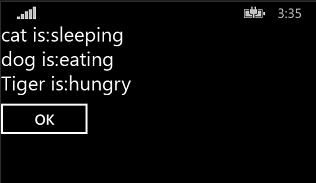
运行效果。
xaml mvvm(2)之属性绑定的更多相关文章
- WPF使用MVVM(一)-属性绑定
WPF使用MVVM(一)-属性绑定 简单介绍MVVM MVVM是Model(数据类型),View(界面),ViewModel(数据与界面之间的桥梁)的缩写,是一种编程模式,优点一劳永逸,初步增加一些逻 ...
- xaml mvvm(1)之结构
在微软winstore.wp和silverlight中xaml是用来构建UI视图的标记语言,全名Extensible Application Markup Language.在结构上类似于html,但 ...
- 【WPF】如何把一个枚举属性绑定到多个RadioButton
一.说明 很多时候,我们要把一个枚举的属性的绑定到一组RadioButton上.大家都知道是使用IValueConverter来做,但到底怎么做才好? 而且多个RadioButton的Checked和 ...
- WPF属性绑定实现双向变化
WPF依赖项属性可以实现属性的绑定,成功绑定之后只要修改后台绑定的属性,即可UI同步自动更新绑定的值,无需手动刷新界面:同样,前台的值变化后,通过获取绑定的属性值也可获取UI变化后的值,实现双向变化的 ...
- 2019-11-29-WPF-依赖属性绑定不上调试方法
原文:2019-11-29-WPF-依赖属性绑定不上调试方法 title author date CreateTime categories WPF 依赖属性绑定不上调试方法 lindexi 2019 ...
- 2019-8-2-WPF-依赖属性绑定不上调试方法
title author date CreateTime categories WPF 依赖属性绑定不上调试方法 lindexi 2019-08-02 19:56:32 +0800 2019-8-2 ...
- Knockoutjs实例 - 属性绑定(Bindings)之流程控制(Control flow)
一.foreach binding 使用此功能可以方便我们循环遍历输出某个数组.集合中的内容. (1).循环遍历输出数组 View Row Code 1 <script type="t ...
- grootJs的属性绑定指令
index6.html 绑定文本text gt-text="{属性名}" 绑定标签属性attr gt-attr="vm属性名称(标签属性,value表达式)" ...
- 控制文本和外观------Attr Binding(attr属性绑定)
Attr Binding(attr属性绑定) 目的 attr 绑定提供了一种方式可以设置DOM元素的任何属性值.你可以设置img的src属性,连接的href属性.使用绑定,当模型属性改变的时候,它会自 ...
随机推荐
- servlet的登陆案例
Users.java package com.po; public class Users { private String username; private String password; pu ...
- windows中dos命令指南
CMD命令:开始->运行->键入cmd或command(在命令行里可以看到系统版本.文件系统版本)chcp 修改默认字符集chcp 936默认中文chcp 650011. appwiz.c ...
- python 爬虫气象气象定时报 气象预警推送
"2018-04-09 14时""长沙市""10日(明天)""多云转雷阵雨""29℃""1 ...
- 43.国际化-app级别的资源文件
转自:https://wenku.baidu.com/view/84fa86ae360cba1aa911da02.html 在src目录下建立两个资源文件,取名为myapp_en_US.propert ...
- MVC4 AspNet MVC下的Ajax / 使用微软提供的Ajax请求脚本 [jquery.unobtrusive-ajax.min.js]
源码参考:链接:http://pan.baidu.com/s/1pKhHHMj 密码:mkr4 1:新建-->项目-->Web-->ASP.NET MVC 4 Web 应用程序.命 ...
- 对avalon的类名操作进行升级
在对SVG元素进行类名操作时,发现有一个坑爹的事情,它的className竟然是一个对象,因此报一系列BUG.第一次想到的方法是添加setClasses, getClasses两个更底层的方法.于是相 ...
- springmvc web.xml配置之 -- ContextLoaderListener
首先回归一下web.xml的常用配置,看一个示例: <context-param> <param-name>contextConfigLocation</param-na ...
- Struts2拦截器概述
--------------------siwuxie095 Struts2 拦截器概述 1.Struts2 框架封装的很多功能都在 Struts2 的拦截器中 2.Struts2 框架中有很多拦截器 ...
- Swift与OC的相互调用
Swift经过四年的发展已经趋于成熟,是时候学一下了,感谢公司swift大佬的不吝赐教.心有所感记录一下,如有不足欢迎指正批评. 新建swift项目 新建Swift.OC类文件 可在新建OC文件时,建 ...
- [leetcode]206. Reverse Linked List反转链表
Reverse a singly linked list. Input: 1->2->3->4->5->NULL Output: 5->4->3->2- ...