
Prometheus+Grafana监控部署实践
参考文档:
- Prometheus github:https://github.com/prometheus
- grafana github:https://github.com/grafana/grafana
- Prometheus getting_started:https://prometheus.io/docs/prometheus/latest/getting_started/
- Prometheus node_exporter:https://github.com/prometheus/node_exporter
- Prometheus部署(docker,optional):https://prometheus.io/docs/prometheus/latest/installation/
- Prometheus配置文件详解:https://prometheus.io/docs/prometheus/latest/configuration/configuration/
- grafana 部署:http://docs.grafana.org/installation/rpm/
一.环境
1. 拓扑
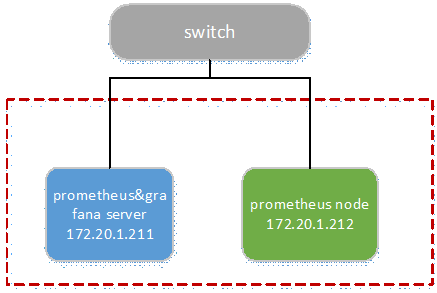
2. 节点
|
Node |
OS |
Hostname |
IP |
Remark |
|
prometheus& grafana server |
centos 7.4 |
prometheus |
172.20.1.211 |
|
|
prometheus node |
centos 7.4 |
node1 |
172.20.1.212 |
3. 版本(截止20171130)
|
Soft/Node |
Version |
Download |
|
prometheus |
2.0.0 |
|
|
node_exporter |
v0.15.1 |
|
|
grafana |
4.6.2-1 |
https://s3-us-west-2.amazonaws.com/grafana-releases/release/grafana-4.6.2-1.x86_64.rpm |
二.部署prometheus
在prometheus& grafana server节点部署prometheus服务。
1. 下载&部署
# 下载

[root@prometheus src]# cd /usr/local/src/

[root@prometheus src]# wget https://github.com/prometheus/prometheus/releases/download/v2.0.0/prometheus-2.0.0.linux-amd64.tar.gz

# 部署到/usr/local/目录

# promethus不用编译安装,解压目录中有配置文件与启动文件

[root@prometheus src]# tar -zxvf prometheus-2.0.0.linux-amd64.tar.gz -C /usr/local/

[root@prometheus src]# cd /usr/local/

[root@prometheus local]# mv prometheus-2.0.0.linux-amd64/ prometheus/

# 验证

[root@prometheus local]# cd prometheus/

[root@prometheus prometheus]# ./prometheus --version

2. 配置文件
# 解压目录中的prometheus.yml

# 简单验证,主要配置采用默认文件配置,有修改/新增处用红色标示

[root@prometheus prometheus]# vim prometheus.yml

# 全局配置

global:

  scrape_interval:     15s # 设置抓取(pull)时间间隔,默认是1m

  evaluation_interval: 15s # 设置rules评估时间间隔,默认是1m

  # scrape_timeout is set to the global default (10s).

# 告警管理配置,暂未使用,默认配置

alerting:

  alertmanagers:

  - static_configs:

    - targets:

      # - alertmanager:9093

# 加载rules,并根据设置的时间间隔定期评估,暂未使用,默认配置

rule_files:

  # - "first_rules.yml"

  # - "second_rules.yml"

# 抓取(pull),即监控目标配置

# 默认只有主机本身的监控配置

scrape_configs:

  # 监控目标的label(这里的监控目标只是一个metric,而不是指某特定主机,可以在特定主机取多个监控目标),在抓取的每条时间序列表中都会添加此label

  - job_name: 'prometheus'

    # metrics_path defaults to '/metrics'

    # scheme defaults to 'http'.

    # 可覆盖全局配置设置的抓取间隔,由15秒重写成5秒。

    scrape_interval: 5s

    # 静态指定监控目标,暂不涉及使用一些服务发现机制发现目标

static_configs:

      - targets: ['localhost:9090']

        # (opentional)再添加一个label,标识了监控目标的主机

labels:

          instance: prometheus

  - job_name: 'linux'

    scrape_interval: 10s

static_configs:

  # 采用node_exporter默认开放的端口

      - targets: ['172.20.1.212:9100']

labels:

          instance: node1
3. 设置用户
# 添加用户,后期用此账号启动服务

[root@prometheus prom etheus]# groupadd prometheus

[root@prometheus prometheus]# useradd -g prometheus -s /sbin/nologin prometheus

# 赋权

[root@prometheus prometheus]# cd ~

[root@prometheus ~]# chown -R prometheus:prometheus /usr/local/prometheus/

# 创建prometheus运行数据目录

[root@prometheus ~]# mkdir -p /var/lib/prometheus

[root@prometheus ~]# chown -R prometheus:prometheus /var/lib/prometheus/
4. 设置开机启动
[root@prometheus ~]# touch /usr/lib/systemd/system/prometheus.service

[root@prometheus ~]# chown prometheus:prometheus /usr/lib/systemd/system/prometheus.service

[root@prometheus ~]# vim /usr/lib/systemd/system/prometheus.service

[Unit]

Description=Prometheus

Documentation=https://prometheus.io/

After=network.target

[Service]

# Type设置为notify时,服务会不断重启

Type=simple

User=prometheus

# --storage.tsdb.path是可选项,默认数据目录在运行目录的./dada目录中

ExecStart=/usr/local/prometheus/prometheus --config.file=/usr/local/prometheus/prometheus.yml --storage.tsdb.path=/var/lib/prometheus

Restart=on-failure

[Install]

WantedBy=multi-user.target

# 设置开机启动

[root@prometheus ~]# systemctl enable Prometheus

[root@prometheus ~]# systemctl start prometheus
5. 设置iptables
[root@prometheus ~]# vim /etc/sysconfig/iptables

-A INPUT -p tcp -m state --state NEW -m tcp --dport 9090 -j ACCEPT

[root@prometheus ~]# service iptables restart
6. 启动并验证
1)查看服务状态
[root@prometheus ~]# systemctl status prometheus

[root@prometheus ~]# netstat -tunlp | grep 9090

2)web ui
Prometheus自带有简单的UI,http://172.20.1.211:9090
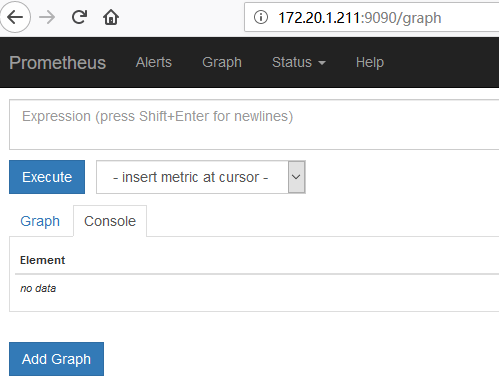
在Status菜单下,Configuration,Rule,Targets等,
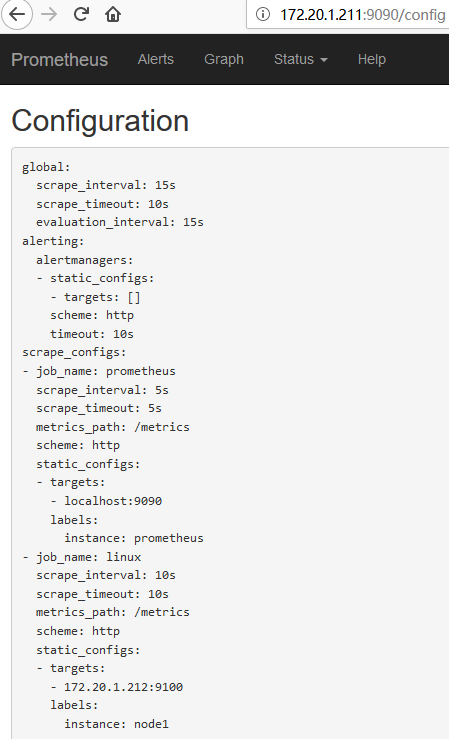
Statu-->Configuration展示prometheus.yml的配置,如下:
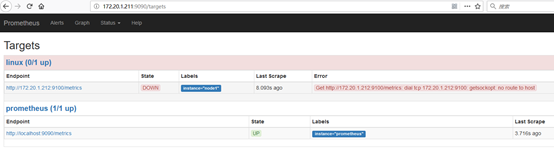
Statu-->Targets展示监控具体的监控目标,这里监控目标"linux"暂未设置node_exporter,未scrape数据,如下:
7. 绘图
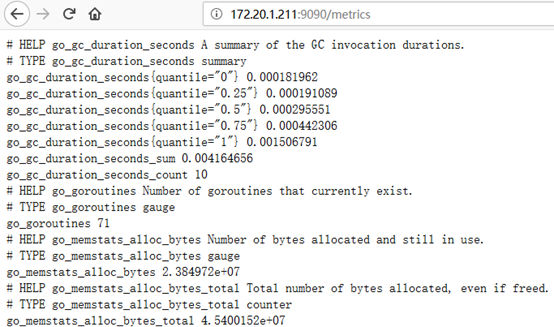
访问:http://172.20.1.211:9090/metrics,查看从exporter具体能抓到的数据,如下:
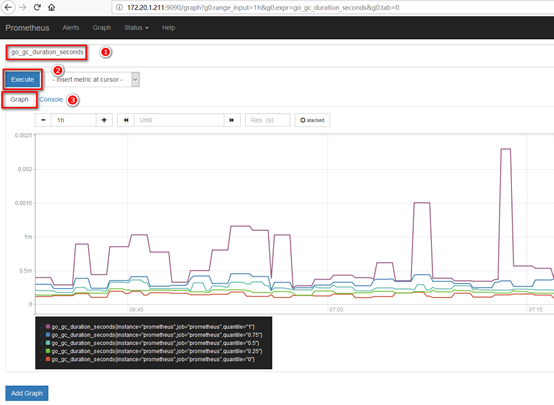
访问:http://172.20.1.211:9090,在输入框中任意输入1个exporter能抓取得值,点击"Execute"与"Execute"按钮,即可见相应抓取数据的图形,同时可对时间与unit做调整,如下:
三.部署node_exporter
Node_exporter收集机器的系统数据,这里采用prometheus官方提供的exporter,除node_exporter外,官方还提供consul,memcached,haproxy,mysqld等exporter,具体可查看官网。
这里在prometheus node节点部署相关服务。
1. 下载&部署
# 下载

[root@node1 ~]# cd /usr/local/src/

[root@node1 src]# wget https://github.com/prometheus/node_exporter/releases/download/v0.15.1/node_exporter-0.15.1.linux-amd64.tar.gz

# 部署

[root@node1 src]# tar -zxvf node_exporter-0.15.1.linux-amd64.tar.gz -C /usr/local/

[root@node1 src]# cd /usr/local/

[root@node1 local]# mv node_exporter-0.15.1.linux-amd64/ node_exporter/
2. 设置用户
[root@node1 ~]# groupadd prometheus

[root@node1 ~]# useradd -g prometheus -s /sbin/nologin prometheus

[root@node1 ~]# chown -R prometheus:prometheus /usr/local/node_exporter/
3. 设置开机启动
[root@node1 ~]# vim /usr/lib/systemd/system/node_exporter.service

[Unit]

Description=node_exporter

Documentation=https://prometheus.io/

After=network.target

[Service]

Type=simple

User=prometheus

ExecStart=/usr/local/node_exporter/node_exporter

Restart=on-failure

[Install]

WantedBy=multi-user.target

[root@node1 ~]# systemctl enable node_exporter

[root@node1 ~]# systemctl start node_exporter
4. 设置iptables
# 官方node_exporter默认使用9100端口

[root@node1 ~]# vim /etc/sysconfig/iptables

-A INPUT -p tcp -m state --state NEW -m tcp --dport 9100 -j ACCEPT

[root@node1 ~]# service iptables restart
5. 验证
访问:http://172.20.1.211:9090,可见node1主机已经可被监控,如下:

四.部署grafana
在prometheus& grafana server节点部署grafana服务。
1. 下载&安装
# 下载

[root@prometheus ~]# cd /usr/local/src/

[root@prometheus src]# wget https://s3-us-west-2.amazonaws.com/grafana-releases/release/grafana-4.6.2-1.x86_64.rpm

# 安装

[root@prometheus src]# yum localinstall grafana-4.6.2-1.x86_64.rpm
2. 配置文件
配置文件位于/etc/grafana/grafana.ini,这里暂时保持默认配置即可。
3. 设置开机启动
[root@prometheus src]# systemctl enable grafana-server

[root@prometheus src]# systemctl start grafana-server
4. 设置iptables
# grafana-server默认使用3000端口

[root@prometheus src]# vim /etc/sysconfig/iptables

-A INPUT -p tcp -m state --state NEW -m tcp --dport 3000 -j ACCEPT

[root@prometheus src]# service iptables restart
5. 添加数据源
1)登陆
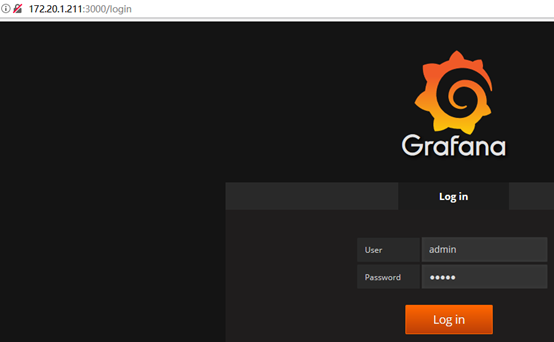
访问:http://172.20.1.211:3000,默认账号/密码:admin/admin
2)添加数据源
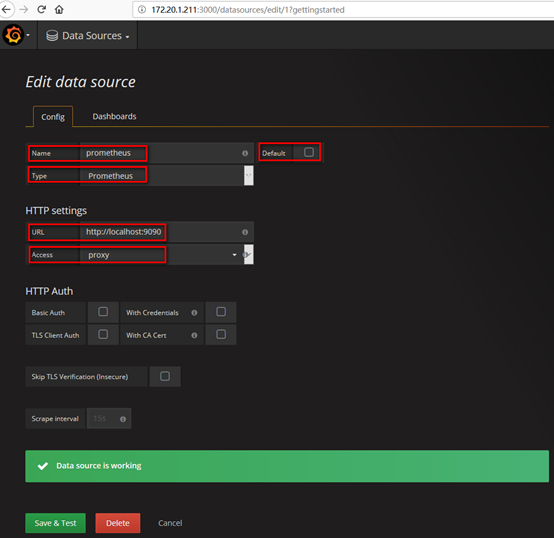
在登陆首页,点击"Add data source"按钮,跳转到添加数据源页面,配置如下:
Name: prometheus
Type: prometheus
URL: http://localhost:9090/
Access: proxy
取消Default的勾选,其余默认,点击"Add",如下:
在"Dashboards"页签下"import"自带的模版,如下:
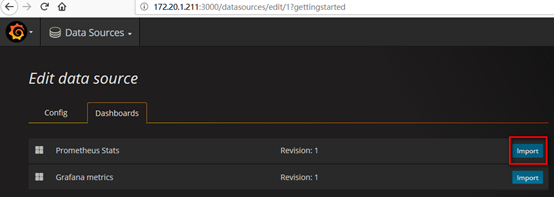
6. 导入dashboard
从grafana官网下载相关dashboaed到本地,如:https://grafana.com/dashboards/405
Grafana首页-->左上角图标-->Dashboard-->import
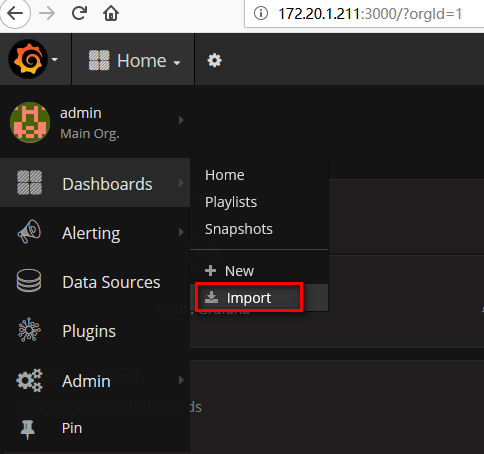
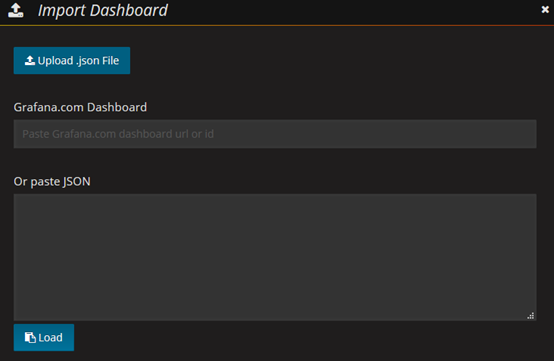
Upload已下载至本地的json文件(或者使用dashboard id,如这里的405),如下:
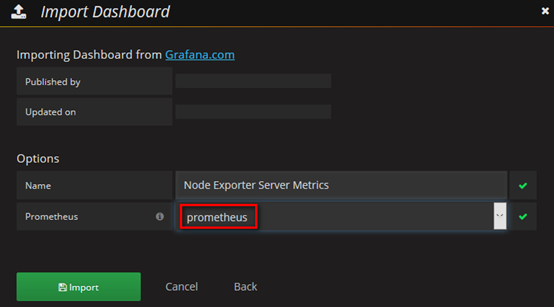
数据源选择"prometheus",即添加的数据源name,点击"Import"按钮,如下:
7. 查看dashboard
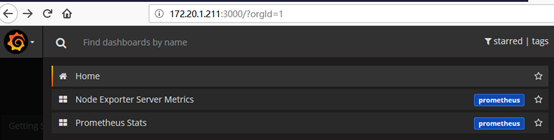
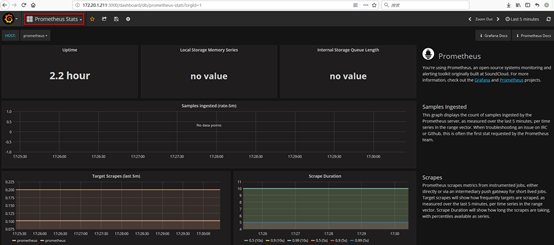
Grafana首页-->左上角图标-->Dashboard-->Home,Home下拉列表中可见有已添加的两个dashboard,"Prometheus Stats"与"Node Exporter Server Metrics",选择1个即可,如下:

Prometheus+Grafana监控部署实践的更多相关文章
- 使用Prometheus+Grafana监控MySQL实践
一.介绍Prometheus Prometheus(普罗米修斯)是一套开源的监控&报警&时间序列数据库的组合,起始是由SoundCloud公司开发的.随着发展,越来越多公司和组织接受采 ...
- Prometheus Grafana监控全方位实践
这次就不用 docker 部署服务了,这样大家会更容易接受.欢迎阅读. 引言 Prometheus 是一个监控系统,也是一个时间序列数据库,用Go语言开发的,官方文档.通过从某些特定的目标如主机,My ...
- 部署Prometheus+Grafana监控
Prometheus 1.不是很友好,各种配置都手写 2.对docker和k8s监控有成熟解决方案 Prometheus(普罗米修斯) 是一个最初在SoudCloud上构建的监控系统,开源项目,拥有非 ...
- [转帖]Prometheus+Grafana监控Kubernetes
原博客的位置: https://blog.csdn.net/shenhonglei1234/article/details/80503353 感谢原作者 这里记录一下自己试验过程中遇到的问题: . 自 ...
- Prometheus + Grafana 监控系统搭
本文主要介绍基于Prometheus + Grafana 监控Linux服务器. 一.Prometheus 概述(略) 与其他监控系统对比 1 Prometheus vs. Zabbix Zabbix ...
- Prometheus+Grafana监控Kubernetes
涉及文件下载地址:链接:https://pan.baidu.com/s/18XHK7ex_J0rzTtfW-QA2eA 密码:0qn6 文件中需要下载的镜像需要自己提前下载好,eg:prom/node ...
- cAdvisor+Prometheus+Grafana监控docker
cAdvisor+Prometheus+Grafana监控docker 一.cAdvisor(需要监控的主机都要安装) 官方地址:https://github.com/google/cadvisor ...
- prometheus+grafana监控redis
prometheus+grafana监控redis redis安装配置 https://www.cnblogs.com/autohome7390/p/6433956.html redis_export ...
- prometheus+grafana监控mysql
prometheus+grafana监控mysql 1.安装配置MySQL官方的 Yum Repository(有mysql只需设置监控账号即可) [root@localhost ~]# wget - ...
随机推荐
- oracle11g之管理oracle数据库笔记(理论基础知识)
第三章 管理oracle数据库 1.启动数据库步骤;(创建启动实例--> ...
- AMQ(approximate membership queries)介绍
目录 简介 举例 Bloom Filter 算法过程 1)位数组: 2)添加元素,k个独立hash函数 3)判断元素是否存在集合 Quotient Filter and Cascade Filter ...
- Myeclipse2014无法启动,启动十分之一自动闪退,闪退
现象: Myeclipse2014 无法启动 闪退 配图: 解决办法: 删掉 {workspace}/.metadata/.plugins/org.eclipse.e4.workbench/work ...
- iOS 地图相关
参考博文:https://blog.csdn.net/zhengang007/article/details/52858198?utm_source=blogxgwz7 1.坐标系 目前常见的坐标系有 ...
- Redis之Redis主从复制
概念: 主从复制就是主机数据更新后,根据配置和策略,自动同步到备机的master/slaver机制,Master以写为主,Slave以读为主. 配置: (1)“一主二仆”策略 准备三台redis服务器 ...
- Java实例 Part5:面向对象入门
目录 Part5:面向对象入门 Example01:成员变量的初始化值 Example02:单例模式的应用 -----懒汉式 -----饿汉式 Example03:汉诺塔问题的求解 Example04 ...
- python3 class类 练习题
"""一.定义一个学生Student类.有下面的类属性:1 姓名 name2 年龄 age3 成绩 score(语文,数学,英语) [每课成绩的类型为整数] 类方法:1 ...
- 使用xadmin更新数据时,报错expected string or bytes-like object
expected string or bytes-like object 期望的字符串或类似字节的对象,一般为数据类型不匹配造成 本人在实际项目里发现的问题是: 数据库里的字段类型与django里mo ...
- Python2+python3——多版本启动和多版本pip install问题
背景描述: python2版本都知道维护到2020年,目前使用python的很大一部分用户群体都开始改安装并且使用最新版的python3版本了,python2和python3在编程大的层面不曾改变,有 ...
- 两组数据的均值是否具有显著差异的T检验
最近在做分析的时候,遇到了T检验,然而对于没有统计学背景的人来说完全不知如何下手 当然了,遇到问题第一反应就是百度. 果然百度出来了很多链接,当时第一次直接选择了用Excel去做T检验.下面是源数据 ...