
android开发中的BaseAdapter之理解(引用自网络,总结的很好,谢谢)
android中的适配器(Adapter)是数据与视图(View)之间的桥梁,用于对要显示的数据进行处理,并通过绑定到组件进行数据的显示。
BaseAdapter是Android应用程序中经常用到的基础数据适配器的基类,它实现了Adapter接口。其主要用途是将一组数据传到像ListView、Spinner、Gallery及GridView等UI显示组件进行显示。我们经常使用的ListView 的adapter(即SimpleAdapter),是继承自BaseAdapter基类的。BaseAdapter是一个基类,没有实现绑定数据的功能。而SimpleAdapter实现了基本控件的绑定,如TextView,Button,ImageView等。并已经为我们实现好了数据优化工作。
这些适配器使用相同组件动态绑定数据的方式进行优化。为什么需要优化呢?因为如果我们有上亿个(较多个)项目要显示怎么办?为每个项目创建一个新视图?这不可能,因为内存有限制。实际上Android为你缓存了视图。Android中有个叫做Recycler的构件,下图是他的工作原理:
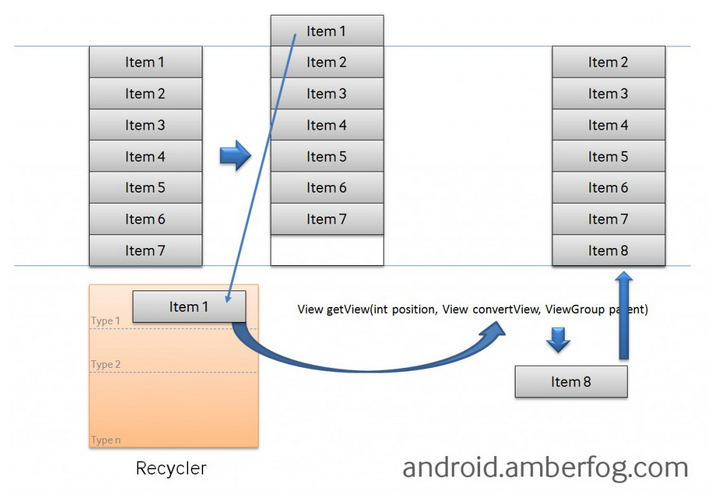
如果你有10亿个项目(item),其中只有可见的项目存在内存中,其他的在Recycler中。其实我的理解Recyler就是一个队列,用来存储不在屏幕范围内的item,如果item滚出屏幕范围,那么就入队,这里的滚出是完全滚出,即边界等也要完全滚出。如果新的item要滚进来,那么android系统的framework就会查看Recyler是否含有可以重复使用的View,如果有那么就重新设置该View 的数据源,然后显示,即出队。那么这么多的item其实只需要占用一定空间的内存,这个内存大小是多少呢?我的感觉是手机屏幕所包含的item的个数,再加上1,然后乘以每个item占用的内存。但是最后我发现是加上2.可能是为了使得缓存更大吧。。。。但是为什么加上2,大家应该理解,如果你不理解,那你就把滚动list的过程好好想一想。那个队列无非就是一个缓存罢了,因为我们的目的是通过那个缓存来重复使用那些已经创建的View。
使用BaseAdapter的话需要重载四个方法,这些方法分别是getView()、getCount()、getItem()和getItemId(),其中getView()最为重要。那么getView函数为什么重要呢?因为它是用来刷新它所在的ListView的。它在什么时候调用的呢?就是在每一次item从屏幕外滑进屏幕内的时候,或者程序刚开始的时候创建第一屏item的时候。下面分别对这几个函数进行一个介绍:
1. getView()
先看看官方API的解释:
public abstract View getView (int position, View convertView, ViewGroup parent)
Get a View that displays the data at the specified position in the data set. You can either create a View manually or inflate it from an XML layout file. When the View is inflated, the parent View (GridView, ListView...) will apply default layout parameters unless you use inflate(int, android.view.ViewGroup, boolean) to specify a root view and to prevent attachment to the root.
Parameters
| position | The position of the item within the adapter's data set of the item whose view we want. |
|---|---|
| convertView | The old view to reuse, if possible. Note: You should check that this view is non-null and of an appropriate type before using. If it is not possible to convert this view to display the correct data, this method can create a new view. Heterogeneous lists can specify their number of view types, so that this View is always of the right type (see getViewTypeCount() and getItemViewType(int)). |
| parent | The parent that this view will eventually be attached to |
Returns
- A View corresponding to the data at the specified position.
position是指当前dataset的位置,通过getCount和getItem来使用。如果list向下滑动的话那么就是最低端的item的位置,如果是向上滑动的话那就是最上端的item的位置。convert是指可以重用的视图,即刚刚出队的视图(在上面已经重点讲过)。parent应该就是显示数据的视图(如ListView、GridView等)。
2. getCount()
作用:主要是获得项目(Item)的数量。
官方API:
int getCount()
- How many items are in the data set represented by this Adapter.
-
- 返回:
- Count of items.
3.getItem()
作用:主要是获得当前选项。注意返回值类型
官方API:
Object getItem(int position)
- Get the data item associated with the specified position in the data set.
参数:
-
position- Position of the item whose data we want within the adapter's data set.- 返回:
- The data at the specified position.
4. getItemId()
作用:主要是获得当前选项的ID。
官方API:
long getItemId(int position)
- Get the row id associated with the specified position in the list.
-
- 参数:
position- The position of the item within the adapter's data set whose row id we want.- 返回:
- The id of the item at the specified position.
为了更好的理解,下面给出个一个实际的BaseAdapter使用方法(该完整例子可参考明日科技Android从入门到精通第五章例程5.9):
 public class MainActivity extends Activity {

     public int[] imageId = new int[] { R.drawable.img01, R.drawable.img02,

             R.drawable.img03, R.drawable.img04, R.drawable.img05,

             R.drawable.img06, R.drawable.img07, R.drawable.img08,

             R.drawable.img09, R.drawable.img10, R.drawable.img11,

             R.drawable.img12}; // 定义并初始化保存图片id的数组

     @Override

     protected void onCreate(Bundle savedInstanceState) {

         super.onCreate(savedInstanceState);

         setContentView(R.layout.main); // 设置该Activity使用的布局

         GridView gridview = (GridView) findViewById(R.id.gridView1); // 获取GridView组件

         BaseAdapter adapter = new BaseAdapter() {

             @Override

             public View getView(int position, View convertView, ViewGroup parent) {

                 ImageView imageview; // 声明ImageView的对象

                 if (convertView == null) {//判断recycler中是否有可用的View

                     imageview = new ImageView(MainActivity.this); // 实例化ImageView的对象

                     /************* 设置图像的宽度和高度 ******************/

                     imageview.setAdjustViewBounds(true);

                     imageview.setMaxWidth();

                     imageview.setMaxHeight();

                     /**************************************************/

                     imageview.setPadding(, , , ); // 设置ImageView的内边距

                 } else {

                     imageview = (ImageView) convertView;

                 }

                 imageview.setImageResource(imageId[position]); // 为ImageView设置要显示的图片,即设置数据源

                 return imageview; // 返回ImageView

             }

             /*

              * 功能:获得当前选项的ID

              */

             @Override

             public long getItemId(int position) {

                 return position;

             }

             /*

              * 功能:获得当前选项

              */

             @Override

             public Object getItem(int position) {

                 return position;

             }

             /*

              * 获得数量

              */

             @Override

             public int getCount() {

                 return imageId.length;

             }

         };

         gridview.setAdapter(adapter); // 将适配器与GridView关联

                 //为gridView的每一项(Item)设置单击事件监听

         gridview.setOnItemClickListener(new OnItemClickListener() {

             @Override

             public void onItemClick(AdapterView<?> parent, View view,

                     int position, long id) {

                 Intent intent = new Intent(MainActivity.this, BigActivity.class);

                 Bundle bundle = new Bundle(); // 创建并实例化一个Bundle对象

                 bundle.putInt("imgId", imageId[position]); // 保存图片ID

                 intent.putExtras(bundle); // 将Bundle对象添加到Intent对象中

                 startActivity(intent); // 启动新的Activity

             }

         });

     }

 }
以后有更深的理解或者有更好的参考再补充。。。
android开发中的BaseAdapter之理解(引用自网络,总结的很好,谢谢)的更多相关文章
- 在Android开发中如何判读当前设备是否连接网络
1:前言: 我们在Android开发的过程中,很多实现是要向远程服务器拿数据的,但是未必当前设备一定连接了网络啊,那么此时我们就是要进行判断的了, 如果是有网络的话,那么此时就去向远程服务器去拿数据, ...
- Android开发中Handler的经典总结--转载至网络
一.Handler的定义: 主要接受子线程发送的数据, 并用此数据配合主线程更新UI. 解释:当应用程序启动时,Android首先会开启一个主线程 (也就是UI线程) , 主线程为管理界面中的UI控件 ...
- Android开发中常见的设计模式
对于开发人员来说,设计模式有时候就是一道坎,但是设计模式又非常有用,过了这道坎,它可以让你水平提高一个档次.而在android开发中,必要的了解一些设计模式又是非常有必要的.对于想系统的学习设计模式的 ...
- Android开发中常见的设计模式 MD
Markdown版本笔记 我的GitHub首页 我的博客 我的微信 我的邮箱 MyAndroidBlogs baiqiantao baiqiantao bqt20094 baiqiantao@sina ...
- Android开发中JavaBean类和序列化知识的理解
原创文章,转载请注明出处:http://www.cnblogs.com/baipengzhan/p/6296121.html Android开发中,我们经常用到JavaBean类以及序列化的知识,但经 ...
- Android 开发中,as或者idea对gradle的使用
原文:Android 开发中,as或者idea对gradle的使用 本文属于转载收藏,侵删,出处:私人博客 ---------------------------------------------- ...
- 在android开发中使用multdex的方法-IT蓝豹为你整理
Android系统在安装应用时,往往需要优化Dex,而由于处理工具DexOpt对id数目的限制,导致其处理的数目不能超过65536个,因此在Android开发中,需要使用到MultiDex来解决这个问 ...
- Android开发中Eclispe相关问题及相应解决(持续更新)
1.Eclipse项目中的Android Private Libraries没有自动生成. 一般而言,在Android开发中,项目中引用到的jar包会放到项目目录中的libs中,引入库会放到Andro ...
- Android开发中的问题及相应解决(持续更新)
最近博客写的少了,以后还得经常更新才行. ------------------------------------------------------------ 1.特定业务需求下try cath ...
随机推荐
- Grails入门系列(一)
Grails入门系列(一) JAVAweb开发技术相对于php,python,note.js等新式技术更为复杂,向来以繁杂的配置著称,但是Java任然被广泛的应用于大型企业级的项目,主要是因为技术成熟 ...
- ZOJ3696 Alien's Organ 2017-04-06 23:16 51人阅读 评论(0) 收藏
Alien's Organ Time Limit: 2 Seconds Memory Limit: 65536 KB There's an alien whose name is Marja ...
- B-spline Curves 学习之B样条基函数的定义与性质(2)
B-spline Basis Functions 本博客转自前人的博客的翻译版本,前几章节是原来博主的翻译内容,但是后续章节博主不在提供翻译,后续章节我在完成相关的翻译学习. (原来博客网址:http ...
- TOAD连接ORACLE而不装ORACLE 客户端的方法
TOAD连接ORACLE而不装ORACLE 客户端的方法 原来连接ORACLE总是要装ORACLE客户端,挺麻烦得,一方面要带ORACLE得盘,另一方面,装这么大得东西也让人很不爽. ORACLE好像 ...
- html Canvas 画图 能够选择并能移动
canvas 画图,能够选中所画的图片并且能够随意移动图片 <html xmlns="http://www.w3.org/1999/xhtml"> <head r ...
- Newtonsoft.Json Deserialize Type 或者 同类型 变量 反序列化
Newtonsoft.Json 经常再用 这样的需求 还是很少用 场景 方法一:根据 Type 反序列化 ; string jsongString = JsonConvert.SerializeObj ...
- 基于ASP.NET MVC 利用(Aspose+Pdfobject.js) 实现在线预览Word、Excel、PPT、PDF文件
#region VS2010版本以及以上版本源码下载地址:http://download.csdn.net/download/u012949335/10231812 VS2012版本以及以上版本源码下 ...
- util.Date转化成sql.date格式
https://www.cnblogs.com/zhaotiancheng/p/6413067.html
- Could NOT find PythonLibs (missing: PYTHON_LIBRARIES PYTHON_INCLUDE_DIRS)
问题: Could NOT find PythonLibs (missing: PYTHON_LIBRARIES PYTHON_INCLUDE_DIRS) 解决: cmake -DPYTHON_INC ...
- django系列7.2--django中的cookie和session基本操作,浏览器登陆验证的不同实现
django中的cookie和session(02)–操作 一.Django中的cookie操作 ctrl + shift + del 是谷歌浏览器中清除页面缓存和cookie的快捷键 1.设置coo ...