
微服务架构之spring cloud hystrix&hystrix dashboard
在前面介绍spring cloud feign中我们已经使用过hystrix,只是没有介绍,spring cloud hystrix在spring cloud中起到保护微服务的作用,不会让发生的异常无边界的蔓延下去,很像我们电路中的保险设置,有超压或者线路有问题就即时的断开,保护用电设备不被损坏,这篇文章就来介绍spring cloud hystrix及其hystrix dashboard。
(一) 版本说明
a) Spring boot 2.0.6.RELEASE
b) Spring cloud Finchley.SR2
c) Java version 1.8
d) spring-cloud-starter-netflix-hystrix 2.0.2.RELEASE
e) spring-cloud-starter-netflix-hystrix-dashboard 2.0.2.RELEASE
(二) 项目配置
1. 项目设置
a) POM设置
<dependency>

<groupId>org.springframework.cloud</groupId>

<artifactId>spring-cloud-starter-netflix-hystrix</artifactId>

</dependency>

<dependency>

<groupId>org.springframework.cloud</groupId>

<artifactId>spring-cloud-starter-netflix-hystrix-dashboard</artifactId>

</dependency>
b) application.yml配置文件
eureka:

datacenter: ctm

environment: dev

instance:

hostname: 192.168.1.78

prefer-ip-address: true

ip-address: 192.168.1.129

lease-renewal-interval-in-seconds: 10

lease-expiration-duration-in-seconds: 30

instance-id: ${eureka.instance.ip-address}:${server.port}

client:

service-url:

defaultZone: http://${eureka.instance.hostname}:1001/eureka/,http://${eureka.instance.hostname}:1002/eureka/,http://${eureka.instance.hostname}:1003/eureka/

fetch-registry: true

register-with-eureka: true

healthcheck:

enabled: true

feign:

hystrix:

enabled: true
c) 主要参数说明
i. eureka.instance.prefer-ip-address 使用IP显示注册信息
ii. eureka.instance.ip-address 实例IP地址,
iii. eureka.instance.instance-id 自定义实例id,服务之间调用就是使用该配置,多个实例必须保证唯一性
iv. eureka.client.service-url.defaultZone 注册中心地址
v. feign.Hystrix.enabled 在feign中其中熔断器
d) 服务提供者API
@Value("${server.port}")

private String getPort;

@GetMapping(name = "index", value = "/index")

public String Index() {

return getPort;

}
2. feign消费端项目配置
a) POM设置
<dependency>

<groupId>org.springframework.cloud</groupId>

<artifactId>spring-cloud-starter-netflix-eureka-client</artifactId>

</dependency>

<dependency>

<groupId>org.springframework.cloud</groupId>

<artifactId>spring-cloud-starter-feign</artifactId>

</dependency>
i. 这里把服务消费端也注册到了服务治理中心,消费者同时也是其它服务的提供者。
b) application.yml配置文件
eureka:

datacenter: ctm

environment: dev

instance:

hostname: 192.168.1.78

prefer-ip-address: true

ip-address: 192.168.1.129

lease-renewal-interval-in-seconds: 10

lease-expiration-duration-in-seconds: 30

instance-id: ${eureka.instance.ip-address}:${server.port}

client:

service-url:

defaultZone: http://${eureka.instance.hostname}:1001/eureka/,http://${eureka.instance.hostname}:1002/eureka/,http://${eureka.instance.hostname}:1003/eureka/

fetch-registry: true

register-with-eureka: true

healthcheck:

enabled: true
c) feign服务消费者API
@Configuration

public class FeignConfig {

@Bean

public Retryer feignRetryer(){

return new Retryer.Default(100, TimeUnit.SECONDS.toMillis(1),3);

}

}

@Component

public class FallBackService implements FeignService {

@Override

public String Index() {

return "hi,feign,error!";

}

}

@Component

@FeignClient(name = "DEMOSERVICEIMPL",configuration = FeignConfig.class,fallback = FallBackService.class)

public interface FeignService {

@GetMapping(value = "/index")

String Index();

}
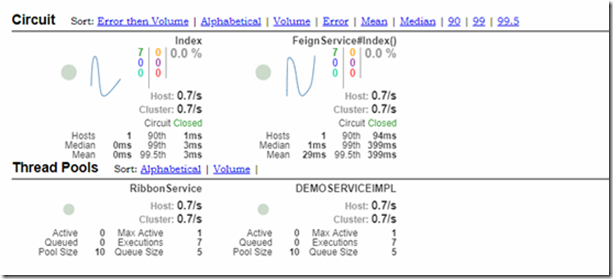
i. FeignClient feign客户端配置,这里配置了服务名称、重试规则、失败回调,fallback 属性就是熔断器提供的功能,这点在后面的熔断器看板中可以更直观的看到。
3. 项目运行
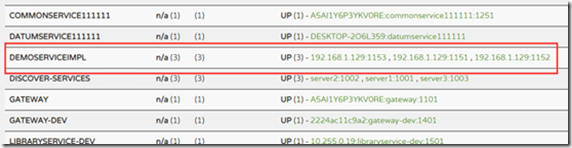
a) 运行服务提供者
i. 运行3个服务者实例后,会在服务中心看到如下效果,服务提供者已经注册成功
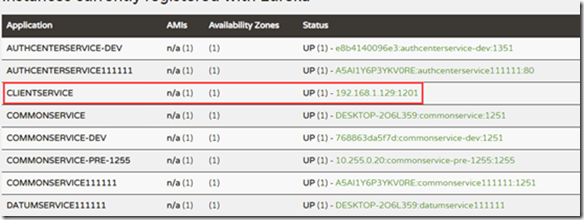
b) feign运行服务消费者
i. 运行消费者,如下图所示
c) 在浏览器中输入消费者地址服务地址,即可看到如下效果
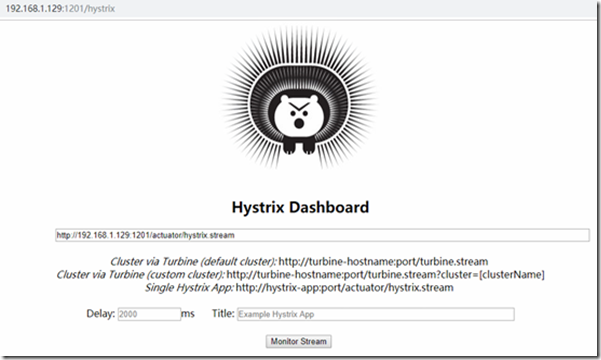
在看板地址中输入http://192.168.1.129:1201/actuator/hystrix.stream,然后点击Monitor Stream 按钮,即可看到熔断器监控,如果没有数据显示,可以用任何客户端调用几次API,即可看到类似效果。
这样spring cloud hystrix&hystrix dashboard就介绍完了,如果在开发中遇到问题,也可以留言共同探讨共同进步。
微服务架构之spring cloud hystrix&hystrix dashboard的更多相关文章
- 微服务架构-选择Spring Cloud,放弃Dubbo
Spring Cloud 在国内中小型公司能用起来吗?从 2016 年初一直到现在,我们在这条路上已经走了一年多. 在使用 Spring Cloud 之前,我们对微服务实践是没有太多的体会和经验的.从 ...
- 微服务架构集大成者—Spring Cloud (转载)
软件是有生命的,你做出来的架构决定了这个软件它这一生是坎坷还是幸福. 本文不是讲解如何使用Spring Cloud的教程,而是探讨Spring Cloud是什么,以及它诞生的背景和意义. 1 背景 2 ...
- 微服务架构之spring cloud eureka
Spring Cloud Eureka是spring cloud的核心组件,负责服务治理功能,起到中心枢纽作用,其它组件都依赖eureka来获取服务,然后再根据项目需求实现自己的业务,eureka在整 ...
- 微服务架构之spring cloud 介绍
在当前的软件开发行业中,尤其是互联网,微服务是非常炽热的一个词语,市面上已经有一些成型的微服务框架来帮助开发者简化开发工作量,但spring cloud 绝对占有一席之地,不管你是否为java开发,大 ...
- 微服务架构之spring cloud turbine
在前面介绍了spring cloud hystrix及其hystrix dashboard,但都是对单个项目的监控,对于一个为项目而言,必定有很多微服务,一个一个去看非常的不方便,如果有一个能集中熔断 ...
- 微服务架构之spring cloud zipkin
Spring Cloud Zipkin是微服务的链路跟踪组件,帮助详细了解一次request&response的总计时,及每个微服务的消耗时间.微服务名称.异常信息等等过程信息. (一) 版本 ...
- 微服务架构之spring cloud gateway
Spring Cloud Gateway是spring cloud中起着非常重要的作用,是终端调用服务的入口,同时也是项目中每个服务对外暴露的统一口径,我们可以在网关中实现路径映射.权限验证.负载均衡 ...
- 微服务架构之spring cloud feign
在spring cloud ribbon中我们用RestTemplate实现了服务调用,可以看到我们还是需要配置服务名称,调用的方法 等等,其实spring cloud提供了更优雅的服务调用方式,就是 ...
- 微服务架构之spring cloud ribbon
现在负载均衡是通用的解决分压的技术方案,实现方式一般分为服务端或者客户端,服务端大部分是使用中间件实现,spring cloud ribbon 是一个客户端负载均衡组件.跟spring cloud e ...
随机推荐
- 获得自己电脑的SSH公匙
关于什么是SSH请点击此"www.Baidu.com”网站了解 我这里只说怎么获取属于自己电脑的SSH公匙 本人是Win10电脑 所以相对来说简单一点 点击win ->选择设置-&g ...
- 2019.04.07 第三次训练 【WHU校赛】
A: (模拟退火+点到线段最短距离) https://blog.csdn.net/Link_Ray/article/details/89173222 B:✅ C: (线段树+二分) https://b ...
- SpringMVC之RequestMappingHandlerMapping
<mvc:annotation-driven content-negotiation-manager="" enable-matrix-variables="tru ...
- WebStorm 快键键
ctrl+/ 单行注释ctrl+shift+/ 块注释ctrl+shift+ +/- 展开/折叠ctrl+alt+L 格式化代码ctrl+shift+ up/down 上下移动句子 Alt+回车 导入 ...
- 判断checkbox是否被选中
jquery判断checked的三种方法: .attr('checked): //看版本1.6+返回:”checked”或”undefined” ;1.5-返回:true或false .prop( ...
- 20.Class的继承
1.简介 Class 可以通过extends关键字实现继承,这比 ES5 的通过修改原型链实现继承,要清晰和方便很多 class Point { } class ColorPoint extends ...
- DotNetCore跨平台~autofac属性的自动注入
回到目录 在使用autofac这个DI工具时,我们一般使用的是构造方法注入,而dotnetcore的标准框架里也集成了构造方法注入,而属性注入在一些场景下,表现的更为灵活,像java的spring框架 ...
- python笔记08-----正则表达式
创建正则表达式对象 import re 常用匹配语法 re.match 从头开始匹配 re.search 匹配包含 re.findall 把所有匹配到的字符放到以列表中的元素返回 re.splital ...
- session_start()导致history.go(-1)返回时无法保存表单数据的解决方法
问题背景: 在填写完表单提交时,由于某个表单项可能填写的不合法,导致提交失败,返回表单页面.但返回后所有的表单都被清空了,重新填写比较麻烦,度娘解释说,是由于每个页面都调用了session_start ...
- [作业] Python入门基础---购物车小程序
1.购物车小程序: 1.1用户输入工资取60% 1.2打印输出商品菜单 1.3由用户输入数字选择 #__author:Mifen #date: 2018/11/27 # 购物车程序 #把工资作为账户的 ...