
Idea+maven+testng+reportng生成测试报告
TestNG自带的测试报告不是很好用,所以一般结合reportng生成美观的测试报告。
首先,在pom.xml中添加testng和reportng相关依赖
    <dependencies>

        <!-- 添加testNG依赖 -->

        <dependency>

            <groupId>org.testng</groupId>

            <artifactId>testng</artifactId>

            <version>6.11</version>

            <scope>test</scope>

        </dependency>

        <!-- 添加reportNG依赖 -->

        <dependency>

            <groupId>org.uncommons</groupId>

            <artifactId>reportng</artifactId>

            <version>1.1.2</version>

            <scope>test</scope>

            <!-- 排除testNG依赖 -->

            <exclusions>

                <exclusion>

                    <groupId>org.testng</groupId>

                    <artifactId>testng</artifactId>

                </exclusion>

            </exclusions>

        </dependency>

        <dependency>

            <groupId>com.google.inject</groupId>

            <artifactId>guice</artifactId>

            <version>3.0</version>

            <scope>test</scope>

        </dependency>

    </dependencies>
pom.xml中配置maven-surefire-plugin并加入reportng listener
    <properties>

        <xmlFileName>testng.xml</xmlFileName>

    </properties>

    <build>

        <plugins>

            <plugin>

                <groupId>org.apache.maven.plugins</groupId>

                <artifactId>maven-surefire-plugin</artifactId>

                <version>2.19</version>

                <configuration>

                    <skipTests>false</skipTests>

                    <suiteXmlFiles>

                        <suiteXmlFile>${xmlFileName}</suiteXmlFile>

                    </suiteXmlFiles>

                    <properties>

                        <property>

                            <name>usedefaultlisteners</name>

                            <value>false</value>

                        </property>

                        <property>

                            <name>listener</name>

                            <value>org.uncommons.reportng.HTMLReporter,org.uncommons.reportng.JUnitXMLReporter</value>

                        </property>

                    </properties>

                    <forkMode>always</forkMode>

                </configuration>

            </plugin>

        </plugins>

    </build>
在testng.xml中<suite>标签加入listener
    <listeners>

        <listener class-name="org.uncommons.reportng.HTMLReporter"/>

        <listener class-name="org.uncommons.reportng.JUnitXMLReporter"/>

    </listeners>
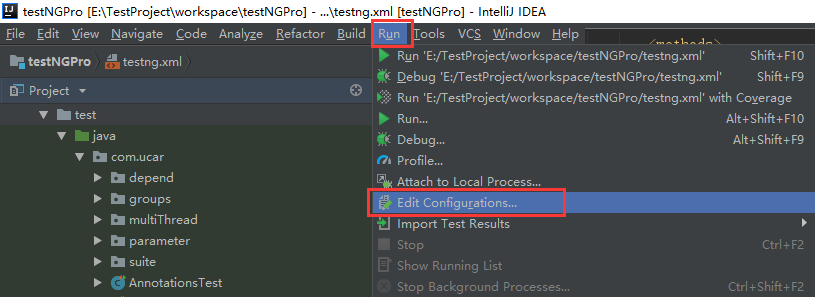
在Idea中打开Run-Edit Configurations...
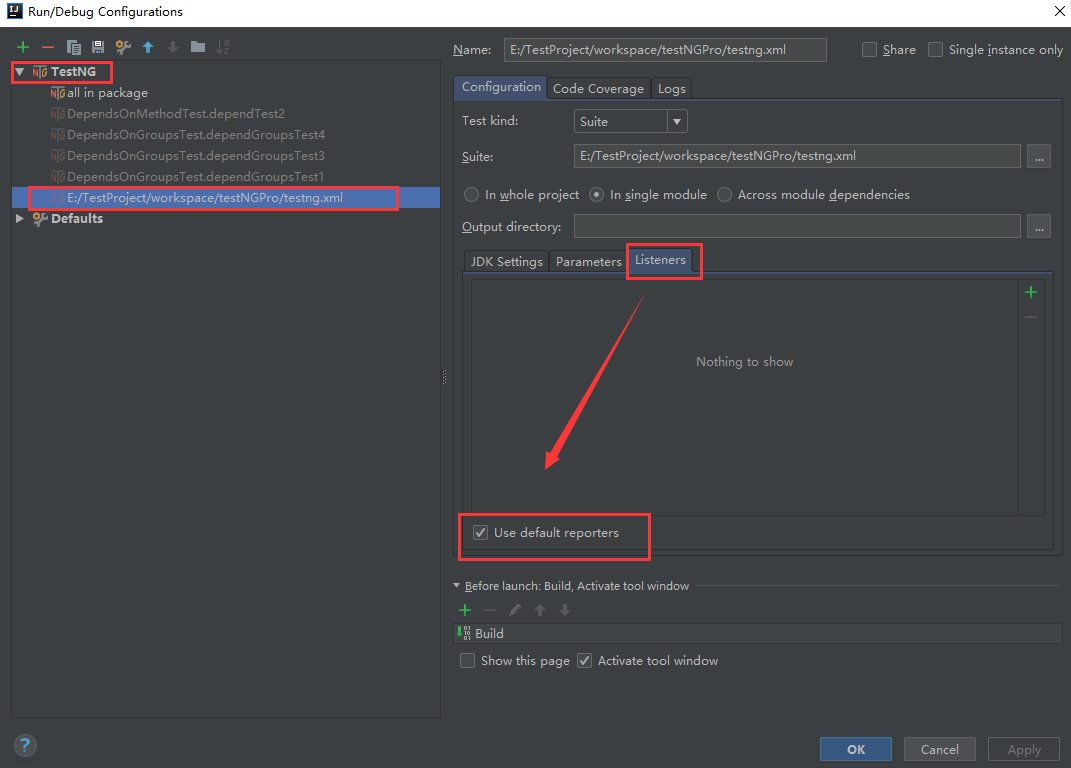
在Listeners标签下勾选“Use default reporters”
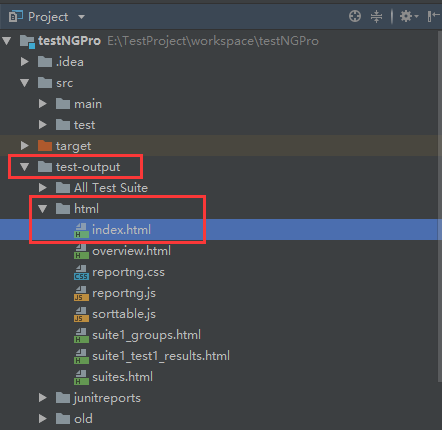
最后运行testng.xml,自动生成test-output目录,在html目录下找到index.html
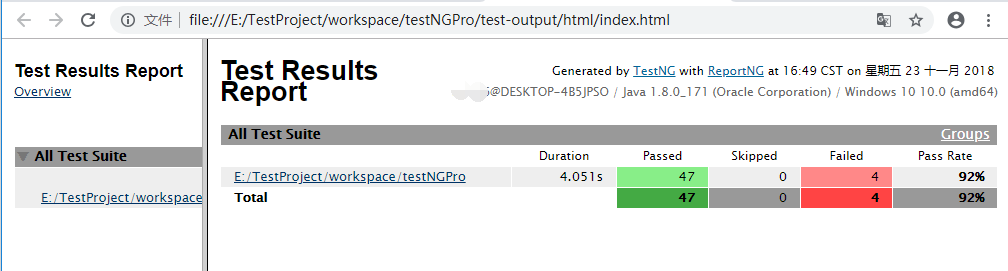
打开index.html
Idea+maven+testng+reportng生成测试报告的更多相关文章
- Mac Eclipse+Maven+TestNg+ReportNg 生成测试报告
TestNG 是java 的单元测试框架,功能很强大,很方便,但是自动生成的测试报告有待改善,可以使用TestNg 自带的TestNG_xslt更改TestNG报告的样式,这里主要讲解ReportNg ...
- Eclipse+Maven+TestNg+ReportNg 生成测试报告
http://blog.csdn.net/a542551042/article/details/46729585
- TestNG之使用ReportNG生成测试报告
TestNG使用ReportNG生成测试报告会更加美观. 依赖包 <!--testNG报告依赖包--> <dependency> <groupId>org.test ...
- Appium+Maven+TestNG(ReportNG)环境搭建(详细过程)
最近群里经常有人会问到关于maven构建Appium测试项目以及使用testNG生成测试报告的问题,试着搭建了一下,下面是过程: jdk安装过程我这里就不说了 一.下载eclipse,推荐下载Ecli ...
- Maven+TestNG+ReportNG/Allure接口自动化测试框架初探(上)
转载:http://www.51testing.com/html/58/n-3721258.html 由于一直忙于功能和性能测试,接口自动化测试框架改造的工作被耽搁了好久.近期闲暇一些,可以来做点有意 ...
- CentOS下搭建自动化测试基础框架:Jenkins+Maven+TestNG+ReportNG
1. 安装JDK 1.1 卸载系统默认已安装的open-jdk rpm -qa|grep java 查出来openjdk相关的应用,把查出来的所有都要通过下面的命令给卸载掉 rpm -e --node ...
- maven+testng+reportng的pom设置
在pom.xml 加入: <dependency> <groupId>org.testng</groupId> <artifactId>testng&l ...
- TestNG+ReportNG+Maven优化测试报告
转载:https://www.cnblogs.com/hardy-test/p/5354733.html 首先在eclipse里面创建一个maven项目,具体要配置maven环境,请自行百度搭配环境. ...
- testng生成报告ReportNG美化测试报告
testng生成报告ReportNG美化测试报告 testng生成报告ReportNG美化测试报告 ReportNG 是一个配合TestNG运行case后自动帮你在test-output文件内生成一个 ...
随机推荐
- HDU 5753Permutation Bo
Permutation Bo Time Limit: 2000/1000 MS (Java/Others) Memory Limit: 131072/131072 K (Java/Others) ...
- 在canvas上面绘制图片--drawImage实例
在canvas上面绘制图片--drawImage实例 关键点: 1.图片居中 2.其它 <!DOCTYPE html> <html lang="zh-cn"> ...
- Python: PS 图像特效 — 抽象画风
今天介绍一种基于图像分割和color map 随机采样生成一种抽象画风的图像特效,简单来说,就是先生成一张 color map 图,颜色是渐变的,然后针对要处理的图像,进行分割,这里用的是 SLIC ...
- csdn 去除广告
下载 Adblock Plus 下载地址:https://adblockplus.org/ 下载后安装即可.
- MIPI接口
接口 分辨率 说明 RGB 800*480以下 大部分AP均支持RGB接口,此类LCD在低端平板广泛使用 LVDS 1024*768及以上 主要通过转换芯片将RGB等专程LVDS来支持:少量AP直接集 ...
- bzoj4818
http://www.lydsy.com/JudgeOnline/problem.php?id=4818 矩阵快速幂+dp 首先我们来写一个dp dp[i][j]:选到第i个数,和为j,复杂度nm,不 ...
- uva1560
In an extended version of the game Lights Out®, is a puzzle with 5 rows of 6 buttons each (the actua ...
- 多条件查询测试用例设计方法(1)—Pairwise(转)
在我的工作中,我也遇到类似需求.正交法是一种不错的选择,而在我们实践过程中,我们还用了Pairwise方法,以及另一种方法(如下): 假设查询因子:A,B,C,D,E 1.单独查询:A:B:C:D:E ...
- 慕课网4-2 编程练习:jQuery祖先后代选择器小案例
4-2 编程练习 结合所学的祖先后代选择器,实现如下图所示效果 任务 (1)使用祖先后代选择器将第二段文字背景色变成红色 (2)使用jQuery的.css()方法设置样式,语法css('属性 '属性值 ...
- 自动生成 html5 小页面
StringBuilder htmltext = new StringBuilder(); try { //var readP ...