
input type=file实现图片上传,预览以及图片删除
背景
前两天在做一个PC网站的意见反馈,其中涉及到了图片上传功能,要求可以上传多张图片,并且支持图片上传预览及图片删除,
图片上传这一块以前没怎么搞过,而且一般也很少会碰到这样的需求,所以在做这个功能的时候,参考了很多网上的代码 ,
现在就单独写一篇博客来记录下实现的整个过程,以及在做的过程中遇到的一些坑。
先来看下实现的最后效果:
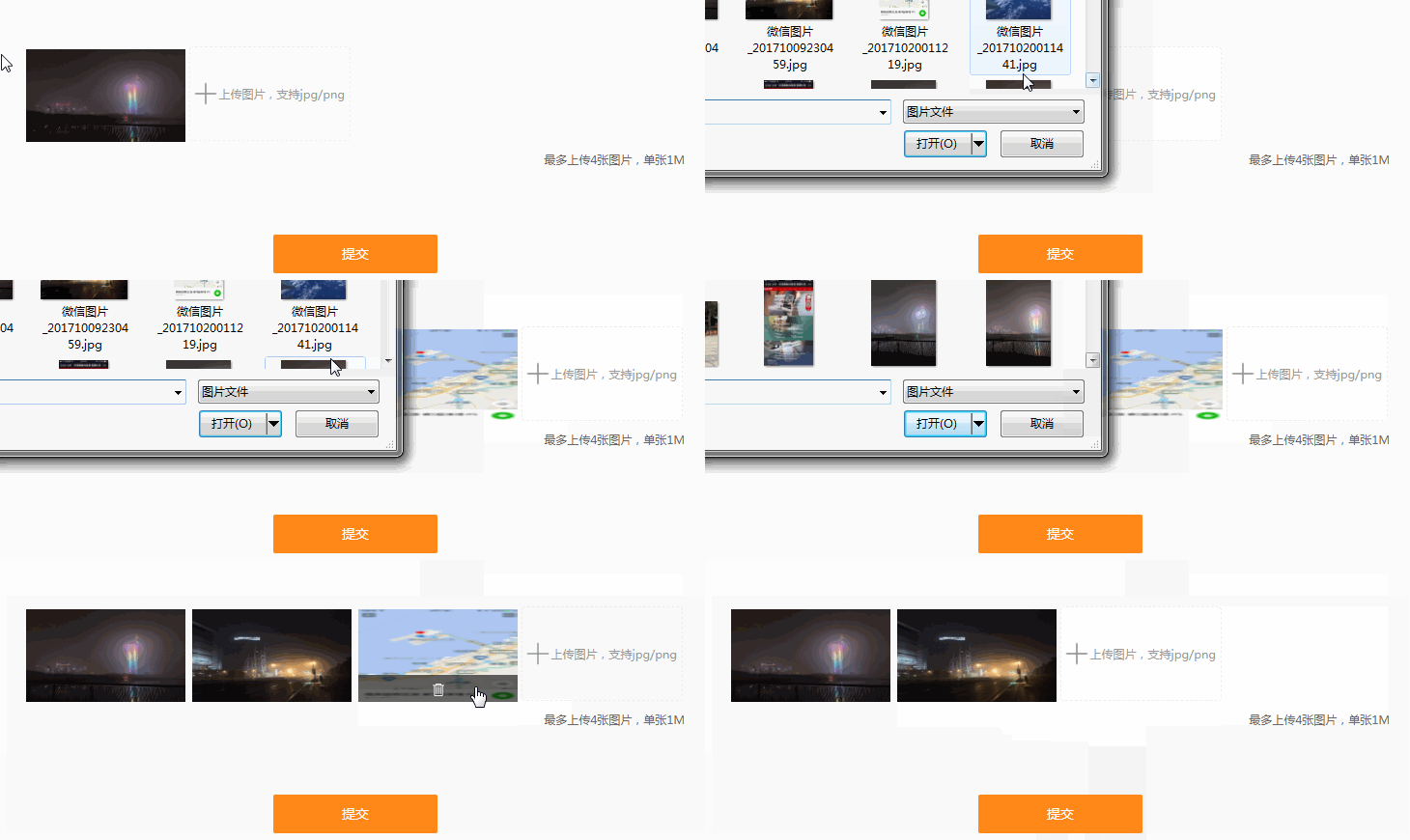
首先先创建好一个用于展示预览图片及上传按钮的div,content-img-list用于动态展示预览图片,file用于显示上传按钮
<div class="content-img">

        	<ul class="content-img-list">

        		<!-- <li class="content-img-list-item"><img src="https://www.baidu.com/img/bd_logo1.png" alt=""><a class="delete-btn"><i class="ico-delete"></i></a></li> -->

        	</ul>

        	<div class="file">

        		<i class="ico-plus"></i>上传图片,支持jpg/png<input type="file" name="file" accept="image/*" id="upload" >

        	</div>

        </div>
上传按钮美化
默认input type=file的上传按钮非常的丑陋,实现自定义上传按钮样式,这里主要通过设置input的透明度将它设置为opacity: 0;
图片上传实现步骤
图片上传
通过jquery监听input change事件,这样我们可以获取到上传的图片流信息,从而可以获取到图片的地址、大小、格式以及名称等信息
这里创建3个数组,imgName、imgSrc、imgFile分别用于存放上传图片的名称、url地址以及图片流信息
var fileList = this.files;

		for(var i = 0; i < fileList.length; i++) {

			var imgSrcI = getObjectURL(fileList[i]);

			imgName.push(fileList[i].name);

			imgSrc.push(imgSrcI);

			imgFile.push(fileList[i]);

		}
getObjectURL方法是一个用于获取本地图片的地址,使用该url可以显示图片
function getObjectURL(file) {

	var url = null ;

	if (window.createObjectURL!=undefined) { // basic

		url = window.createObjectURL(file) ;

	} else if (window.URL!=undefined) { // mozilla(firefox)

		url = window.URL.createObjectURL(file) ;

	} else if (window.webkitURL!=undefined) { // webkit or chrome

		url = window.webkitURL.createObjectURL(file) ;

	}

	return url ;

}
控制上传图片大小、格式以及上传数量
	$('#upload').on('change',function(){

		  if(imgSrc.length==4){

			return alert("最多只能上传4张图片");

		}

		var imgSize = this.files[0].size;  //b

		if(imgSize>1024*1024*1){//1M

			return alert("上传图片不能超过1M");

		}

		if(this.files[0].type != 'image/png' && this.files[0].type != 'image/jpeg' && this.files[0].type != 'image/gif'){

			return alert("图片上传格式不正确");

		}

	})
图片预览
创建一个addNewContent方法用于动态展示添加的图片实现图片预览,在每次上传图片的时候调用该方法
function addNewContent(obj) {

	$(obj).html("");

	for(var a = 0; a < imgSrc.length; a++) {

		var oldBox = $(obj).html();

		$(obj).html(oldBox + '<li class="content-img-list-item"><img src="'+imgSrc[a]+'" alt=""><a index="'+a+'" class="hide delete-btn"><i class="ico-delete"></i></a></li>');

	}

}
图片删除
1.通过监听鼠标的mouseover事件,显示图片删除按钮
$('.content-img-list').on('mouseover','.content-img-list-item',function(){

		$(this).children('a').removeClass('hide');

	});
2.监听鼠标的mouseleave事件,隐藏图片删除按钮
$('.content-img-list').on('mouseleave','.content-img-list-item',function(){

		$(this).children('a').addClass('hide');

	});
3.获取图片index下标属性,通过js的splice方法删除数组元素,重新调用addNewContent方法遍历图片数组显示预览图片
$(".content-img-list").on("click",'.content-img-list-item a',function(){

	    	var index = $(this).attr("index");

			imgSrc.splice(index, 1);

			imgFile.splice(index, 1);

			imgName.splice(index, 1);

			var boxId = ".content-img-list";

			addNewContent(boxId);

			if(imgSrc.length<4){//显示上传按钮

				$('.content-img .file').show();

			}

	  });
图片上传提交
这里主要使用FormData来拼装好数据参数,提交到后台
var formFile = new FormData();
遍历imgFile图片流数组拼装到FormData中
 $.each(imgFile, function(i, file){

            formFile.append('myFile[]', file);

        });
添加其他参数
    formFile.append("type", type);

        formFile.append("content", content);

        formFile.append("mobile", mobile);
最后使用ajax提交内容
 $.ajax({

            url: 'http://zhangykwww.yind123.com/webapi/feedback',

            type: 'POST',

            data: formFile,

            async: true,

            cache: false,

            contentType: false,

            processData: false,

            // traditional:true,

            dataType:'json',

            success: function(res) {

                console.log(res);

            }

        })
以上就实现了图片上传、图片预览和图片删除的功能
实现过程中遇到的坑
1.解决input file上传图片无法上传相同的图片 如果是相同图片onChange事件只会触发一次
onChange里面清除元素的value
document.querySelector('#uploader-get-file').value = null
也可以这样this.value = null;
$('#upload').on('change',function(){//图片上传

        this.value = null;//解决无法上传相同图片的问题

})
2.使用formData上传file数组 3种方式(参考https://segmentfault.com/q/1010000009622562)
方式1:

$.each(getImgFiles(), function(i, file){

    formData.append('files', file);

});

方式2:

$.each(getImgFiles(), function(i, file){

    formData.append('files[]', file);

});

方式3:

$.each(getImgFiles(), function(i, file){

    formData.append('files_' + i, file);

});
3.jquery设置 ajax属性
processData : false, // 告诉jQuery不要去处理发送的数据

contentType : false,// 告诉jQuery不要去设置Content-Type请求头
完整的代码我已经上传到了https://github.com/fozero/frontcode,可以点击查看,如果觉得还不错的话,记得star一下哦!
相关链接
http://www.17sucai.com/pins/26463.html
https://blog.csdn.net/take_dream_as_horse/article/details/53197697
https://blog.csdn.net/qq_35556474/article/details/54575779
http://www.jb51.net/article/83894.htm
http://www.haorooms.com/post/css_input_uploadmh
https://www.cnblogs.com/LoveTX/p/7081515.html
http://www.haorooms.com/post/input_file_leixing
作者:fozero
声明:原创文章,转载请注明出处,谢谢!http://www.cnblogs.com/fozero/p/8835628.html
标签:input,file,图片上传
input type=file实现图片上传,预览以及图片删除的更多相关文章
- html,图片上传预览,input file获取文件等相关操作
input file常用方法: var obj=document.getElementById("upimage"); var file=obj.files[0];//获取文件数据 ...
- 兼容好的JS图片上传预览代码
转 : http://www.codefans.net/articles/1395.shtml 兼容好的JS图片上传预览代码 (谷歌,IE11) <html xmlns="http:/ ...
- Jquery图片上传预览效果
uploadPreview.js jQuery.fn.extend({ uploadPreview: function (opts) { var _self = this, _this = $(thi ...
- [前端 4] 使用Js实现图片上传预览
导读:今天做图片上传预览,刚开始的做法是,先将图片上传到Nginx,然后重新加载页面才能看到这个图片.在这个过程中,用户一直都看不到自己上传的文件是什么样子.Ps:我发现我真的有强迫症了,都告诉我说不 ...
- Javascript之图片上传预览
使用Javascript之图片上传预览,我们无需上传到服务器中,兼容所有浏览器. 关键方法是使用微软库filter:progid:DXImageTransform.Microsoft.AlphaIma ...
- HTML5 图片上传预览
<!DOCTYPE html> <html lang="zh-cn"> <head> <meta charset="utf-8& ...
- ASP.NET工作笔记之一:图片上传预览及无刷新上传
转自:http://www.cnblogs.com/sibiyellow/archive/2012/04/27/jqueryformjs.html 最近项目里面涉及到无刷新上传图片的功能,其实也就是上 ...
- php 图片上传预览(转)
网上找的图片上传预览: <!DOCTYPE html PUBLIC "-//W3C//DTD XHTML 1.0 Transitional//EN" "http:/ ...
- js实现图片上传预览及进度条
原文js实现图片上传预览及进度条 最近在做图片上传的时候,由于产品设计的比较fashion,上网找了比较久还没有现成的,因此自己做了一个,实现的功能如下: 1:去除浏览器<input type= ...
- html 图片上传预览
Html5 upload img 2012年12月27日 20:36 <!DOCTYPE HTML> <html> <head> <meta http-equ ...
随机推荐
- 基于ASP.NET高职学生工作管理系统--文献随笔(八)
一.基本信息 标题:基于ASP.NET高职学生工作管理系统 时间:2015 出版源:电子科技大学 关键词:高职; 学生管理; ASP.NET; 系统; 二.研究背景 问题定义:随着社会的发展,我国经济 ...
- 数据库mysql之慢查询优化
今天项目遇到一个问题:就是在公司test环境中执行sql查询语句很快,也就几百毫秒,但是放到sit环境中测试就要延迟至少1分钟左右. 网上找了很多原因,大多数都是说索引问题,我看了索引没问题,又重新建 ...
- getObjectURL 上传图片预览
js 函数 function getObjectURL(file) { var url = null ; if (window.createObjectURL!=undefined) { ...
- 牛客练习赛31 B 赞迪卡之声妮莎与奥札奇 逻辑,博弈 B
牛客练习赛31 B 赞迪卡之声妮莎与奥札奇 https://ac.nowcoder.com/acm/contest/218/B 时间限制:C/C++ 1秒,其他语言2秒 空间限制:C/C++ 2621 ...
- ABP框架系列之八:(Introduction-介绍)
Introduction We are creating different applications based on different needs. But implementing commo ...
- Python开发——7.迭代器、生成器和装饰器
一.迭代器 1.迭代器协议 (1)迭代器协议是指:对象必须提供一个next方法,执行该方法要么返回迭代中的下一项,要么引起一个StopIteration移除异常以中止迭代. (2)可迭代对象:实现了迭 ...
- middleware#52
错误做法 这道题还是挺有意思的,一开始自己的做法是这样的 const app = { fns: [], callback(ctx) { console.log(ctx) }, use(fn) { th ...
- AdminLTE用django部署
前言 最近从网上看到AdminLTE这个web前端的主题挺好的,我平时用python就是写一些后台,准备以后就用这个框架了,这里就是把这个用django初始化一下这个项目. 基础环境介绍 Python ...
- day_1 Python介绍及计算机组成和系统
python学习路线 基础语法 - 文件操作 - 函数 - 模块 - 面向对象(类) - 网络编程 - 数据库 - 前段 - 项目 学习方法 wwwh: what-why-where-how #wha ...
- mysql 存储过程 CONCAT 字符串拼接
mysql 存储过程 CREATE PROCEDURE pro_province_report (IN startDate VARCHAR(),IN endDate VARCHAR(),IN Sour ...