
开源仓库Harbor搭建及配置过程
1、Harbor介绍
Harbor是Vmvare中国团队开发的开源registry仓库,相比docker官方拥有更丰富的权限权利和完善的架构设计,适用大规模docker集群部署提供仓库服务。
2、安装环境(自行准备docker环境)
系统:centos7
docker版本:17.09 客户端和服务器版本一致
compose:1.18
Harbor版本:1.3
3、环境准备
1)Harbor是通过docker的compose项目部署的,需要安装compose,幸好compost 在git上提供了安装指令:
curl -L https://github.com/docker/compose/releases/download/1.18.0/docker-compose-`uname -s`-`uname -m` -o /usr/local/bin/docker-compose

chmod +x /usr/local/bin/docker-compose   #设置执行权限
docker-compose --version  #查看安装是否程成功
这是2条命令,先执行curl再执行chmod指令,下载过程可能会出现网络问题,多尝试几次即可。
安装截图:

软件git网址:https://github.com/docker/compose/releases
2)Harbor软件安装
harbor软件网址:https://github.com/vmware/harbor/releases
此页面提供源码安装和二进制安装下载地址,不建议方式
镜像网址:http://harbor.orientsoft.cn/
此页面只提供离线下载安装包,建议此种方式,在线安装容易出现科学上网问题。
#下载离线安装软件

wget http://harbor.orientsoft.cn/harbor-v1.3.0-rc4/harbor-offline-installer-v1.3.0-rc4.tgz

#解压文件

tar -zxf harbor-offline-installer-v1.3.0-rc4.tgz
#解压后的文件夹是harbor
解压完成后:修改配置文件harbor.conf,如果是测试环境基本不用什么更改配置,主要就是hostname
[root@c7test_master harbor]# vim harbor.cfg

## Configuration file of Harbor

#The IP address or hostname to access admin UI and registry service.

#DO NOT use localhost or 127.0.0.1, because Harbor needs to be accessed by external clients.

#主机地址,不可以设置为127或者localhost

hostname = 10.10.90.105

#The protocol for accessing the UI and token/notification service, by default it is http.

#It can be set to https if ssl is enabled on nginx.

ui_url_protocol = http

#The password for the root user of mysql db, change this before any production use.
#mysql密码

db_password = root123

#Maximum number of job workers in job service

max_job_workers =

#Determine whether or not to generate certificate for the registry's token.

#If the value is on, the prepare script creates new root cert and private key

#for generating token to access the registry. If the value is off the default key/cert will be used.

#This flag also controls the creation of the notary signer's cert.

customize_crt = on

#The path of cert and key files for nginx, they are applied only the protocol is set to https

ssl_cert = /data/cert/server.crt

ssl_cert_key = /data/cert/server.key

#The path of secretkey storage

secretkey_path = /data

#Admiral's url, comment this attribute, or set its value to NA when Harbor is standalone

admiral_url = NA

#The password of the Clair's postgres database, only effective when Harbor is deployed with Clair.

#Please update it before deployment, subsequent update will cause Clair's API server and Harbor unable to access Clair's database.

clair_db_password = password

#Log files are rotated log_rotate_count times before being removed. If count is , old versions are removed rather than rotated.

log_rotate_count =

#Log files are rotated only if they grow bigger than log_rotate_size bytes. If size is followed by k, the size is assumed to be in kilobytes.

#If the M is used, the size is in megabytes, and if G is used, the size is in gigabytes. So size , size 100k, size 100M and size 100G

#are all valid.

log_rotate_size = 200M

#NOTES: The properties between BEGIN INITIAL PROPERTIES and END INITIAL PROPERTIES

#only take effect in the first boot, the subsequent changes of these properties

#should be performed on web ui

#************************BEGIN INITIAL PROPERTIES************************

#Email account settings for sending out password resetting emails.

#Email server uses the given username and password to authenticate on TLS connections to host and act as identity.

#Identity left blank to act as username.

email_identity =

email_server = smtp.mydomain.com

email_server_port =

email_username = sample_admin@mydomain.com

email_password = abc

email_from = admin <sample_admin@mydomain.com>

email_ssl = false

email_insecure = false

##The initial password of Harbor admin, only works for the first time when Harbor starts.

#It has no effect after the first launch of Harbor.

#Change the admin password from UI after launching Harbor.
#这里是web登录页面的密码,可以更改

harbor_admin_password = Harbor12345

##By default the auth mode is db_auth, i.e. the credentials are stored in a local database.

#Set it to ldap_auth if you want to verify a user's credentials against an LDAP server.

auth_mode = db_auth

#The url for an ldap endpoint.

ldap_url = ldaps://ldap.mydomain.com

#A user's DN who has the permission to search the LDAP/AD server.

#If your LDAP/AD server does not support anonymous search, you should configure this DN and ldap_search_pwd.

#ldap_searchdn = uid=searchuser,ou=people,dc=mydomain,dc=com

#the password of the ldap_searchdn

#ldap_search_pwd = password

#The base DN from which to look up a user in LDAP/AD

ldap_basedn = ou=people,dc=mydomain,dc=com

#Search filter for LDAP/AD, make sure the syntax of the filter is correct.

#ldap_filter = (objectClass=person)

# The attribute used in a search to match a user, it could be uid, cn, email, sAMAccountName or other attributes depending on your LDAP/AD

ldap_uid = uid

#the scope to search for users, -LDAP_SCOPE_BASE, -LDAP_SCOPE_ONELEVEL, -LDAP_SCOPE_SUBTREE

ldap_scope =

#Timeout (in seconds)  when connecting to an LDAP Server. The default value (and most reasonable) is  seconds.

ldap_timeout =

#Turn on or off the self-registration feature

self_registration = on

#The expiration time (in minute) of token created by token service, default is  minutes

token_expiration =

#The flag to control what users have permission to create projects

#The default value "everyone" allows everyone to creates a project.

#Set to "adminonly" so that only admin user can create project.

project_creation_restriction = everyone

#The follow configurations are for Harbor HA mode only

#the address of the mysql database.

db_host = mysql

#The port of mysql database host

db_port =

#The user name of mysql database

db_user = root

#************************END INITIAL PROPERTIES************************

#The following attributes only need to be set when auth mode is uaa_auth

uaa_endpoint = uaa.mydomain.org

uaa_clientid= id

uaa_clientsecret= secret

uaa_ca_root= /path/to/uaa_ca.pem

#############
启动harbor,修改完配置文件就可以执行该目录下的install.sh文件即可,程序会自动启动相关镜像,因为harbor是用你镜像进行安装的。
[root@c7test_master harbor]# ./install.sh
安装截图:

检测环境及下载harbor相关镜像,镜像比较多,耐心等待。
安装完成:
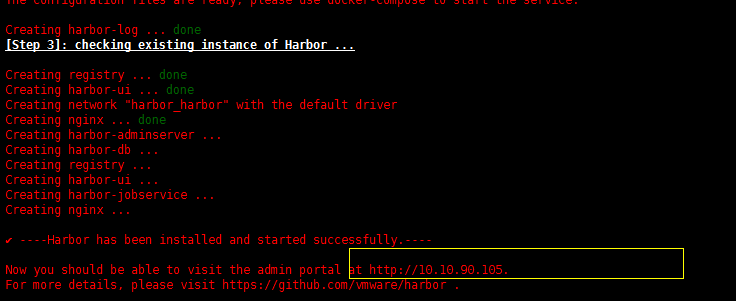
运行的容器:

访问地址:http://10.10.90.105
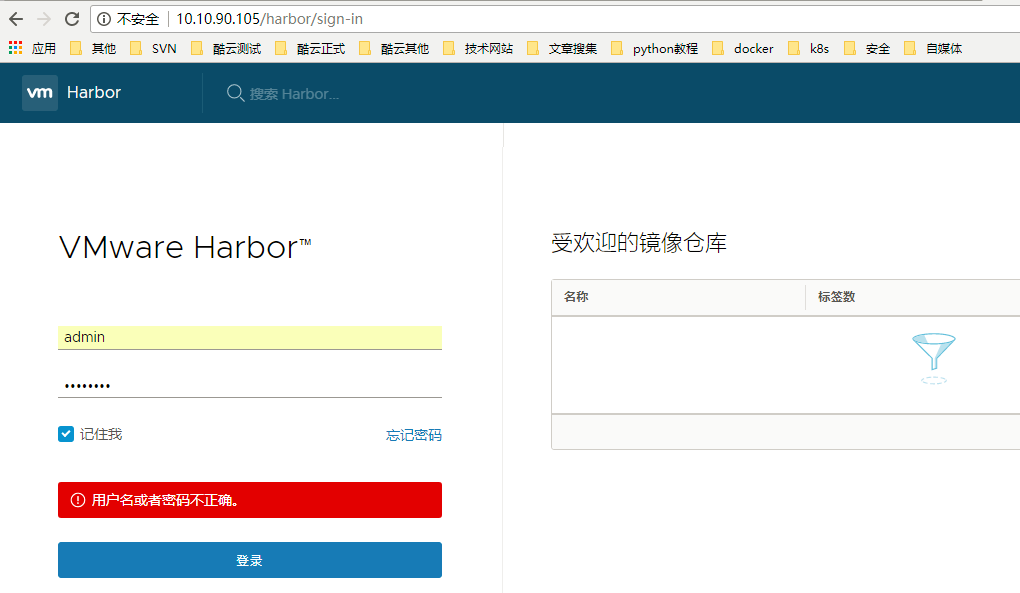
登录密码是配置文件中的harbor_admin_password = Harbor12345
3)有关使用其实无非就是创建仓库,上传镜像等操作
常见问题:
1、docker login报错Error response from daemon: Get https://10.10.90.105/v2/: dial tcp 10.10.90.105:443: getsockopt: connection refused
解决方案:修改docekr参数
文件:/usr/lib/systemd/system/docker.service

修改完成后 执行:
[root@c7test_master ~]# systemctl daemon-reload
[root@c7test_master ~]# systemctl start docker
再次重启我们的harbor,进入解压的目录并执行start会自动编排
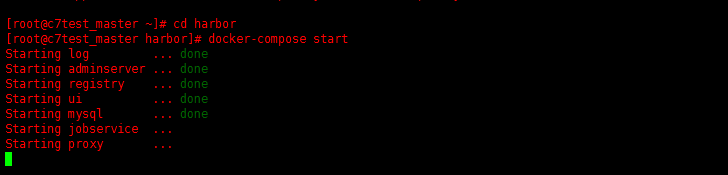
查看是否启动成功:

尝试login:

login成功!!!!!!!!
开源仓库Harbor搭建及配置过程的更多相关文章
- Docker镜像仓库Harbor搭建及配置
一.harbor简介 Harbor是一个用于存储和分发Docker镜像的企业级Registry服务器,通过添加一些企业必需的功能特性,例如安全.标识和管理等,扩展了开源Docker Distribut ...
- docker实战——Docker本地私有镜像仓库Harbor搭建及配置
Harbor介绍 Docker容器应用的开发和运行离不开可靠的镜像管理,虽然docker官方提供了公共的镜像仓库(Docker Hub),但是从安全和效率等方面考虑,部署我们私有环境内的Registr ...
- 企业级镜像仓库harbor搭建
企业级镜像仓库harbor搭建 一. Harbor概述 VMware公司最近开源了企业级Registry项目Harbor,其的目标是帮助用户迅速搭建一个企业级的Docker registry 服 ...
- docker的私有化仓库harbor搭建
目前比较流行的docker私有化仓库是harbor,harbor是一个github开源的项目,直接在github上搜索即可,下载地址:https://github.com/goharbor/harbo ...
- 微服务探索之路03篇-docker私有仓库Harbor搭建+Kubernetes(k8s)部署私有仓库的镜像
❝ 目录: 微服务探索之路01篇.net6.0项目本地win10系统docker到服务器liunx系统docker的贯通 微服务探索之路02篇liunx ubuntu服务器部署k8s(kubernet ...
- Kubernets二进制安装(5)之私有仓库harbor搭建
在IP地址为192.168.80.50,机器名为mfyxw50上搭建私有仓库harbor harbor下载地址: harbor下载连接地址:https://github.com/goharbor/ha ...
- Docker镜像仓库Harbor搭建
园子里面已经有人写过了.也写得很好,我这里只记录下我遇到的问题 Harbor 依赖: 1:docker 2:docker-compose 怎么安装就不说了. 然后是安装Harbor github:ht ...
- Docker(二):Docker镜像仓库Harbor搭建
安装docker-compose 因为docker-compose下载容易失败, 所以选择从github下载方式安装. [root@harbor ~]# mv docker-compose-Linux ...
- 企业级仓库harbor搭建
1.Harbor是什么? Harbor是Vmvare中国团队开发的开源registry仓库,相比docker官方拥有更丰富的权限权利和完善的架构设计,适用大规模docker集群部署提供仓库服务.在企业 ...
随机推荐
- 使用Java对字符串进行升序排序
Java对字符串的很多API和功能是JavaWeb能广泛发展的基础,下面是一道经典的字符串操作题,需要边查JAVASE的API对每个步骤进行操作. 题目:给一个字符串,"34 12 -8 0 ...
- Java-函数式编程(二)Lambda表达式
本文首发:Java-函数式编程(二)Lambda表达式 “Lambda 表达式”(lambda expression)是一个匿名函数,Lambda表达式基于数学中的λ演算得名,直接对应于其中的lamb ...
- [翻译]C# BAD PRACTICES: Learn how to make a good code by bad example---C#:如何将坏的代码重新编译为好的代码
自己的前言说明: 本文原作者:Radoslaw Sadowski,原文链接为:C# BAD PRACTICES: Learn how to make a good code by bad exampl ...
- 【 js 基础 】【 源码学习 】backbone 源码阅读(三)
最近看完了 backbone.js 的源码,这里对于源码的细节就不再赘述了,大家可以 star 我的源码阅读项目(https://github.com/JiayiLi/source-code-stud ...
- Code Signal_练习题_growingPlant
Each day a plant is growing by upSpeed meters. Each night that plant's height decreases by downSpeed ...
- HTML 代码复用实践
前言 通常我们所做的一些页面,我们可以从设计图里面看出有一些地方是相同的.例如:头部,底部,侧边栏等等.如果是制作静态页面的同学,对于这些重复的部分只能够通过复制粘贴到新的页面来,如果页面的数量上去了 ...
- MaxScript与外部程序通讯
最近项目要求通过java给max发送任务指令,max接收指令执行任务,并且返回执行的结果.不管为什么会有这样的需求,有就要去实现. 1.OLE开启 Max本身提供了一个方式,它可以将自己注册成一个Ol ...
- Android系统常用的adb命令
自己工作中经常要用一些Android的adb命令,把常用的adb命令记录一下,留作备忘. adb devices 查看当前连接的设备 adb install 安装 adb install拖动apk到命 ...
- Hive Serde - CSV、TSV
CSV hive-0.14.0内置支持CSV Serde,以前的版本需要引入第三方库的jar包(http://https://github.com/ogrodnek/csv-serde) 现在有个文本 ...
- Sql server 索引详解
参考资料:老K写的,http://www.cnblogs.com/AK2012/archive/2013/01/04/2844283.html SQL索引在数据库优化中占有一个非常大的比例, 一个好的 ...