
TensorFlow实现的激活函数可视化
书上的代码:
 # coding: utf-8

 # In[1]:

 import matplotlib.pyplot as plt

 import numpy as np

 import tensorflow as tf

 from pylab import *

 # In[19]:

 def show_activation(activation,y_lim=5):

     x=np.arange(-10., 10., 0.01)

     ts_x = tf.Variable(x)

     ts_y =activation(ts_x )

     with tf.Session() as sess:

         init = tf.global_variables_initializer()

         sess.run(init)

         y=sess.run(ts_y)

     ax = gca()

     ax.spines['right'].set_color('none')

     ax.spines['top'].set_color('none')

     ax.spines['bottom'].set_position(('data',0))

     ax.spines['left'].set_position(('data',0))

     ax.xaxis.set_ticks_position('bottom')

     ax.yaxis.set_ticks_position('left')

     lines=plt.plot(x,y)

     plt.setp(lines, color='b', linewidth=3.0)

     plt.ylim(y_lim*-1-0.1,y_lim+0.1)

     plt.xlim(-10,10)

     plt.show()

 # In[20]:

 show_activation(tf.nn.sigmoid,y_lim=1)

 # In[4]:

 show_activation(tf.nn.softsign,y_lim=1)

 # In[5]:

 show_activation(tf.nn.tanh,y_lim=1)

 # In[6]:

 show_activation(tf.nn.relu,y_lim=10)

 # In[7]:

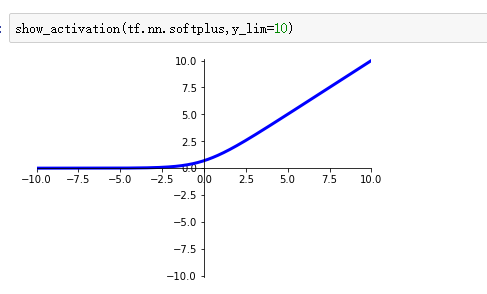
 show_activation(tf.nn.softplus,y_lim=10)

 # In[8]:

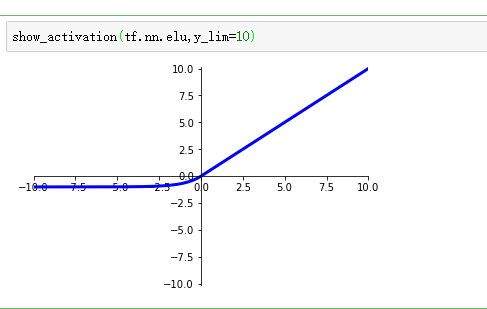
 show_activation(tf.nn.elu,y_lim=10)

 # In[14]:

 a = tf.constant([[1.0,2.0],[1.0,2.0],[1.0,2.0]])

 sess = tf.Session()

 print(sess.run(tf.sigmoid(a)))

 # In[ ]:
sigmoid激活函数:
S(x)=1/(1+e-x)

优点在于输出映射在0-1内,单调连续,适合做输出层,求导容易。
缺点在于软饱和性,即当x趋于无穷大时,一阶导数趋于0,容易产生梯度消失,神经网络的改善缓慢或消失。
softsign激活函数:
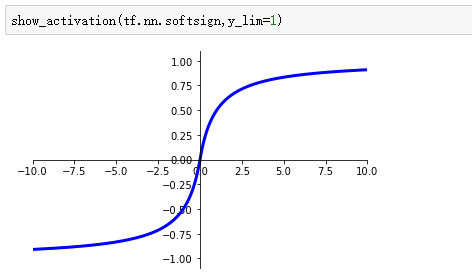
tanh激活函数:
tanh(x)=(1-e-2x)/(1+e-2x)

也具有软饱和性,收敛速度比sigmoid快,但是仍无法解决梯度消失的问题。
relu激活函数:
f(x)=max(x,0)

缺点:当relu在x<0时硬饱和,即在负半轴,激活函数的一阶导数等于0。
优点:由于x>0时导数为1,所以relu能在正半轴保持梯度的不衰减,缓解梯度消失的问题。
但是随着训练的进行,部分落入硬饱和区,权重无法更新。
softplus激活函数:
relu的平滑版本f(x)=log(1+exp(x))
此外还有的激活函数如下数张图:
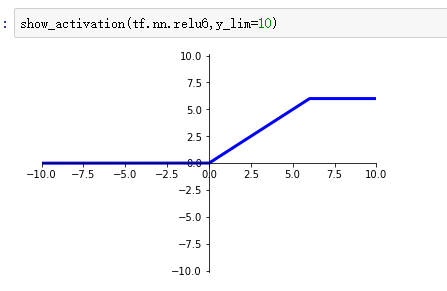
等等..............................................................................................
......................................................................................................
输入数据特征相差明显时,tanh效果较好,不明显时,sigmoid较好。二者在使用时需要对输入进行规范化,减少进入平坦区的可能。
relu是比较流行的激活函数,不需要输入量的规范化等...
TensorFlow实现的激活函数可视化的更多相关文章
- Tensorboard教程:Tensorflow命名空间与计算图可视化
Tensorflow命名空间与计算图可视化 觉得有用的话,欢迎一起讨论相互学习~Follow Me 参考文献 强烈推荐Tensorflow实战Google深度学习框架 实验平台: Tensorflow ...
- 吴裕雄 python 神经网络——TensorFlow 训练过程的可视化 TensorBoard的应用
#训练过程的可视化 ,TensorBoard的应用 #导入模块并下载数据集 import tensorflow as tf from tensorflow.examples.tutorials.mni ...
- tensorflow(3)可视化,日志,调试
可视化 添加变量 tf.summary.histogram( "weights1", weights1) # 可视化观看变量 还有添加图像和音频. 常量 tf.summary.sc ...
- Tensorflow 之模型内容可视化
TensorFlow模型保存和提取方法 1. tensorflow实现 卷积神经网络CNN:Tensorflow实现(以及对卷积特征的可视化) # 卷积网络的训练数据为MNIST(28*28灰度单色图 ...
- 【tensorflow基础】ubuntu-tensorflow可视化工具tensorboard-No dashboards are active for the current data set.
前言 今天基于tensorflow训练一个检测模型,本应看到训练曲线的,却只见到一个文件events.out.tfevents.1570520647.hostname,后来发现这个文件可以查看训练曲线 ...
- TensorFlow(八):tensorboard可视化
import tensorflow as tf from tensorflow.examples.tutorials.mnist import input_data from tensorflow.c ...
- Deep Learning基础--26种神经网络激活函数可视化
在神经网络中,激活函数决定来自给定输入集的节点的输出,其中非线性激活函数允许网络复制复杂的非线性行为.正如绝大多数神经网络借助某种形式的梯度下降进行优化,激活函数需要是可微分(或者至少是几乎完全可微分 ...
- tensorflow中常用激活函数和损失函数
激活函数 各激活函数曲线对比 常用激活函数: tf.sigmoid() tf.tanh() tf.nn.relu() tf.nn.softplus() tf.nn.softmax() tf.nn.dr ...
- Tensorflow机器学习入门——网络可视化TensorBoard
一.在代码中标记要显示的各种量 tensorboard各函数的作用和用法请参考:https://www.cnblogs.com/lyc-seu/p/8647792.html import tensor ...
随机推荐
- SoundChannel和soundTransform的关系
SoundChannel 音乐的 播放 暂停 当前获取当前位置 长度 leftPeak : Number[只读] 左声道的当前幅度(音量),范围从 0(静音)至 1(最大幅度) rightPe ...
- linux ubuntu 18.04 无线网卡 rtl8821ce的安装
解压rtl8821ce.zip 修改makefile,在shell中输入pwd,查看当前文件的路径,之后在Makefile中查找export Topdir ?= /home/zzm/Download ...
- 如何禁止chrome自动跳转https
请在chrome的地址栏输入: chrome://net-internals/#hsts 在打开的页面中, Delete domain 栏的输入框中输入:xx.xx.com(注意这里是二级域名),然后 ...
- java获取电脑部分信息
获取mac地址与cpu序列号 参考博客:https://www.jb51.net/article/94793.htm 另一篇参考地址没记录下来 package util; import java.io ...
- Topological Sorting拓扑排序
定义: Topological Sorting is a method of arranging the vertices in a directed acyclic graph (DAG有向无环图) ...
- java ATM模拟程序
//基本功能已经完善,文件读取没有问题,文件重写尚未完成. Account类 public class Account { //初始化参数 private String accountID; priv ...
- Java_7.2库存管理
package demo1; import java.util.ArrayList; import java.util.Scanner; public class Demo1 { public sta ...
- ubuntu14.04 源码安装MySQL
转发麻烦备注本站地址:http://www.cnblogs.com/cyq632694540/p/7053179.html 1.下载源码包 >wget http://dev.mysql.com/ ...
- ClickHouse高性能数据库
ClickHouse之简单性能测试 前面的文章ClickHouse之初步认识已经简单的介绍了ClickHouse,接下来进行简单的性能测试.测试数据来源于美国民用航班的数据,从1987年到2017 ...
- springboot 日志2
SpringBoot关于日志的官方文档 1.简述 SpringBoot官方文档关于日志的整体说明 本博客基于SpringBoot_1.3.6大家请先简单看下这篇英文的官方文档,文中有说 Sprin ...