
ASP.NET Core分布式项目-2.oauth密码模式identity server4实现
这里根据《ASP.NET Core分布式项目-1.IdentityServer4登录中心》的代码来继续更新oauth密码模式,这里的密码模式比上次的客户端模式更安全
在WebApiIdentityServer服务端的config里添加用户
 public class config

    {

        //IdentityServer配置——用户

        //IdentityServer用户-这里通过提供一个简单的C#类完成,

        //当然你可以从任何数据存储加载用户。

        //我们提供了ASP.NET Identity 和MembershipReboot支持检索用户信息。

        public static IEnumerable<ApiResource> GetResources()

        {

            return new List<ApiResource> { new ApiResource("api","MQapi")};

        }

        //IdentityServer需要一些关于客户端信息,这可以简单地提供使用客户端对象

        public static IEnumerable<Client> GetClients()

        {

            return new List<Client>

            {

                new Client()

                {

                    ClientId="ClientId",

                    AllowedGrantTypes=GrantTypes.ClientCredentials,//客户端模式

                    ClientSecrets={ new Secret("secrt".Sha256())},

                    AllowedScopes={ "api"}

                },

                new Client()

                {

                    ClientId="pwdClient",

                    AllowedGrantTypes=GrantTypes.ResourceOwnerPassword,//密码模式

                     ClientSecrets={ new Secret("secrt".Sha256())},

                     RequireClientSecret=false,

                    AllowedScopes={ "api"}

                }

            };

        }

        //模拟用户

        public static List<TestUser> GetTsetUsers()

        {

            return new List<TestUser>{

                new TestUser{

                    SubjectId="1",

                    Username="MQ",

                    Password="123456"

                }

            };

        }

    }
然后再去配置Startup
public class Startup

    {

        public Startup(IConfiguration configuration)

        {

            Configuration = configuration;

        }

        public IConfiguration Configuration { get; }

        // This method gets called by the runtime. Use this method to add services to the container.

        public void ConfigureServices(IServiceCollection services)

        {

            //添加依赖注入配置

            services.AddIdentityServer()

                .AddDeveloperSigningCredential()

                .AddInMemoryApiResources(config.GetResources())

                .AddInMemoryClients(config.GetClients())

                .AddTestUsers(config.GetTsetUsers());

            services.AddMvc();

        }

        // This method gets called by the runtime. Use this method to configure the HTTP request pipeline.

        public void Configure(IApplicationBuilder app, IHostingEnvironment env)

        {

            if (env.IsDevelopment())

            {

                app.UseDeveloperExceptionPage();

            }

            app.UseIdentityServer();

            //app.UseMvc();

        }

    }
运行WebApiIdentityServer 和 ClientCredentialApi测试下 dotnet watch run
打开 paotman
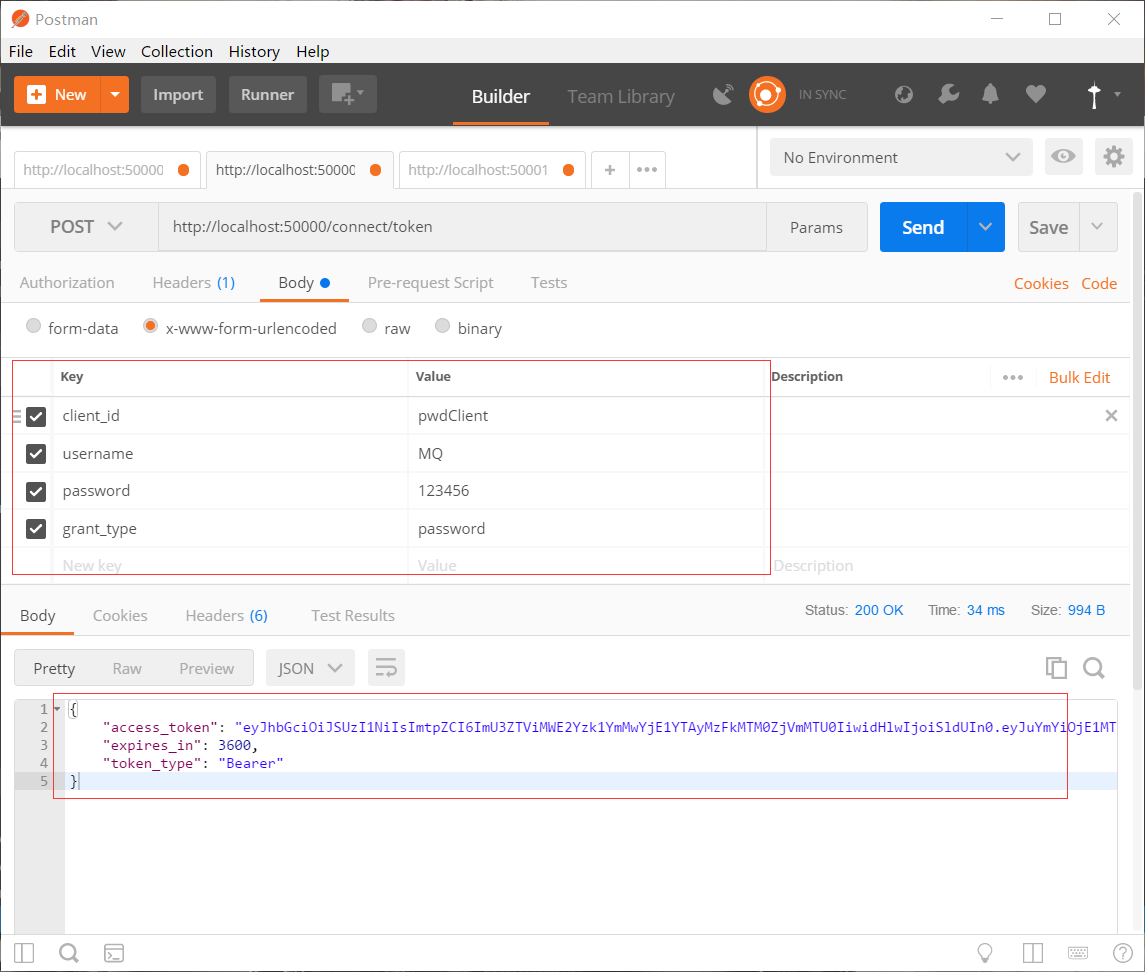
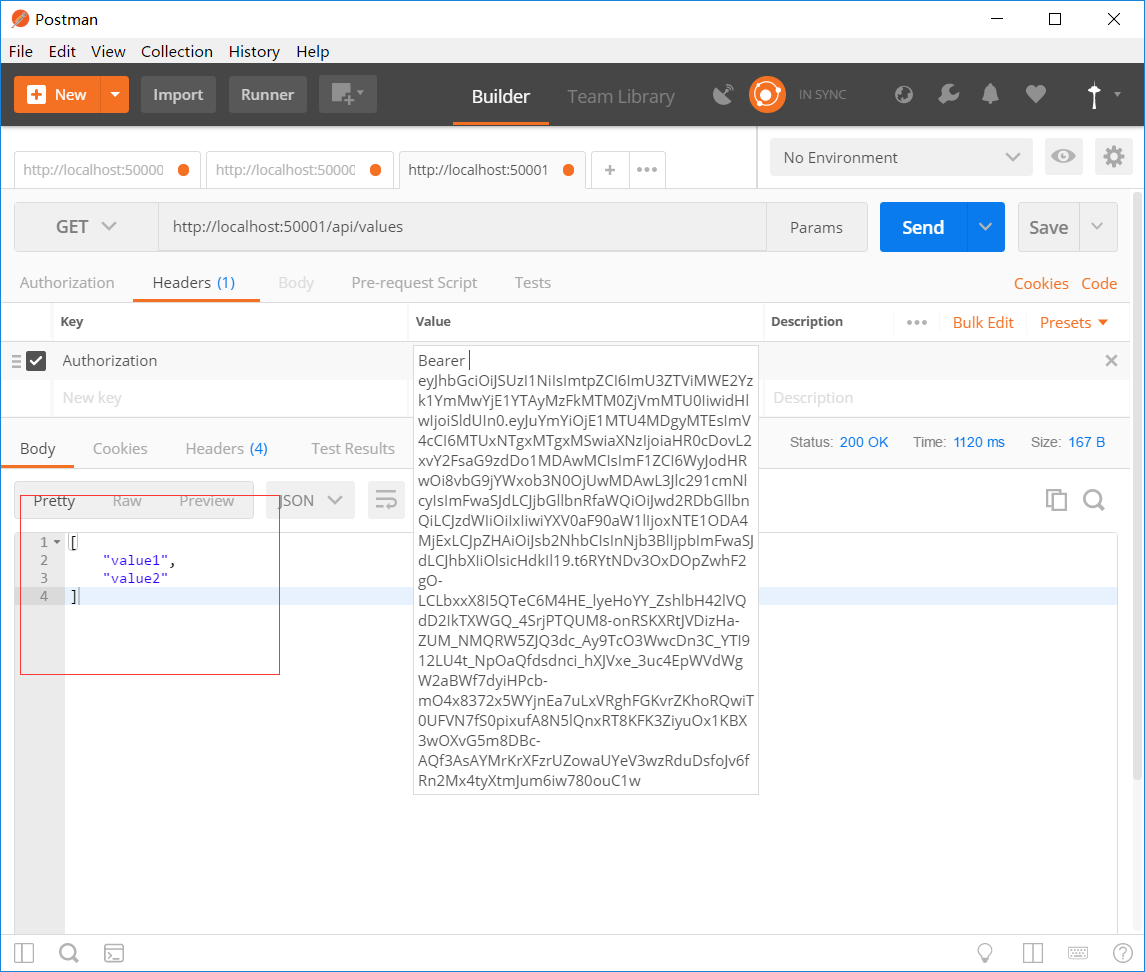
拿到token后 去访问ClientCredentialApi
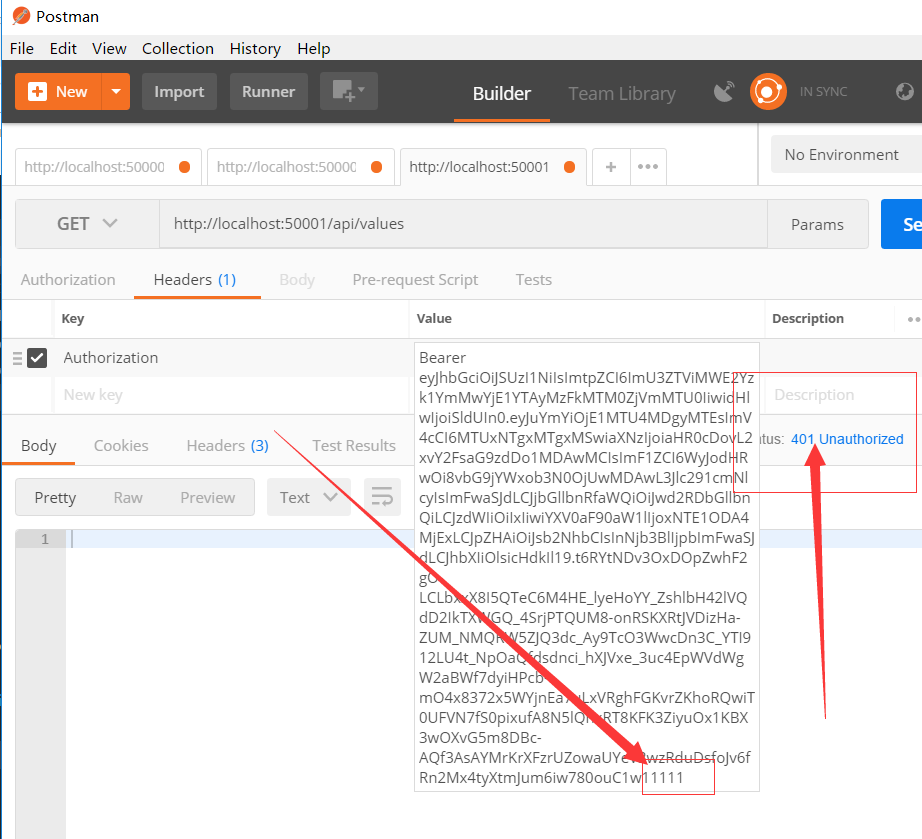
修改token看看
ASP.NET Core分布式项目-2.oauth密码模式identity server4实现的更多相关文章
- 【ASP.NET Core分布式项目实战】(一)IdentityServer4登录中心、oauth密码模式identity server4实现
本博客根据http://video.jessetalk.cn/my/course/5视频整理 资料 OAuth2 流程:http://www.ruanyifeng.com/blog/2014/05/o ...
- ASP.NET Core分布式项目实战
ASP.NET Core开发者成长路线图 asp.net core 官方文档 https://docs.microsoft.com/zh-cn/aspnet/core/getting-started/ ...
- 【笔记目录1】ASP.NET Core分布式项目实战
当前标签: ASP.NET Core分布式项目实战 共2页: 1 2 下一页 35.Docker安装Mysql挂载Host Volume GASA 2019-06-20 22:02 阅读:51 评论 ...
- 【笔记目录2】ASP.NET Core分布式项目实战
当前标签: ASP.NET Core分布式项目实战 共2页: 上一页 1 2 11.ClientCredential模式总结 GASA 2019-03-11 12:59 阅读:26 评论:0 10. ...
- ASP.NET Core分布式项目实战-目录
前言 今年是2018年,发现已经有4年没有写博客了,在这4年的时光里,接触了很多的.NET技术,自己的技术也得到很大的进步.在这段时光里面很感谢张队长以及其他开发者一直对.NET Core开源社区做出 ...
- 【ASP.NET Core分布式项目实战】(三)整理IdentityServer4 MVC授权、Consent功能实现
本博客根据http://video.jessetalk.cn/my/course/5视频整理(内容可能会有部分,推荐看源视频学习) 前言 由于之前的博客都是基于其他的博客进行开发,现在重新整理一下方便 ...
- 【ASP.NET Core分布式项目实战】(五)Docker制作dotnet core控制台程序镜像
Docker制作dotnet core控制台程序镜像 基于dotnet SDK 新建控制台程序 mkdir /home/console cd /home/console dotnet new cons ...
- 【ASP.NET Core分布式项目实战】(六)Gitlab安装
Gitlab GitLab是由GitLabInc.开发,使用MIT许可证的基于网络的Git仓库管理工具,且具有wiki和issue跟踪功能.使用Git作为代码管理工具,并在此基础上搭建起来的web服务 ...
- 【ASP.NET Core分布式项目实战】(二)oauth2 + oidc 实现 server部分
本博客根据http://video.jessetalk.cn/my/course/5视频整理(内容可能会有部分,推荐看源视频学习) 资料 我们基于之前的MvcCookieAuthSample来做开发 ...
随机推荐
- Vue进阶(Bus/作用域slot/动态组件)
一.Vue非父子组件传值(Bus/总线/发布订阅模式/观察者模式) 我们在之前已经知道了父子传值.父组件传递过来了的值,在子组件通过props接受,然后就可以使用了. 也学过了隔代传值,均是通过pro ...
- HttpClient学习(一)—— 基本使用
HttpClient是支持Http协议的客户端编程工具包. 一.简单使用 1.1 引入依赖 <dependency> <groupId>org.apache.httpcompo ...
- 《Glibc内存管理》笔记DAY5
目录 分箱式内存管理 Unsorted bin Fast bins 核心结构体分析 malloc_state 内容来源 分箱式内存管理 Unsorted bin Unsorted bin 可以看作 ...
- java定时案例
好久没写笔记了,变懒了! java定时运行的三个案例: 一, 通过sleep方法来达到定时任务的效果 public class testTime { public static void main(S ...
- Windows使用Latex
目录 安装Texlive 安装TeXstudio 编写简单的文章 教程 安装Texlive 到清华大学开源软件镜像站下载Texlive2019.iso文件 下载之后,如果有光驱就装载,没有的话就解压. ...
- ElasticSearch 6 安装、下载
1,安装配置JDK 8 参考:官方文档 #为什么是JDK1.8?在ElasticSearch6.2.4中提到:JDK版本必须为:1.8.0_131 以上 > 1,安装JDK1.8-161 #解压 ...
- keras Dense 层
文档地址:https://keras.io/layers/core/#dense keras.layers.Dense(units, activation=None, use_bias=True, k ...
- osg HUD 前景色
#ifdef _WIN32 #include <Windows.h> #endif // _WIN32 #include<iostream> #include <osgV ...
- 阶段5 3.微服务项目【学成在线】_day09 课程预览 Eureka Feign_15-课程预览功能开发-接口开发
红色部分 定义model 定义api接口 Service 主要分为这几步 定义feignClient 打开cms接口,根据接口来写feignClient Service调用 service调用feig ...
- mysqlcheck修复工具
mysqlcheck工具可以检查.修复.优化和分析MyISAM引擎的表,实际上是集成了Mysql中的check.repair.analyze.tmpimize的功能. mysqlcheck共军存在于m ...