
Install Hyper-V on Windows 10
Enable Hyper-V to create virtual machines on Windows 10.
Hyper-V can be enabled in many ways including using the Windows 10 control panel, PowerShell (my favorite) or using the Deployment Imaging Servicing and Management tool (DISM). This documents walks through each option.
Note: Hyper-V is built into Windows as an optional feature -- there is no Hyper-V download or installable component.
Check Requirements
- Windows 10 Enterprise, Professional, or Education
- 64-bit Processor with Second Level Address Translation (SLAT).
- CPU support for VM Monitor Mode Extension (VT-c on Intel CPU's).
- Minimum of 4 GB memory.
The Hyper-V role cannot be installed on Windows 10 Home.
Upgrade from Windows 10 Home edition to Windows 10 Professional by opening up Settings > Update and Security > Activation.
For more information and troubleshooting, see Windows 10 Hyper-V System Requirements.
Install Hyper-V
Hyper-V is built into Windows as an optional feature -- there is no Hyper-V download or installable component. There are several ways to enable the built-in Hyper-V role.
Enable Hyper-V using PowerShell
- Open a PowerShell console as Administrator.
- Run the following command:
PowerShellCopy
Enable-WindowsOptionalFeature -Online -FeatureName:Microsoft-Hyper-V -All
If the command couldn't be found, make sure you're running PowerShell as Administrator.
When the installation has completed you need to reboot the computer.
Enable Hyper-V with CMD and DISM
The Deployment Image Servicing and Management tool (DISM) helps configure Windows and Windows images. Among its many applications, DISM can enable Windows features while the operating system is running.
To enable the Hyper-V role using DISM:
- Open up a PowerShell or CMD session as Administrator.
- Type the following command:
PowerShellCopy
DISM /Online /Enable-Feature /All /FeatureName:Microsoft-Hyper-V


For more information about DISM, see the DISM Technical Reference.
Manually enable the Hyper-V role
- Right click on the Windows button and select 'Programs and Features'.
- Select Turn Windows Features on or off.
- Select Hyper-V and click OK.


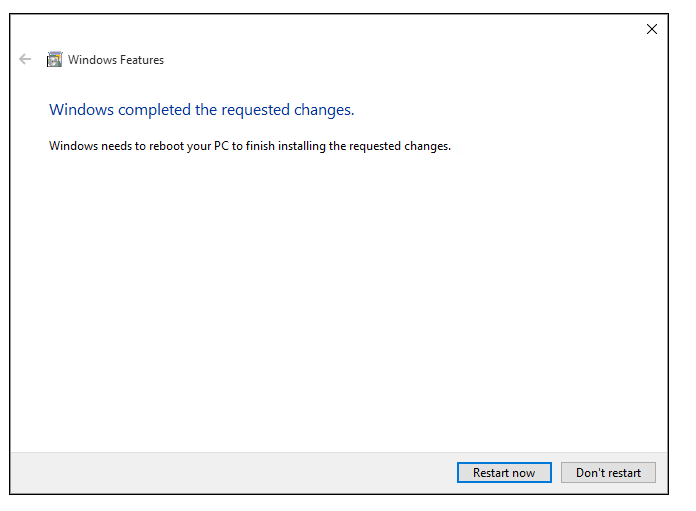
When the installation has completed you are prompted to restart your computer.




From: https://docs.microsoft.com/en-us/virtualization/hyper-v-on-windows/quick-start/enable-hyper-v
Install Hyper-V on Windows 10的更多相关文章
- 如何在 Windows 10 上安装 WSL 2
翻译自 Joey Sneddon 2020年10月30日的文章<How to Install WSL 2 on Windows 10> [1] 如果您想在最新的 Windows 版本中尝试 ...
- 在Windows 10 系统上启用Hyper V遇到的错误:0x800f0831
Hyper-V是微软的一款虚拟化技术,是微软第一个采用类似Vmware和Citrix开源Xen一样的基于hypervisor的技术. 在Windows 10的powershell命令里,输入如下的命令 ...
- windows server 2008 r2 企业版 hyper v做虚拟化的相关问题处理
windows server 2008 r2 企业版 hyper v做虚拟化的相关问题处理 今天在dell r710 上用windows server 2008 r2企业版hyper v 做虚拟化,添 ...
- Install and run DB Query Analyzer 6.04 on Microsoft Windows 10
Install and run DB Query Analyzer 6.04 on Microsoft Windows 10 DB Query Analyzer is presented ...
- A Newbie’s Install of Keras & Tensorflow on Windows 10 with R
This weekend, I decided it was time: I was going to update my Python environment and get Keras and T ...
- windows 10安装和配置caffe教程 | Install and Configure Caffe on windows 10
本文首发于个人博客https://kezunlin.me/post/1739694c/,欢迎阅读! Install and Configure Caffe on windows 10 Part 1: ...
- windows rails new demo时候出错Make sure that `gem install mysql2 -v '0.3.15'` succeeds before bundling.
rails new demo --database=mysql最后报错Gem files will remain installed in D:/BillFiles/rails_dev/Ruby193 ...
- Windows 10 新特性 -- Bing Maps 3D地图开发入门(一)
本文主要内容是讲述如何创建基于 Windows Universal App 的Windows 10 3D地图应用,涉及的Windows 10新特性包括 Bing Maps 控件.Compiled da ...
- 2016最新 wamp2.5+windows 10安装CoedSgniffer代码格式检查:
14:59 2016/1/112016最新 wamp2.5+windows 10安装CoedSgniffer代码格式检查:注意问题:1.手动安装2.5.0和pear安装方式都成功但是执行时无任何反映, ...
随机推荐
- JTAG Communications model
https://en.wikipedia.org/wiki/Joint_Test_Action_Group In JTAG, devices expose one or more test acces ...
- 如何用visio(word)绘制图片表格
1.用visio是插入excel表格,但是不能差如公示了,修改的话也是进入了excel修改. 2.在word里修改即可,word表格可以插入公式,然后阿银玉兰或者转给pdf截图就好
- Lucene 3.0 输出相似度
http://www.cnblogs.com/ibook360/archive/2011/10/19/2217638.html Lucene3.0之结果排序(原理篇) 传统上,人们将信息检索系统返回结 ...
- 在Brackets中使用Emmet
当在Brackets中安装上Emmet插件后,就可以使用Emmet的语法来加速前端编写. 有关html ● 子关系> div>ul>li ● 相邻+ div+p+bq ● 上一级^ ...
- iOS关于error can't allocate region的一点发现
调试的时候出现error can't allocate region错误,后来去搜了下网上关于这个错误的帖子,是这么说的:error can't allocate region 程序运行报错,在xco ...
- activity_main.xml 要用 Android Common XML Editor打开,双击的方式直接跳转到浏览器了
- 蓝精灵:寻找神秘村Smurfs: The Lost Village迅雷下载
蓝妹妹(黛米·洛瓦托 Demi Lovato 配音)发现了一张遗落的地图,由此引发精灵们对于神秘村庄真实性的猜想.于是,满怀好奇心的蓝妹妹与聪聪(丹尼·朴迪 Danny Pudi 配音).笨笨(杰克· ...
- PHPthinking赠书了!
[站长赠书]2014年10月第一期幸运用户 大家好,我是PHP开发学习门户的站长,小站建站一个多月,感谢大家以来的关注和支持,假设大家对本站有什么建议或者投稿,欢迎留言或者给我发邮件. 本站宣布对于 ...
- 实用ExtJS教程100例-009:ExtJS Form无刷新文件上传
文件上传在Web程序开发中必不可少,ExtJS Form中有一个filefield字段,用来选择文件并上传.今天我们来演示一下如何通过filefield实现ExtJS Form无刷新的文件上传. 首先 ...
- Shape画圆形控件
这里涉及到shape的运用,这仅仅是一个实例 circle.xml <?xml version="1.0" encoding="utf-8"?> & ...