
5.spring:注解配置 Bean
在classpath中扫描组件
组键扫描:能够从classpath下自动扫描,侦测和实例化具有特定注解的组件
特定的组件包括:
->@Componment:基于注解,标识一个受Spring管理的组键
->@Respository:标识持久层组件
->@Service:标识服务层
->@controller:标识表现层组件
对于扫描到的组件,Spring有默认的命名策略,使用非限定类名,第一个字母小写,也可以通过注解中value属性值标识组建的名称
在classpath中扫描组键
当在组键类中使用了特定的注解后,还需要再Spring的配置中声明<context:componment-scan>
->base-packge属性是指定一个需要扫描的基类包,Spring容器将会扫描这个基类包里及其他子类包中的所有类
->当需要扫描多个包时,可以使用逗号分隔
->如果仅希望扫描特定类而非集包下的所有类,可使用resource-pattren属性过滤特定的类
通常情况下我们在创建spring项目的时候在xml配置文件中都会配置这个标签,配置完这个标签后,spring就会去自动
扫描base-package对应的路径或者该路径的子包下面的java文件,
如果扫描到文件中带有@Service,@Component,@Repository,@Controller等这些注解的类,则把这些类注册为bean
注:在注解后加上例如@Component(value=”abc”)时,注册的这个类的bean的id就是abc.
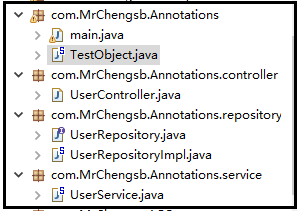
TestObject.java
@Component

public class TestObject {

//@Componment:基于注解,标识一个受Spring管理的组键

}
UserController.java
@Controller

public class UserController {

    //建立关联关系

    @Autowired

    private UserService userService;

    public void execute() {

        System.out.println("UserController execute...");

        userService.add();

    }

}
UserRepository.java
public interface UserRepository {

    void save();

}
UserRepositoryImpl.java
@Repository("userRepository")

public class UserRepositoryImpl implements UserRepository {

    @Override

    public void save() {

        System.out.println("UserRepository  save...");

    }

}
UserService.java
@Service

public class UserService {

    @Autowired

    private UserRepository userRepository;

    public void add() {

        // TODO Auto-generated method stub

        System.out.println("UserService add...");

        userRepository.save();

    }

}
applicationContext.xml
<!-- 指定IOC容器扫描的包 -->

<!-- 下面的引入文件,没有进入IOC容器的立马进入IOC容器,有S的标志 -->

<!-- 扫描这个包以及它的子包 -->

<context:component-scan base-package="com.MrChengsb.Annotations" ></context:component-scan>

<!--

    只扫描子包中这个包里的类

    resource-pattern="repository/*.class"

    不包含...

    指定排除那些表达式的组键

    <context:exclude-filter type="annotation" expression="org.springframework.stereotype.Repository"/>

 -->

<!--

    <context:exclude-filter type="annotation" expression="org.springframework.stereotype.Repository"/>

-->

<!--

     和 context:component-scan 中的 use-default-filters="false" 进行搭配才可以只包括,就是只有包含的这个

    <context:include-filter type="annotation" expression="org.springframework.stereotype.Repository"/>

-->

<!--
   只包含
   use-default-filters="false" 共同使用

    <context:include-filter type="assignable" expression="com.MrChengsb.Annotations.repository.UserRepository"/>

-->

<!--

    不包含这个接口以及它的实现类

    <context:exclude-filter type="assignable"

    expression="com.MrChengsb.Annotations.repository.UserRepository"/>

-->
测试以及相关注释:
public static void main(String[] args) {

        ApplicationContext ctx = new ClassPathXmlApplicationContext("Annotations.xml");

        //没有设立关联关系的

//        TestObject test = (TestObject) ctx.getBean("testObject");

//        System.out.println(test);

//

//        UserController uc = (UserController) ctx.getBean("userController");

//        System.out.println(uc);

//

//        UserRepositoryImpl urp = (UserRepositoryImpl) ctx.getBean("userRepository");

//        System.out.println(urp);

//

//        UserService use = (UserService) ctx.getBean("userService");

//        System.out.println(use);

//

        //设立关联关系的

//        TestObject test = (TestObject) ctx.getBean("testObject");

//        System.out.println(test);

        UserController uc = (UserController) ctx.getBean("userController");

        System.out.println(uc);

        uc.execute();

//        UserRepositoryImpl urp = (UserRepositoryImpl) ctx.getBean("userRepository");

//        System.out.println(urp);

//

//        UserService use = (UserService) ctx.getBean("userService");

//        System.out.println(use);

        //没建立Bean之家的引用关系

//        com.MrChengsb.Annotations.controller.UserController@2925bf5bException in thread "main"

//        UserController execute...

//        java.lang.NullPointerException

//            at com.MrChengsb.Annotations.controller.UserController.execute(UserController.java:18)

//            at com.MrChengsb.Annotations.main.main(main.java:37)

    }
测试代码省略.......
5.spring:注解配置 Bean的更多相关文章
- Spring 注解配置Bean
一.使用注解配置Bean 1.注解 在类定义.方法定义.成员变量定义前使用.其简化<bean>标签,功能同<bean>标签.格式为: @注解标记名. 2.组件扫描 Spring ...
- [原创]java WEB学习笔记103:Spring学习---Spring Bean配置:基于注解的方式(基于注解配置bean,基于注解来装配bean的属性)
本博客的目的:①总结自己的学习过程,相当于学习笔记 ②将自己的经验分享给大家,相互学习,互相交流,不可商用 内容难免出现问题,欢迎指正,交流,探讨,可以留言,也可以通过以下方式联系. 本人互联网技术爱 ...
- Spring(二)--FactoryBean、bean的后置处理器、数据库连接池、引用外部文件、使用注解配置bean等
实验1:配置通过静态工厂方法创建的bean [通过静态方法提供实例对象,工厂类本身不需要实例化!] 1.创建静态工厂类 public class StaticFactory { private st ...
- Spring(十五):通过注解配置 Bean
在ClassPath中扫描组件 1)组件扫描(component scanning):Spring能够从classpath下自动扫描,侦测和实例化具有特定注解的组件: 2)特定组件包含: --- @C ...
- IDEA02 利用Maven创建Web项目、为Web应用添加Spring框架支持、bean的创建于获取、利用注解配置Bean、自动装配Bean、MVC配置
1 环境版本说明 Jdk : 1.8 Maven : 3.5 IDEA : 专业版 2017.2 2 环境准备 2.1 Maven安装及其配置 2.2 Tomcat安装及其配置 3 详细步骤 3.1 ...
- Spring IOC机制之使用注解配置bean
一. 通过注解配置bean 1.1 概述 相对于XML方式而言,通过注解的方式配置bean更加简洁和优雅,而且和MVC组件化开发的理念十分契合,是开发中常用的使用方式. 1.2 ...
- Spring框架入门之基于Java注解配置bean
Spring框架入门之基于Java注解配置bean 一.Spring bean配置常用的注解 常用的有四个注解 Controller: 用于控制器的注解 Service : 用于service的注解 ...
- (转)Spring注解完成Bean的定义
使用Spring注解完成Bean的定义 2010-04-21 16:48:54| 分类: spring|举报|字号 订阅 下载LOFTER客户端 通过@Autowired或@Reso ...
- 通过注解配置Bean
之前说的三种配置方式,都是使用XML配置,现在我们说说使用注解配置Bean. 这部分内容主要分为两个部分:使用注解配置Bean,使用注解配置Bean属性. 在classpath中扫描组件 组件扫描:S ...
随机推荐
- Redis - 事务操作
Redis的事务基于四个命令: MULTI EXEC DISCARD WATCH 创建事务 Redis的事务从一个MULTI命令开始,MULTI总会命令返回"ok". 接着就可以开 ...
- java中list、set、map区别(转)
Collection├List│├LinkedList│├ArrayList│└Vector│ └Stack└SetMap├Hashtable├HashMap└WeakHashMap Collecti ...
- tsung
要做针对mongodb的压力测试,下了个tsung,看看他的策略是什么,目前定位ts_launcher.erl:do_launch({Intensity, MyHostName, PhaseId})- ...
- centos jdk8 install
0. 装了好多遍jdk 以前一直是 vi /etc/profile文件 追加 环境变量 ,仔细一看 profile文件提示 尽量不要修改!!! so... 1. 下载jdk8.tar.gz 2. 卸载 ...
- Android解析ActivityManagerService(二)ActivityTask和Activity栈管理
前言 关于AMS,原计划是只写一篇文章来介绍,但是AMS功能繁多,一篇文章的篇幅远远不够.这一篇我们接着来学习与AMS相关的ActivityTask和Activity栈管理. 1.ActivitySt ...
- Java在Web开发语言上败给了PHP(转)
PHP的主要语言开发者之一.Zend公司的创始人之一Andi Gutmans最近在blog中直言不讳地批评了Java语言.他指出,目前Java厂商试图在JVM上提供动态语言实现的路子根本不对,Java ...
- day22笔记
用户上传的文件要保存 保存在服务器上的media文件夹下,用户上传的文件很多,所以需要分目录进行存放具体步骤 settings.pyMEDIA_URL="/media/"MEDIA ...
- arcgis silverlight api 图层介绍
Layer |--TiledMapServiceLayer | |--ArcGISTiledMapServiceLayer |--DynamicLayer | |--DynamicMapService ...
- jquery事件绑定函数
1.bind 使用语法: jQueryObject.bind( events [, data ], handler ) jQueryObject.bind( events [, data ] [, i ...
- C++ inheritance examples
1.C++继承经典例子 #include <iostream> using namespace std; class Base { private: int b_number; publi ...