
Spring MVC Checkbox And Checkboxes Example
In Spring MVC, <form:checkbox /> is used to render a HTML checkbox field, the checkbox values are hard-coded inside the JSP page; While the <form:checkboxes /> is used to render multiple checkboxes, the checkbox values are generated at runtime.
In this tutorial, we show you 3 different ways of render HTML checkbox fields:
1. <form:checkbox /> – Single Checkbox
Generate a classic single checkbox, with a boolean value.
public class Customer{

	boolean receiveNewsletter;

	//...

}
<form:checkbox path="receiveNewsletter" />
If you set the “receiveNewsletter” boolean value to true, this checkbox will be checked. For example :
public class Customer{

	boolean receiveNewsletter = true;

	//...

}
2. <form:checkbox /> – Multiple Checkboxes
Generate multiple checkboxes and hard-coded the value.
public class Customer{

	String [] favLanguages;

	//...

}
<form:checkbox path="favLanguages" value="Java"/>Java

<form:checkbox path="favLanguages" value="C++"/>C++

<form:checkbox path="favLanguages" value=".Net"/>.Net
If you want to make the checkbox with value “Java” is checked by default, you can initialize the “favLanguages” property with value “Java”. For example :
        //SimpleFormController...

        @Override

	protected Object formBackingObject(HttpServletRequest request)

		throws Exception {


		Customer cust = new Customer();

		cust.setFavLanguages(new String []{"Java"});


		return cust;


	}
3. <form:checkboxes /> – Multiple Checkboxes
Generate a runtime list for the checkboxes value, and link it to Spring’s form tag <form:checkboxes>.
        //SimpleFormController...

	protected Map referenceData(HttpServletRequest request) throws Exception {


		Map referenceData = new HashMap();

		List<String> webFrameworkList = new ArrayList<String>();

		webFrameworkList.add("Spring MVC");

		webFrameworkList.add("Struts 1");

		webFrameworkList.add("Struts 2");

		webFrameworkList.add("Apache Wicket");

		referenceData.put("webFrameworkList", webFrameworkList);


		return referenceData;

	}
<form:checkboxes items="${webFrameworkList}" path="favFramework" />
If you want to make 2 checkboxes with value “Spring MVC” and “Struts 2″ are checked by default, you can initialize the “favFramework” property with value “Spring MVC” and “Struts 2″. Fro example :
         //SimpleFormController...

        @Override

	protected Object formBackingObject(HttpServletRequest request)

		throws Exception {


		Customer cust = new Customer();

		cust.setFavFramework(new String []{"Spring MVC","Struts 2"});


		return cust;

	}
<form:checkboxes items="${dynamic-list}" path="property-to-store" />
For multiple checkboxes, as long as the “path” or “property” value is equal to any of the “checkbox values – ${dynamic-list}“, the matched checkbox will be checked automatically.
Full checkbox example
Let’s go thought a complete Spring MVC checkbox example :
1. Model
A customer model class to store the checkbox value.
File : Customer.java
package com.mkyong.customer.model;


public class Customer{


	//checkbox

	boolean receiveNewsletter = true; //checked it

	String [] favLanguages;

	String [] favFramework;


	public String[] getFavFramework() {

		return favFramework;

	}

	public void setFavFramework(String[] favFramework) {

		this.favFramework = favFramework;

	}

	public boolean isReceiveNewsletter() {

		return receiveNewsletter;

	}

	public void setReceiveNewsletter(boolean receiveNewsletter) {

		this.receiveNewsletter = receiveNewsletter;

	}

	public String[] getFavLanguages() {

		return favLanguages;

	}

	public void setFavLanguages(String[] favLanguages) {

		this.favLanguages = favLanguages;

	}

}
2. Controller
A SimpleFormController to handle the form checkbox value.
File : CheckBoxController.java
package com.mkyong.customer.controller;


import java.util.ArrayList;

import java.util.HashMap;

import java.util.List;

import java.util.Map;


import javax.servlet.http.HttpServletRequest;

import javax.servlet.http.HttpServletResponse;

import org.springframework.validation.BindException;

import org.springframework.web.servlet.ModelAndView;

import org.springframework.web.servlet.mvc.SimpleFormController;

import com.mkyong.customer.model.Customer;


public class CheckBoxController extends SimpleFormController{


	public CheckBoxController(){

		setCommandClass(Customer.class);

		setCommandName("customerForm");

	}


	@Override

	protected Object formBackingObject(HttpServletRequest request)

		throws Exception {


		Customer cust = new Customer();


		//Make "Spring MVC" and "Struts 2" as default checked value

		cust.setFavFramework(new String []{"Spring MVC","Struts 2"});


		//Make "Java" as default checked value

		cust.setFavLanguages(new String []{"Java"});


		return cust;


	}


	@Override

	protected ModelAndView onSubmit(HttpServletRequest request,

		HttpServletResponse response, Object command, BindException errors)

		throws Exception {


		Customer customer = (Customer)command;

		return new ModelAndView("CustomerSuccess","customer",customer);


	}


	//Generate the data for web framework multiple checkboxes

	protected Map referenceData(HttpServletRequest request) throws Exception {


		Map referenceData = new HashMap();

		List<String> webFrameworkList = new ArrayList<String>();

		webFrameworkList.add("Spring MVC");

		webFrameworkList.add("Struts 1");

		webFrameworkList.add("Struts 2");

		webFrameworkList.add("Apache Wicket");

		referenceData.put("webFrameworkList", webFrameworkList);


		return referenceData;


	}

}
3. Validator
A simple form validator make sure the “favLanguages” property is not empty.
File : CheckBoxValidator.java
package com.mkyong.customer.validator;


import org.springframework.validation.Errors;

import org.springframework.validation.Validator;

import com.mkyong.customer.model.Customer;


public class CheckBoxValidator implements Validator{


	@Override

	public boolean supports(Class clazz) {

		//just validate the Customer instances

		return Customer.class.isAssignableFrom(clazz);

	}


	@Override

	public void validate(Object target, Errors errors) {


		Customer cust = (Customer)target;


		if(cust.getFavLanguages().length==0){

			errors.rejectValue("favLanguages", "required.favLanguages");

		}

	}

}
File : message.properties
required.favLanguages = Please select at least a favorite programming language!
4. View
A JSP page to show the use of Spring’s form tag <form:checkbox /> and <form:checkboxes />.
File : CustomerForm.jsp
<%@ taglib prefix="form" uri="http://www.springframework.org/tags/form"%>

<html>

<head>

<style>

.error {

	color: #ff0000;

}


.errorblock {

	color: #000;

	background-color: #ffEEEE;

	border: 3px solid #ff0000;

	padding: 8px;

	margin: 16px;

}

</style>

</head>


<body>

	<h2>Spring's form checkbox example</h2>


	<form:form method="POST" commandName="customerForm">

		<form:errors path="*" cssClass="errorblock" element="div" />

		<table>

			<tr>

				<td>Subscribe to newsletter? :</td>

				<td><form:checkbox path="receiveNewsletter" /></td>

				<td><form:errors path="receiveNewsletter" cssClass="error" /></td>

			</tr>

			<tr>

				<td>Favourite Languages :</td>

				<td>

                                       <form:checkbox path="favLanguages" value="Java" />Java

                                       <form:checkbox path="favLanguages" value="C++" />C++

                                       <form:checkbox path="favLanguages" value=".Net" />.Net

                                </td>

				<td><form:errors path="favLanguages" cssClass="error" />

				</td>

			</tr>

			<tr>

				<td>Favourite Web Frameworks :</td>

				<td><form:checkboxes items="${webFrameworkList}"

						path="favFramework" /></td>

				<td><form:errors path="favFramework" cssClass="error" /></td>

			</tr>

			<tr>

				<td colspan="3"><input type="submit" /></td>

			</tr>

		</table>

	</form:form>


</body>

</html>
Use JSTL to loop over the submitted checkboxes value, and display it.
File : CustomerSuccess.jsp
<%@ taglib prefix="c" uri="http://java.sun.com/jsp/jstl/core"%>


<html>

<body>

	<h2>Spring's form checkbox example</h2>


	Receive Newsletter : ${customer.receiveNewsletter}

	<br />


         Favourite Languages :

	<c:forEach items="${customer.favLanguages}" var="current">

		[<c:out value="${current}" />]

	</c:forEach>

	<br />


         Favourite Web Frameworks :

	<c:forEach items="${customer.favFramework}" var="current">

		[<c:out value="${current}" />]

	</c:forEach>

	<br />

</body>

</html>
5. Spring Bean Configuration
Link it all ~
<beans xmlns="http://www.springframework.org/schema/beans"

	xmlns:xsi="http://www.w3.org/2001/XMLSchema-instance"

	xsi:schemaLocation="http://www.springframework.org/schema/beans

	http://www.springframework.org/schema/beans/spring-beans-2.5.xsd">


  <bean

  class="org.springframework.web.servlet.mvc.support.ControllerClassNameHandlerMapping" />


	<bean class="com.mkyong.customer.controller.CheckBoxController">

		<property name="formView" value="CustomerForm" />

		<property name="successView" value="CustomerSuccess" />


		<!-- Map a validator -->

		<property name="validator">

			<bean class="com.mkyong.customer.validator.CheckBoxValidator" />

		</property>

	</bean>


	<!-- Register the Customer.properties -->

	<bean id="messageSource"

		class="org.springframework.context.support.ResourceBundleMessageSource">

		<property name="basename" value="message" />

	</bean>


	<bean id="viewResolver"

		class="org.springframework.web.servlet.view.InternalResourceViewResolver">

		<property name="prefix">

			<value>/WEB-INF/pages/</value>

		</property>

		<property name="suffix">

			<value>.jsp</value>

		</property>

	</bean>


</beans>
6. Demo
Access the page – http://localhost:8080/SpringMVCForm/checkbox.htm

If the user did not select any language checkboxes value while submitting the form, display and highlight the error message.

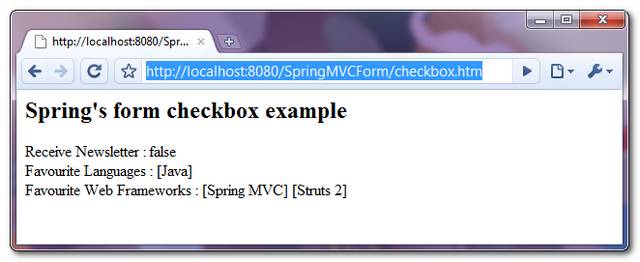
If the form is submitted successfully, just display the submitted checkboxes value.
Spring MVC Checkbox And Checkboxes Example的更多相关文章
- Spring MVC遭遇checkbox的问题解决方式
Spring MVC遭遇checkbox的问题是:当checkbox全不选时候,则该checkbox域的变量为null,不能动态绑定到spring的controller方法的入參上,并抛出异常. 解决 ...
- Spring MVC遭遇checkbox的问题解决方案
转:http://lavasoft.blog.51cto.com/62575/1407213 Spring MVC遭遇checkbox的问题是:当checkbox全不选时候,则该checkbox域的变 ...
- Spring MVC 学习总结(四)——视图与综合示例
一.表单标签库 1.1.简介 从Spring2.0起就提供了一组全面的自动数据绑定标签来处理表单元素.生成的标签兼容HTML 4.01与XHTML 1.0.表单标签库中包含了可以用在JSP页面中渲染H ...
- spring mvc:复选框(多选)
以user为例,user下有 username用户,password密码, address地址, receivePaper是否订阅, favotireFramework兴趣爱好, user.java ...
- spring mvc:常用标签库(文本框,密码框,文本域,复选框,单选按钮,下拉框隐藏于,上传文件等)
在jsp页面需要引入:<%@taglib uri="http://www.springframework.org/tags/form" prefix="form&q ...
- 视图框架:Spring MVC 4.0(1)
目录 一.表单标签库 1.1.简介 1.2.常用属性 1.3.form标签与input标签 1.4.checkbox标签 1.5.radiobutton标签 1.6.password标签 1.7.se ...
- Spring MVC列表多选框
以下示例显示如何在使用Spring Web MVC框架的表单中使用列表框(Listbox).首先使用Eclipse IDE来创建一个WEB工程,实现一个让用户可选择自己所善长的技术(多选)的功能.并按 ...
- Spring MVC下拉选项(Select)
以下示例显示如何在使用Spring Web MVC框架的表单中使用下拉选项(Dropdown).首先使用Eclipse IDE来创建一个WEB工程,实现一个让用户可选择自己所在的国家的功能.并按照以下 ...
- Spring MVC多项单选按钮
以下示例显示如何在使用Spring Web MVC框架的表单中使用多选按钮(RadioButton).首先使用Eclipse IDE来创建一个WEB工程,实现一个让用户可选择自己喜欢的数字的功能.并按 ...
随机推荐
- [转]SQL中使用WITH AS提高性能-使用公用表表达式(CTE)简化嵌套SQL
一.WITH AS的含义 WITH AS短语,也叫做子查询部分(subquery factoring),可以让你做很多事情,定义一个SQL片断,该SQL片断会被整个SQL语句所用到.有的时候, ...
- MySQL中用户授权/删除授权的方法
用户授权方法 你可以通过发出GRANT语句增加新用户: 代码如下 复制代码 shell> mysql --user=root mysql mysql> GRANT ALL PRIVILE ...
- (转)Facebook内部分享:26个高效工作的小技巧
春节假期马上就要结束了,该收收心进入新一年的工作节奏了~分享 26 个高效工作的小技巧,希望对大家有所帮助~(我发现自己只有最后一条执行得很好,并且堪称完美!) 1.时间常有,时间优先. 2.时间总会 ...
- From MSI to WiX, Part 8 - Major Upgrade, by Alex Shevchuk
Following content is reprinted from here, please go to the original website for more information. Au ...
- Linux 配置文件
Linux系统的配置文件,在多用户.多任务环境中,配置文件控制用户权限.系统应用程序.守护进程.服务和其他管理任务.这些任务包括管理用户账号.分配磁盘配额.管理电子邮件和新闻组,以及配置内核参数.以下 ...
- Ueditor中增加迅雷下载支持
在项目中有遇到需要在Ueditor中加一个链接,迅雷的开头是thunder 会被默认加上http:// 最后的 结果就变成了http://thunder://xxxxx 导致用户点击失败: 其实在 ...
- DirectSound学习(二)--流式缓冲区
使用流式缓冲方式播放波形音频文件比较复杂,主要原因是在只有一个缓冲区提供给用户的前提下,这个缓冲区在提供给声卡播放数据的同是还需要用户不断的定时向其中写入数据.要注意从缓冲区这时是一个环形缓冲区,声音 ...
- Jquery get parameter value
http://www.sitepoint.com/url-parameters-jquery/ $.urlParam('id') ==> $.urlParam = function(name){ ...
- amcharts 网页绘图插件
Amcharts是一组js图表,你可以免费使用在你的网站和基于网络的产品(非开源). Amcharts可以从简单的json提取数据,也可以从动态数据读取生成,比如PHP, .NET, Ruby on ...
- VB6-AppendToLog 通过API写入日志
工作中免不了需要为自己的程序添加日志,我也从网上扒拉了一个老外写的模块,修改修改了下,凑合用吧. Option Explicit '********************************** ...