
一个打砖块的小游戏1.0 KILL THE BLOCKS !
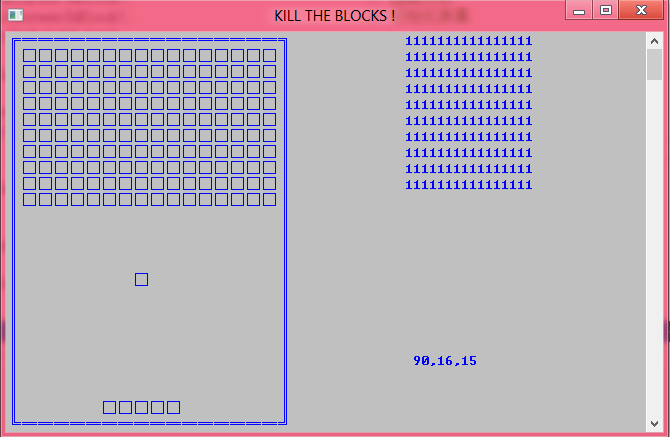
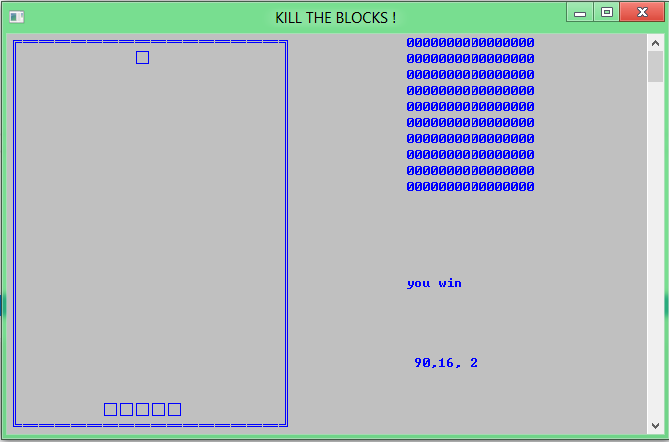
 /********************************************

  * 程序名称:MR.DUAN 的打砖块(KILL THE BLOCKS !)

  * 作  者:WindAutumn <duanxu@outlook.com>

  * 最后修改:2012-8-11-PM

  * 版 本 号:1.0

  *

  *// 好像有个BUG。。。间歇性发作,可能是编译器问题吧,不管了。。。

  *

  * *****************************************/

 #include<stdio.h>

 #include<Windows.h>

 #include<conio.h>

 #define PI 3.1415926

 #define LEFT 0

 #define RIGHT34

 #define UP 0

 #define DOWN24

 #define X_OFFSET 2

 #define Y_OFFSET 1

 #define BLOCK_MAP 0xffff// 砖块地图

 unsigned short block[]= {};

 char blocks[][]= {};

 int arm_head=+X_OFFSET, arm_tail=+X_OFFSET;

 void HideCursor(HANDLE hBlock);

 void GotoXY(HANDLE hBlock, int x, int y);

 void InitScreen(HANDLE hBlock);

 void GameStart();

 void GameOver(HANDLE hBlock, int mode);

 void PrintBlock(HANDLE hBlock);

 void ChangeArm(HANDLE hBlock);

 void PrintBall(HANDLE hBlock);

 void KillBlock(HANDLE hBlock, int x, int y);

 void main()

 {

     system("color 7b");// 默认颜色,白色底色

     SetConsoleTitle("KILL THE BLOCKS !");// 设置控制台标题

     GameStart();// 开始游戏

 }

 void GameStart()

 {

     int i;

     HANDLE hBlock = GetStdHandle(STD_OUTPUT_HANDLE);

     HideCursor(hBlock);// 隐藏光标

     InitScreen(hBlock);// 初始化屏幕

     for(i=; i<; i++)

         block[i]=BLOCK_MAP;

     PrintBlock(hBlock);// 绘制砖块地图

     GotoXY(hBlock, arm_head, DOWN - );// 以下3行打印托盘

     for(i=; i<(arm_tail-arm_head)/+; i++)

         printf("□");

     PrintBall(hBlock);// 对小球的控制

 }

 void InitScreen(HANDLE hBlock)// 初始化屏幕

 {

     int i;

     SetConsoleTextAttribute(hBlock, FOREGROUND_INTENSITY | FOREGROUND_BLUE | BACKGROUND_BLUE |BACKGROUND_GREEN | BACKGROUND_RED);

     // 白的背景色,亮蓝色前景色

     GotoXY(hBlock, , );

     printf("╔");

     for(i=; i<RIGHT/; i++)

         printf("═");

 //printf("%2d",i);

     printf("╗");

     for(i=; i< DOWN; i++)

     {

         GotoXY(hBlock, , i);

 //printf("%d",i);

         printf("║");

         GotoXY(hBlock, RIGHT, i);

         printf("║");

     }

     GotoXY(hBlock, , DOWN);

     printf("╚");

     for(i=; i<RIGHT/; i++)

         printf("═");

     printf("╝");

     GotoXY(hBlock, , );

 }

 void HideCursor(HANDLE hBlock)// 隐藏光标

 {

     CONSOLE_CURSOR_INFO cursor_info = {, };

     SetConsoleCursorInfo(hBlock, &cursor_info);

 }

 void GotoXY(HANDLE hBlock, int x, int y)

 {

     COORD coord;

     coord.X = x;

     coord.Y = y;

     SetConsoleCursorPosition(hBlock, coord);

 }

 void PrintBlock(HANDLE hBlock)

 {

     int i,j;

     for(i=; i<; i++)// 打印右侧数字视图

     {

         for(j=; j<; j++)

         {

             if(((block[i]<<j)&0x8000) == (unsigned short)0x8000)

                 blocks[i][j]=;

             else blocks[i][j]=;

             GotoXY(hBlock,+j,i);

             printf("%d",blocks[i][j]);

         }

     }

     for(i=; i<; i++)// 打印砖块

     {

         for(j=; j<; j++)

         {

             if(blocks[i][j]==)

             {

                 GotoXY(hBlock,+*j,+i);

                 printf("□");

             }

         }

     }

 }

 void ChangeArm(HANDLE hBlock)

 {

     int key_direct=;

     if(_kbhit())

     {

         key_direct = getch();

         if(key_direct == 'a'&&arm_head > LEFT+)// 托盘往左走

         {

             arm_head -= ;

             GotoXY(hBlock, arm_head, DOWN-);

             printf("□");

             GotoXY(hBlock, arm_tail, DOWN-);

             printf("  ");

             arm_tail -= ;

         }

         if(key_direct == 'd'&&arm_tail < RIGHT-)// 托盘向右走

         {

             arm_tail += ;

             GotoXY(hBlock, arm_tail, DOWN-);

             printf("□");

             GotoXY(hBlock, arm_head, DOWN-);

             printf("  ");

             arm_head += ;

         }

     }

 }

 void PrintBall(HANDLE hBlock)

 {

     int k,flag=;

     int x = (arm_head+arm_tail)/, y =DOWN - ;// 球的坐标

     int tempx = x,tempy = y;

     int degree =;// 初始角度

     GotoXY(hBlock, x, y);// 初始球坐标

     printf("□");

     while()

     {

         if(x == LEFT+ || x == RIGHT-)

             degree = (degree<=)?(-degree):(-degree);// 碰左右边的角度计算

         if(y == UP+)

             degree =  - degree;// 碰上边的角度计算

         if(y == DOWN-)

         {

             if(!(x>=arm_head&&x<=arm_tail))// 没有碰上托盘的情况

                 GameOver(hBlock,);// 失败

             else if(degree > )

             {

                 if(x == (arm_head+arm_tail)/)

                     degree =  - degree;// 计算碰托盘之后角度

                 else

                     degree =  - degree +  * ((arm_head+arm_tail)/ - x);

             }

         }

         switch(degree)// 根据角度确定方块移动方向

         {

         case :

         case :

         case   :

             tempx = x+;

             tempy = y-;

             break;

         case   :

             tempx = x+;

             tempy = y-;

             break;

         case   :

             tempx = x  ;

             tempy = y-;

             break;

         case  :

             tempx = x-;

             tempy = y-;

             break;

         case  :

             tempx = x-;

             tempy = y-;

             break;

         case :

         case  :

             tempx = x-;

             tempy = y+;

             break;

         case  :

             tempx = x-;

             tempy = y+;

             break;

         case  :

             tempx = x  ;

             tempy = y+;

             break;

         case  :

             tempx = x+;

             tempy = y+;

             break;

         case  :

             tempx = x+;

             tempy = y+;

             break;

         }

         GotoXY(hBlock, tempx, tempy);// 下一个点在哪?

         printf("□");

         GotoXY(hBlock, x, y);// 消除上一个点

         printf("  ");

         x = tempx;

         y = tempy;

         ChangeArm(hBlock);

         KillBlock(hBlock,x,y);

         for(k=; k<; k++)// 如果每行非0就置flag为1

             if(block[k]!=(unsigned short)0x0000)

                 flag=;

         if(flag==)// 如果flag为0则游戏胜利

             GameOver(hBlock,);

         flag=;

         GotoXY(hBlock,,);// 打印坐标,角度信息

         printf("%3d,%2d,%2d",degree,x,y);

         Sleep();// 暂停0.1s *********************important

     }

 }

 void KillBlock(HANDLE hBlock, int x, int y)

 {

     int i,j;

     unsigned short temp;

     i=y-;

     j=(x-)/;

     if(blocks[i][j] == )

     {

         blocks[i][j] = ;

         temp = ~(0x0001<<j);// 掩码

         block[i]=block[i] & temp;// 将block信息与( 1111 1110 1111 1111 )进行与运算,消除bit位

         GotoXY(hBlock,+j,i);// 刷新右侧数字区

         printf("");

 //GotoXY(hBlock,50,12+i);// 打印实时每行信息

 //printf("%#x",block[j]);

     }

 }

 void GameOver(HANDLE hBlock, int mode)

 {

     GotoXY(hBlock,,);

     if(mode)

         printf("you win");

     else

         printf("you loss");

     getch();

     exit();

 }
一个打砖块的小游戏1.0 KILL THE BLOCKS !的更多相关文章
- 软件工程:黄金G点小游戏1.0
我们要做的是黄金G点小游戏: N个同学(N通常大于10),每人写一个0~100之间的有理数 (不包括0或100),交给裁判,裁判算出所有数字的平均值,然后乘以0.618(所谓黄金分割常数),得到G值. ...
- python写的battle ship小游戏 - 1.0
最近学python,这是今天写的一个小游戏. from random import randint class Board(object): board = [] def __init__(self, ...
- 一个很有意思的小游戏:Dig2China
最近通关了一个小游戏,游戏故事是这样的:一个美国小男孩想要去中国,他决定从自家后院往下挖,横穿地心去中国,期间经历了很多次失败.但是,每次尝试都能收获一批钱,用这些钱升级钻地机,调整自己的工具,终于在 ...
- 一听就懂:用Python做一个超简单的小游戏
写它会用到 while 循环random 模块if 语句输入输出函数
- HTML5存储(带一个粗糙的打怪小游戏案例)
本地存储localStorage设置存储内容setItem(key,value) localStorage.setItem('leo','23'); 更新存储内容对象[key]=value对象.key ...
- 一个控制台贪吃蛇小游戏(wsad控制移动)
/******************************************** * 程序名称:MR.DUAN 的贪吃蛇游戏(链表法) * 作 者:WindAutumn <flutti ...
- 2D命令行小游戏Beta1.0
前提: 遇到许多问题,没有参考大佬一些方法是敲不出来的...Orz using System; using System.Collections.Generic; using System.Linq; ...
- 简单的鼠标操作<一个填充格子的小游戏>
#include "graphics.h" #include "conio.h" void main(){ // 初始化界面 initgraph(, ); ; ...
- Unity小游戏制作 - 暗影随行
用Unity制作小游戏 - 暗影惊吓 最近玩了一个小游戏,叫做暗影惊吓,虽然是一个十分简单的小游戏,但是感觉还是十分有趣的.这里就用Unity来实现一个类似的游戏. 项目源码:DarkFollow 主 ...
随机推荐
- c构造函数
构造函数 任何一们面向对象语言里都会涉及构造函数这一概念,只是实现的方式各有差异.需要这main函数之前执行一段代码是非常容易的事情,只需要声明一对象的全局变量,在构造函数可以为所欲为干你想干的事 ...
- ExtJS 4 MVC架构讲解
大规模客户端应用通常不好实现不好组织也不好维护,因为功能和人力的不断增加,这些应用的规模很快就会超出掌控能力,ExtJS 4 带来了一个新的应用架构,不但可以组织代码,还可以减少实现的内容新的应用架构 ...
- 转:7个鲜为人知却超实用的PHP函数
PHP have lots of built-in functions, and most developers know many of them. But a few functions are ...
- 多线程Two-Phase Termination Pattern两阶段终止模式
一 Two-Phase Termination Pattern Two-Phase Termination Pattern,指的就是当希望结束一个线程的时候,送出一个终止请求,但是不会马上停止,做一些 ...
- -_-#【Mac】快捷操作
快捷键 command + 拖拽 = 剪切option + 拖拽 = 复制command + option + 拖拽 = 快捷方式 command + ] 前进command + [ 后退 comma ...
- Nginx+Keepalived主备切换(包含nginx服务停止)
原文地址:http://blog.sina.com.cn/s/blog_79ac6aa80101bmed.html Nginx+Keepalived主备切换(包含nginx服务停止) 环境: VM中4 ...
- Hive从概念到安装使用总结
一.Hive的基本概念 1.1 hive是什么? (1)Hive是建立在hadoop数据仓库基础之上的一个基础架构: (2)相当于hadoop之上的一个客户端,可以用来存储.查询和分析存储在hadoo ...
- Java的多线程(上)
多线程的优点和必要性是不言而喻的. 三种方法实现多线程 1. 继承Thread class A extends Thread{ public void run() {...} } 使用时, new A ...
- escape encodeURI encodeURIComponent区别
escape() 函数可对字符串进行编码,这样就可以在所有的计算机上读取该字符串.使用unescape来解码. 有效的URI(统一资源标示符)是不能包含某些字符的,如空格,所以需要进行编码,编码方法有 ...
- (五)unity4.6Ugui中文教程文档-------概要-UGUI Interaction Components
watermark/2/text/aHR0cDovL2Jsb2cuY3Nkbi5uZXQvdTAxMDAxOTcxNw==/font/5a6L5L2T/fontsize/400/fill/I0JBQk ...