
git push时报错:Updates were rejected because the tip of your current branch is behind
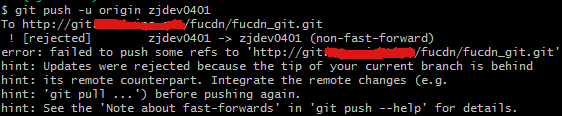
出现这样的问题是由于:自己当前版本低于远程仓库版本
有如下几种解决方法:
1.使用强制push的方法:
git push -u origin master -f
这样会使远程修改丢失,一般是不可取的,尤其是多人协作开发的时候。
2.push前先将远程repository中对应的分支修改pull下来
git pull origin master
git push -u origin master
3.若不想merge远程和本地修改,可以先创建新的分支:
git branch [name]
然后push
git push -u origin [name]
我用了2的方法成功解决。
git push时报错:Updates were rejected because the tip of your current branch is behind的更多相关文章
- git提交时报错:Updates were rejected because the tip of your current branch is behind
有如下3种解决方法: 1.使用强制push的方法:git push -u origin master -f这样会使远程修改丢失,一般是不可取的,尤其是多人协作开发的时候. 2.push前先将远程rep ...
- Git 报错:Updates were rejected because the tip of your current branch is behind
刚开始学习 git 命令,发现会出现很多的错误,所以就总结下出现的错误,以此来加深理解和掌握吧! 环境:在本地库操作了一系列的 add 和 commit 操作后,想把本地仓库推送到远端,但是发生以下错 ...
- [git] Updates were rejected because the tip of your current branch is behind its remote counterpart.
场景 $ git push To https://github.com/XXX/XXX ! [rejected] dev -> dev (non-fast-forward) error: fai ...
- (转)Updates were rejected because the tip of your current branch is behind
刚创建的github版本库,在push代码时出错: $ git push -u origin masterTo git@github.com:******/Demo.git ! [rejected] ...
- 01_第一次如何上传GitHub(转)Updates were rejected because the tip of your current branch is behind
https://www.cnblogs.com/code-changeworld/p/4779145.html 刚创建的github版本库,在push代码时出错: $ git push -u orig ...
- git提交报错:Updates were rejected because the tip of your current branch is behind
提交代码push时报错:上网查询了一下解决办法有很多种,1.使用强制push的方法:(上网查询说这种会使远程修改丢失,一般是不可取的,尤其是多人协作开发的时候.) git push -u origin ...
- Updates were rejected because the tip of your current branch is behind 问题出现解决方案
提供如下几种方式: 1.使用强制push的方法(多人协作时不可取): git push -u origin master -f 2.push前先将远程repository修改pull下来 git pu ...
- git push ! [rejected] master -> master (non-fast-forward) error: failed to push some refs to 'https://github.com/Operater9/guest' hint: Updates were rejected because the tip of your current bra
推送本地代码到github报错 git push报错 ! [rejected] master -> master (non-fast-forward) error: failed to push ...
- git push时报错refusing to merge unrelated histories
1. 删除本地项目中的.git目录,然后向远程仓库提交代码的时候,重新配置后再次提交.会有冲突. 解决方式: git remote add origin [//your giturl] git pul ...
随机推荐
- C++ opencv调用resize修改插值方式遇到的坑
opencv提供的热死则函数原型如下:void resize(InputArray src, OutputArray dst, Size dsize, double fx=0, double fy=0 ...
- Mac上安装Charles进行抓包全流程设置
安装 -- 官网下载最新版的Charles版本,按照提示安装即可 破解 -- https://blog.csdn.net/qq_25821067/article/details/79848589. M ...
- 解决webpack打包报错: Cannot find module '@webassemblyjs/wasm-parser'
出现这个错误时,百度和谷歌中都搜索不出个所以然出来,后来看了一下webpack官网,说建议安装node最新版本: 前提条件 在开始之前,请确保安装了 Node.js 的最新版本.使用 Node.js ...
- webpack 4.0 配置文件 webpack.config.js文件的放置位置
一般webpack.config.js是默认放在根目录的,不在根目录的时候需要在package.json中制定位置,我的配置文件目录是config/webpack.config.js,在package ...
- ORA-27300 ORA-27301 ORA-27302 skgpspawn3 CRS-2674
oracle@WWJD-DB1:~> $ORACLE_HOME/bin/srvctl start database -d ndscdb PRCR-1079 : Failed to start r ...
- DDD领域驱动
DDD领域驱动领域驱动模型.模型驱动代码接触到需求第一步就是考虑领域模型,而不是将其切割成数据和行为,然后数据用数据库实现,行为使用服务实现,最后造成需求的首肢分离.DDD让你首先考虑的是业务语言而不 ...
- Fiddler抓包【5】_Fiddler过滤
1.User Fiters启用 2.Action Action:Run Filterset now是否运行,Load Filterset加载,Save Filterset保存: 3.Hosts过滤 Z ...
- Oracle VM Virtual 安装 ubuntu 后设置全屏
按照正常流程在vm中安装了ubuntu之后,发现ubuntu系统无法全屏显示,解决途径如下: 1.在vm中点击设置 2.选择“安装增强功能” 3.正常情况下,我们可以在桌面看到一个光盘图标(文件名:V ...
- Unity3D 粒子系统 属性
- ASP.NET页面之间传值的方式之Cookie(个人整理)
Cookie Cookie 提供了一种在 Web 应用程序中存储用户特定信息的方法.例如,当用户访问您的站点时,您可以使用 Cookie 存储用户首选项或其他信息.当该用户再次访问您的网站时,应用程序 ...