
offsetWidth clientWidth scrollWidth 的区别
了解 offsetWidth clientWidth scrollWidth 的区别
最近需要清除区分开元素的width,height及相应的坐标等,当前这篇用来区分offsetWidth clientWidth scrollWidth的区别
各自的概念
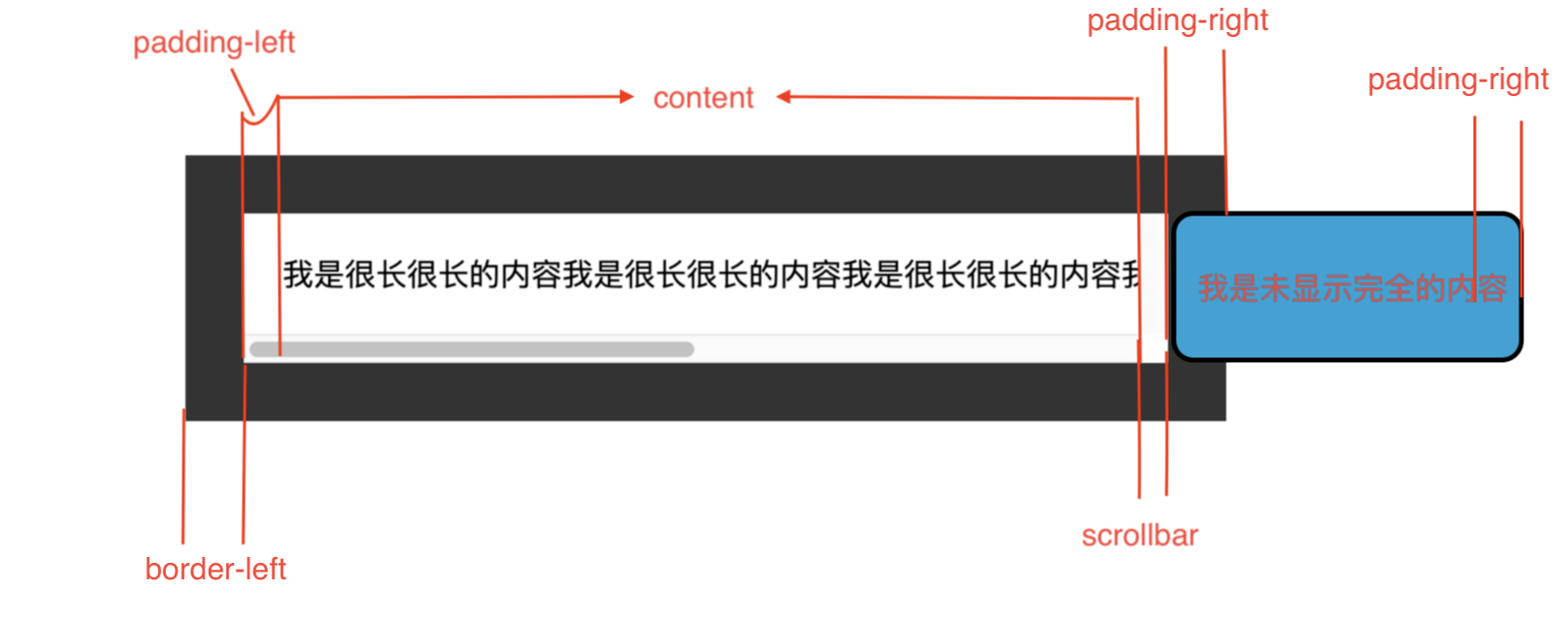
假设有一个元素,width有以下几个进行组合
- content
- padding-left
- padding-right
- scrollbar 垂直的滚动条宽度(假设有,没有便为0)
- border-left
- border-right
clientWidth = content + padding-left + padding-right
offsetWidth = content + padding-left + padding-right + border-left + border-right + scrollbar
scrollWidth = content + padding-left + padding-right + scrollbar + border-left + border-right +滚动进入不可见的内容
示例
在上述中,我们可以计算出
scrollbar为
const scrollbar = el.offsetWidth - (border-left + border-right) - clientWidth
html
<section class="client-xyz">

    <p>我是很长很长的内容我是很长很长的内容我是很长很长的内容我是很长很长的内容我是很长很长的内容我是很长很长的内容</p>

</section>
css
p {

    margin: 20px;

    padding: 20px;

    /* border: 30px solid #333; */

    /* border: 10vw solid #333; */

    /* border: calc(100px - 70px) solid #333; */

    border: 30px solid #333;

    word-break: keep-all;

    overflow-y: scroll;

}
js
const Box = document.querySelector('p')

let border = 0

// 获取元素的style信息

const style = window.getComputedStyle(Box, null)

// border不管设置的单位如何,最终都会转为 px

border = parseFloat(style['borderRightWidth'].replace('px', '')) + parseFloat(style['borderLeftWidth'].replace('px', ''))

const scollbar = Box.offsetWidth - Box.clientWidth - border
总结
- 知道了计算滚动条宽度,并不是简单的
el.offsetWidth - el.clientWidth而是还需要减去border的宽度 - clientWidth,offsetWidth,scrollWidth
offsetWidth clientWidth scrollWidth 的区别的更多相关文章
- offsetWidth clientWidth scrollWidth 三者之间的区别和联系
scrollWidth:对象的实际内容的宽度,不包边线宽度,会随对象中内容超过可视区后而变大. clientWidth:对象内容的可视区的宽度,不包滚动条等边线,会随对象显示大小的变化而改变. off ...
- js中clientWidth, scrollWidth, innerWidth, outerWidth,offsetWidth的区别
js中clientWidth, scrollWidth, innerWidth, outerWidth,offsetWidth的属性汇总,测试浏览器:ie7~ie11.chrome 和 firefox ...
- 四种浏览器对 clientHeight、offsetHeight、scrollHeight、clientWidth、offsetWidth 和 scrollWidth 的解释差异
网页可见区域宽:document.body.clientWidth 网页可见区域高:document.body.clientHeight 网页可见区域宽:document.body.offsetWid ...
- JS 获取浏览器窗口大小clientWidth、offsetWidth、scrollWidth
常用: JS 获取浏览器窗口大小 // 获取窗口宽度 if (windows.innerWidth) winWidth = windows.innerWidth; else if ((docume ...
- JS:body元素对象的clientWidth、offsetWidth、scrollWidth、clientLeft、offsetLeft、scrollLeft
document.body.clientWidth 获取body元素对象的内容可视区域的宽度,即clientWidth=width+padding,不包括滚动条. document.body.clie ...
- clientWidth、offsetWidth、scrollWidth……
1.元素视图属性 clientWidth:元素内容可视区宽度(水平方向 width + 左右 padding). clientHeight:元素内容可视高度(垂直方向 height + 上下paddi ...
- js的offsetWidth,clientWidth
js元素的offsetWidth与clientWidth很相似,因此放在一起记录. clientWidth与offsetWidth clientWidth=元素内容区域宽度+水平内边距padding. ...
- JS中关于clientWidth offsetWidth scrollWidth 的区别及意义
网页可见区域宽: document.body.clientWidth;网页可见区域高: document.body.clientHeight;网页可见区域宽: document.body.offset ...
- scrollWidth、clientWidth、offsetWidth、width的区别
scrollWidth:对象的实际内容的宽度,不包边线宽度,会随对象中内容超过可视区后而变大. clientWidth:对象内容的可视区的宽度,不包滚动条等边线,会随对象显示大小的变化而改变. off ...
随机推荐
- php上传大文件
1.使用PHP的创始人 Rasmus Lerdorf 写的APC扩展模块来实现(http://pecl.php.net/package/apc) APC实现方法: 安装APC,参照官方文档安装,可以使 ...
- BZOJ 2157: 旅游 (结构体存变量)
用结构体存变量好像确实能提高运行速度,以后就这么写数据结构了 Code: #include <cstdio> #include <algorithm> #include < ...
- 配置文件:mainfest.xml
AndroidManifest.xml 是每个android程序中必须的文件. 它位于整个项目的根目录,描述了package中暴露的组件(activities,services, 等等),他们各自 ...
- [CF118D]Caesar's Legions 题解
题意简述 一个01序列由\(n_1\)个0和\(n_2\)个1组成,求最长连续0串长度不超过\(k_1\),最长连续1串长度不超过\(k_2\)的序列的方案总数 题解 状态 方案总数 变量 已经取了i ...
- scrapy项目4:爬取当当网中机器学习的数据及价格(CrawlSpider类)
scrapy项目3中已经对网页规律作出解析,这里用crawlspider类对其内容进行爬取: 项目结构与项目3中相同如下图,唯一不同的为book.py文件 crawlspider类的爬虫文件book的 ...
- 字符串处理工具StringUtils
package yqw.java.util; import java.io.File;import java.text.ParseException;import java.text.SimpleDa ...
- 接口自动化request库入门
requests库7个主要方法 r= requsts.get(),主要属性: r.raise_for_status()方法内部判断r.status_code是否等于200不需要增加额外的if语句,该语 ...
- nowcoder---常州大学新生寒假训练会试----F 大佬的生日礼包(二分)
链接:https://www.nowcoder.net/acm/contest/78/F 时间限制:C/C++ 1秒,其他语言2秒 空间限制:C/C++ 32768K,其他语言65536K 64bit ...
- serlvet操作数据库
工具:eclipse 数据库工具:mysql java ee操作数据库,首先要导入数据库驱动文件,我用的是mysql 刚开始,很多人代码正确但是就是连接不上,原因就是忘了驱动文件的导入. 我的驱动文件 ...
- Oracle dba角色和sysdba的区别
如果用户需要远程sysdba的方式登陆,需要grant sysdba权限,登陆后以sys用户执行命令,需要验证密码文件. 密码文件如果是从12c之前的老版本同步过来,需要重建12c格式的密码文件. d ...