
Spring AOP中级——应用场景
在《Spring AOP初级——入门及简单应用》中对AOP作了简要的介绍,以及一些专业术语的解释,同时写了一个简单的Spring AOPdemo。本文将继续探讨Spring AOP在实际场景中的应用。
对用户操作日志的记录是很常见的一个应用场景,本文选取“用户管理”作为本文Spring AOP的示例。当然,该示例只是对真实场景的模拟,实际的环境一定比该示例更复杂。
该示例的完整代码路径在https://github.com/yu-linfeng/BlogRepositories/tree/master/repositories/Spring%20AOP%E4%B8%AD%E7%BA%A7%E2%80%94%E2%80%94%E5%BA%94%E7%94%A8%E5%9C%BA%E6%99%AF。本文仅对Spring AOP相关的代码进行讲解。
在这个示例中首次采用RESTful架构风格,对于以下RESTful API的设计可能并不完美,如果有熟悉、精通RESTful架构风格的朋友希望能够指出我的错误。
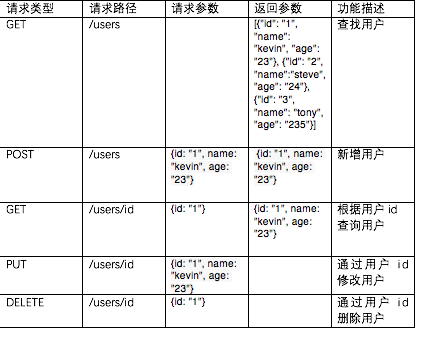
使用RESTful的前后端分离架构风格后,我感受到了前所未有的畅快,所以此次示例并没有前端页面的展示,完全使用JUnit进行单元测试包括对HTTP请求的Mock模拟,这部分代码不会进行详细讲解,之后会继续深入JUnit单元测试的一些学习研究。
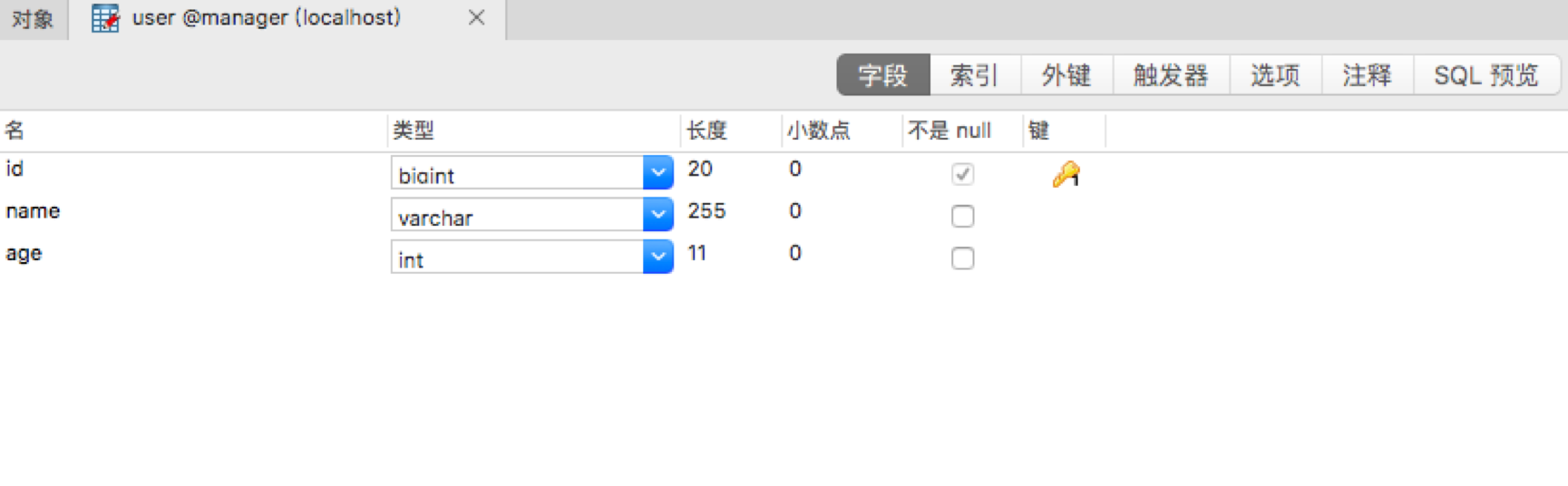
数据库只有一张表:
回到正题,我们回顾下切面由哪两个部分组成: 通知 切点 首先明确我们需要在何时记录日志:
通知
切点
首先明确我们需要在何时记录日志:
1. 查询所有用户时,并没有参数(此示例没有作分页),只有在返回时才会有数据的返回,所以对查询所有用户的方法采用返回通知(AfterReturning)。
2. 新增用户时,会带有新增的参数,此时可采用前置通知(Before)。
3. 修改用户时,也会带有新增的参数,此时同样采用前置通知(Before)。
4. 删除用户时,通常会带有唯一标识符ID,此时采用前置通知(Before)记录待删除的用户ID。
在明确了通知类型后,此时我们需要明确切点,也就是在哪个地方记录日志。当然上面实际已经明确了日志记录的位置,但主要是切面表达式的书写。 在有了《Spring AOP初级——入门及简单应用》的基础,相信对日志切面类已经比较熟悉了:
 package com.manager.aspect;

 import org.apache.log4j.Logger;

 import org.aspectj.lang.JoinPoint;

 import org.aspectj.lang.annotation.*;

 import org.springframework.stereotype.Component;

 import java.util.Arrays;

 /**

  * 日志切面

  * Created by Kevin on 2017/10/29.

  */

 @Aspect

 @Component

 public class LogAspect {

     /**

      * 操作日志文件名

      */

     private static final String OPERATION_LOG_NAME = "operationLog";

     private static final String LOG_FORMATTER = "%s.%s - %s";

     Logger log = Logger.getLogger(OPERATION_LOG_NAME);

     /**

      * 对查询方法记录日志的切点

      */

     @Pointcut("execution(* com.manager..*.*Controller.query*(..))")

     public void query(){}

     /**

      * 对新增方法记录日志的切点

      */

     @Pointcut("execution(* com.manager..*.*Controller.add*(..))")

     public void add(){}

     /**

      * 对修改方法记录日志的切点

      */

     @Pointcut("execution(* com.manager..*.*Controller.update*(..))")

     public void update(){}

     /**

      * 对删除方法记录日志的切点

      */

     @Pointcut("execution(* com.manager..*.*Controller.delete*(..))")

     public void delete(){}

     @AfterReturning(value = "query()", returning = "rvt")

     public void queryLog(JoinPoint joinPoint, Object rvt) {

         String className = joinPoint.getTarget().getClass().getName();

         String methodName = joinPoint.getSignature().getName();

         String returnResult = rvt.toString();

         log.info(String.format(LOG_FORMATTER, className, methodName, returnResult));

     }

     @Before("add()")

     public void addLog(JoinPoint joinPoint) {

         String className = joinPoint.getTarget().getClass().getName();

         String methodName = joinPoint.getSignature().getName();

         Object[] params = joinPoint.getArgs();

         log.info(String.format(LOG_FORMATTER, className, methodName, Arrays.toString(params)));

     }

     @Before("update()")

     public void updateLog(JoinPoint joinPoint) {

         String className = joinPoint.getTarget().getClass().getName();

         String methodName = joinPoint.getSignature().getName();

         Object[] params = joinPoint.getArgs();

         log.info(String.format(LOG_FORMATTER, className, methodName, Arrays.toString(params)));

     }

     @Before("delete()")

     public void deleteLog(JoinPoint joinPoint) {

         String className = joinPoint.getTarget().getClass().getName();

         String methodName = joinPoint.getSignature().getName();

         Object[] params = joinPoint.getArgs();

         log.info(String.format(LOG_FORMATTER, className, methodName, Arrays.toString(params)));

     }

 }
上面的日志切面类中出现了JointPoint类作为参数的情况,这个参数能够传递被通知方法的相信,例如被通知方法所处的类以及方法名等。在第47行中的Object rvt参数就是获取被通知方法的返回值。 上面的切面并没有关注被通知方法的参数,如果要使得切面和被通知方法参数参数关联可以使用以下的方式:
@Pointcut("execution(* com.xxx.demo.Demo.method(int)) && args(arg)")

public void aspectMethod(int arg){}

@Before(“aspectMedhot(arg)”)

    public void method(int arg) {

    //此时arg参数就是被通知方法的参数

}
本例中最主要的切面部分就完成了。注意在结合Spring时需要在applicationContext.xml中加入以下语句:
<!--启用AspectJ自动代理,其中proxy-target-class为true表示使用CGLib的代理方式,false表示JDK的代理方式,默认false-->

<aop:aspectj-autoproxy />
示例中关于log4j、pom.xml依赖、JUnit如何结合Spring进行单元测试等等均可可以参考完整代码。特别是JUnit是很值得学习研究的一部分,这部分在将来慢慢我也会不断学习推出新的博客,在这里就只贴出JUnit的代码,感兴趣的可以浏览一下:
 package com.manager.user.controller;

 import com.fasterxml.jackson.databind.ObjectMapper;

 import com.manager.user.pojo.User;

 import org.junit.Before;

 import org.junit.Test;

 import org.junit.runner.RunWith;

 import org.springframework.beans.factory.annotation.Autowired;

 import org.springframework.http.MediaType;

 import org.springframework.test.context.ContextConfiguration;

 import org.springframework.test.context.junit4.SpringJUnit4ClassRunner;

 import org.springframework.test.context.web.WebAppConfiguration;

 import org.springframework.test.web.servlet.MockMvc;

 import org.springframework.test.web.servlet.request.MockMvcRequestBuilders;

 import org.springframework.test.web.servlet.result.MockMvcResultMatchers;

 import org.springframework.test.web.servlet.setup.MockMvcBuilders;

 import org.springframework.web.context.WebApplicationContext;

 import static org.junit.Assert.assertNotNull;

 /**

  * UserController单元测试

  * Created by Kevin on 2017/10/26.

  */

 @RunWith(SpringJUnit4ClassRunner.class)

 @ContextConfiguration({"classpath*:applicationContext.xml", "classpath*:spring-servlet.xml"})

 @WebAppConfiguration

 public class UserControllerTest {

     @Autowired

     private WebApplicationContext wac;

     private MockMvc mvc;

     @Before

     public void initMockHttp() {

         this.mvc = MockMvcBuilders.webAppContextSetup(wac).build();

     }

     @Test

     public void testQueryUsers() throws Exception {

         mvc.perform(MockMvcRequestBuilders.get("/users"))

                 .andExpect(MockMvcResultMatchers.status().isOk());

     }

     @Test

     public void testAddUser() throws Exception {

         User user = new User();

         user.setName("kevin");

         user.setAge(23);

         mvc.perform(MockMvcRequestBuilders.post("/users")

                 .contentType(MediaType.APPLICATION_JSON_UTF8)

                 .content(new ObjectMapper().writeValueAsString(user)))

                 .andExpect(MockMvcResultMatchers.status().isOk())

                 .andExpect(MockMvcResultMatchers.jsonPath("$.name").value("kevin"))

                 .andExpect(MockMvcResultMatchers.jsonPath("$.age").value(23));

     }

     @Test

     public void testQueryUserById() throws Exception {

         User user = new User();

         user.setId(8);

         mvc.perform(MockMvcRequestBuilders.get("/users/" + user.getId()))

                 .andExpect(MockMvcResultMatchers.status().isOk())

                 .andExpect(MockMvcResultMatchers.jsonPath("$.name").value("kevin"))

                 .andExpect(MockMvcResultMatchers.jsonPath("$.age").value(23));

     }

     @Test

     public void testUpdateUserById() throws Exception {

         User user = new User();

         user.setId(9);

         user.setName("tony");

         user.setAge(99);

         mvc.perform(MockMvcRequestBuilders.put("/users/" + user.getId())

                 .contentType(MediaType.APPLICATION_JSON_UTF8)

                 .content(new ObjectMapper().writeValueAsString(user)))

                 .andExpect(MockMvcResultMatchers.status().isOk());

     }

     @Test

     public void testDeleteUserById() throws Exception {

         long id = 10;

         mvc.perform(MockMvcRequestBuilders.delete("/users/" + id))

                 .andExpect(MockMvcResultMatchers.status().isOk());

     }

 }
有了初级和中级,接下来必然就是Spring AOP高级——源码实现。
这是一个能给程序员加buff的公众号

Spring AOP中级——应用场景的更多相关文章
- [转]彻底征服 Spring AOP 之 实战篇
Spring AOP 实战 看了上面这么多的理论知识, 不知道大家有没有觉得枯燥哈. 不过不要急, 俗话说理论是实践的基础, 对 Spring AOP 有了基本的理论认识后, 我们来看一下下面几个具体 ...
- 161110、彻底征服 Spring AOP 之 实战篇
Spring AOP 实战 看了上面这么多的理论知识, 不知道大家有没有觉得枯燥哈. 不过不要急, 俗话说理论是实践的基础, 对 Spring AOP 有了基本的理论认识后, 我们来看一下下面几个具体 ...
- Spring技术内幕:Spring AOP的实现原理(二)
**二.AOP的设计与实现 1.JVM的动态代理特性** 在Spring AOP实现中, 使用的核心技术时动态代理.而这样的动态代理实际上是JDK的一个特性.通过JDK的动态代理特性,能够为随意Jav ...
- Spring Aop 应用实例与设计浅析
0.代码概述 代码说明:第一章中的代码为了突出模块化拆分的必要性,所以db采用了真实操作.下面代码中dao层使用了打印日志模拟插入db的方法,方便所有人运行demo. 1.项目代码地址:https:/ ...
- 彻底征服 Spring AOP 之 实战篇
Spring AOP 实战 看了上面这么多的理论知识, 不知道大家有没有觉得枯燥哈. 不过不要急, 俗话说理论是实践的基础, 对 Spring AOP 有了基本的理论认识后, 我们来看一下下面几个 ...
- 关于 Spring AOP (AspectJ) 该知晓的一切
关联文章: 关于Spring IOC (DI-依赖注入)你需要知道的一切 关于 Spring AOP (AspectJ) 你该知晓的一切 本篇是年后第一篇博文,由于博主用了不少时间在构思这篇博文,加上 ...
- 关于 Spring AOP (AspectJ) 你该知晓的一切
版权声明:本文为CSDN博主「zejian_」的原创文章,遵循 CC 4.0 BY-SA 版权协议,转载请附上原文出处链接及本声明.原文链接:https://blog.csdn.net/javazej ...
- Spring AOP 实战运用
Spring AOP 实战 看了上面这么多的理论知识, 不知道大家有没有觉得枯燥哈. 不过不要急, 俗话说理论是实践的基础, 对 Spring AOP 有了基本的理论认识后, 我们来看一下下面几个具体 ...
- Spring AOP应用场景你还不知道?这篇一定要看!
回顾一下Spring AOP的知识 为什么会有面向切面编程(AOP)? 我们知道Java是一个面向对象(OOP)的语言,但它有一些弊端,比如当我们需要为多个不具有继承关系的对象引入一个公共行为,例如日 ...
随机推荐
- FastDFS安装全过程记录(V5.05)
FastDFS安装全过程记录 1.安装准备 HA虚拟IP:192.168.1.208 HA软件:Keepalived 操作系统:CentOS 7 用户:root 数据目录:/data/fastdfs ...
- DOM中元素对象的属性方法
在 HTML DOM (文档对象模型)中,每个部分都是节点. 节点是DOM结构中最基本的组成单元,每一个HTML标签都是DOM结构的节点. 文档是一个 文档节点 . 所有的HTML元素都是 ...
- 针对Openlayer3官网例子的简介
网址:http://openlayers.org/en/latest/examples/ 如果大家想了解ol3能做什么,或者说已提供的API有什么,又闲一个个翻例子跟API累的话,就看看这个吧. 1. ...
- 使用vs编译事件来动态发布配置文件
我们知道开发有很多的环境,一般我们会分为开发环境,测试环境,生产环境.而我们使用的vs默认配置就两种:Debug和Release.当然vs支持通过配置管理器来添加,编辑及删除配置. 为此不同的环境和配 ...
- 机器学习-KNN分类器
1. K-近邻(k-Nearest Neighbors,KNN)的原理 通过测量不同特征值之间的距离来衡量相似度的方法进行分类. 2. KNN算法过程 训练样本集:样本集中每个特征值都已经做好类别 ...
- 再起航,我的学习笔记之JavaScript设计模式30(简单模板模式)
简单模板模式 概念介绍 简单模板模式(Simple template): 通过格式化字符串拼凑出视图避免创建视图时大量节点操作,优化内存开销. 创建模板 在实际的业务中如果我们需要进行前后台交互,或多 ...
- git添加比较和合并工具(meld)
git 下的(difftool)和(mergetool)是专门提供给使用者用自己的工具进行diff和merge的命令: # git config --global diff.tool meld # g ...
- 使用Dapper操作Mysql数据库
首先我想说明一下:相比最原始的ADO.NET,一般都认为封装过一层的ORM性能上会有损耗,但其实在使用中你会发现,当你需要把数据库对象转化为实体模型时,很多所谓的DbHelper其实封装的很低效,反而 ...
- WPF 中模拟键盘和鼠标操作
转载:http://www.cnblogs.com/sixty/archive/2009/08/09/1542210.html 更多经典文章:http://www.qqpjzb.cn/65015.ht ...
- 一个scrapy框架的爬虫(爬取京东图书)
我们的这个爬虫设计来爬取京东图书(jd.com). scrapy框架相信大家比较了解了.里面有很多复杂的机制,超出本文的范围. 1.爬虫spider tips: 1.xpath的语法比较坑,但是你可以 ...