
(七十五)c#Winform自定义控件-控件水印组件
官网
前提
入行已经7,8年了,一直想做一套漂亮点的自定义控件,于是就有了本系列文章。
GitHub:https://github.com/kwwwvagaa/NetWinformControl
码云:https://gitee.com/kwwwvagaa/net_winform_custom_control.git
如果觉得写的还行,请点个 star 支持一下吧
欢迎前来交流探讨: 企鹅群568015492 
麻烦博客下方点个【推荐】,谢谢
NuGet
Install-Package HZH_Controls
目录
https://www.cnblogs.com/bfyx/p/11364884.html
用处及效果
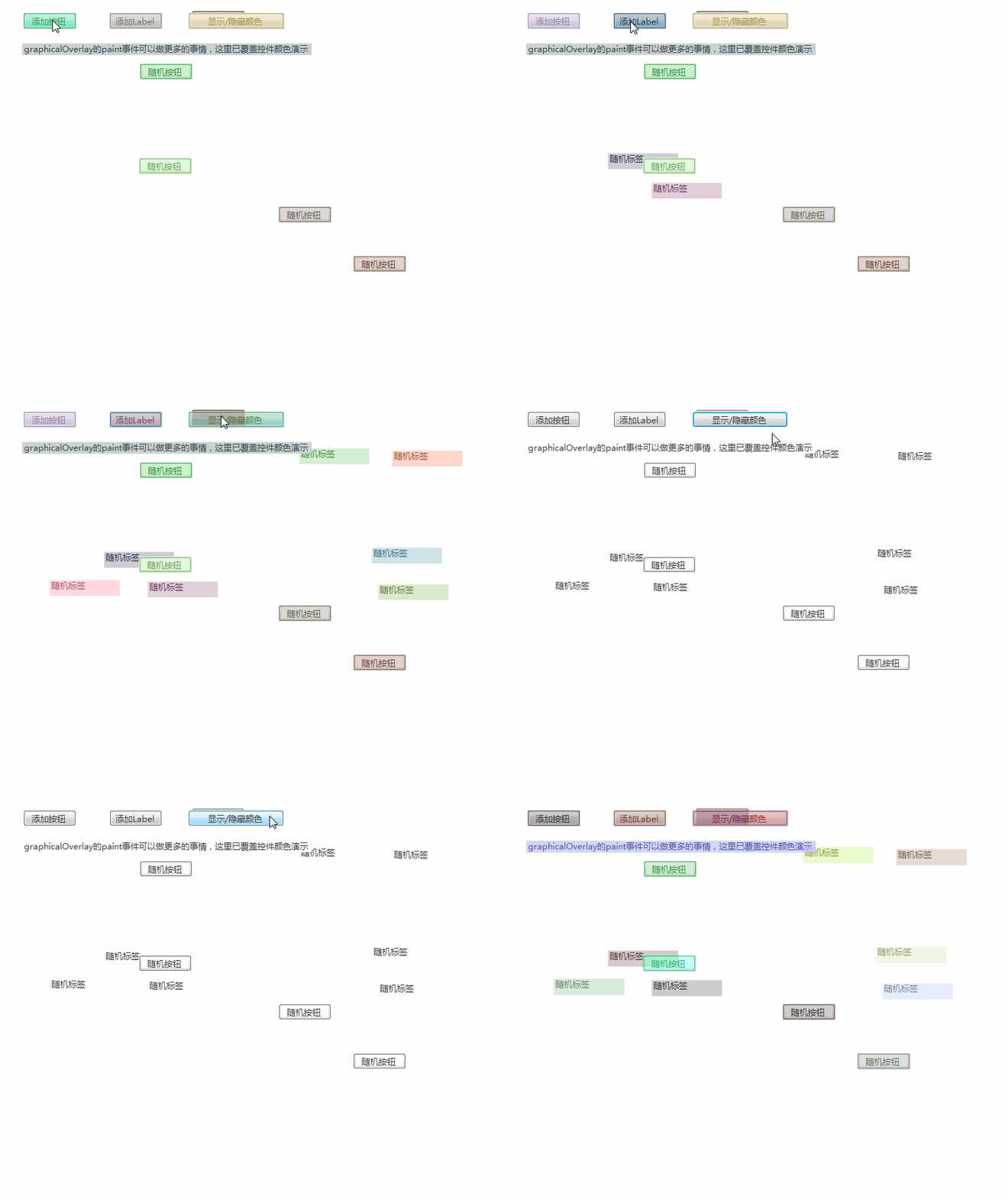
此效果只是牛刀小试,需要注意的是,像textbox这样的控件并不起作用,请注意。
你可以向目标控件绘图,画任何你想画的东西,此效果只是向控件覆盖一个半透明随机颜色
准备工作
没什么可准备的
开始
添加一个类GraphicalOverlay ,继承Component
代码比较少,一次全上了,主要就是用控件的paint事件搞事情,逻辑比较简单
 using System;

 using System.ComponentModel;

 using System.Drawing;

 using System.Windows.Forms;

 namespace HZH_Controls.Controls

 {

     [DefaultEvent("Paint")]

     public partial class GraphicalOverlay : Component

     {

         public event EventHandler<PaintEventArgs> Paint;

         public GraphicalOverlay()

         {

             InitializeComponent();

         }

         public GraphicalOverlay(IContainer container)

         {

             container.Add(this);

             InitializeComponent();

         }

         private Control owner;

         public Control Owner

         {

             get { return owner; }

             set

             {

                 // The owner form cannot be set to null.

                 if (value == null)

                     throw new ArgumentNullException();

                 // The owner form can only be set once.

                 if (owner != null)

                     throw new InvalidOperationException();

                 // Save the form for future reference.

                 owner = value;

                 // Handle the form's Resize event.

                 owner.Resize += new EventHandler(Form_Resize);

                 // Handle the Paint event for each of the controls in the form's hierarchy.

                 ConnectPaintEventHandlers(owner);

             }

         }

         private void Form_Resize(object sender, EventArgs e)

         {

             owner.Invalidate(true);

         }

         private void ConnectPaintEventHandlers(Control control)

         {

             // Connect the paint event handler for this control.

             // Remove the existing handler first (if one exists) and replace it.

             control.Paint -= new PaintEventHandler(Control_Paint);

             control.Paint += new PaintEventHandler(Control_Paint);

             control.ControlAdded -= new ControlEventHandler(Control_ControlAdded);

             control.ControlAdded += new ControlEventHandler(Control_ControlAdded);

             // Recurse the hierarchy.

             foreach (Control child in control.Controls)

                 ConnectPaintEventHandlers(child);

         }

         private void Control_ControlAdded(object sender, ControlEventArgs e)

         {

             // Connect the paint event handler for the new control.

             ConnectPaintEventHandlers(e.Control);

         }

         private void Control_Paint(object sender, PaintEventArgs e)

         {

             // As each control on the form is repainted, this handler is called.

             Control control = sender as Control;

             Point location;

             // Determine the location of the control's client area relative to the form's client area.

             if (control == owner)

                 // The form's client area is already form-relative.

                 location = control.Location;

             else

             {

                 // The control may be in a hierarchy, so convert to screen coordinates and then back to form coordinates.

                 location = owner.PointToClient(control.Parent.PointToScreen(control.Location));

                 // If the control has a border shift the location of the control's client area.

                 location += new Size((control.Width - control.ClientSize.Width) / , (control.Height - control.ClientSize.Height) / );

             }

             // Translate the location so that we can use form-relative coordinates to draw on the control.

             if (control != owner)

                 e.Graphics.TranslateTransform(-location.X, -location.Y);

             // Fire a paint event.

             OnPaint(sender, e);

         }

         private void OnPaint(object sender, PaintEventArgs e)

         {

             // Fire a paint event.

             // The paint event will be handled in Form1.graphicalOverlay1_Paint().

             if (Paint != null)

                 Paint(sender, e);

         }

     }

 }

 namespace System.Windows.Forms

 {

     using System.Drawing;

     public static class Extensions

     {

         public static Rectangle Coordinates(this Control control)

         {

             // Extend System.Windows.Forms.Control to have a Coordinates property.

             // The Coordinates property contains the control's form-relative location.

             Rectangle coordinates;

             Form form = (Form)control.TopLevelControl;

             if (control == form)

                 coordinates = form.ClientRectangle;

             else

                 coordinates = form.RectangleToClient(control.Parent.RectangleToScreen(control.Bounds));

             return coordinates;

         }

     }

 }
最后的话
如果你喜欢的话,请到 https://gitee.com/kwwwvagaa/net_winform_custom_control 点个星星吧
(七十五)c#Winform自定义控件-控件水印组件的更多相关文章
- (七十)c#Winform自定义控件-饼状图
前提 入行已经7,8年了,一直想做一套漂亮点的自定义控件,于是就有了本系列文章. GitHub:https://github.com/kwwwvagaa/NetWinformControl 码云:ht ...
- 十五、RF操作时间控件
由于日期控件经常用的是readonly属性,这个属性意思是此控件为可读,明白点就是只让你看,不让你动. 解决方法就是:用js去掉这个属性,就可写了,就能输入了 导入库:DateTime #方式一 op ...
- winform基础控件总结
转自:http://www.cnblogs.com/top5/archive/2010/04/29/1724039.html 基础 - 常用控件 C# WinForm开发系列 - CheckBox/B ...
- 在DevExpress程序中使用Winform分页控件直接录入数据并保存
一般情况下,我们都倾向于使用一个组织比较好的独立界面来录入或者展示相关的数据,这样处理比较规范,也方便显示比较复杂的数据.不过在一些情况下,我们也可能需要直接在GridView表格上直接录入或者修改数 ...
- winform窗体控件(全)
回顾跟补充下除了昨天那常用6个其他的winform窗体控件作用 1:Button:按钮 (1)AutoSize:如果是True的情况下,内容将会撑开:False的话会另起一行 (2)Enabled: ...
- winform用户控件、动态创建添加控件、timer控件、控件联动
用户控件: 相当于自定义的一个panel 里面可以放各种其他控件,并可以在后台一下调用整个此自定义控件. 使用方法:在项目上右键.添加.用户控件,之后用户控件的编辑与普通容器控件类似.如果要在后台往窗 ...
- C#实现WinForm DataGridView控件支持叠加数据绑定
我们都知道WinForm DataGridView控件支持数据绑定,使用方法很简单,只需将DataSource属性指定到相应的数据源即可,但需注意数据源必须支持IListSource类型,这里说的是支 ...
- winform基本控件----按钮
这次来引用一个我们上课时候老师给的一个实验内容,来说一下winform程序设计中的按钮控件的使用.下面是我们老师给的实验内容. 实验目的: 掌握Winform的开发环境. 掌握窗体的创建和基本方法. ...
- WinForm给控件加入hint文字
本文代码主要是参考别人的,仅为个人记录,方面后续使用~ 效果图: 主要代码在一个Win32Utility类中,代码如下: public static class Win32Utility { [Dll ...
随机推荐
- 消息中间件——RabbitMQ(七)高级特性全在这里!(上)
前言 前面我们介绍了RabbitMQ的安装.各大消息中间件的对比.AMQP核心概念.管控台的使用.快速入门RabbitMQ.本章将介绍RabbitMQ的高级特性.分两篇(上/下)进行介绍. 消息如何保 ...
- IIS配置后本地访问正常,但外网无法访问
很久没有部署IIS网站项目了,都有些手生了,这不今天就遇到了问题.首先确定的是,我的网站配置没有问题,因为内网访问正常.内网访问情况如下: 但是外网访问时确是这样的: 怎么回事儿呢?我就想是不是防火墙 ...
- gradle引jar包,引工程
gradle引jar包有直接引mvn仓库的,也有引本地的,引本地jar包需要: compile files("xxxxxx.jar")
- H5 API编码、解码
方式一.decodeURI 解码 encodeURI 编码 方式二. var str = 'hello'; //加密 data base 64编码 组成部分 0-9 a-z A-Z +/ = 64位个 ...
- 集群、限流、缓存 BAT 大厂无非也就是这么做
前言 前阵子有网友询问,如何优化网站?这个问题真的很大,跟他简单的聊了一下,随便说了几点,觉得有必要整理一篇文章出来,正好前阵子在做爬虫博客,于是把大体思路分享出来,与大家互通有无,共同进步. 优化 ...
- Java并发编程——线程池的使用
在前面的文章中,我们使用线程的时候就去创建一个线程,这样实现起来非常简便,但是就会有一个问题: 如果并发的线程数量很多,并且每个线程都是执行一个时间很短的任务就结束了,这样频繁创建线程就会大大降低系统 ...
- ES5新增数组方法测试和字符串常见API测试
首先是ES5新增数组方法测试: <!DOCTYPE html><html lang="en"><head> <meta charset=& ...
- [Error]Win8安装程序出现2502、2503错误解决方法
转载自:http://jingyan.baidu.com/article/a501d80cec07daec630f5e18.html 在Win8中,在安装msi安装包的时候常常会出现代码为2502.2 ...
- bzoj 1588: [HNOI2002]营业额统计(splay入门)
题目链接:http://www.lydsy.com/JudgeOnline/problem.php?id=1588 题解:这题如果用普通的bst的话是可以过时间差不多4s左右如果用splay的话是14 ...
- poj 1511 Invitation Cards(dijstra优化)
题目链接:http://poj.org/problem?id=1511 题意:给出n个点和n条有向边,求所有点到源点1的来回最短路之和(保证每个点都可以往返源点1) 题目比较简单就是边和点的个数有点多 ...