
android中的简单animation(三)accelerate(加速),decelerate(减速),anticipate,overshoot,bounce
animation_3.xml:
 <?xml version="1.0" encoding="utf-8"?>

 <LinearLayout xmlns:android="http://schemas.android.com/apk/res/android"

     android:orientation="vertical"

     android:padding="10dip"

     android:layout_width="match_parent"

     android:layout_height="wrap_content"

     android:clipToPadding="false">

     <TextView

         android:id="@+id/target"

         android:layout_width="wrap_content"

         android:layout_height="wrap_content"

         android:textSize="26sp"

         android:text="@string/animation_3_text"/>

     <TextView

         android:layout_width="match_parent"

         android:layout_height="wrap_content"

         android:layout_marginTop="20dip"

         android:layout_marginBottom="5dip"

         android:text="@string/animation_2_instructions" />

     <Spinner

         android:id="@+id/spinner"

         android:layout_width="match_parent"

         android:layout_height="wrap_content" />

 </LinearLayout>
Animation3.java:
 package com.example.android.apis.view;

 import com.example.android.apis.R;

 import android.app.Activity;

 import android.os.Bundle;

 import android.view.View;

 import android.view.animation.AnimationUtils;

 import android.view.animation.Animation;

 import android.view.animation.TranslateAnimation;

 import android.widget.AdapterView;

 import android.widget.ArrayAdapter;

 import android.widget.Spinner;

 public class Animation3 extends Activity implements AdapterView.OnItemSelectedListener {

     private static final String[] INTERPOLATORS = {

             "Accelerate", "Decelerate", "Accelerate/Decelerate",

             "Anticipate", "Overshoot", "Anticipate/Overshoot",

             "Bounce"

     };

     @Override

     public void onCreate(Bundle savedInstanceState) {

         super.onCreate(savedInstanceState);

         setContentView(R.layout.animation_3);

         Spinner s = (Spinner) findViewById(R.id.spinner);

         ArrayAdapter<String> adapter = new ArrayAdapter<String>(this,

                 android.R.layout.simple_spinner_item, INTERPOLATORS);

         adapter.setDropDownViewResource(android.R.layout.simple_spinner_dropdown_item);

         s.setAdapter(adapter);

         s.setOnItemSelectedListener(this);

     }

     public void onItemSelected(AdapterView<?> parent, View v, int position, long id) {

         final View target = findViewById(R.id.target);

         final View targetParent = (View) target.getParent();

         Animation a = new TranslateAnimation(0.0f,

                 targetParent.getWidth() - target.getWidth() - targetParent.getPaddingLeft() -

                 targetParent.getPaddingRight(), 0.0f, 0.0f);

         a.setDuration(1000);

         a.setStartOffset(300);

         a.setRepeatMode(Animation.RESTART);

         a.setRepeatCount(Animation.INFINITE);

         switch (position) {

             case 0:

                 a.setInterpolator(AnimationUtils.loadInterpolator(this,

                         android.R.anim.accelerate_interpolator));

                 break;

             case 1:

                 a.setInterpolator(AnimationUtils.loadInterpolator(this,

                         android.R.anim.decelerate_interpolator));

                 break;

             case 2:

                 a.setInterpolator(AnimationUtils.loadInterpolator(this,

                         android.R.anim.accelerate_decelerate_interpolator));

                 break;

             case 3:

                 a.setInterpolator(AnimationUtils.loadInterpolator(this,

                         android.R.anim.anticipate_interpolator));

                 break;

             case 4:

                 a.setInterpolator(AnimationUtils.loadInterpolator(this,

                         android.R.anim.overshoot_interpolator));

                 break;

             case 5:

                 a.setInterpolator(AnimationUtils.loadInterpolator(this,

                         android.R.anim.anticipate_overshoot_interpolator));

                 break;

             case 6:

                 a.setInterpolator(AnimationUtils.loadInterpolator(this,

                         android.R.anim.bounce_interpolator));

                 break;

         }

         target.startAnimation(a);

     }

     public void onNothingSelected(AdapterView<?> parent) {

     }

 }
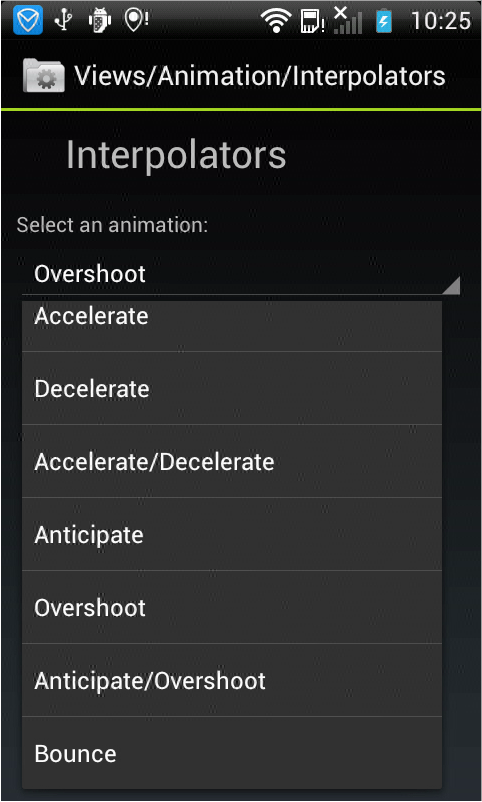
效果如下,文字会根据不同的效果执行动画显示效果:
android中的简单animation(三)accelerate(加速),decelerate(减速),anticipate,overshoot,bounce的更多相关文章
- android中的简单animation(四)3D transition
animation_main_screen.xml: <?xml version="1.0" encoding="utf-8"?> <Fram ...
- android中的简单animation(二)push up,push left,cross fade,hyperspace
animation_2.xml: <?xml version="1.0" encoding="utf-8"?> <LinearLayout x ...
- android中的简单animation(一)shake
1.shake animation_1.xml: <?xml version="1.0" encoding="utf-8"?> <Linear ...
- android中解析文件的三种方式
android中解析文件的三种方式 好久没有动手写点东西了,最近在研究android的相关技术,现在就android中解析文件的三种方式做以下总结.其主要有:SAX(Simple API fo ...
- MVP架构在xamarin android中的简单使用
好几个月没写文章了,使用xamarin android也快接近两年,还有一个月职业生涯就到两个年了,从刚出来啥也不会了,到现在回头看这个项目,真jb操蛋(真辛苦了实施的人了,无数次吐槽怎么这么丑),怪 ...
- Gradle在Android中的简单使用
Gradle在Android中简单的使用 还望支持个人博客站:http://www.enjoytoday.cn Android Studio 使用gradle进行工程构建,为了更好的了解整个andro ...
- URL转Drawable之 Android中获取网络图片的三种方法
转载自: http://doinone.iteye.com/blog/1074283 Android中获取网络图片是一件耗时的操作,如果直接获取有可能会出现应用程序无响应(ANR:Applicatio ...
- Android中xml设置Animation动画效果详解
在 Android 中, Animation 动画效果的实现可以通过两种方式进行实现,一种是 tweened animation 渐变动画,另一种是 frame by frame animation ...
- android中实现简单的聊天功能
这个例子只是简单的实现了单机版的聊天功能,自己跟自己聊,啦啦~~ 主要还是展示RecyclerView控件的使用吧~ 参考我之前写的文章: android中RecyclerView控件的使用 andr ...
随机推荐
- 「快学Docker」Docker简介、安装和Hello World实现
前言 Docker已经成为了一门炙手可热的技术,每个程序员(特别是后端程序员)都应该学习下Docker这门技术. Docker是什么 来自官网的定义:Docker是以Docker容器为资源分割和调度的 ...
- MSSQL2005数据库快照(SNAPSHOT)初探
定义:数据库快照是数据库(称为“源数据库”)的只读静态视图.在创建时,每个数据库快照在事务上都与源数据库一致.多个快照可以位于一个源数据库中,并且可以作为数据库始终驻留在同一服务器实例上.在创建数据库 ...
- win10系统黑屏无法显示桌面解决
适用情况:win10系统 黑屏无法显示出桌面但是程序能正常运行时 解决方法:win+r 调出运行窗口 运行:Explorer.exe
- C++中的可调用对象
在C++中,常常会利用函数来简化程序流程.函数的存在使得C++整体更加“模块化”,因而也使得代码可读性大大提高. 在C++程序中,常常会很灵活地调用函数来实现不同的功能与目的(函数重载.继承多态等等) ...
- 原生JS 和 JQ 获取滚动条的高度,以及距离顶部的高度
JQ:相对比较简便 获取浏览器显示区域(可视区域)的高度 : $(window).height(); 获取浏览器显示区域(可视区域)的宽度 : $(window).width(); 获取页面的文档高度 ...
- Spring MVC原理解析
SpringMVC Spring MVC的工作原理 ①客户端的所有请求都交给前端控制器DispatcherServlet来处理,它会负责调用系统的其他模块来真正处理用户的请求. ② Dispatche ...
- luogu P4014 分配问题
简单的费用流问题,每个人对每个任务连边,每个任务对汇点连,源点对每个人连,最大费用取反即可 #include<bits/stdc++.h> using namespace std; #de ...
- Day1-A-POJ-3295
由题意知,有5种操作,5个未知数,可0可1,一串操作问是否恒为1,最多100个字符,直接栈模拟所有情况即可 代码如下: int p, q, r, s, t; bool calculate(string ...
- js 表格操作----添加删除
js 表格操作----添加删除 书名:<input type="text" id="name"> 价格:<input type="t ...
- 解决新建maven工程没有web.xml的问题
首先确定创建maven工程时选择的打包方式为 war 创建后如图所示没有web.xml文件以及相关文件夹,错误信息:缺少web.xml文件 解决方法: 右击maven项目,找到ProjectFacet ...