
android中的简单animation(四)3D transition
animation_main_screen.xml:
 <?xml version="1.0" encoding="utf-8"?>

 <FrameLayout xmlns:android="http://schemas.android.com/apk/res/android"

     android:id="@+id/container"

     android:layout_width="match_parent"

     android:layout_height="match_parent">

     <ListView

         android:id="@android:id/list"

         android:persistentDrawingCache="animation|scrolling"

         android:layout_width="match_parent"

         android:layout_height="match_parent"

         android:layoutAnimation="@anim/layout_bottom_to_top_slide" />

     <ImageView

         android:id="@+id/picture"

         android:scaleType="fitCenter"

         android:layout_width="match_parent"

         android:layout_height="match_parent"

         android:visibility="gone" />

 </FrameLayout>
layout_bottom_to_top.xml:
 xml version="1.0" encoding="utf-8"?>

 <layoutAnimation xmlns:android="http://schemas.android.com/apk/res/android"

         android:delay="30%"

         android:animationOrder="reverse"

         android:animation="@anim/slide_right" />
slide_right.xml:
 <?xml version="1.0" encoding="utf-8"?>

 <set xmlns:android="http://schemas.android.com/apk/res/android"

     android:interpolator="@android:anim/accelerate_interpolator">

     <translate

         android:fromXDelta="-100%p"

         android:toXDelta="0"

         android:duration="@android:integer/config_shortAnimTime" />

 </set>
Transition3d.java:
 package com.example.android.apis.animation;

 import com.example.android.apis.R;

 import android.app.Activity;

 import android.os.Bundle;

 import android.widget.ListView;

 import android.widget.ArrayAdapter;

 import android.widget.AdapterView;

 import android.widget.ImageView;

 import android.view.View;

 import android.view.ViewGroup;

 import android.view.animation.Animation;

 import android.view.animation.AccelerateInterpolator;

 import android.view.animation.DecelerateInterpolator;

 public class Transition3d extends Activity implements

         AdapterView.OnItemClickListener, View.OnClickListener {

     private ListView mPhotosList;

     private ViewGroup mContainer;

     private ImageView mImageView;

     // Names of the photos we show in the list

     private static final String[] PHOTOS_NAMES = new String[] {

             "Lyon",

             "Livermore",

             "Tahoe Pier",

             "Lake Tahoe",

             "Grand Canyon",

             "Bodie"

     };

     // Resource identifiers for the photos we want to display

     private static final int[] PHOTOS_RESOURCES = new int[] {

             R.drawable.photo1,

             R.drawable.photo2,

             R.drawable.photo3,

             R.drawable.photo4,

             R.drawable.photo5,

             R.drawable.photo6

     };

     @Override

     protected void onCreate(Bundle savedInstanceState) {

         super.onCreate(savedInstanceState);

         setContentView(R.layout.animations_main_screen);

         mPhotosList = (ListView) findViewById(android.R.id.list);

         mImageView = (ImageView) findViewById(R.id.picture);

         mContainer = (ViewGroup) findViewById(R.id.container);

         // Prepare the ListView

         final ArrayAdapter<String> adapter = new ArrayAdapter<String>(this,

                 android.R.layout.simple_list_item_1, PHOTOS_NAMES);

         mPhotosList.setAdapter(adapter);

         mPhotosList.setOnItemClickListener(this);

         // Prepare the ImageView

         mImageView.setClickable(true);

         mImageView.setFocusable(true);

         mImageView.setOnClickListener(this);

         // Since we are caching large views, we want to keep their cache

         // between each animation

         mContainer.setPersistentDrawingCache(ViewGroup.PERSISTENT_ANIMATION_CACHE);

     }

     /**

      * Setup a new 3D rotation on the container view.

      *

      * @param position the item that was clicked to show a picture, or -1 to show the list

      * @param start the start angle at which the rotation must begin

      * @param end the end angle of the rotation

      */

     private void applyRotation(int position, float start, float end) {

         // Find the center of the container

         final float centerX = mContainer.getWidth() / 2.0f;

         final float centerY = mContainer.getHeight() / 2.0f;

         // Create a new 3D rotation with the supplied parameter

         // The animation listener is used to trigger the next animation

         final Rotate3dAnimation rotation =

                 new Rotate3dAnimation(start, end, centerX, centerY, 310.0f, true);

         rotation.setDuration(500);

         rotation.setFillAfter(true);

         rotation.setInterpolator(new AccelerateInterpolator());

         rotation.setAnimationListener(new DisplayNextView(position));

         mContainer.startAnimation(rotation);

     }

     public void onItemClick(AdapterView<?> parent, View v, int position, long id) {

         // Pre-load the image then start the animation

         mImageView.setImageResource(PHOTOS_RESOURCES[position]);

         applyRotation(position, 0, 90);

     }

     public void onClick(View v) {

         applyRotation(-1, 180, 90);

     }

     /**

      * This class listens for the end of the first half of the animation.

      * It then posts a new action that effectively swaps the views when the container

      * is rotated 90 degrees and thus invisible.

      */

     private final class DisplayNextView implements Animation.AnimationListener {

         private final int mPosition;

         private DisplayNextView(int position) {

             mPosition = position;

         }

         public void onAnimationStart(Animation animation) {

         }

         public void onAnimationEnd(Animation animation) {

             mContainer.post(new SwapViews(mPosition));

         }

         public void onAnimationRepeat(Animation animation) {

         }

     }

     /**

      * This class is responsible for swapping the views and start the second

      * half of the animation.

      */

     private final class SwapViews implements Runnable {

         private final int mPosition;

         public SwapViews(int position) {

             mPosition = position;

         }

         public void run() {

             final float centerX = mContainer.getWidth() / 2.0f;

             final float centerY = mContainer.getHeight() / 2.0f;

             Rotate3dAnimation rotation;

             if (mPosition > -1) {

                 mPhotosList.setVisibility(View.GONE);

                 mImageView.setVisibility(View.VISIBLE);

                 mImageView.requestFocus();

                 rotation = new Rotate3dAnimation(90, 180, centerX, centerY, 310.0f, false);

             } else {

                 mImageView.setVisibility(View.GONE);

                 mPhotosList.setVisibility(View.VISIBLE);

                 mPhotosList.requestFocus();

                 rotation = new Rotate3dAnimation(90, 0, centerX, centerY, 310.0f, false);

             }

             rotation.setDuration(500);

             rotation.setFillAfter(true);

             rotation.setInterpolator(new DecelerateInterpolator());

             mContainer.startAnimation(rotation);

         }

     }

 }
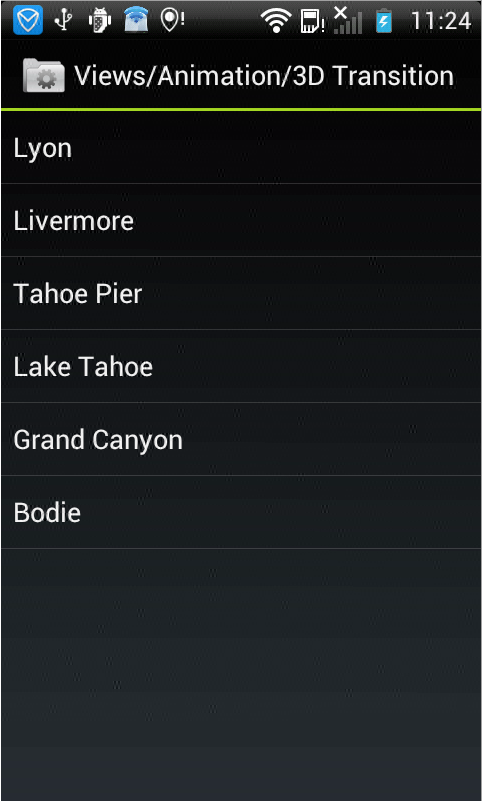
显示效果如下,点击某个选项之后,将会用3D的方式显示图片:

android中的简单animation(四)3D transition的更多相关文章
- android中的简单animation(三)accelerate(加速),decelerate(减速),anticipate,overshoot,bounce
animation_3.xml: <?xml version="1.0" encoding="utf-8"?> <LinearLayout x ...
- android中的简单animation(二)push up,push left,cross fade,hyperspace
animation_2.xml: <?xml version="1.0" encoding="utf-8"?> <LinearLayout x ...
- android中的简单animation(一)shake
1.shake animation_1.xml: <?xml version="1.0" encoding="utf-8"?> <Linear ...
- Android中xml设置Animation动画效果详解
在 Android 中, Animation 动画效果的实现可以通过两种方式进行实现,一种是 tweened animation 渐变动画,另一种是 frame by frame animation ...
- MVP架构在xamarin android中的简单使用
好几个月没写文章了,使用xamarin android也快接近两年,还有一个月职业生涯就到两个年了,从刚出来啥也不会了,到现在回头看这个项目,真jb操蛋(真辛苦了实施的人了,无数次吐槽怎么这么丑),怪 ...
- android中实现简单的聊天功能
这个例子只是简单的实现了单机版的聊天功能,自己跟自己聊,啦啦~~ 主要还是展示RecyclerView控件的使用吧~ 参考我之前写的文章: android中RecyclerView控件的使用 andr ...
- Gradle在Android中的简单使用
Gradle在Android中简单的使用 还望支持个人博客站:http://www.enjoytoday.cn Android Studio 使用gradle进行工程构建,为了更好的了解整个andro ...
- EventBus在Android中的简单使用
EventBus是一个方便与Android中各组件通信的开源框架,开源地址;https://github.com/greenrobot/EventBus.EventBus功能非常强大 ,今天在做一个功 ...
- Android中数据存储(四)——ContentProvider存储数据
目录(?)[+] 当一个应用程序在Android中安装后,我们在使用应用的过程中会产生很多的数据,应用都有自己的数据,那么我们应该如何存储数据呢? 数据存储方式 Android 的数据存储有5种方 ...
随机推荐
- 数字反转(0)<P2011_1>
数字反转 (reverse.cpp/c/pas) [问题描述] 给定一个整数,请将该数各个位上数字反转得到一个新数.新数也应满足整数的常见形 式,即除非给定的原数为零,否则反转后得到的新数的最高位数 ...
- 11 JavaScript Number原始值&对象&科学记数法&范围&进制转换&溢出Infinity&NaN
JavaScript Number对象 是经过封装的能处理数字值的对象 由Number()构造器创建 只有一种数字类型 可以使用也可以不使用小数点书写数字 JavaScript原始值与对象: 在Jav ...
- 块级元素、行内元素、display属性
块级元素 特点: 总是以一个块的形式表现出来,占领一整行.若干同级块元素会从上之下依次排列(使用float属性除外). 可以设置高度.宽度.各个方向的margin以及各个方向的padding. 当宽度 ...
- H.264 中的Annex B格式和AVCC格式
首先要理解的是没有标准的H.264基本流格式.文档中的确包含了一个Annex,特别是描述了一种可能的格式Annex B格式,但是这个并不是一个必须要求的格式.标准文档中指定了视频怎样编码成独立的包,但 ...
- java连接sql server 2008
请先确保已经设置好了sa,如果不是,可以参照下面链接修改http://jingyan.baidu.com/article/8cdccae9452b3c315513cd52.html 然后重启数据库,重 ...
- Python输出三位数以内的水仙花数
num = 100 while num <= 999: a = num % 10 #取个位数 b = num // 10 % 10 #取十位数 c = num // 100 #取百位数 if n ...
- VS2010如何进行程序调试
VS2010如何进行程序调试 一.前言 对于初步学习C++的朋友,程序的调试是一项必备的技能.尤其是像C++这样难学的语言,程序调试的基本方法更是至关重要.毕竟,谁也不想自己幸幸苦苦一天敲出来的代码就 ...
- python如何画三维图像?
python三维图像输出的代码如下所示:#画3D函数图像输出from mpl_toolkits.mplot3d import Axes3Dfrom matplotlib import cmimport ...
- Vue 前后台交互,插件
目录 Vuex 插件 前端存储数据汇总 前后台交互方式(重点) axios 插件 同源策略-跨域问题 前后台分离项目交互流程 异步请求细节 Element-ui 插件 jQ + Bs插件 Django ...
- pip升级报错(权限问题)
今天跟新pip的时候错一个接一个 看到拒绝访问应该是权限的问题,想起安装的时候选择谁可以使用软件(大概是这样的一个选项),选择了“只有我”,选择所有用户应该就不会存在这个问题了,那么怎么解决呢? 敲黑 ...