
android中的简单animation(二)push up,push left,cross fade,hyperspace
animation_2.xml:
 <?xml version="1.0" encoding="utf-8"?>

 <LinearLayout xmlns:android="http://schemas.android.com/apk/res/android"

         android:orientation="vertical"

         android:padding="10dip"

         android:layout_width="match_parent"

         android:layout_height="wrap_content">

     <ViewFlipper android:id="@+id/flipper"

         android:layout_width="match_parent"

         android:layout_height="wrap_content"

         android:flipInterval=""

         android:layout_marginBottom="20dip" >

                 <TextView

                         android:layout_width="match_parent"

                         android:layout_height="wrap_content"

                         android:gravity="center_horizontal"

                         android:textSize="26sp"

                         android:text="@string/animation_2_text_1"/>

                 <TextView

                         android:layout_width="match_parent"

                         android:layout_height="wrap_content"

                         android:gravity="center_horizontal"

                         android:textSize="26sp"

                         android:text="@string/animation_2_text_2"/>

                 <TextView

                         android:layout_width="match_parent"

                         android:layout_height="wrap_content"

                         android:gravity="center_horizontal"

                         android:textSize="26sp"

                         android:text="@string/animation_2_text_3"/>

                 <TextView

                         android:layout_width="match_parent"

                         android:layout_height="wrap_content"

                         android:gravity="center_horizontal"

                         android:textSize="26sp"

                         android:text="@string/animation_2_text_4"/>

     </ViewFlipper>

     <TextView

         android:layout_width="match_parent"

         android:layout_height="wrap_content"

         android:layout_marginBottom="5dip"

         android:text="@string/animation_2_instructions"

     />

     <Spinner android:id="@+id/spinner"

         android:layout_width="match_parent"

         android:layout_height="wrap_content"

     />

 </LinearLayout>
push_up_in.xml(100%p表示相对于父控件100%):
 <?xml version="1.0" encoding="utf-8"?>

 <set xmlns:android="http://schemas.android.com/apk/res/android">

     <translate android:fromYDelta="100%p" android:toYDelta="0" android:duration="300"/>

     <alpha android:fromAlpha="0.0" android:toAlpha="1.0" android:duration="300" />

 </set>
push_up_out.xml:
 <?xml version="1.0" encoding="utf-8"?>

 <set xmlns:android="http://schemas.android.com/apk/res/android">

     <translate android:fromYDelta="0" android:toYDelta="-100%p" android:duration="300"/>

     <alpha android:fromAlpha="1.0" android:toAlpha="0.0" android:duration="300" />

 </set>
push_left_in.xml:
 <?xml version="1.0" encoding="utf-8"?>

 <set xmlns:android="http://schemas.android.com/apk/res/android">

     <translate android:fromXDelta="100%p" android:toXDelta="0" android:duration="300"/>

     <alpha android:fromAlpha="0.0" android:toAlpha="1.0" android:duration="300" />

 </set>
push_left_out.xml:
 <?xml version="1.0" encoding="utf-8"?>

 <set xmlns:android="http://schemas.android.com/apk/res/android">

     <translate android:fromXDelta="0" android:toXDelta="-100%p" android:duration="300"/>

     <alpha android:fromAlpha="1.0" android:toAlpha="0.0" android:duration="300" />

 </set>
Animation2.java:
 package com.example.android.apis.view;

 // Need the following import to get access to the app resources, since this

 // class is in a sub-package.

 import com.example.android.apis.R;

 import android.app.Activity;

 import android.os.Bundle;

 import android.view.View;

 import android.view.animation.AnimationUtils;

 import android.widget.AdapterView;

 import android.widget.ArrayAdapter;

 import android.widget.Spinner;

 import android.widget.ViewFlipper;

 public class Animation2 extends Activity implements

         AdapterView.OnItemSelectedListener {

     @Override

     public void onCreate(Bundle savedInstanceState) {

         super.onCreate(savedInstanceState);

         setContentView(R.layout.animation_2);

         mFlipper = ((ViewFlipper) this.findViewById(R.id.flipper));

         mFlipper.startFlipping();

         Spinner s = (Spinner) findViewById(R.id.spinner);

         ArrayAdapter<String> adapter = new ArrayAdapter<String>(this,

                 android.R.layout.simple_spinner_item, mStrings );

         adapter.setDropDownViewResource(android.R.layout.simple_spinner_dropdown_item);

         s.setAdapter(adapter);

         s.setOnItemSelectedListener(this);

     }

     public void onItemSelected(AdapterView<?> parent, View v, int position, long id) {

         switch (position) {

         case 0:

             mFlipper.setInAnimation(AnimationUtils.loadAnimation(this,

                     R.anim.push_up_in));

             mFlipper.setOutAnimation(AnimationUtils.loadAnimation(this,

                     R.anim.push_up_out));

             break;

         case 1:

             mFlipper.setInAnimation(AnimationUtils.loadAnimation(this,

                     R.anim.push_left_in));

             mFlipper.setOutAnimation(AnimationUtils.loadAnimation(this,

                     R.anim.push_left_out));

             break;

         case 2:

             mFlipper.setInAnimation(AnimationUtils.loadAnimation(this,

                     android.R.anim.fade_in));

             mFlipper.setOutAnimation(AnimationUtils.loadAnimation(this,

                     android.R.anim.fade_out));

             break;

         default:

             mFlipper.setInAnimation(AnimationUtils.loadAnimation(this,

                     R.anim.hyperspace_in));                              //hyperspace多维空间

             mFlipper.setOutAnimation(AnimationUtils.loadAnimation(this,

                     R.anim.hyperspace_out));

             break;

         }

     }

     public void onNothingSelected(AdapterView<?> parent) {

     }

     private String[] mStrings = {

             "Push up", "Push left", "Cross fade", "Hyperspace"};

     private ViewFlipper mFlipper;

 }
显示效果如下,选择不同的显示方式,文字将会按照显示方式作不同的显示:
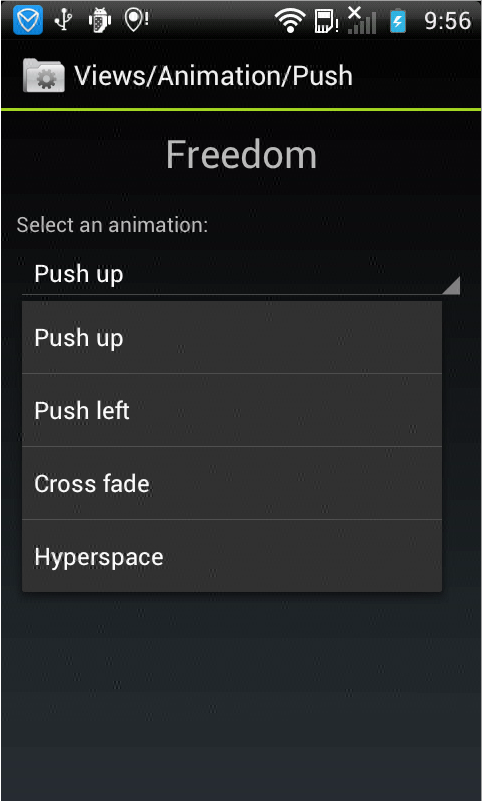
android中的简单animation(二)push up,push left,cross fade,hyperspace的更多相关文章
- android中的简单animation(四)3D transition
animation_main_screen.xml: <?xml version="1.0" encoding="utf-8"?> <Fram ...
- android中的简单animation(三)accelerate(加速),decelerate(减速),anticipate,overshoot,bounce
animation_3.xml: <?xml version="1.0" encoding="utf-8"?> <LinearLayout x ...
- android中的简单animation(一)shake
1.shake animation_1.xml: <?xml version="1.0" encoding="utf-8"?> <Linear ...
- Android中xml设置Animation动画效果详解
在 Android 中, Animation 动画效果的实现可以通过两种方式进行实现,一种是 tweened animation 渐变动画,另一种是 frame by frame animation ...
- MVP架构在xamarin android中的简单使用
好几个月没写文章了,使用xamarin android也快接近两年,还有一个月职业生涯就到两个年了,从刚出来啥也不会了,到现在回头看这个项目,真jb操蛋(真辛苦了实施的人了,无数次吐槽怎么这么丑),怪 ...
- android中实现简单的聊天功能
这个例子只是简单的实现了单机版的聊天功能,自己跟自己聊,啦啦~~ 主要还是展示RecyclerView控件的使用吧~ 参考我之前写的文章: android中RecyclerView控件的使用 andr ...
- Gradle在Android中的简单使用
Gradle在Android中简单的使用 还望支持个人博客站:http://www.enjoytoday.cn Android Studio 使用gradle进行工程构建,为了更好的了解整个andro ...
- EventBus在Android中的简单使用
EventBus是一个方便与Android中各组件通信的开源框架,开源地址;https://github.com/greenrobot/EventBus.EventBus功能非常强大 ,今天在做一个功 ...
- Android中Intent具体解释(二)之使用Intent广播事件及Broadcast Receiver简单介绍
通过第一篇的解说,我们已经看到了怎样使用Intent来启动新的应用程序组件,可是实际上他们也能够使用sendBroadcast方法来在组件间匿名的广播消息. 作为一个系统级别的消息传递机制,Inten ...
随机推荐
- 设计模式01 创建型模式 - 建造者模式(Build Pattern)
参考 1. Builder Design Pattern | Youtube 2. 建造者模式(Builder和Director)| 博客园 3. 深入理解Builder模式 | 简书 建造者模式(B ...
- Spring中解决循环依赖报错的问题
什么是循环依赖 当一个ClassA依赖于ClassB,然后ClassB又反过来依赖ClassA,这就形成了一个循环依赖: ClassA -> ClassB -> ClassA 原创声明 本 ...
- 笔记-爬虫部署及运行工具-scrapydweb
笔记-爬虫部署及运行工具-scrapydweb 1. 简介 scrapyd是爬虫部署工具,但它的ui比较简单,使用不是很方便. scrapydweb以scrapyd为基础,增加了ui界面和监 ...
- Struts2学习(四)
struts-defualt.xml指定的result的类型 1.struts-defualt.xml 文件的 181 行 开始定义了: <result-types> <result ...
- Nmap 使用
0×01 前言 因为今天的重点并非nmap本身的使用,主要还是想借这次机会给大家介绍一些在实战中相对比较实用的nmap脚本,所以关于nmap自身的一些基础选项就不多说了,详情可参考博客端口渗透相关文章 ...
- spring boot 是如何启动 tomcat
Spring boot 的启动类启动后,tomcat 容器.Spring mvc .spring 事务等等第三方依赖也已经自动启动,那么spring boot 是如何启动的第三方依赖? 以spring ...
- 第4课.编写通用的Makefile
1.框架 1. 顶层目录的Makefile 2. 顶层目录的Makefile.build 3. 各级子目录的Makefile 2.概述 1.各级子目录的Makefile: 它最简单,形式如下: obj ...
- 学习笔记(3)- BioASQ
本次目的是验证BioBERT在QA的效果. A challenge on large-scale biomedical semantic indexing and question answering ...
- input文本框自适应文本内容宽度
input文本框自适应文本内容宽度 <!DOCTYPE html> <html> <head> <meta charset="utf-8" ...
- 第1节 Scala基础语法:3、环境;4、插件
1. Scala编译器安装 1.1. 安装JDK 因为Scala是运行在JVM平台上的,所以安装Scala之前要安装JDK. 1.2. 安装Scala 1.2.1. Windows ...