
Salesforce LWC学习(十四) Continuation进行异步callout获取数据
本篇参考:
https://developer.salesforce.com/docs/component-library/documentation/en/lwc/lwc.apex_continuations
我们在项目中经常遇到会和后台apex进行交互通过SOQL/SOSL去获取数据展示在前台。当然,有些场景下数据是存储在外部系统,需要apex进行callout操作去获取数据展示前端。lwc针对callout操作可以简单的分成几步走,我们这里以
一. Enable Remote Site
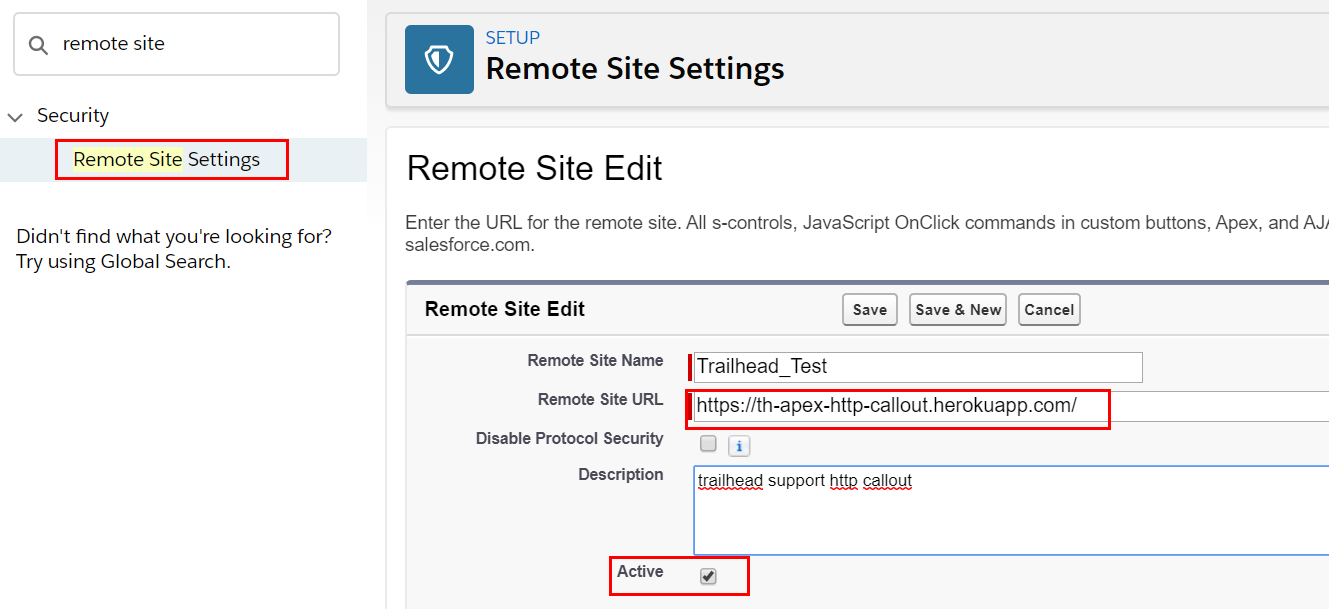
针对外部系统的交互,我们第一步就是要先在salesforce系统中配置Remote Site,才可以访问,否则会报错。我们以https://th-apex-http-callout.herokuapp.com/这个trailhead提供的callout URL作为 remote site 的配置,这个URL返回的值为: {"trailhead":"is awesome."}
二. 前后台构建
我们以前做callout通常通过HttpRequest,然后将设置对应的header, url , body等以后然后Http.sendRequest即可实现外部系统callout交互。在lwc中,我们需要使用 Continuation这个salesforce提供的类进行交互,具体使用和文档可以查看最上方的链接。我们在lwc和apex交互需要设置 @AuraEnabled=true,这个同样需要,在这个基础上,需要设置continuation=true,如果请求数据是固定的,可以也设置cacheable=true从而增加效率,都声明情况下写法如下
@AuraEnabled(continuation=true cacheable=true)
除了这里的小变动,另外的改变就是不用Http.sendRequest方式来构建,而是使用 Continuation方式来构建。Continuation构造函数只有一个参数,用来设置time out时间,以秒为单位。他有几个参数,continuationMethod用来设置访问以后对应的回调函数。timeout用来设置超时时间,最多120秒。state设置用来当callout操作完成并且callback方法执行完成以后的状态值。我们可以用这个状态值来确定当前的callout操作是否执行完成。Continuation有三个常用的方法:
addHttpRequest/getRequests()/getResponse()这三个方法的详情描述自行查看上方的API文档。
ContinuationDemoController类描述如下:声明startRequest方法用来callout指定的service URL,然后将response放在callback函数中进行返回。
public with sharing class ContinuationDemoController {

    // Callout endpoint as a named credential URL

    // or, as shown here, as the long-running service URL

    private static final String LONG_RUNNING_SERVICE_URL =

        'https://th-apex-http-callout.herokuapp.com/';

    // Action method

    @AuraEnabled(continuation=true cacheable=true)

    public static Object startRequest() {

      // Create continuation. Argument is timeout in seconds.

      Continuation con = new Continuation(40);

      // Set callback method

      con.continuationMethod='processResponse';

      // Set state

      con.state='Hello, World!';

      // Create callout request

      HttpRequest req = new HttpRequest();

      req.setMethod('GET');

      req.setEndpoint(LONG_RUNNING_SERVICE_URL);

      // Add callout request to continuation

      con.addHttpRequest(req);

      // Return the continuation

      return con;

    }

    // Callback method

    @AuraEnabled(cacheable=true)

    public static Object processResponse(List<String> labels, Object state) {

      // Get the response by using the unique label

      HttpResponse response = Continuation.getResponse(labels[0]);

      // Set the result variable

      String result = response.getBody();

      return result;

    }

}
continuationCmp.html:用来展示从远程服务器端的内容
<template>

    <div>

        service content: {formattedWireResult}

    </div>

</template>
continuationCmp.js:写法上和访问apex class方法没有任何不同
import { LightningElement,wire } from 'lwc';

import startRequest from '@salesforce/apexContinuation/ContinuationDemoController.startRequest';

export default class ContinuationComponent extends LightningElement {

    // Using wire service

    @wire(startRequest)

    wiredContinuation;

    get formattedWireResult() {

        return JSON.stringify(this.wiredContinuation);

    }

}
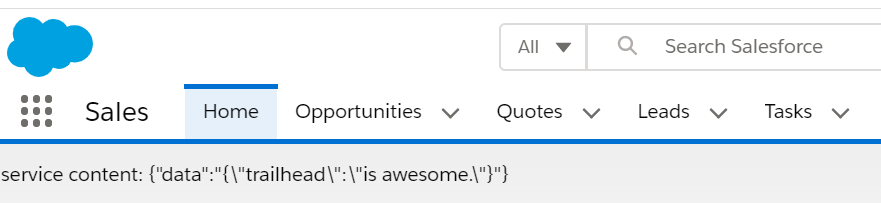
结果:将远程服务器内容转换成JSON字符串
总结:篇中只是简单介绍了Continuation的介绍,还有很多的细节的操作和限制没有在本篇中说出,比如Continuation和DML操作前后关系等限制,相关的limitation等等。篇中有错误的地方欢迎指出,有不懂欢迎留言。
Salesforce LWC学习(十四) Continuation进行异步callout获取数据的更多相关文章
- Salesforce LWC学习(十五) Async 以及 Picklist 公用方法的实现
本篇参考:salesforce 零基础学习(六十二)获取sObject中类型为Picklist的field values(含record type) https://developer.salesfo ...
- Salesforce LWC学习(十六) Validity 在form中的使用浅谈
本篇参考: https://developer.salesforce.com/docs/component-library/bundle/lightning-input/documentation h ...
- Salesforce LWC学习(五) LDS & Wire Service 实现和后台数据交互 & meta xml配置
之前的几节都是基于前台变量进行相关的操作和学习,我们在项目中不可避免的需要获取数据以及进行DML操作.之前的内容中也有提到wire注解,今天就详细的介绍一下对数据进行查询以及DML操作以及Wire S ...
- Salesforce LWC学习(十) 前端处理之 list 处理
本篇参看:https://developer.mozilla.org/zh-CN/docs/Web/JavaScript/Reference/Global_Objects/Array list是我们经 ...
- Salesforce LWC学习(十八) datatable展示 image
本篇参看: https://developer.salesforce.com/docs/component-library/bundle/lightning-datatable/documentati ...
- Salesforce LWC学习(十九) 针对 lightning-input-field的label值重写
本篇参考: https://salesforcediaries.com/2020/02/24/how-to-override-lightning-input-field-label-in-lightn ...
- Salesforce LWC学习(三十) lwc superbadge项目实现
本篇参考:https://trailhead.salesforce.com/content/learn/superbadges/superbadge_lwc_specialist 我们做lwc的学习时 ...
- Salesforce LWC学习(四十) dynamic interaction 浅入浅出
本篇参考: Configure a Component for Dynamic Interactions in the Lightning App Builder - Salesforce Light ...
- Salesforce LWC学习(三十九) lwc下quick action的recordId的问题和解决方案
本篇参考: https://developer.salesforce.com/docs/component-library/bundle/force:hasRecordId/documentation ...
随机推荐
- 【深入理解Java虚拟机 】类加载器的命名空间以及类的卸载
类加载器的命名空间 每个类加载器又有一个命名空间,由其以及其父加载器组成 类加载器的命名空间的作用和影响 每个类加载器又有一个命名空间,由其以及其父加载器组成 在每个类加载器自己的命名空间中不能出现相 ...
- 达拉草201771010105《面向对象程序设计(java)》第十八周学习总结
达拉草201771010105<面向对象程序设计(java)>第十八周学习总结 实验十八 总复习 实验时间 2018-12-30 1.实验目的与要求 (1) 综合掌握java基本程序结构 ...
- 攻防世界Mobile5 EasyJNI 安卓逆向CTF
EasyJNI 最近正好在出写JNI,正好看到了一道JNI相关的较为简单明了的CTF,就一时兴起的写了,不得不说逆向工程和正向开发确实是可以互补互相加深的 JNI JNI(Java Native In ...
- 查询mysql版本号
mysql> select version(); +------------+| version() |+------------+| 5.7.23-log |+------------+1 r ...
- 7-3 jmu-python-回文数判断(5位数字) (10 分)
本题目要求输入一个5位自然数n,如果n的各位数字反向排列所得的自然数与n相等,则输出‘yes’,否则输出‘no’. 输入格式: 13531 输出格式: yes 输入样例1: 13531 输出样例1: ...
- py基础之无序列表
'''dic是一个可以将两个相关变量关联起来的集合,格式是dd={key1:value1,key2:value2,key3:value3}'''d = { 'adam':95, 'lisa':85, ...
- jdbc对 数据库的数据进行增删改(两个类)
1.方法类 package com.com; import java.sql.Connection;import java.sql.DriverManager;import java.sql.Resu ...
- 从零认识 DOM (一): 对象及继承关系
先上图为敬! 说明: 图中包括了大部分 DOM 接口及对象, 其中: 青色背景为接口, 蓝色背景为类, 灰色背景表示为 ECMAScript 中的对象 忽略了一部分对象, 包括: HTML/SVG 的 ...
- Apache Druid 的集群设计与工作流程
导读:本文将描述 Apache Druid 的基本集群架构,说明架构中各进程的作用.并从数据写入和数据查询两个角度来说明 Druid 架构的工作流程. 关注公众号 MageByte,设置星标点「在看」 ...
- 开源字体不香吗?五款 GitHub 上的爆红字体任君选
作者:HelloGitHub-ChungZH 在编程时,用一个你喜欢的字体可以大大提高效率,越看越舒服.这篇文章就推荐 5 个在 GitHub 上优秀的字体供大家选择吧! 1. Iosevka 网站: ...