
Salesforce LWC学习(十九) 针对 lightning-input-field的label值重写
本篇参考:
https://developer.salesforce.com/docs/component-library/bundle/lightning-input-field/documentation
https://www.lightningdesignsystem.com/components/input/
在https://www.cnblogs.com/zero-zyq/p/11380449.html 篇中,我们了解了 LDS的使用,其中让我们用起来很爽的莫过于使用lightning-input-field。
我们在Account表中创建两个字段,分别为User_For_LookUp__c关联到User表以及Contact_For_Lookup__c用来关联到Contact表。
eventCreate.html:用于关联需要创建Event的几个字段,因为Event不能使用 lightning-record-edit-form,所以将 暂时绑定 到Account,OwnerId使用 User_For_LookUp__c借壳绑定,WhoId使用Contact_For_Lookup__c绑定。
<template>

    <lightning-card>

        <lightning-record-edit-form

            object-api-name='Account'

            onsubmit={saveEvent}

        >

            <lightning-layout multiple-rows="true">

                <lightning-layout-item size="6" padding="around-small" flexibility='auto'>

                    <lightning-input type="text" label="Subject" name="subject" value={eventWrapper.subject} onchange={handleInputChange}></lightning-input>

                </lightning-layout-item>

                <lightning-layout-item size="6" padding="around-small" flexibility='auto'>

                </lightning-layout-item>

                <lightning-layout-item padding="around-small" flexibility='auto' size='6'>

                    <lightning-input label="Start Date" type="datetime" name="startDateTime" value={eventWrapper.startDateTime} date-style="long" required onchange={handleInputChange}></lightning-input>

                </lightning-layout-item>

                <lightning-layout-item padding="around-small" flexibility='auto' size='6'>

                    <lightning-input label="End Date" type="datetime" name="endDateTime" value={eventWrapper.endDateTime} date-style="long" required onchange={handleInputChange}></lightning-input>

                </lightning-layout-item>

                <lightning-layout-item size="6" padding="around-small" flexibility='auto'>

                    <lightning-input-field

                        field-name="User_For_LookUp__c"

                        variant="label-stacked"

                    ></lightning-input-field>

                </lightning-layout-item>

                <lightning-layout-item size="6" padding="around-small" flexibility='auto'>

                    <lightning-input-field

                        field-name="Contact_For_Lookup__c"

                        variant="label-stacked"

                    ></lightning-input-field>

                </lightning-layout-item>

            </lightning-layout>

            <lightning-layout>

                <lightning-layout-item>

                    <lightning-button-group>

                        <lightning-button type="submit" label="Submit"></lightning-button>

                        <lightning-button label="cancel"></lightning-button>

                    </lightning-button-group>

                </lightning-layout-item>

            </lightning-layout>

        </lightning-record-edit-form>

    </lightning-card>

</template>
eventCreate.js:当 saveEvent方法时,先组织默认提交,通过event.detail.fields可以获取到 record-edit-form中的所有的 lightning-input-field的绑定值内容,在给自定义的wrapper字段赋值传递到后台即可。
import { LightningElement,track } from 'lwc';

export default class EventCreate extends LightningElement {

    @track eventWrapper = {

        subject : '',

        whoId : '',

        ownerId : '',

        startDateTime : '',

        endDateTime : ''

    };

    handleInputChange(event) {

        let eventSourceName = event.target.name;

        if(eventSourceName === 'subject') {

            this.eventWrapper.subject = event.target.value;

        } else if(eventSourceName === 'startDateTime') {

            this.eventWrapper.startDateTime = event.target.value;

        } else if(eventSourceName === 'endDateTime') {

            this.eventWrapper.endDateTime = event.target.value;

        }

    }

    saveEvent(event) {

        event.preventDefault();

        const allFields = event.detail.fields;

        this.eventWrapper.whoId = allFields.User_For_LookUp__c;

        this.eventWrapper.ownerId = allFields.Contact_For_Lookup__c;

        console.log(JSON.stringify(this.eventWrapper));

    }

}
效果展示:当我们录入完基本信息点击 submit按钮以后,console栏展示了返回的内容。
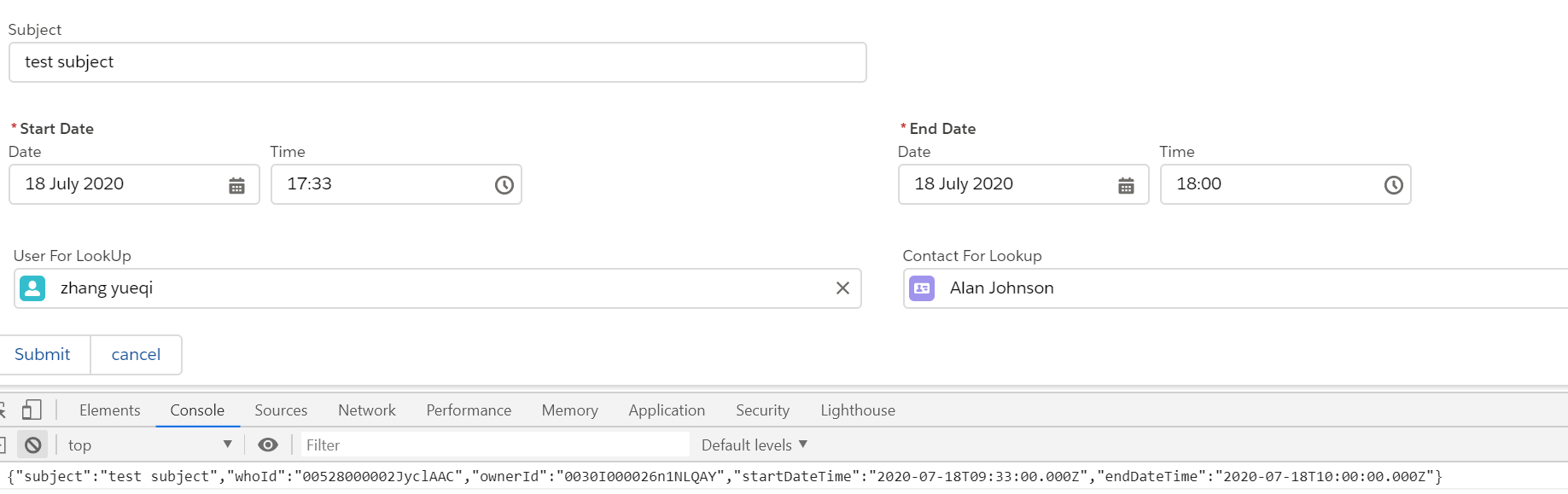
上面我们使用的variant是label-stacked,可以看到User_For_LookUp__c字段展示的 label是 User For LookUp,但是我们想要展示他的值是 Owner Id,然而lightning-input-field中没有任何属性可以更改其label值,应该如何操作呢?这个时候可以看前辈们提供的方法了,原操作可以查看片头链接。
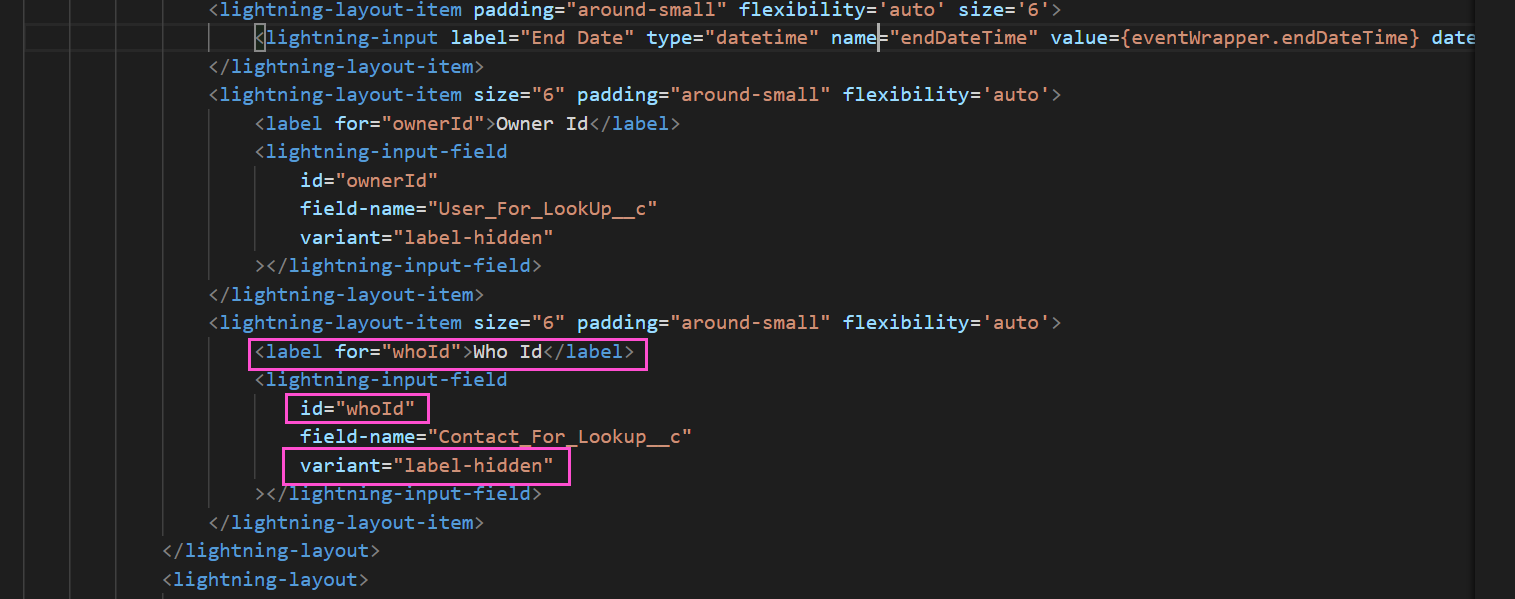
秘密就在variant中,lwc针对此组件存在一个variant为label-hidden,即不展示 label信息,我们只需要隐藏这个字段的label值,然后通过lightning design system中的提供方式重新布局展示想要的label信息即可,优化后代码如下:
修改之后的展示效果:

总结:篇中主要描述如何对 lightning-input-field的label值进行修改,允许修改以后可以极大程度上保证了字段的复用性和可扩展性。篇中有错误地方欢迎指出,有不懂欢迎留言。
Salesforce LWC学习(十九) 针对 lightning-input-field的label值重写的更多相关文章
- Salesforce LWC学习(十) 前端处理之 list 处理
本篇参看:https://developer.mozilla.org/zh-CN/docs/Web/JavaScript/Reference/Global_Objects/Array list是我们经 ...
- Salesforce LWC学习(十五) Async 以及 Picklist 公用方法的实现
本篇参考:salesforce 零基础学习(六十二)获取sObject中类型为Picklist的field values(含record type) https://developer.salesfo ...
- Salesforce LWC学习(十六) Validity 在form中的使用浅谈
本篇参考: https://developer.salesforce.com/docs/component-library/bundle/lightning-input/documentation h ...
- Salesforce LWC学习(十八) datatable展示 image
本篇参看: https://developer.salesforce.com/docs/component-library/bundle/lightning-datatable/documentati ...
- Salesforce LWC学习(十四) Continuation进行异步callout获取数据
本篇参考: https://developer.salesforce.com/docs/component-library/documentation/en/lwc/lwc.apex_continua ...
- Salesforce LWC学习(三十九) lwc下quick action的recordId的问题和解决方案
本篇参考: https://developer.salesforce.com/docs/component-library/bundle/force:hasRecordId/documentation ...
- Salesforce LWC学习(四十) dynamic interaction 浅入浅出
本篇参考: Configure a Component for Dynamic Interactions in the Lightning App Builder - Salesforce Light ...
- Salesforce LWC学习(三十) lwc superbadge项目实现
本篇参考:https://trailhead.salesforce.com/content/learn/superbadges/superbadge_lwc_specialist 我们做lwc的学习时 ...
- Salesforce LWC学习(十七) 前端知识之 onclick & onblur & onmousedown
在Salesforce LWC学习(八) Look Up组件实现篇中,我们实现了公用的lookup组件,使用的过程中,会发现当我们输入内容以后,搜索出来的列表便无法被清空. 针对此种情况我们打算优化一 ...
随机推荐
- javaScript深入浅出之理解闭包
javaScript深入浅出之理解闭包 引言 闭包是个老生长谈的话题了,对于闭包网上也有很多不同的看法 <你不知道的javaScript>对于闭包是这么定义的:函数创建和函数执行不在同一个 ...
- css样式学习笔记
视频参见php中文网玉女心经视频教程 讲解的相当的清楚和明白 第1章 :css快速入门 1.1 什么是css 改变html框架的样式. 1.2 css的三种引入形式 第一种形式 ...
- DNS篇(详解DNS)
*文章来源:https://blog.egsec.cn/archives/601 *本文将主要说明:本文主要叙述什么是DNS.域名的层级.DNS 解析过程.DNS的缓存时间.DNS 的记录类型.DNS ...
- 查看日志文件常用命令:tail,cat,tac,head,echo
linux查看日志文件内容命令tail.cat.tac.head.echo tail -f test.log你会看到屏幕不断有内容被打印出来. 这时候中断第一个进程Ctrl-C, ---------- ...
- Illegal reflective access by org.apache.hadoop.security.authentication.util.KerberosUtil
在使用Java API操作HBase时抛出如下异常: Illegal reflective access by org.apache.hadoop.security.authentication.ut ...
- python R语言 入门常见指令
环境是windows R语言安装包 install.packages("magrittr")
- nginx 注释配置及详解
前言 DMZ(Demilitarized Zone) 非军事区,生产环境 WEB 服务部署的区域,公司的架构为一台nginx 充当 load balance 服务,负载到两台 nginx 上面,反向代 ...
- 问题 C: 最短路径
问题 C: 最短路径 在洛谷上刷最短路的题然后被老师拉回去做算法笔记上面的题... 拿到这道题,先确定所有路径唯一,然后是无向边,那么对于边权处理,直接赋值为2的k次方就可以了,然后直接跑最短路. 这 ...
- P3879 阅读理解
都这么大了,you这些怎么能算生词呢,难道三年级以前就有人做蓝题了吗(是我不配) 我觉得这道题出难一点点的话,可以整行读入什么的(口嗨怪).先看题目,对于每个生词,输出他出现在了哪些文章(需要排序). ...
- 洛谷 P1347 【排序】
这篇题解没有用拓补排序 (嗐 菜就直说) 个人感觉这道题拓补排序没有变种\(Floyd\)好写吧,思维难度也低一点(亲眼目睹机房dalao这道题拓补排序调了很久). 吐槽结束,开始正题~ 对于这道题为 ...