
Selenium WebDriver 处理table
首先,html table是由 table 元素以及一个或多个 tr、th 或 td 元素组成。
for example:
这是一个简单的html table:

源码如下:
<html>

<head>

<meta http-equiv="Content-Language" content="zh-cn">

<meta http-equiv="Content-Type" content="text/html; charset=gb2312">

<title>for selenium test </title>

</script>

</head>

<body>

<div align="center">

    <h4 align="left">               table head:</h4>

    <table border="2" width="90%" id="table138" bordercolorlight="#CCCCCC" cellspacing="0" cellpadding="0" bordercolordark="#CCCCCC" style="border-collapse: collapse">

    <tr align="center">

        <td height="26" width="10%" align="center" bgcolor="#CCEEAA" ><Strong>Test Case ID</Strong></td>

        <td  height="26" width="35%" align="center" bgcolor="#EEEEAA" ><Strong>Steps</Strong></td>

        <td  height="26" width="30%" align="center" bgcolor="#00EEEE" ><Strong>Expect</Strong></td>

        <td  height="26" align="center" bgcolor="#EE00EE" ><Strong>Actual</Strong></td>

        <td  height="26" align="center" bgcolor="#00EE00" ><Strong>PASS/FAIL</Strong></td>

    </tr>

    <tr align="center">

        <td height="26" align="center" bgcolor="#CCEEAA">ENT#-12345</td>

        <td  height="26" align="left" bgcolor="#EEEEAA" >1.open baidu.com ,wait for the page load</br>2.enter "selenium" in the input box" </br>3.click search button  </td>

        <td  height="26" align="left" bgcolor="#00EEEE" >"Selenium - Web Browser Automation" link be the first of the search result</td>

        <td  height="26" align="left" bgcolor="#EE00EE" >Selenium - Web Browser Automation is appear the page,but is not the first link</td>

        <td  height="26" align="center" bgcolor="#00EE00" >FAIL</td>

    </tr>

    </tr>

    <tr align="center">

        <td height="26" align="center" bgcolor="#CCEEAA">ENT#-12346</td>

        <td  height="26" align="left" bgcolor="#EEEEAA" >1.click the "Selenium - Web Browser Automation" link</br>2.wait for page load</td>

        <td  height="26" align="left" bgcolor="#00EEEE" >open the official home page of selenium</td>

        <td  height="26" align="left" bgcolor="#EE00EE" >selenium home page is load </td>

        <td  height="26" align="center" bgcolor="#00EE00" >FAIl</td>

    </tr>

    </tr>

    <tr align="center">

        <td height="26" align="center" bgcolor="#CCEEAA">ENT#-12347</td>

        <td  height="26" align="left" bgcolor="#EEEEAA" >1.click baidu snapshot of selenium web page </br>2. wait for the page load</td>

        <td  height="26" align="left" bgcolor="#00EEEE" >the snapshot web page can be show up</td>

        <td  height="26" align="left" bgcolor="#EE00EE" >the snapshot web page is show up</td>

        <td  height="26" align="center" bgcolor="#00EE00" >PASS</td>

    </tr>

    </table>

    </div>

</body>

</html>
那么问题就来了,我想通过xpath获取这个table的每一个cell的值(比如获取expect的值),该怎么做。
如果这个表格被改变了,增加或删除一些行列该如何处理?
我的solution是获取table的base xpath,这个所谓的base xpath是指这个table的第n行第m列相同的部分,然后通过传入n,m获取返回值
    public static String tableCell(WebDriver driver,int row, int column)

    {

        String text = null;

        //avoid get the head line of the table

        row=row+1;

        String xpath="//*[@id='table138']/tbody/tr["+row+"]/td["+column+"]";

        WebElement table=driver.findElement(By.xpath(xpath)); //*[@id="table138"]/tbody/tr[1]/td[1]/strong

        text=table.getText();

        return text;

    }
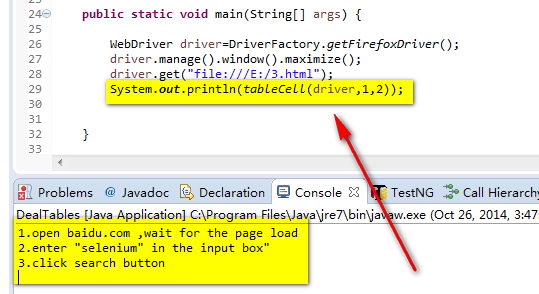
所以,tableCell(driver,1,2)就能返回
Selenium WebDriver 处理table的更多相关文章
- Selenium Webdriver——处理Table
html table是由 table 元素以及一个或多个 tr.th 或 td 元素组成.如下: HTML源码如下: <html> <head> <meta http-e ...
- Selenium Webdriver——Table类封装
WebTable.java import java.util.List; import org.openqa.selenium.By; import org.openqa.selenium.WebEl ...
- selenium webdriver 右键另存为下载文件(结合robot and autoIt)
首先感谢Lakshay Sharma 大神的指导 最近一直在研究selenium webdriver右键菜单,发现selenium webdriver 无法操作浏览器右键菜单,如图 如果我想右键另存为 ...
- Selenium_用selenium webdriver实现selenium RC中的类似的方法
最近想总结一下学习selenium webdriver的情况,于是就想用selenium webdriver里面的方法来实现selenium RC中操作的一些方法.目前封装了一个ActionDrive ...
- WebDriver获取table的内容(通过动态获取Table单元格的TagName对其innerHTML值进行获取)
import java.util.ArrayList;import java.util.Iterator;import java.util.LinkedHashMap;import java.util ...
- selenium webdriver (python)的基本用法一
阅在线 AIP 文档:http://selenium.googlecode.com/git/docs/api/py/index.html目录一.selenium+python 环境搭建........ ...
- Selenium Webdriver 自动化测试开发常见问题(C#版)
转一篇文章,有修改,出处http://www.7dtest.com/site/blog-2880-203.html 1:Selenium中对浏览器的操作 首先生成一个Web对象 IWebDriver ...
- Selenium WebDriver Api 知识梳理
之前一直没有系统的梳理WebDriver Api的相关知识,今天借此机会整理一下. 1.页面元素定位 1.1.8种常用定位方法 # id定位 driver.find_element_by_id() # ...
- Selenium Webdriver概述(转)
Selenium Webdriver https://www.yiibai.com/selenium/selenium_overview.html# webdriver自动化俗称Selenium 2. ...
随机推荐
- webservice报错Message part refundRequest was not recognized. (Does it exist in service WSDL?)
最近在做一个支付的接口. 因为接口方使用webservice交互. 我只能去学习了下webservice 现在出了一个很古怪的问题~ 我在请求他们url的时候, 返回给我找不到控制名错误 Mess ...
- VMnet1和V8
vmware默认使用了两个虚拟网卡: vmnet1 v1 vmnet8 v8 vmnet1是host-only,也就是说,选择用vmnet1的话就相当于VMware给你提供了一个虚拟交换机,仅将虚拟机 ...
- 2015年12月01日 GitHub入门学习(一)GitHub简介
序:Github理念是Social Coding(社会化编程).octocat是它的吉祥物. 一.Github与Git的区别与联系 区别:GIT是仓库,Github是提供一种将代码提交到Git仓库的服 ...
- spring缓存Ehcache(入门2)源码解读
Ehcache缓存: 解读: Ehcache缓存是在继承spring缓存核心类CacheManager的基础上实现的. 常用类: EhCacheCacheManager:继承自CacheManager ...
- 只会CSS还不够,LESS、SASS、BootStrap、Foundation一网打尽!
有些人想学CSS,不知如何下手:有些人已经学会CSS的各种属性,却不知如何运用:有些人会平面设计,不知道如何与网页设计结合:有些人会HTML,就是学不会CSS.试问自己,图中的技术你都会了吗? 别总是 ...
- mongoDB- - 2 增、删、改 操作
1.创建数据库 语法:use database 说明:如果database不存在,就会创建database:如果存在就会切换到database 2.查看所有数据库 语法:show dbs; 说明:如果 ...
- php正则
PHP代码 $str = preg_replace("/(<a.*?>)(.*?)(<\/a>)/", '\1<span class="li ...
- ASP.NET、C#调用外部可执行exe文件--多种方案
一. try { //方法一 //调用自己的exe传递参数 //Process proc = new Process(); //proc.StartInfo.FileName = @"D:\ ...
- Laravel5.1-错误和日志
简介 这一章也是属于文档写得比较混乱的一章,所以我决定重新组织一下内容结构: 配置 debug配置 我们都知道,开发环境应该把debug打开,生产环境应该把debug关闭:这个设置在config/ap ...
- Ubuntu 虚拟机空间不足增加空间笔记
一开始给虚拟机加空间以为只是需要在虚拟机设置里面添加就行,后面发现还得重新在虚拟机内部增加. 链接: http://pan.baidu.com/s/1c2uVcCo 密码: xid8 这只是第一步,共 ...