
Selenium Webdriver概述(转)
Selenium Webdriver
https://www.yiibai.com/selenium/selenium_overview.html#
webdriver自动化俗称Selenium 2.0测试Web应用程序工具。 webdriver使用不同的底层框架,Selenium 遥控器使用JavaScript的Selenium 核嵌入式已经在有一定的局限性的浏览器中。 webdriver直接交互而不与Selenium 远程控制,依赖于服务器上的任何中介的浏览器。它是用在以下方面:
在Selenium开发者社区努力下,不断提高Selenium webdriver与Selenium的整合。
MULT浏览器测试,包括对不能很好地支持Selenium的远程控制浏览器改进的功能(硒1.0)
处理多个帧,多个浏览器窗口,弹出窗口和警报。
复杂的页面导航。
高级用户导航,如拖动和拖放。
基于AJAX的UI元素
体系结构
webdriver最好用一个简单的架构图,说明,如下图所示。
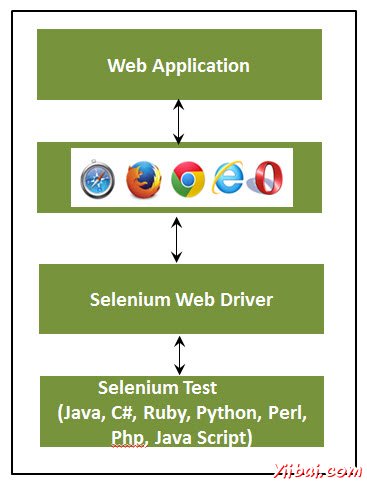
Selenium RC VS webdriver
| Selenium RC | Selenium WebDriver |
|---|---|
| Selenium RC的结构复杂,因为服务器需要启动在开始试运行前。 | webdriver架构比Selenium RC简单,因为它控制着从操作系统层面的浏览器。 |
| Selenium服务器充当浏览器和Selenese的命令之间的中间人 | webdriver直接相互作用,以在浏览器和使用浏览器的引擎进行控制。 |
| Selenium RC的脚本执行速度较慢,因为它使用了Javascript来与RC互动 | webdriver的速度更快,因为它直接交互使用的浏览器。 |
| Selenium RC不能支持无头,因为它需要一个真正的浏览器一起工作。 | webdriver可以支持无头执行 |
| 它是一个简单的API | 复杂,API相比,RC有点大 |
| 减面向对象的API | 纯粹的面向对象的API |
| 不能测试移动应用程序 | 可测试iPhone/Android应用程序 |
使用webdriver脚本
让我们了解webdriver如何工作。为了演示目的,我们将使用http://www.calculator.net/。我们将执行“百分比计算器”,这是位于“数学计算器”。我们已经下载了所需要webdriver的JAR。请参阅环境设置一章。
第1步:从提取Eclipse文件夹中启动“Eclipse”。

第2步:点击“Browse”按钮选择工作区。

第3步:现在,创建“New Project”,从“File”菜单。

第4步:输入项目名称,然后单击“Next”。

第五步:进入Libraries选项卡,并选中所有的JAR包文件,我们已经下载(请参阅环境搭建章)。添加引用Selenium webdriver的库文件夹中的所有JAR,selenium-java-2.42.2.jar和selenium-java-2.42.2-srcs.jar

第6步:如下图所示创建包。

第7步:现在,让我们创建一个通过执行'Class'右键单击程序包,然后选择“New”>>“Class”

第8步:现在命名类,并让它设置为main方法

第9步:类概要如下所示。

步骤10:现在是时候编写代码了。下面的脚本更容易理解,因为它清楚地解释了一步,在嵌入的注释步骤。请看看“Locators”一章,了解如何捕捉对象的属性。
import java.util.concurrent.TimeUnit;

import org.openqa.selenium.*;

import org.openqa.selenium.firefox.FirefoxDriver;

public class webdriverdemo

{

  public static void main(String[] args)

  {

	WebDriver driver = new FirefoxDriver();

    //Puts a Implicit wait, Will wait for 10 seconds before throwing exception

	driver.manage().timeouts().implicitlyWait(10, TimeUnit.SECONDS);

    //Launch website

	driver.navigate().to("http://www.calculator.net/");

	//Maximize the browser

	driver.manage().window().maximize();

    // Click on Math Calculators

	driver.findElement(By.xpath(".//*[@id='menu']/div[3]/a")).click();

    // Click on Percent Calculators

	driver.findElement(By.xpath(".//*[@id='menu']/div[4]/div[3]/a")).click();

	// Enter value 10 in the first number of the percent Calculator

    driver.findElement(By.id("cpar1")).sendKeys("10");

    // Enter value 50 in the second number of the percent Calculator

    driver.findElement(By.id("cpar2")).sendKeys("50");

    // Click Calculate Button

    driver.findElement(By.xpath(".//*[@id='content']/table/tbody/tr/td[2]/input")).click();

    // Get the Result Text based on its xpath

    String result = driver.findElement(By.xpath(".//*[@id='content']/p[2]/span/font/b")).getText();

	//Print a Log In message to the screen

    System.out.println(" The Result is " + result);

	//Close the Browser.

    driver.close();

  }

}
第11步:以上脚本的输出将被打印在控制台。

最常用的命令
下表列出了webdriver的最常用的命令以及它的语法,这将有助于我们开发webdriver脚本。
| Commmand | 描述 |
|---|---|
| driver.get("URL") | 导航到应用程序 |
| element.sendKeys("inputtext") | 输入一些文本输入框 |
| element.clear() | 从输入框清空内容 |
| select.deselectAll() | 这将取消选择页面上的第一个选择所有选项: |
| select.selectByVisibleText("some text") | select the OPTION with the input specified by the user. |
| driver.switchTo().window("windowName") | Moving the focus from one window to another |
| driver.switchTo().frame("frameName") | swing from frame to frame |
| driver.switchTo().alert() | Helps in handling alerts |
| driver.navigate().to("URL") | Navigate to the URL |
| driver.navigate().forward() | To Navigate forward |
| driver.navigate().back() | To Navigate back |
| driver.close() | Closes the current Browser associated with the driver |
| driver.quit() | Quits the driver and closes all the associated window of that driver. |
| driver.refresh() | Refreshes the current page. |
Selenium Webdriver概述(转)的更多相关文章
- 转载 基于Selenium WebDriver的Web应用自动化测试
转载原地址: https://www.ibm.com/developerworks/cn/web/1306_chenlei_webdriver/ 对于 Web 应用,软件测试人员在日常的测试工作中, ...
- Selenium WebDriver Code
Selenium WebDriver 用于模拟浏览器的功能,可以做网站测试用,也可以用来做crawler.我是用eclipse开发的,导入selenium-server-standalone-***. ...
- 使用httpclient 调用selenium webdriver
结合上次研究的selenium webdriver potocol ,自己写http request调用remote driver代替selenium API selenium web driver ...
- selenium webdriver 右键另存为下载文件(结合robot and autoIt)
首先感谢Lakshay Sharma 大神的指导 最近一直在研究selenium webdriver右键菜单,发现selenium webdriver 无法操作浏览器右键菜单,如图 如果我想右键另存为 ...
- Selenium Webdriver java 积累一
Selenium Webdriver 学习: http://jarvi.iteye.com/category/203994 https://github.com/easonhan007/webdriv ...
- Selenium的PO模式(Page Object Model)|(Selenium Webdriver For Python)
研究Selenium + python 自动化测试有近两个月了,不能说非常熟练,起码对selenium自动化的执行有了深入的认识. 从最初无结构的代码,到类的使用,方法封装,从原始函数 ...
- Selenium Webdriver下click失效问题解决
最近在使用Selenium Webdriver(Selenium2.0)进行界面自动化测试的时候发现单击事件无效,通过driver.findElement的方式是可以找到click元素的,但是就是cl ...
- 如何用selenium webdriver 捕获js error
### 问题 捕捉页面上js error ### 解决办法 从Selenium webdriver log 中解析 # -*- coding:utf8 -*- import unittest from ...
- Selenium WebDriver 之 PageObjects 模式 by Example
目录 1. 项目配置 2. 一个WebDriver简单例子 3. 使用Page Objects模式 4. 总结 5. Troubleshooting 6. 参考文档 本篇文章通过例子来阐述一下Sele ...
随机推荐
- SPOJ6340 ZUMA - ZUMA
题意:n个珠子排成一排,都有各自的颜色. 你可以选择不少于w个连续同色的珠子消掉,也可以先放着.你还可以任意插入任意颜色的珠子. 求全部消掉至少要插入几个珠子. 解: 什么毒瘤东西...... 有个十 ...
- Nginx配置——区分PC或手机访问不同域名以及http跳转https
新官网上线,但在手机上访问新官网的体验很差,要求在手机上访问新官网时访问旧官网,可以通过修改Nginx配置来实现自动跳转.首先是新官网的Nginx配置文件加个跳转判断,通过user-agent判断来源 ...
- 【CSS】定义元素的位置
CSS定义元素的位置html元素的position属性,有4个属性值,分别是static.relative.fixed.absolute static: 1.默认值,一般不显式设置为static 2. ...
- Solr记录-solr基础内容
Solr架构(体系结构) 在本章中,我们将讨论Apache Solr的架构. 下图显示了Apache Solr的体系结构的框图. Solr架构 - 构件块以下是Apache Solr的主要构建块(组件 ...
- git push --set-upstream
我在本地建了一个分支wangxiao,开发完之后,提交代码 git add .git commit -m '注释'git push 出现下面的问题,这个意思是:当前分支没有与远程分支关联. 因此导致了 ...
- HDU 1524 树上无环博弈 暴力SG
一个拓扑结构的图,给定n个棋的位置,每次可以沿边走,不能操作者输. 已经给出了拓扑图了,对于每个棋子找一遍SG最后SG和就行了. /** @Date : 2017-10-13 20:08:45 * @ ...
- ASP.NET MVC学习(一)之路由篇Route
什么是路由 通过[路由]配置,路由可以规定URL的特殊格式,使其达到特殊效果. 在ASP.NET MVC框架中,通过路由配置URL,使用户的URL请求可以映射到Controller下的action方法 ...
- ie8下jquery改变PNG的opacity出现黑边
复制网上的,没有他们那个类型的博客,所以就直接复制了 这些天在做一个效果,鼠标经过,PNG图片由透明变成不透明,jquery代 码:$(element).animate({"opacity& ...
- C根据排序字符串
#include<stdio.h> #include<string.h> #include <stdlib.h> #define STR_LEN_MAX 100 c ...
- 关于An internal error occurred during: "Launching MVC on Tomcat 6.x". java.lang.NullPointerException异常处理
一大早上来启动打开myeclipse就报一个这样的错误An internal error occurred during: "Launching MVC on Tomcat 6.x&quo ...